Page 200 of 420
�µ�µ
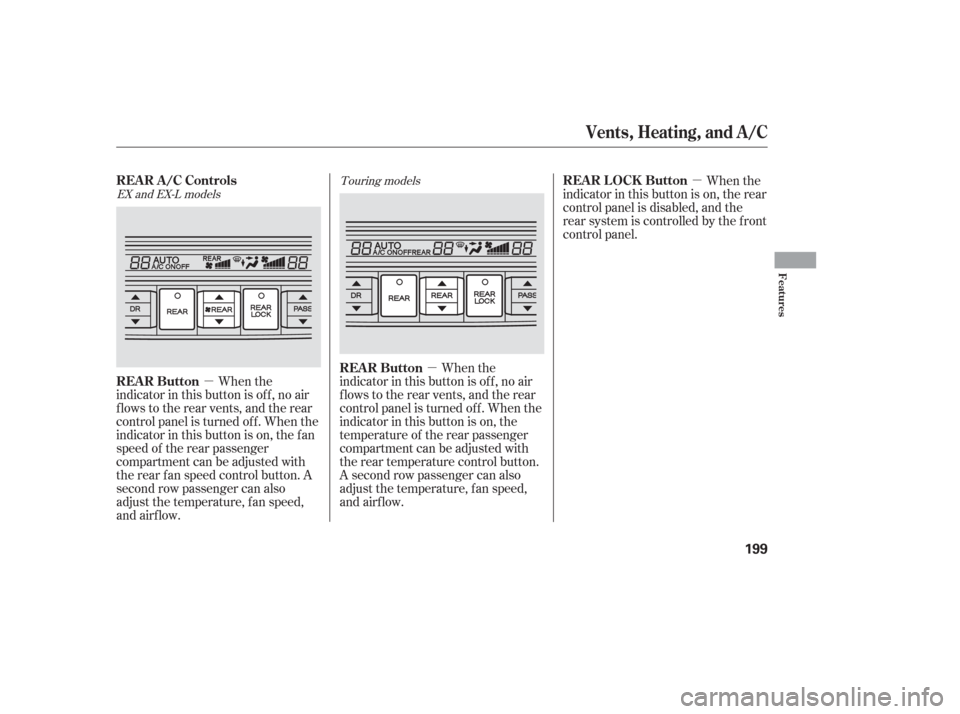
�µ When the
indicator in this button is of f , no air
flows to the rear vents, and the rear
control panel is turned of f . When the
indicator in this button is on, the
temperature of the rear passenger
compartment can be adjusted with
the rear temperature control button.
A second row passenger can also
adjust the temperature, f an speed,
and airflow. When the
indicator in this button is on, the rear
control panel is disabled, and the
rear system is controlled by the f ront
control panel.
When the
indicator in this button is of f , no air
flows to the rear vents, and the rear
control panel is turned of f . When the
indicator in this button is on, the f an
speed of the rear passenger
compartment can be adjusted with
the rear f an speed control button. A
second row passenger can also
adjust the temperature, f an speed,
and airflow.
EX and EX-L models Touring models
Vents, Heating, and A/C
REAR ButtonREAR LOCK Button
REAR A/C Controls
REAR Button
Features
199
Page 201 of 420
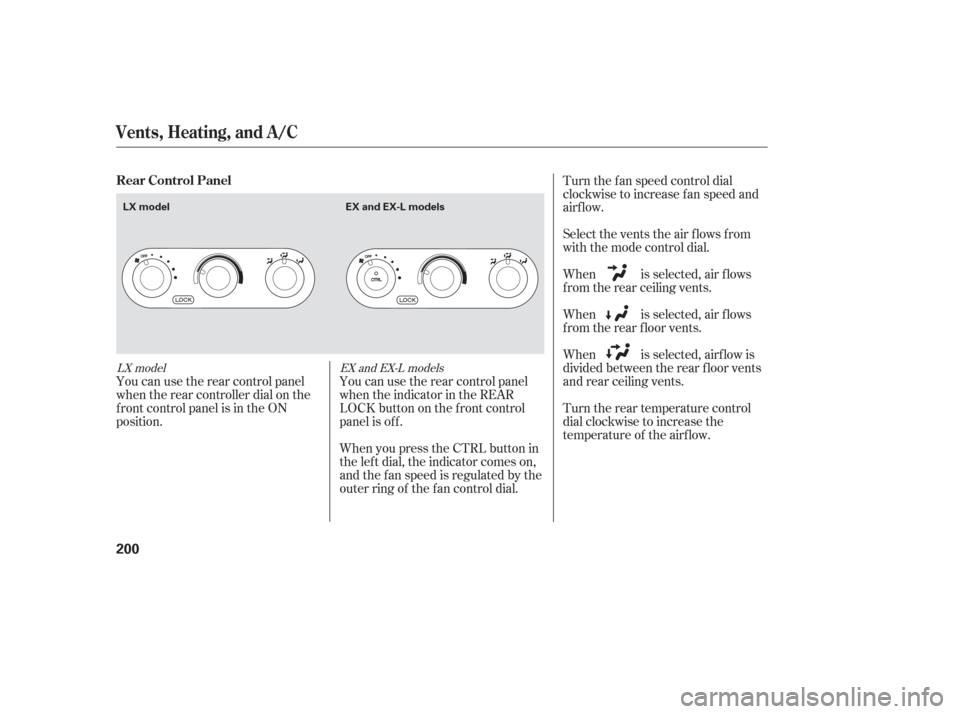
You can use the rear control panel
when the rear controller dial on the
f ront control panel is in the ON
position.Turn the rear temperature control
dial clockwise to increase the
temperature of the airflow. When is selected, air f lows
f rom the rear f loor vents. When is selected, air f lows
f rom the rear ceiling vents. Select the vents the air flows from
with the mode control dial. Turn the f an speed control dial
clockwise to increase fan speed and
airflow.
When is selected, airf low is
divided between the rear f loor vents
and rear ceiling vents.
You can use the rear control panel
when the indicator in the REAR
LOCK button on the f ront control
panel is off.
When you press the CTRL button in
the left dial, the indicator comes on,
and the f an speed is regulated by the
outer ring of the f an control dial.
LX model EX and EX-L models
Rear Control Panel
Vents, Heating, and A/C
200
LX model
EX and EX-L models
Page 202 of 420
�Û�Ý �Û
�Ý
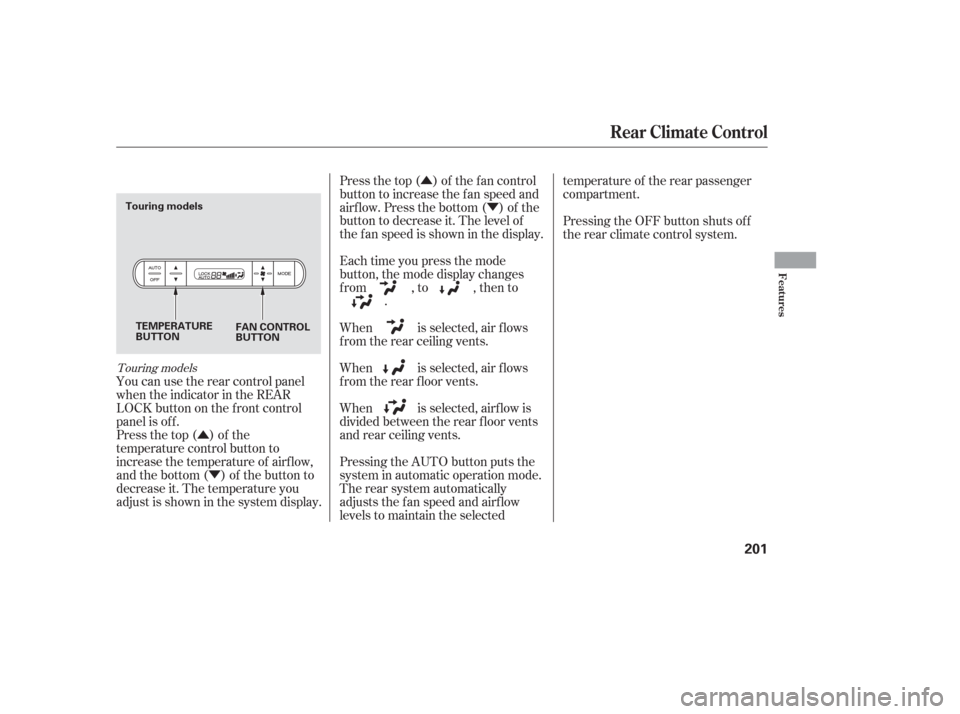
You can use the rear control panel
when the indicator in the REAR
LOCK button on the f ront control
panel is off.
Press the top ( ) of the
temperature control button to
increase the temperature of airf low,
and the bottom ( ) of the button to
decrease it. The temperature you
adjust is shown in the system display. Press the top ( ) of the f an control
button to increase the f an speed and
airf low. Press the bottom ( ) of the
button to decrease it. The level of
the f an speed is shown in the display.
Each time you press the mode
button, the mode display changes
from , to , then to
.
When is selected, air f lows
f rom the rear ceiling vents.
When is selected, air f lows
f rom the rear f loor vents.
Pressing the AUTO button puts the
system in automatic operation mode.
The rear system automatically
adjusts the fan speed and airflow
levels to maintain the selected temperature of the rear passenger
compartment.
Pressing the OFF button shuts off
the rear climate control system.
When is selected, airf low is
divided between the rear f loor vents
and rear ceiling vents.
Touring models
Rear Climate Control
Features
201
TEMPERATURE
BUTTON FAN CONTROL
BUTTON
Touring models
Page 216 of 420
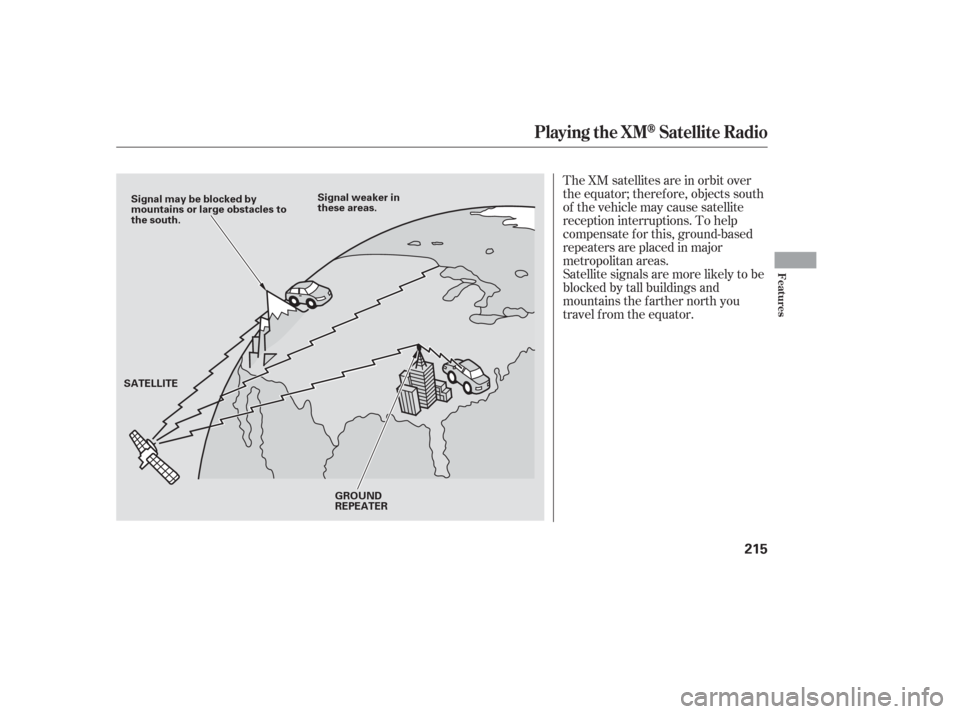
The XM satellites are in orbit over
the equator; therefore, objects south
of the vehicle may cause satellite
reception interruptions. To help
compensate f or this, ground-based
repeaters are placed in major
metropolitan areas.
Satellite signals are more likely to be
blocked by tall buildings and
mountains the f arther north you
travel from the equator.
Playing the XMSatellite Radio
Features
215
Signal may be blocked by
mountains or large obstacles to
the south.Signal weaker in
these areas.
SATELLITE GROUND
REPEATER
Page 233 of 420
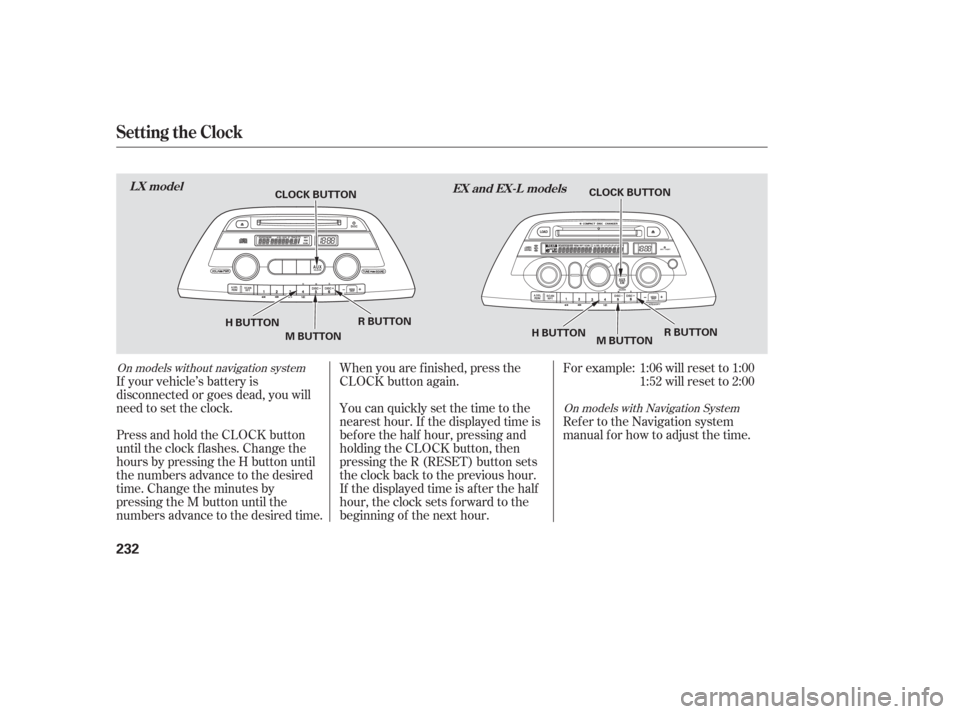
If your vehicle’s battery is
disconnected or goes dead, you will
need to set the clock.You can quickly set the time to the
nearest hour. If the displayed time is
bef ore the half hour, pressing and
holding the CLOCK button, then
pressing the R (RESET) button sets
the clock back to the previous hour.
If the displayed time is after the half
hour, the clock sets f orward to the
beginning of the next hour. When you are f inished, press the
CLOCK button again.For example: 1:06 will reset to 1:00
1:52 will reset to 2:00
Press and hold the CLOCK button
until the clock f lashes. Change the
hours by pressing the H button until
the numbers advance to the desired
time. Change the minutes by
pressing the M button until the
numbers advance to the desired time. Ref er to the Navigation system
manual f or how to adjust the time.
On models with Navigation System
On models without navigation system
Setting the Clock
LX model
EX and EX-L models
232
CLOCK BUTTON
H BUTTON R BUTTON
M BUTTON CLOCK BUTTON
H BUTTON R BUTTON
M BUTTON
Page 238 of 420

The DVD player in your rear
entertainment system can play DVD
video discs and CDs.Open the overhead screen by
pushing the OPEN button. The
screen will swing down part-way.
Pivot the screen the rest of the way.
If you pivot the screen too f ar
f orward, past the second detent, the
display will turn of f . Pivot the screen
back to the second or first detent to
turn the display back on. To close
the screen, pivot it up until it latches.
To operate the rear entertainment
system from the front panel, turn the
RR CTRL knob counterclockwise.
The amber RR LED comes on to
show that the control panel is
enabled.
If CDs are loaded in the CD changer,
select CD. If a CD is loaded in the
lower player, select DVD/AUX. To play the radio, the buttons for the
f ront entertainment system have the
same f unctions.
CONT INUED
To Select Rear Entertainment
f rom the Front Control Panel
Operating the DVD Player f rom
the Front Control Panel
Rear Entertainment System
Features
237
REAR CONTROL PANEL
OPEN BUTTON
OVERHEAD SCREEN
Page 239 of 420
�µ�µ
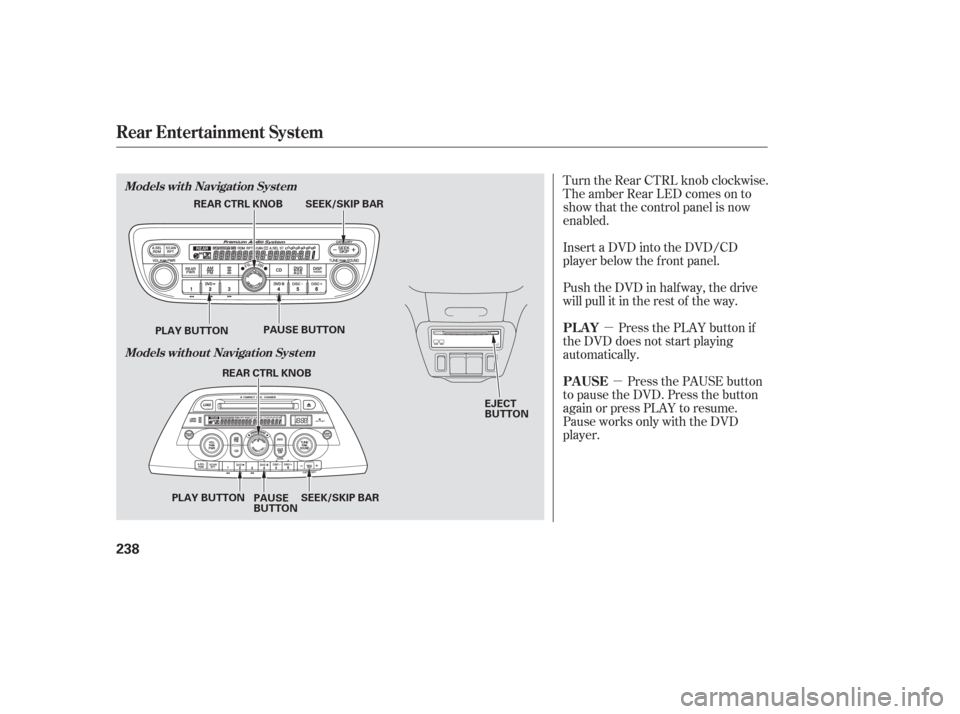
Turn the Rear CTRL knob clockwise.
The amber Rear LED comes on to
show that the control panel is now
enabled.
Insert a DVD into the DVD/CD
player below the f ront panel.
Push the DVD in half way, the drive
will pull it in the rest of the way.
Press the PLAY button if
the DVD does not start playing
automatically.
Press the PAUSE button
to pause the DVD. Press the button
again or press PLAY to resume.
Pause works only with the DVD
player. PL AY
PAUSE
Rear Entertainment System
Models with Navigation System
Models without Navigation System
238
EJECT
BUTTON
SEEK/SKIP BAR
REAR CTRL KNOB
PLAY BUTTON PAUSE BUTTON
SEEK/SKIP BAR
REAR CTRL KNOB
PLAY BUTTON PAUSE
BUTTON
Page 240 of 420
�µ
�´
�µ
�´ �µ�µ
Press and hold the
side to move forward; you will see
‘‘CUE’’ in the display. Press and hold
the sidetomovebackward;you
will see ‘‘REV’’ in the display.
Release the bar when the system
reaches the point you want.
Each time you press and release the side of the SEEK/SKIP bar, the
system skips f orward to the
beginning of the next track or
chapter. Press and release the
side of the bar to skip backward to
the beginning of the current track or
chapter. Press it again to skip to the
beginning of the previous track or
chapter. Press the eject button to
remove the DVD from the drive.
To return f ront panel control to the
front audio system, turn the REAR
CTRL knob counterclockwise. To turn on the rear entertainment
system f rom the rear control panel,
press the PWR button. Use the AM/
FM button, XM RADIO button (U.S.
models), CD button, DVD/AUX
button (U.S. models), or AUX button
(Canadian models) to select the
entertainment source. The selected
source will be shown in the display.
Make sure the rear control operation
has not been disabled with the REAR
CTRL knob on the f ront panel.
SEEK /SK IP
EJECT
To Return to Front Audio
Controls Using the Rear Control Panel
Rear Entertainment System
Features
239