Page 110 of 307
Af ter both doors are closed tightly,
the light dims slightly, then f ades out
in about 30 seconds.
The ceiling light (with the switch in
the center position) comes on when
you remove the key f rom the ignition
switch. If you do not open a door, the
light stays on, then f ades out in
about 30 seconds.
If you leave either door open without
the key in the ignition switch, the
ceiling light goes of f af ter 3 minutes.
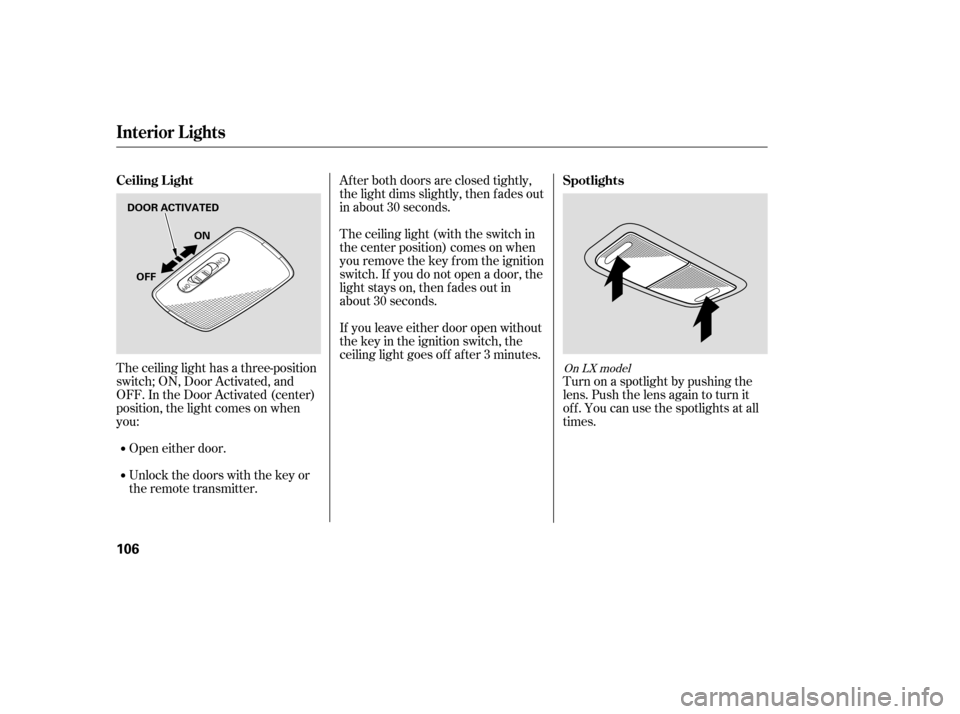
The ceiling light has a three-position
switch; ON, Door Activated, and
OFF. In the Door Activated (center)
position, the light comes on when
you:
Open either door.
Unlock the doors with the key or
the remote transmitter. Turn on a spotlight by pushing the
lens. Push the lens again to turn it
of f . You can use the spotlights at all
times.
On LX model
Interior Lights
Spotlights
Ceiling L ight
106
DOOR ACTIVATED
ON
OFF
�����—�����—�����y�
�������������y���
�(�+���������y���
�����y
Page 111 of 307
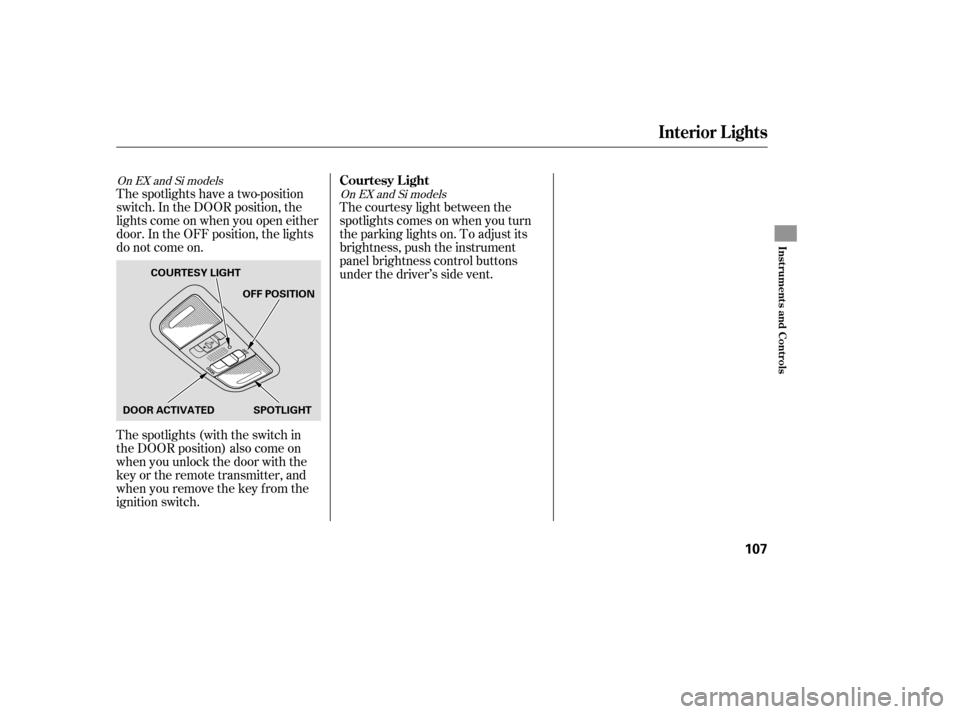
The spotlights have a two-position
switch. In the DOOR position, the
lights come on when you open either
door. In the OFF position, the lights
do not come on.
The spotlights (with the switch in
the DOOR position) also come on
when you unlock the door with the
key or the remote transmitter, and
when you remove the key f rom the
ignition switch.The courtesy light between the
spotlights comes on when you turn
the parking lights on. To adjust its
brightness, push the instrument
panel brightness control buttons
under the driver’s side vent.OnEXandSimodels
OnEXandSimodels
Interior Lights
Courtesy L ight
Inst rument s and Cont rols
107
DOOR ACTIVATED OFF POSITION
SPOTLIGHT
COURTESY LIGHT
�����—�����—�����y�
�������������y���
�(�+���������y���
�
���y
Page 168 of 307
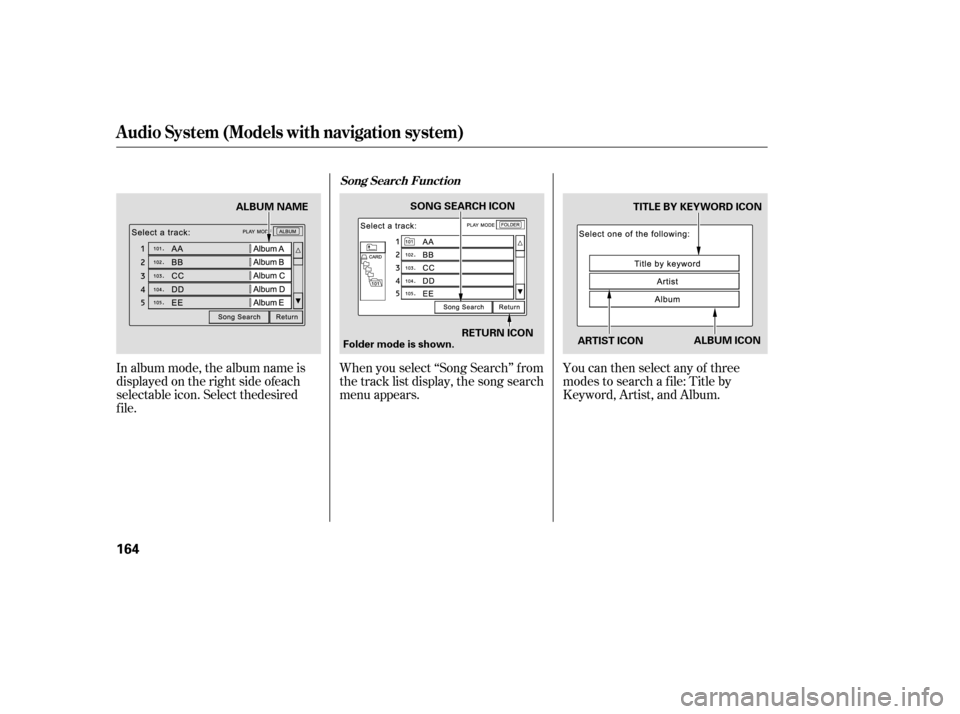
Wh en you select ‘‘Song Search’’ f rom
the track list display, the song search
menu appears. You can then select any of three
modes to search a f ile: Title by
Keyword, Artist, and Album.
Audio System (Models with navigation system)
Song Search Funct ion
164
ARTIST ICONTITLE BY KEYWORD ICON
RETURN ICON
SONG SEARCH ICON
ALBUM ICON
Folder mode is shown.
ALBUM NAME
�����—�����—�����y�
�������������y���
�(�+���������y���
�����y
In album mode, the album name is
displayed on the right side of each
f
ile
.
selectable icon. Select the desired
Page 169 of 307
�Û�Ý
Searching f or a Song Title by KeywordSearching f or a Song by Artist Name
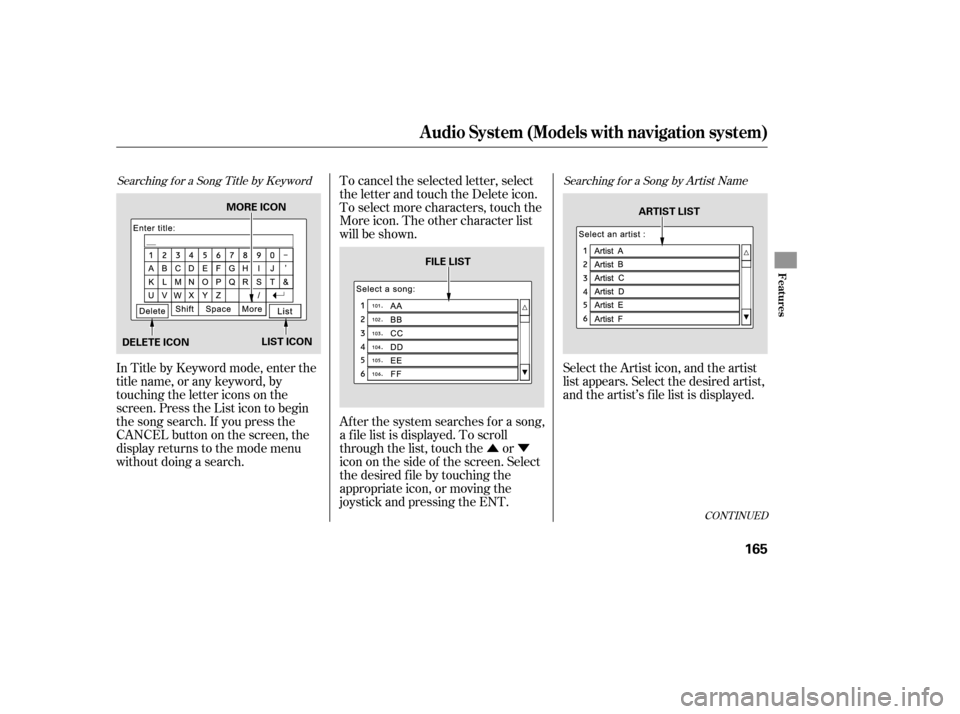
In Title by Keyword mode, enter the
title name, or any keyword, by
touching the letter icons on the
screen. Press the List icon to begin
the song search. If you press the
CANCELbuttononthescreen,the
display returns to the mode menu
without doing a search.To cancel the selected letter, select
the letter and touch the Delete icon.
To select more characters, touch the
More icon. The other character list
will be shown.
Af ter the system searches f or a song,
a f ile list is displayed. To scroll
through the list, touch the or
icon on the side of the screen. Select
the desired f ile by touching the
appropriate icon, or moving the
joystick and pressing the ENT.
Select the Artist icon, and the artist
list appears. Select the desired artist,
and the artist’s f ile list is displayed.
CONT INUED
Audio System (Models with navigation system)
Features
165
MORE ICON
DELETE ICON LIST ICON FILE LIST
ARTIST LIST
�����—�����—�����y�
���������
���y���
�(�+���������y���
�����y
Page 178 of 307
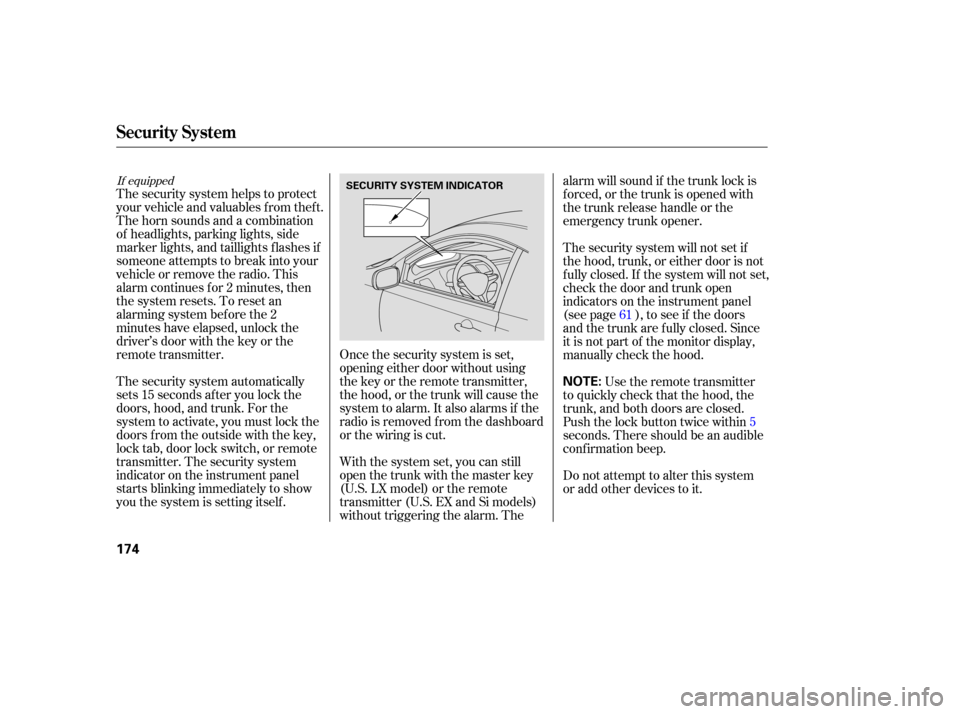
Once the security system is set,
opening either door without using
the key or the remote transmitter,
the hood, or the trunk will cause the
system to alarm. It also alarms if the
radio is removed f rom the dashboard
or the wiring is cut.
The security system helps to protect
your vehicle and valuables f rom thef t.
The horn sounds and a combination
of headlights, parking lights, side
marker lights, and taillights f lashes if
someone attempts to break into your
vehicleorremovetheradio.This
alarm continues f or 2 minutes, then
the system resets. To reset an
alarming system before the 2
minutes have elapsed, unlock the
driver’s door with the key or the
remote transmitter.
The security system automatically
sets 15 seconds after you lock the
doors, hood, and trunk. For the
system to activate, you must lock the
doors f rom the outside with the key,
lock tab, door lock switch, or remote
transmitter. The security system
indicator on the instrument panel
starts blinking immediately to show
you the system is setting itself .
With the system set, you can still
open the trunk with the master key
(U.S. LX model) or the remote
transmitter (U.S. EX and Si models)
without triggering the alarm. Thealarm will sound if the trunk lock is
f orced, or the trunk is opened with
thetrunkreleasehandleorthe
emergency trunk opener.
The security system will not set if
the hood, trunk, or either door is not
f ully closed. If the system will not set,
check the door and trunk open
indicators on the instrument panel
(see page ), to see if the doors
and the trunk are f ully closed. Since
it is not part of the monitor display,
manually check the hood.
Use the remote transmitter
to quickly check that the hood, the
trunk, and both doors are closed.
Push the lock button twice within5
seconds. There should be an audible
conf irmation beep.
Do not attempt to alter this system
or add other devices to it. 61
If equipped
Security System
174
NOTE:
SECURITY SYSTEM INDICATOR
�����—�����—�����y�
�������������y���
�(�+���������y���
�����y
Page 198 of 307

Apply the parking brake.
In cold weather, turn of f all
electrical accessories to reduce
the drain on the battery.
Without touching the accelerator
pedal, turn the ignition key to the
START (III) position. Do not hold
the key in the START (III)
position f or more than 15 seconds
at a time. If the engine does not
start right away, pause for at least
10 seconds bef ore trying again. Make sure the shif t lever is in
Park. Press on the brake pedal.If the engine fails to start, press
the accelerator pedal all the way
down, and hold it there while
starting to clear flooding. If the
engine still does not start, return
to step 5. If the engine does not start within
15 seconds, or starts but stalls
right away, repeat step4with the
accelerator pedal pressed halfway
down. If the engine starts, release
pressure on the accelerator pedal
so the engine does not race.
Push the clutch pedal down all the
way. The START (III) position
does not f unction unless the clutch
pedal is pressed.
5.
6.
1.
2.
3.
4.
Manual Transmission:
Automatic Transmission: 75
Starting the Engine
194
The engine is harder to start in cold
weather. Also, the thinner air f ound at
altitudes above 8,000 f eet (2,400
meters) adds to this problem.
T he immobilizer system protects your
vehicle f rom thef t. If an improperly-
coded key (or other device) is used, the
engine’s f uel system is disabled. For
more inf ormation, see page .
�����—�����—�����y�
���������
���y���
�(�+���������y���
�����y
Page 201 of 307
If you exceed the maximum speed
f or the gear you are in, the engine
speed will enter into the tachometer’s
red zone. If this occurs, you may f eel
the engine cut in and out. This is
caused by a limiter in the engine’s
computer controls. The engine will
run normally when you reduce the
rpm below the red zone.
Bef ore downshif ting, make sure the
engine will not go into the
tachometer’s red zone.
Your vehicle has a rev limit indicator
to show you when the engine speed
is near the tachometer’s red zone
(see page ).If you are still unable to shif t to
reverse, apply the parking brake,
and turn the ignition key to the
ACCESSORY (I) or LOCK (0)
position.
With the clutch pedal still pressed,
start the engine. Press the clutch pedal, and shif t to
reverse.
If you need to use this procedure to
shif t to reverse, your vehicle may be
developing a problem. Have the
vehicle checked by your dealer.
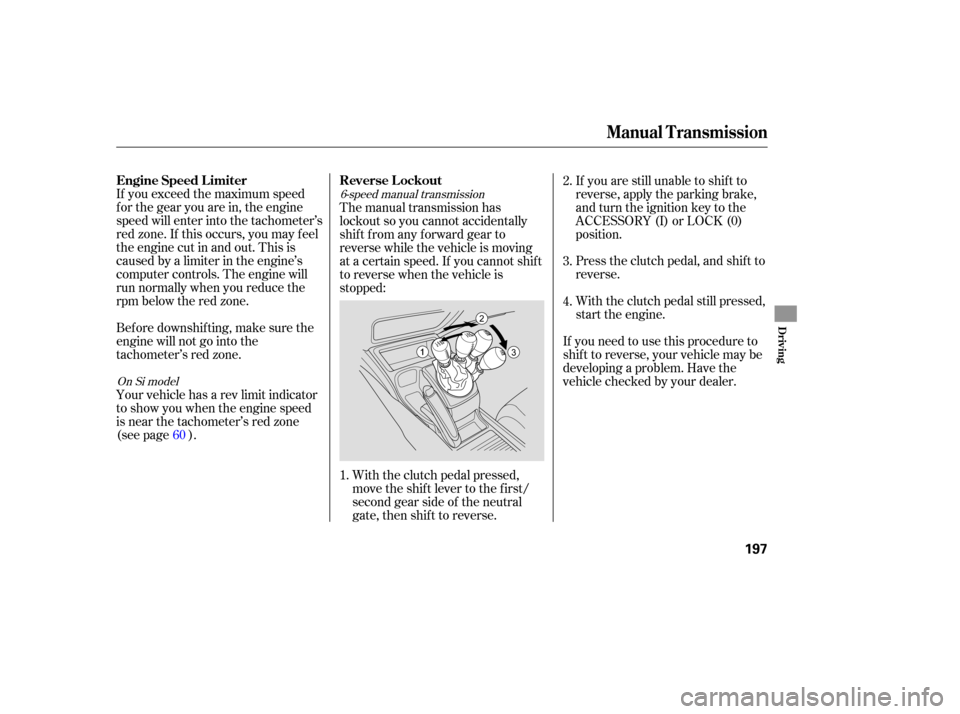
The manual transmission has
lockout so you cannot accidentally
shif t f rom any f orward gear to
reverse while the vehicle is moving
at a certain speed. If you cannot shif t
to reverse when the vehicle is
stopped:
With the clutch pedal pressed,
move the shift lever to the first/
second gear side of the neutral
gate, then shif t to reverse.
60
1. 2.
3.
4.
On Si model
6-speed manual transmission
Engine Speed L imiter
Reverse L ockout
Manual T ransmission
Driving
197
�����—�����—�����y�
�������������y���
�(�+���������y���������y
Page 203 of 307
�µ
�µ �µ
�µ
CONT INUED
If you have done all of the above and
still cannot move the lever out of
Park, see on
page .
To avoid transmission damage, come
to a complete stop bef ore shif ting
into Park. You must also press the
release button to shift into Park. The
shif t lever must be in Park bef ore
you can remove the key f rom the
ignition switch. Press the brake
pedal and press the release button
on the f ront of the shif t lever to shif t
f rom Park to reverse. To shif t f rom
reverse to neutral, come to a
completestopandthenshift.Press
the release button bef ore shif ting
into reverse f rom neutral.
This position mechani-
cally locks the transmission. Use
Park whenever you are turning of f or
starting the engine. To shif t out of
Park, you must press on the brake
pedal and have your f oot of f the
accelerator pedal. Press the release
buttononthefrontof theshiftlever
to move it. Use neutral if you
need to restart a stalled engine, or if
it is necessary to stop brief ly with
the engine idling. Shif t to the Park
position if you need to leave your
vehicle for any reason. Press on the
brake pedal when you are moving
the shift lever from neutral to
another gear.
Use this position f or
your normal driving. The
transmission automatically selects a
suitable gear (1 through 5) f or your
speed and acceleration. You may
notice the transmission shifting up at
higher engine speeds when the
engine is cold. This helps the engine
warm up f aster.
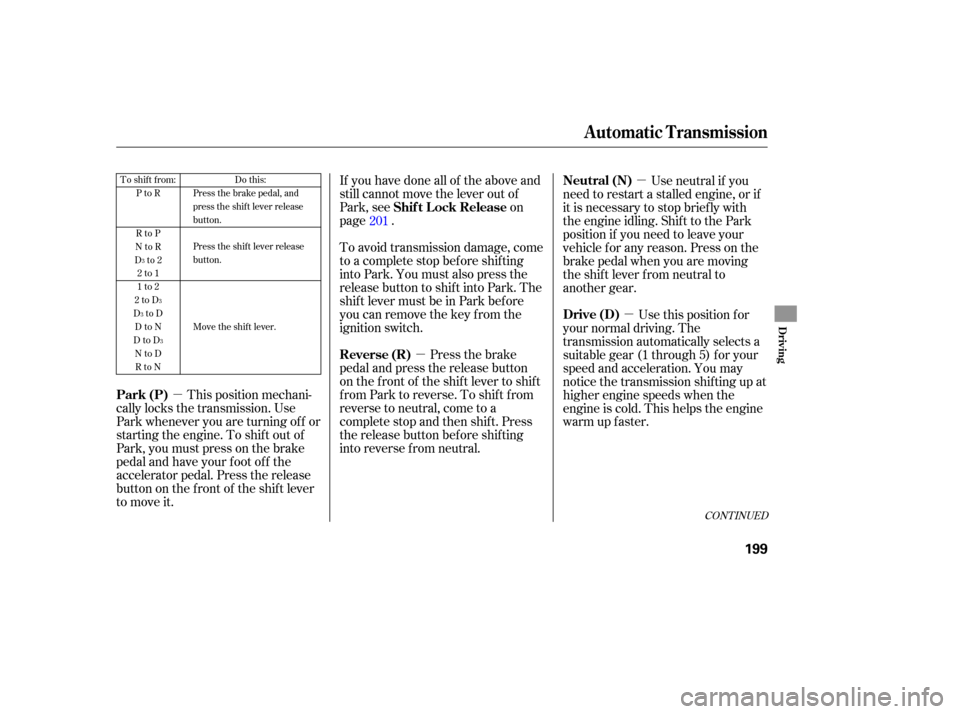
201To shift from:
PtoR
RtoP
NtoR
Dto2 2to1
1to2
2toD
DtoD DtoN
DtoD NtoDRtoN Do this:
Press the brake pedal, and
press the shift lever release
button.
Press the shift lever release
button.
Move the shift lever.
3
3
3
3
Automatic Transmission
Shif t L ock Release
Reverse (R)
Park (P) Neutral (N)
Drive (D)
Driving
199
�����—�����—�����y�
�������������y���
�(�+���������y���������y