Page 205 of 307
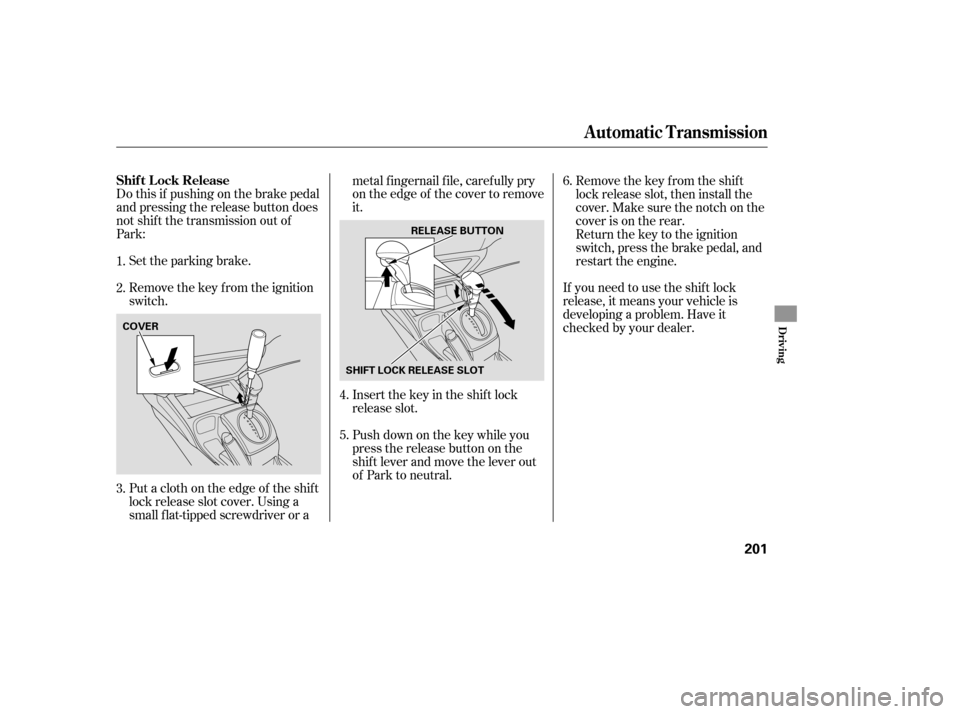
Do this if pushing on the brake pedal
and pressing the release button does
not shif t the transmission out of
Park:Set the parking brake.
Remove the key from the ignition
switch.
Put a cloth on the edge of the shif t
lock release slot cover. Using a
small f lat-tipped screwdriver or a metal f ingernail f ile, caref ully pry
on the edge of the cover to remove
it.
Insert the key in the shift lock
release slot.
If you need to use the shif t lock
release, it means your vehicle is
developing a problem. Have it
checked by your dealer.
Push down on the key while you
pressthereleasebuttononthe
shif t lever and move the lever out
of Park to neutral. Remove the key from the shift
lock release slot, then install the
cover. Make sure the notch on the
cover is on the rear.
Return the key to the ignition
switch, press the brake pedal, and
restart the engine.
1.
2.
3. 4.
5.6.
Automatic Transmission
Shif t L ock Release
Driving
201
COVER
SHIFT LOCK RELEASE SLOTRELEASE BUTTON
�����—�����—�����y�
�������������y���
�(�+���������y���������y
Page 207 of 307

Check the brakes after driving
through deep water. Apply the
brakes moderately to see if they f eel
normal. If not, apply them gently and
f requently until they do. Be extra
cautious in your driving.
The hydraulic system that operates
the brakes has two separate circuits.
Each circuit works diagonally across
the vehicle (the lef t-f ront brake is
connected with the right-rear brake,
etc.). If one circuit should develop a
problem, you will still have braking
at two wheels.
Resting your f oot on the pedal keeps
the brakes applied lightly, builds up
heat, and reduces their ef f ectiveness.
It also keeps your brake lights on all
the time, conf using drivers behind
you.
Constant application of the brakes
when going down a long hill builds
up heat and reduces their ef f ective-
ness. Use the engine to assist the
brakes by taking your f oot of f the
accelerator and downshif ting to a
lower gear. Your vehicle is equipped with f ront
disc brakes. The brakes on the rear
wheels may be disc or drum,
depending on the model. A power
assist helps reduce the ef f ort needed
on the brake pedal. The ABS helps
you retain steering control when
braking very hard. If the brake pads need replacing, you
will hear a distinctive, metallic
screeching sound when you apply
the brake pedal. If you do not have
the brake pads replaced, they will
screech all the time. It is normal f or
the brakes to occasionally squeal or
squeak when you apply them.
Braking System Design Brake Wear Indicators
Braking System
Driving
203
�����—�����—�����y�
�����������
�y���
�(�+���������y���������y
Page 211 of 307

This section explains why it is
important to keep your vehicle well
maintained and how to f ollow basic
maintenance saf ety precautions.
If you have the skills and tools to
perf orm more complex maintenance
tasks on your vehicle, you may want
to purchase the service manual. See
page f or inf ormation on how to
obtain a copy, or see your dealer. This section also includes
instructions on how to read the
maintenance minder messages in the
inf ormation display, a maintenance
record, and instructions f or simple
maintenance tasks you may want to
take care of yourself .......................
Maintenance Saf ety .208
....................
Maintenance Minder .209
....................
Maintenance Record .216
..............................
Fluid Locations .218
........................
Adding Engine Oil .220
.......
Recommended Engine Oil .220
..............................
Synthetic Oil .221
................
Engine Oil Additives .221
.........
Changing the Oil and Filter .222
..............................
Engine Coolant .224
....................
Windshield Washers .227
....
Automatic Transmission Fluid .228
........
Manual Transmission Fluid .229
................
Brake and Clutch Fluid .230
....................
Power Steering Fluid .231
.............................................
Lights .232
................
Cleaning the Seat Belts .237
.....................................
Floor Mats .238
..................
Dust and Pollen Filter .239
.................................
Wiper Blades .239
...............................................
Tires .241
...................
Checking the Battery .248
.............................
Vehicle Storage .250
291
Maintenance
Maint enance
207
�����—�����—�����y�
���������
���y���
�(�+���������y�����
���y
Page 217 of 307
If you have the required service
done but do not reset the display, or
reset the display without doing the
service, the system will not show the
proper maintenance intervals. This
canleadtoseriousmechanical
problems because you will no longer
have an accurate record of when
maintenance is needed.
Your authorized Honda dealer
knows your vehicle best and can
provide competent, ef f icient service.However, service at a dealer is not
mandatory to keep your warranties
in effect. Maintenance may be done
by any qualif ied service f acility or
person who is skilled in this type of
automotive service. Make sure to
have the service f acility or person
reset the display as previously
described. Keep all receipts as proof
of completion, and have the person
who does the work fill out the
maintenance record. Check your
warranty booklet f or more
inf ormation.
Press the SEL/RESET button f or
more than 5 seconds. The
maintenance item code(s) will
disappear, and the engine oil lif e
will reset to ‘‘100.’’ We recommend using Honda parts
and fluids whenever you have
maintenance done. These are
manuf actured to the same high-
quality standards as the original
components, so you can be conf ident
of their performance and durability.
4.
CONT INUED
Important Maintenance
Precautions
Maintenance Minder
Maint enance
213
�����—�����—�����y�
���������
���y���
�(�+���������y�����
���y
Page 218 of 307

�µ
�µ
�µ
�µ
�µ
�µ
�Ì
U.S. Vehicles:
Youshouldcheckthefollowing
items at the specif ied intervals. If
you are unsure of how to perf orm
any check, turn to the appropriate
page listed. Lights Check the operation of
the headlights, parking lights,
taillights, high-mount brake light,
and license plate lights monthly.
See page .
Engine coolant level Check the
radiator reserve tank every time
you f ill the f uel tank. See page . Engine oil level Check every
time you fill the fuel tank. See
page .
Automatic transmission Check
the f luid level monthly. See page .
Brakes Check the f luid level
monthly. See page .
Tires Check the tire pressure
monthly. Examine the tread f or
wear and foreign objects. See page .
According to state and federal
regulations, f ailure to perf orm
maintenance on the items marked
with will not void your emissions
warranties. However, all
maintenance services should be
perf ormed in accordance with the
intervals indicated by the
inf ormation display.
183
185
228 230
241 232
Maintenance, replacement, or
repair of emissions control
devices and systems may be done
by any automotive repair
establishment or individual using
parts that are ‘‘certif ied’’ to EPA
standards. Owner’s Maintenance Checks
Maintenance Minder
214
�����—�����—�����y�
�������������y���
�(�+���������y�����
���y
Page 219 of 307

�Î
�Î
�Ì �Ì
�Ì �Î
Maintenance Minder
215
:If the message ‘‘SERVICE’’ does not appear more than 12 months after the
display is reset, change the engine oil every year.
See information on maintenance and emissions warranty in the first column
on page .
Independent of the maintenance minder indicator in the information
display, replace the brake fluid every 3 years.
Inspect idle speed every 160,000 miles (256,000 km).
Adjust the valves during services A, B, 1, 2, or 3 only if they are noisy.
NOTE: :
214
Maintenance Sub Items
Rotate tires
Replace air cleaner element If you drive primarily in dusty conditions, replace
every 15,000 miles (24,000 km).
Replace dust and pollen filter If you drive primarily in urban areas that have high
concentrations of soot in the air from industry and
from diesel-powered vehicles, replace every 15,000
miles (24,000 km).
Inspect drive belt
Replace transmission fluid
Replace spark plugs
Inspect valve clearance
Replace engine coolant
Maintenance Main Items
Replace engine oil
Replace engine oil and oil filter
Inspect front and rear brakes
Check parking brake adjustment
Visually inspect these items: Tie rod ends, steering gear box, and boots
Suspension components
Driveshaft boots
Brake hoses and line (including ABS)
All fluid levels and condition of fluids
Exhaust system
Fuel lines and connections
A
B
Symbol
Symbol
1
2
3
4
5
Maintenance Minder
�����—�����—�����y�
�������������y���
�(�+���������y�����
���y
Page 224 of 307
Oil is a major contributor to your
engine’s perf ormance and longevity.
Always use a premium-grade
detergent oil displaying the API
Certif ication Seal. This seal indicates
the oil is energy conserving, and that
it meets the American Petroleum
Institute’s latest requirements. It is
highly recommended that you use
Honda Motor Oil in your vehicle f or
optimum engine protection.
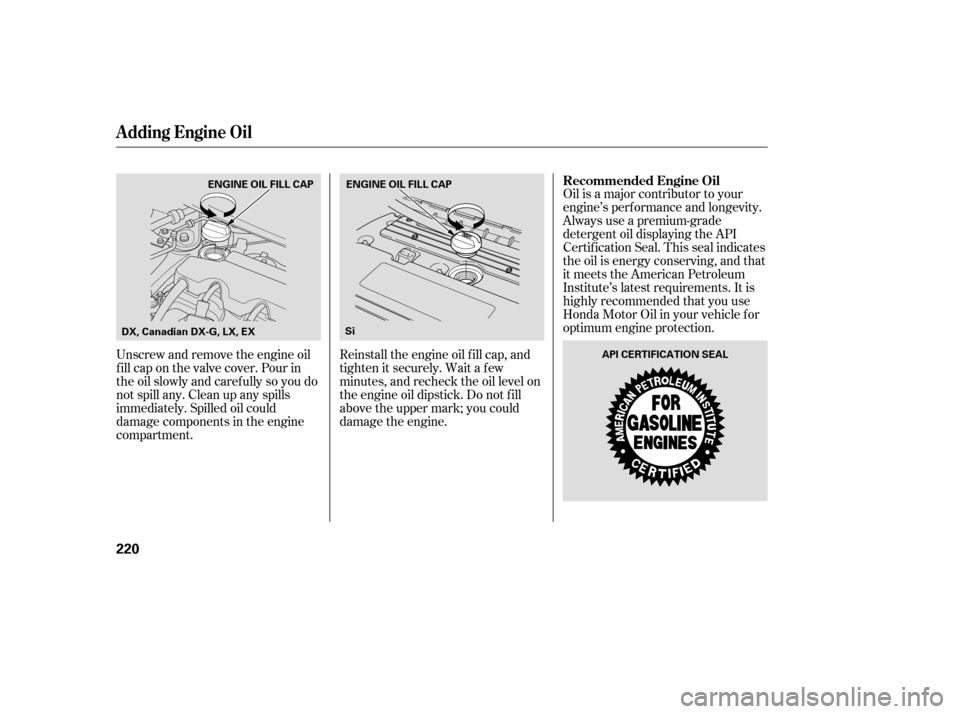
Reinstall the engine oil f ill cap, and
tighten it securely. Wait a f ew
minutes, and recheck the oil level on
the engine oil dipstick. Do not f ill
above the upper mark; you could
damage the engine.
Unscrew and remove the engine oil
fill cap on the valve cover. Pour in
the oil slowly and caref ully so you do
not spill any. Clean up any spills
immediately. Spilled oil could
damage components in the engine
compartment. Recommended Engine Oil
A dding Engine Oil
220
API CERTIFICATION SEAL
Si
ENGINE OIL FILL CAP ENGINE OIL FILL CAP
DX, Canadian DX-G, LX, EX
�����—�����—�����y�
���������
���y���
�(�+���������y���������y
Page 227 of 307
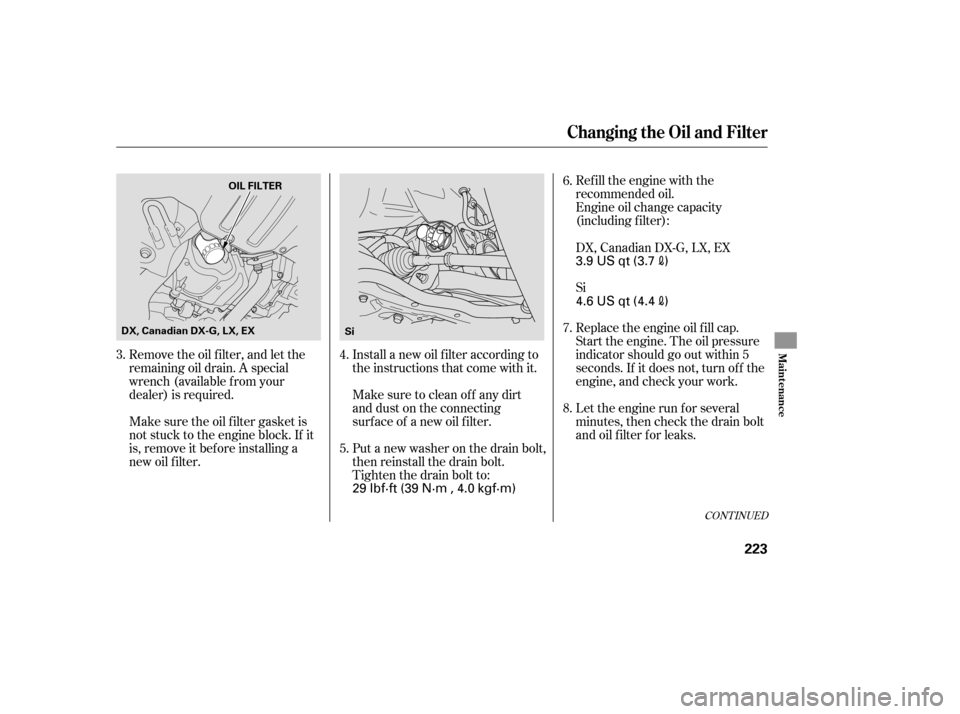
Remove the oil f ilter, and let the
remaining oil drain. A special
wrench (available from your
dealer) is required.Refill the engine with the
recommended oil.
Engine oil change capacity
(including f ilter):
Replace the engine oil f ill cap.
Start the engine. The oil pressure
indicator should go out within 5
seconds. If it does not, turn of f the
engine, and check your work.
Let the engine run f or several
minutes, then check the drain bolt
and oil f ilter f or leaks.
Install a new oil f ilter according to
the instructions that come with it.
Make sure to clean of f any dirt
and dust on the connecting
surf ace of a new oil f ilter.
Put a new washer on the drain bolt,
then reinstall the drain bolt.
Tighten the drain bolt to:
Make sure the oil f ilter gasket is
not stuck to the engine block. If it
is, remove it bef ore installing a
new oil f ilter.
5. 6.
7.
8.
3. 4. Si DX, Canadian DX-G, LX, EX
CONT INUED
Changing the Oil and Filter
Maint enance
223
OIL FILTER
Si
DX, Canadian DX-G, LX, EX
3.9 US qt (3.7)
29 lbf·ft (39 N·m , 4.0 kgf·m) 4.6 US qt (4.4
)
�����—�����—�����y�
�������������y���
�(�+���������y���������y