Page 5 of 319
Your Vehicle at a Glance
You r Vehicle at a Glance
3
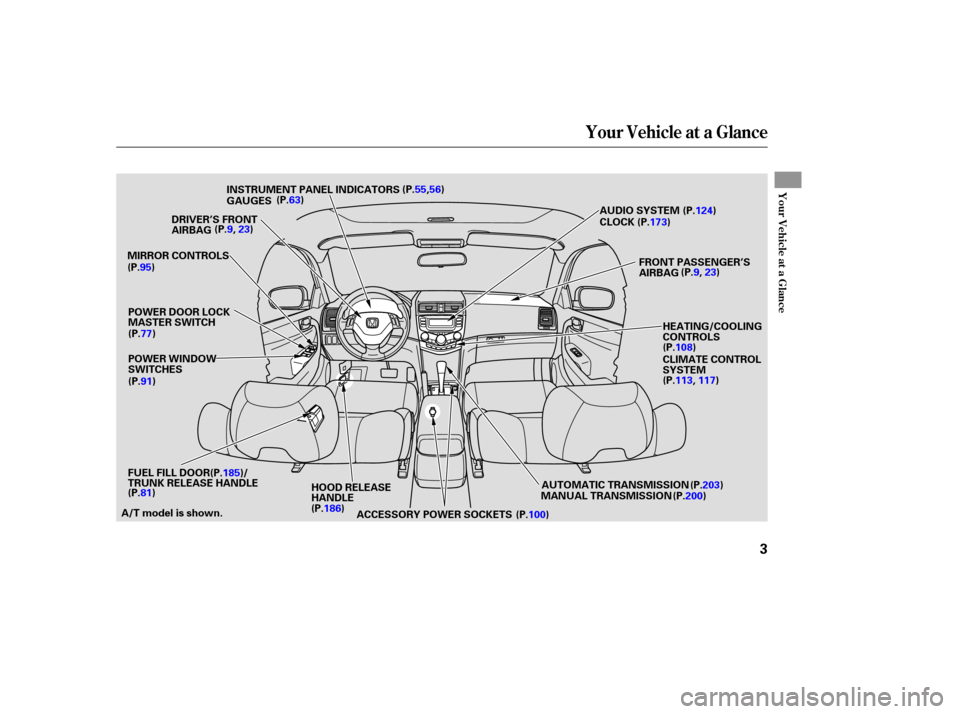
POWER WINDOW
SWITCHES
MIRROR
CONTROLS AUDIO
SYSTEM
POWER DOOR LOCK
MASTER SWITCH
HOOD RELEASE
HANDLE AUTOMATIC
TRANSMISSION
MANUAL TRANSMISSION HEATING/COOLING
CONTROLS
CLIMATE
CONTROL
SYSTEM
INSTRUMENT
PANEL INDICATORS
GAUGES
ACCESSORY POWER SOCKETS
DRIVER’S
FRONT
AIRBAG (P.63)
CLOCK
(P.55,56)
FRONT PASSENGER’S
AIRBAG (P.9,
23)
(P.100)
(P.91) (P.77)
(P.95)
(P.9,
23)
A/T model is shown. (P.124)
(P.173)
(P.108)
(P.113, 117)
(P.203)
(P.200)
(P.186)
(P.81) FUEL
FILL DOOR(P.185)/
TRUNK RELEASE HANDLE
�����—�����—�����y�
�������������y���
�(���%�������y���������y
Page 56 of 319
Control Locations
54
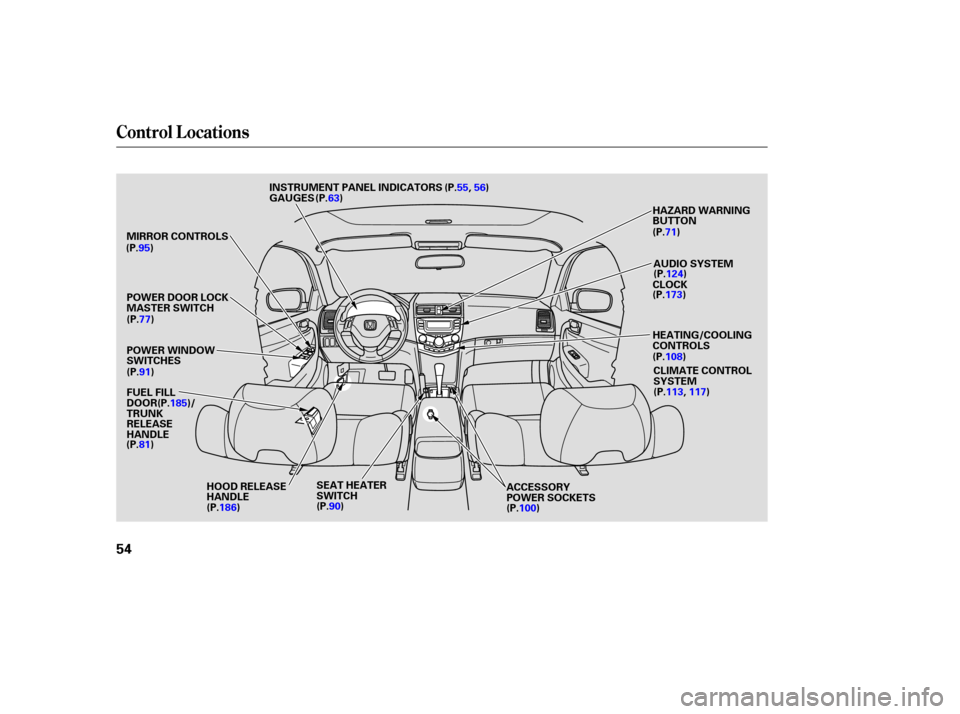
MIRROR CONTROLS
POWER WINDOW
SWITCHES
HOOD RELEASE
HANDLE AUDIO
SYSTEM
POWER DOOR LOCK
MASTER SWITCH
CLIMATE CONTROL
SYSTEM
HEATING/COOLING
CONTROLS HAZARD
WARNING
BUTTON
INSTRUMENT
PANEL INDICATORS
GAUGES
ACCESSORY
POWER SOCKETS
SEAT
HEATER
SWITCH
(P.63)
CLOCK
(P.55,
56)
(P.95)
(P.77)
(P.91)
(P.90) (P.71)
(P.100)
(P.186) (P.124)
(P.173)
(P.108)
(P.113, 117)
FUEL FILL
DOOR(P.185)/
TRUNK
RELEASE
HANDLE
(P.81)
�����—�����—�����y�
���������
���y���
�(���%�������y���������y
Page 90 of 319
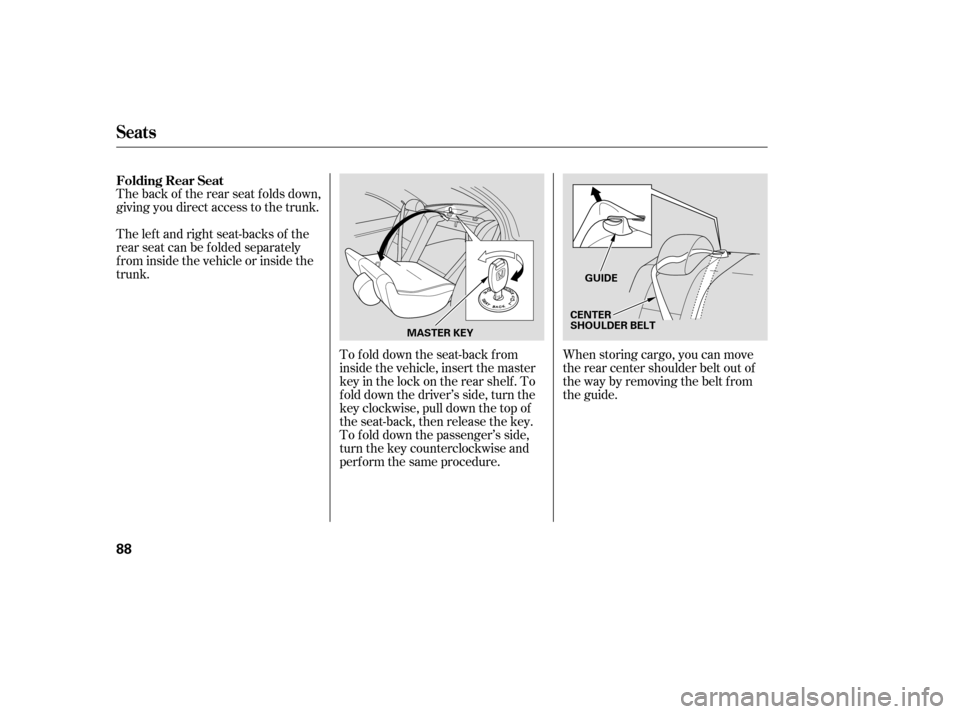
The back of the rear seat folds down,
giving you direct access to the trunk.
The lef t and right seat-backs of the
rear seat can be folded separately
f rom inside the vehicle or inside the
trunk.To fold down the seat-back from
inside the vehicle, insert the master
keyinthelockontherearshelf.To
f old down the driver’s side, turn the
key clockwise, pull down the top of
the seat-back, then release the key.
To f old down the passenger’s side,
turn the key counterclockwise and
perf orm the same procedure.When storing cargo, you can move
therearcentershoulderbeltoutof
the way by removing the belt from
the guide.
Folding Rear Seat
Seats
88
GUIDE
CENTER
SHOULDER BELT
MASTER KEY
�����—�����—�����y�
���������
���y���
�(���%�������y�������
�y
Page 95 of 319
You can open and close the windows
with the key in the driver’s door lock.To close:
Insert the key in the driver’s door
lock.
Turn the key counterclockwise,
then release it.
Turn the key counterclockwise
again, and hold it. Both windows
starttoclose.Tostopthewindows,
release the key.
To close the windows f urther, turn
andholdthekeyagain(within
10 seconds).
NOTE: If the windows stop bef ore
the desired position, repeat steps 2
and 3.
To open:
Insert the key in the driver’s door
lock.
Turn the key clockwise, then
release it.
Turnthekeyclockwiseagain,and
hold it. Both windows start to open.
To stop the windows, release the
key.
To open the windows further, turn
andholdthekeyagain(within
10 seconds).
NOTE: If the windows stop bef ore
the desired position, repeat steps 2
and 3. 1.
2.
3.
4. 3. 4.
1.
2.
Opening/Closing the Windows
with the Key
Power Windows
Inst rument s and Cont rols
93
Open
Close
UNLOCK BUTTON
�����—�����—�����y�
�����������
�y���
�(���%�������y���������y
Page 107 of 319

The standard audio system has
many f eatures. This section de-
scribes those f eatures and how to
use them.
Your vehicle has an anti-theft audio
system that requires a code number
to enable it. The heating and cooling system in
your vehicle provides a comf ortable
driving environment in all weather
conditions.......
Heating and Cooling System .106
......................
Heating and A/C .108
..........
Climate Control System .113
Climate Control System
.......
with navigation system .117
.........
Dual Temperature Control .121
.............
Climate Control Sensors .123
...............................
Audio System .124
.................
AM/FM/CD Player .126
............
AM/FM/CD Changer .136
AM/FM/CD Changer
.......
with navigation system .149
...........
AM/FM Radio Reception .164
...
XM
Satellite Radio Reception . 166
...................
Protecting Your CDs .169
.........
Caring f or the Tape Player . 170
...............
Remote Audio Controls . 171
................
Radio Thef t Protection . 172
.........................
Setting the Clock .173
...........................
Security System .174
..............................
Cruise Control .175
HomeLink Universal ...............................
Transceiver .178
The security system helps to
discourage vandalism and thef t of
your vehicle.
On all models except the 4-cylinder LX
Features
Features
105
�����—�����—�����y�
�������������y���
�(���%�������y���
�����y
Page 110 of 319
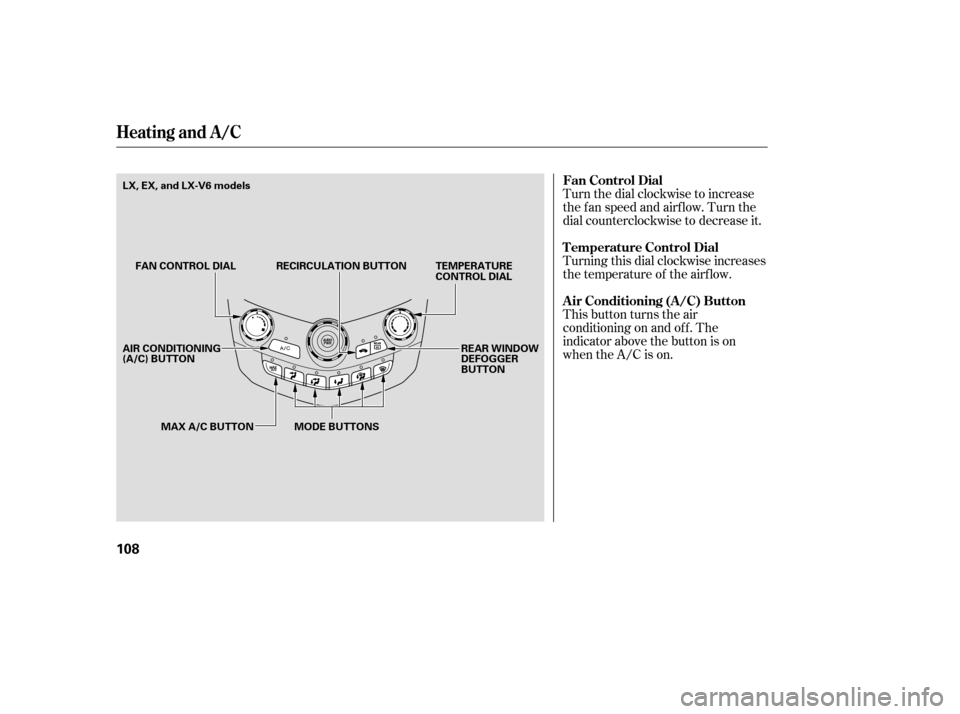
Turn the dial clockwise to increase
the fan speed and airflow. Turn the
dial counterclockwise to decrease it.
Turning this dial clockwise increases
the temperature of the airflow.
This button turns the air
conditioning on and of f . The
indicator above the button is on
when the A/C is on. Fan Control Dial
T emperature Control Dial
Air Conditioning (A/C) Button
Heating and A /C
108
FAN CONTROL DIALTEMPERATURE
CONTROL DIAL
MODE BUTTONS
RECIRCULATION BUTTON
MAX A/C BUTTON REAR WINDOW
DEFOGGER
BUTTON
AIR CONDITIONING
(A/C) BUTTON LX, EX, and LX-V6 models
�����—�����—�����y�
�������������y���
�(���%�������y���
�
�
�y
Page 175 of 319

The upper display shows the time
when the ignition switch is in the
ACCESSORY (I) or ON (II) position.
The navigation system receives
signals f rom the Global Positioning
System (GPS), and the displayed
time is updated automatically by the
GPS. Ref er to the navigation system
owner’s manual to set up the time.
If your vehicle’s battery is
disconnected or goes dead, you will
need to set the clock.
To set the time, press the clock set
(SOUND) button until you hear a
beep. The displayed time begins to
blink.
Press and hold the H (preset 4) side
of the bar until the hour advances to
the desired time. Press and hold the
M (preset 5) side of the bar until the
minutes advance to the desired time.
Press the clock set (SOUND) button
again to enter the set time.
You can quickly set the time to the
nearest hour. If the displayed time is
bef ore the half hour, pressing the
clock set (SOUND) button until you
hear a beep, then pressing the R
(preset 6) side of the bar sets the
clockbacktotheprevioushour.If
the displayed time is after the half
hour, the clock sets f orward to the
beginning of the next hour.
For example:
1:06 will reset to 1:00
1:53 will reset to 2:00
On models without navigation system
On models with navigation system
Setting the Clock
Features
173
CLOCK SET BUTTON
PRESET BARS
CLOCK
EX-L and EX-V6 models without
navigation system is shown.
�����—�����—�����y�
���������
���y���
�(���%�������y���
�����y
Page 239 of 319
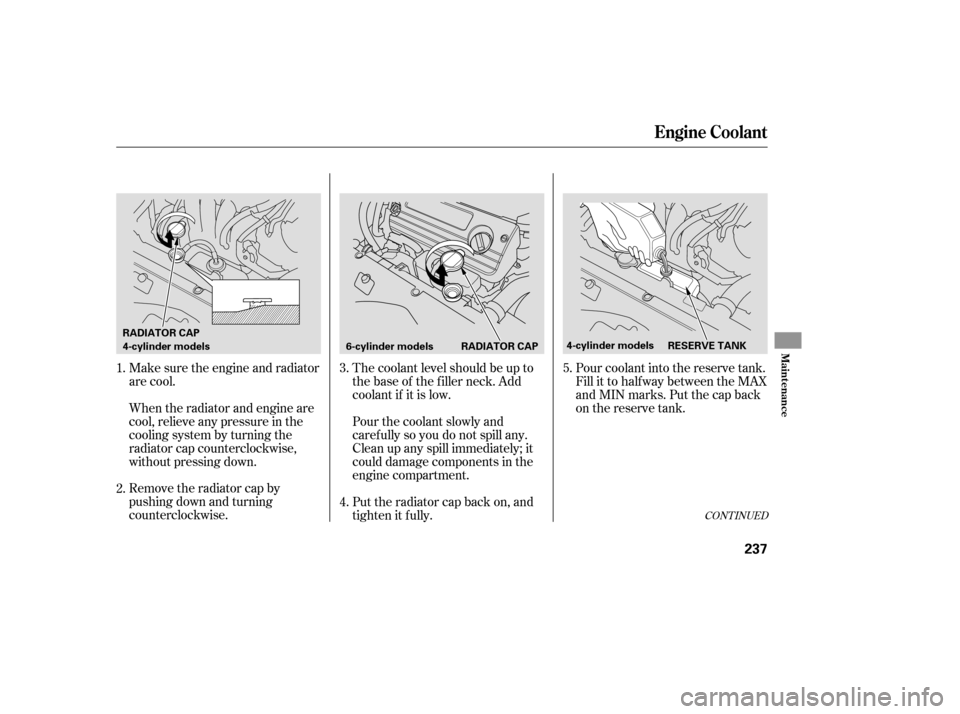
Remove the radiator cap by
pushing down and turning
counterclockwise. When the radiator and engine are
cool, relieve any pressure in the
cooling system by turning the
radiator cap counterclockwise,
without pressing down. Make sure the engine and radiator
are cool.The coolant level should be up to
the base of the f iller neck. Add
coolant if it is low.
Pourthecoolantslowlyand
caref ully so you do not spill any.
Clean up any spill immediately; it
could damage components in the
engine compartment.
Put the radiator cap back on, and
tighten it fully.Pour coolant into the reserve tank.
Fill it to half way between the MAX
and MIN marks. Put the cap back
on the reserve tank.
4.
1. 3.
2.
5.
CONT INUED
Engine Coolant
Maint enance
237
4-cylinder models
6-cylinder models RADIATOR CAP
RADIATOR CAP
4-cylinder modelsRESERVE TANK
�����—�����—�����y�
�������������y���
�(���%�������y���������y