Page 1 of 288
Introduction 4
Instrument Cluster 10
Warning and control lights 10
Gauges 14
Entertainment Systems 17
AM/FM stereo with CD 17
AM/FM stereo with in-dash six CD 20
Family entertainment system 25
Climate Controls 40
Manual heating and air conditioning 40
Automatic temperature control 42
Rear window defroster 51
Lights 52
Headlamps 52
Turn signal control 56
Bulb replacement 56
Driver Controls 61
Windshield wiper/washer control 61
Steering wheel adjustment 62
Power windows 66
Mirrors 68
Speed control 70
Message center 78
Locks and Security 90
Keys 90
Locks 90
Anti-theft system 100
Table of Contents
1
2006 Freestyle(219)
Owners Guide (post-2002-fmt)
USA(fus)
Page 2 of 288
Seating and Safety Restraints 105
Seating 105
Safety restraints 118
Airbags 132
Child restraints 147
Tires, Wheels and Loading 161
Tire Information 161
Tire Inflation 163
Vehicle loading 176
Trailer towing 182
Recreational towing 185
Driving 186
Starting 186
Brakes 189
Traction control 192
Transmission operation 193
Roadside Emergencies 205
Getting roadside assistance 205
Hazard flasher switch 206
Fuel pump shut-off switch 206
Fuses and relays 207
Changing tires 214
Lug Nut Torque 221
Jump starting 222
Wrecker towing 227
Customer Assistance 229
Reporting safety defects (U.S. only) 235
Cleaning 236
Table of Contents
2
2006 Freestyle(219)
Owners Guide (post-2002-fmt)
USA(fus)
Page 5 of 288
SAFETY AND ENVIRONMENT PROTECTION
Warning symbols in this guide
How can you reduce the risk of personal injury to yourself or others? In
this guide, answers to such questions are contained in comments
highlighted by the warning triangle symbol. These comments should be
read and observed.
Warning symbols on your vehicle
When you see this symbol, it is
imperative that you consult the
relevant section of this guide before
touching or attempting adjustment
of any kind.
Protecting the environment
We must all play our part in
protecting the environment. Correct
vehicle usage and the authorized
disposal of waste, cleaning and
lubrication materials are significant
steps towards this aim. Information in this respect is highlighted in this
guide with the tree symbol.
BREAKING-IN YOUR VEHICLE
Your vehicle does not need an extensive break-in. Try not to drive
continuously at the same speed for the first 1,000 miles (1,600 km) of
new vehicle operation. Vary your speed frequently in order to give the
moving parts a chance to break in.
Drive your new vehicle at least 500 miles (800 km) before towing a
trailer. For more detailed information about towing a trailer, refer to
Trailer towingin theTires, Wheels and Loadingchapter.
Do not add friction modifier compounds or special break-in oils during
the first few thousand miles (kilometers) of operation, since these
additives may prevent piston ring seating. SeeEngine oilin the
Maintenance and Specificationschapter for more information on oil
usage.
2006 Freestyle(219)
Owners Guide (post-2002-fmt)
USA(fus)
Introduction
5
Page 6 of 288
SPECIAL NOTICES
New Vehicle Limited Warranty
For a detailed description of what is covered and what is not covered by
your vehicle’s New Vehicle Limited Warranty, refer to theWarranty
Guidethat is provided to you along with yourOwner’s Guide.
Service Data Recording
Service data recorders in your vehicle are capable of collecting and
storing diagnostic information about your vehicle. This potentially
includes information about the performance or status of various systems
and modules in the vehicle, such as engine, throttle, steering or brake
systems. In order to properly diagnose and service your vehicle, Ford
Motor Company, Ford of Canada, and service and repair facilities may
access vehicle diagnostic information through a direct connection to your
vehicle when diagnosing or servicing your vehicle.
Event Data Recording
Other modules in your vehicle — event data recorders — are capable of
collecting and storing data during a crash or near crash event. The
recorded information may assist in the investigation of such an event.
The modules may record information about both the vehicle and the
occupants, potentially including information such as:
•how various systems in your vehicle were operating;
•whether or not the driver and passenger seatbelts were buckled;
•how far (if at all) the driver was depressing the accelerator and/or the
brake pedal;
•how fast the vehicle was traveling; and
•where the driver was positioning the steering wheel.
To access this information, special equipment must be directly connected
to the recording modules. Ford Motor Company and Ford of Canada do
not access event data recorder information without obtaining consent,
unless pursuant to court order or where required by law enforcement,
other government authorities or other third parties acting with lawful
authority. Other parties may seek to access the information
independently of Ford Motor Company and Ford of Canada.
2006 Freestyle(219)
Owners Guide (post-2002-fmt)
USA(fus)
Introduction
6
Page 33 of 288
Note:The volume level of the wireless headphones can only be
controlled by the thumbwheel. Neither the remote control nor the rear
seat controls will affect the volume output of the wireless headphones.
When not using the headphones, turn them off to preserve battery life.
The headphones will automatically turn off after five minutes if they have
not received an infrared audio signal from the Family Entertainment
System (FES).
Note:Ensure that the line of sight between the headphone and infrared
transmitter (mounted on the DVD housing) is not obstructed for optimal
performance.
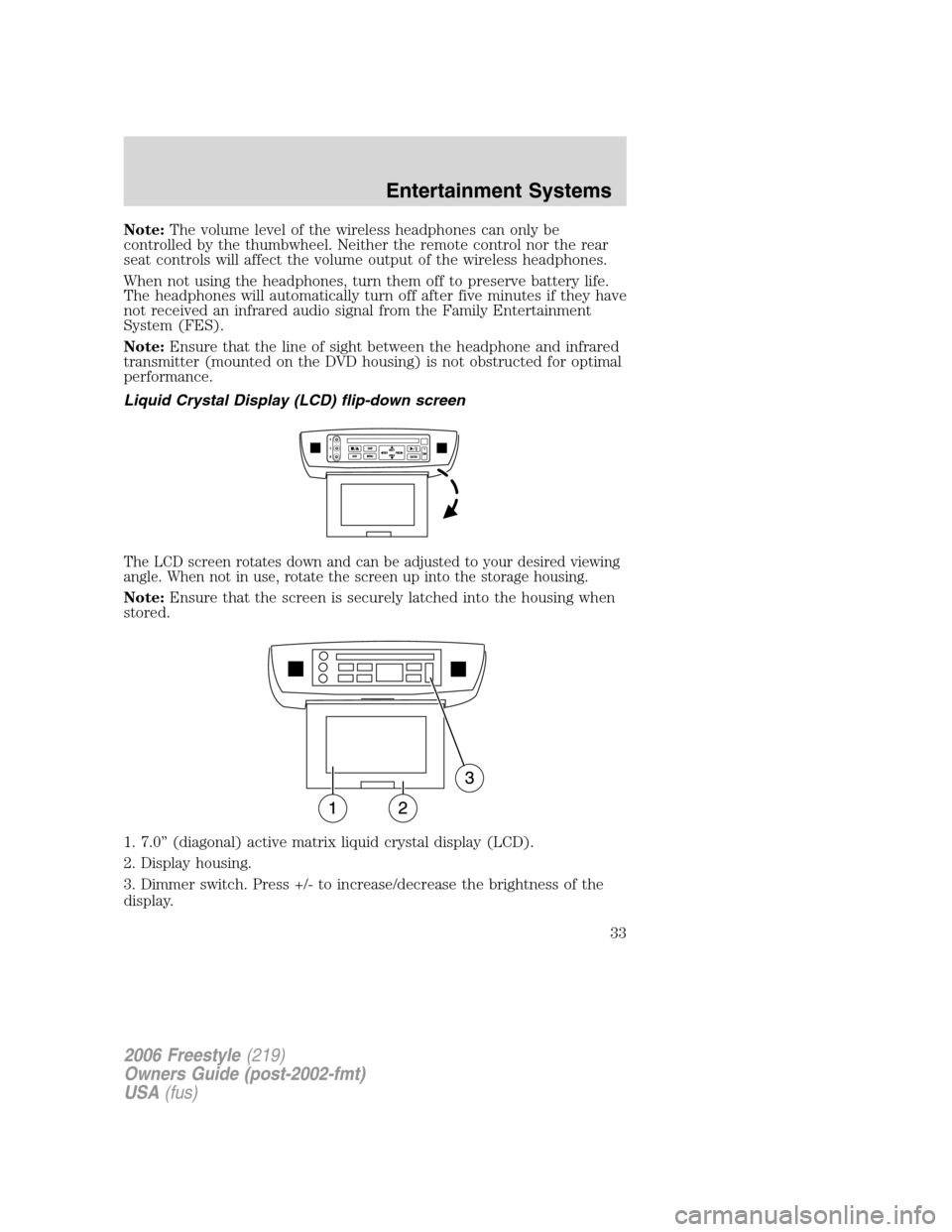
Liquid Crystal Display (LCD) flip-down screen
The LCD screen rotates down and can be adjusted to your desired viewing
angle. When not in use, rotate the screen up into the storage housing.
Note:Ensure that the screen is securely latched into the housing when
stored.
1. 7.0” (diagonal) active matrix liquid crystal display (LCD).
2. Display housing.
3. Dimmer switch. Press +/- to increase/decrease the brightness of the
display.
2006 Freestyle(219)
Owners Guide (post-2002-fmt)
USA(fus)
Entertainment Systems
33
Page 62 of 288
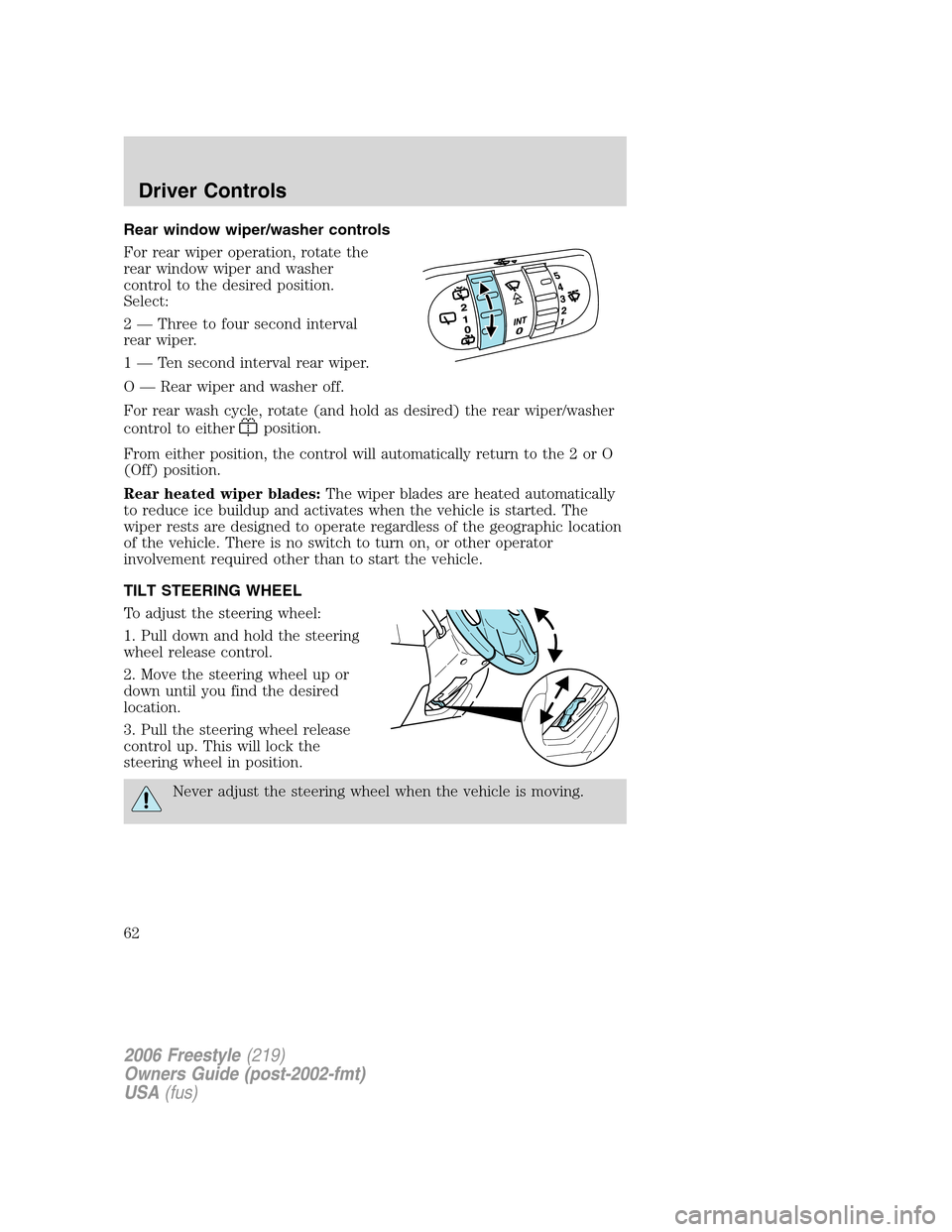
Rear window wiper/washer controls
For rear wiper operation, rotate the
rear window wiper and washer
control to the desired position.
Select:
2 — Three to four second interval
rear wiper.
1 — Ten second interval rear wiper.
O — Rear wiper and washer off.
For rear wash cycle, rotate (and hold as desired) the rear wiper/washer
control to either
position.
From either position, the control will automatically return to the 2 or O
(Off) position.
Rear heated wiper blades:The wiper blades are heated automatically
to reduce ice buildup and activates when the vehicle is started. The
wiper rests are designed to operate regardless of the geographic location
of the vehicle. There is no switch to turn on, or other operator
involvement required other than to start the vehicle.
TILT STEERING WHEEL
To adjust the steering wheel:
1. Pull down and hold the steering
wheel release control.
2. Move the steering wheel up or
down until you find the desired
location.
3. Pull the steering wheel release
control up. This will lock the
steering wheel in position.
Never adjust the steering wheel when the vehicle is moving.
2006 Freestyle(219)
Owners Guide (post-2002-fmt)
USA(fus)
Driver Controls
62
Page 70 of 288
SPEED CONTROL
With speed control set, you can maintain a speed of 30 mph (48 km/h)
or more without keeping your foot on the accelerator pedal. Speed
control does not work at speeds below 30 mph (48 km/h).
Do not use the speed control in heavy traffic or on roads that
are winding, slippery or unpaved.
Setting speed control
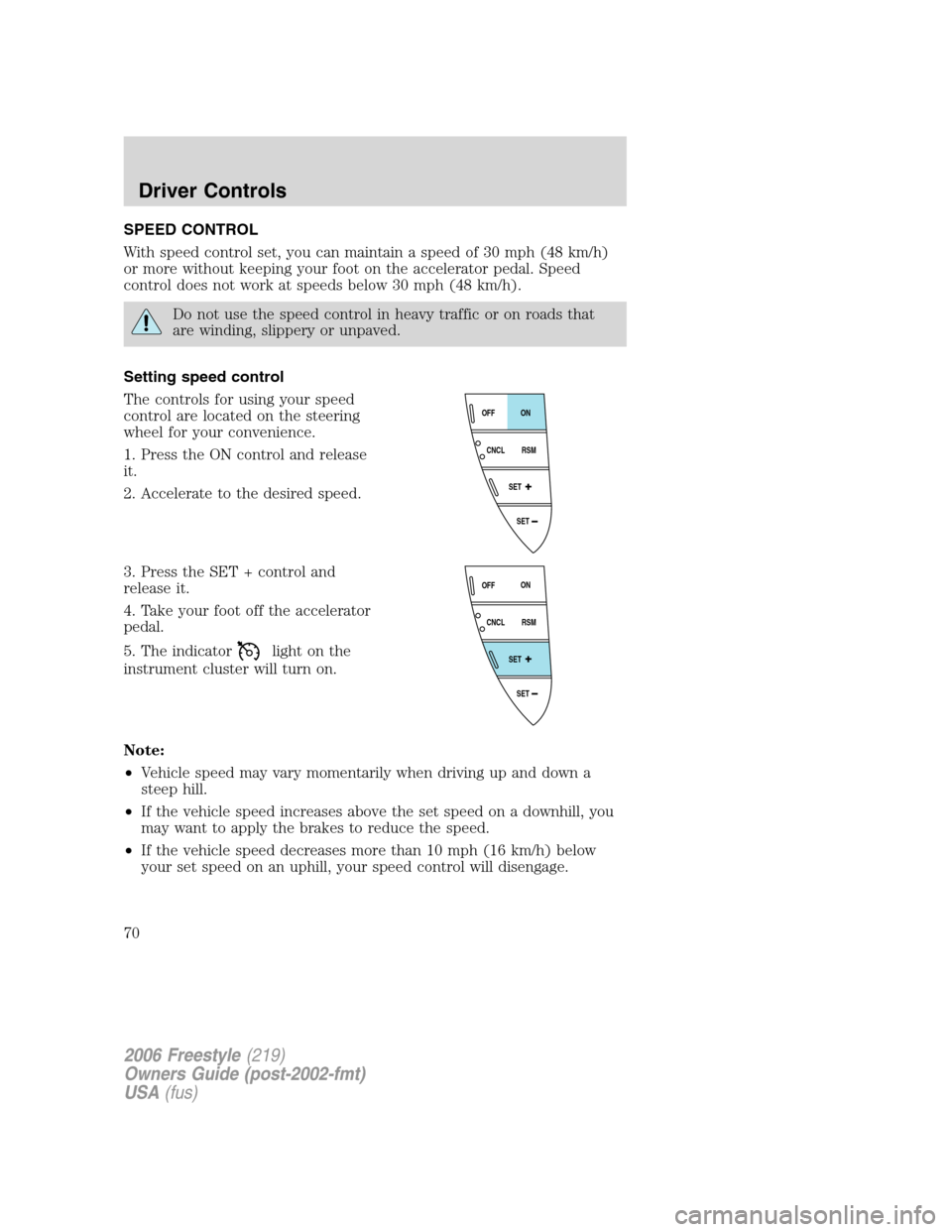
The controls for using your speed
control are located on the steering
wheel for your convenience.
1. Press the ON control and release
it.
2. Accelerate to the desired speed.
3. Press the SET + control and
release it.
4. Take your foot off the accelerator
pedal.
5. The indicator
light on the
instrument cluster will turn on.
Note:
•Vehicle speed may vary momentarily when driving up and down a
steep hill.
•If the vehicle speed increases above the set speed on a downhill, you
may want to apply the brakes to reduce the speed.
•If the vehicle speed decreases more than 10 mph (16 km/h) below
your set speed on an uphill, your speed control will disengage.
SET
SET
RSM CNCLON
OFF
SET
SET
RSM CNCLON
OFF
2006 Freestyle(219)
Owners Guide (post-2002-fmt)
USA(fus)
Driver Controls
70
Page 73 of 288
STEERING WHEEL CONTROLS (IF EQUIPPED)
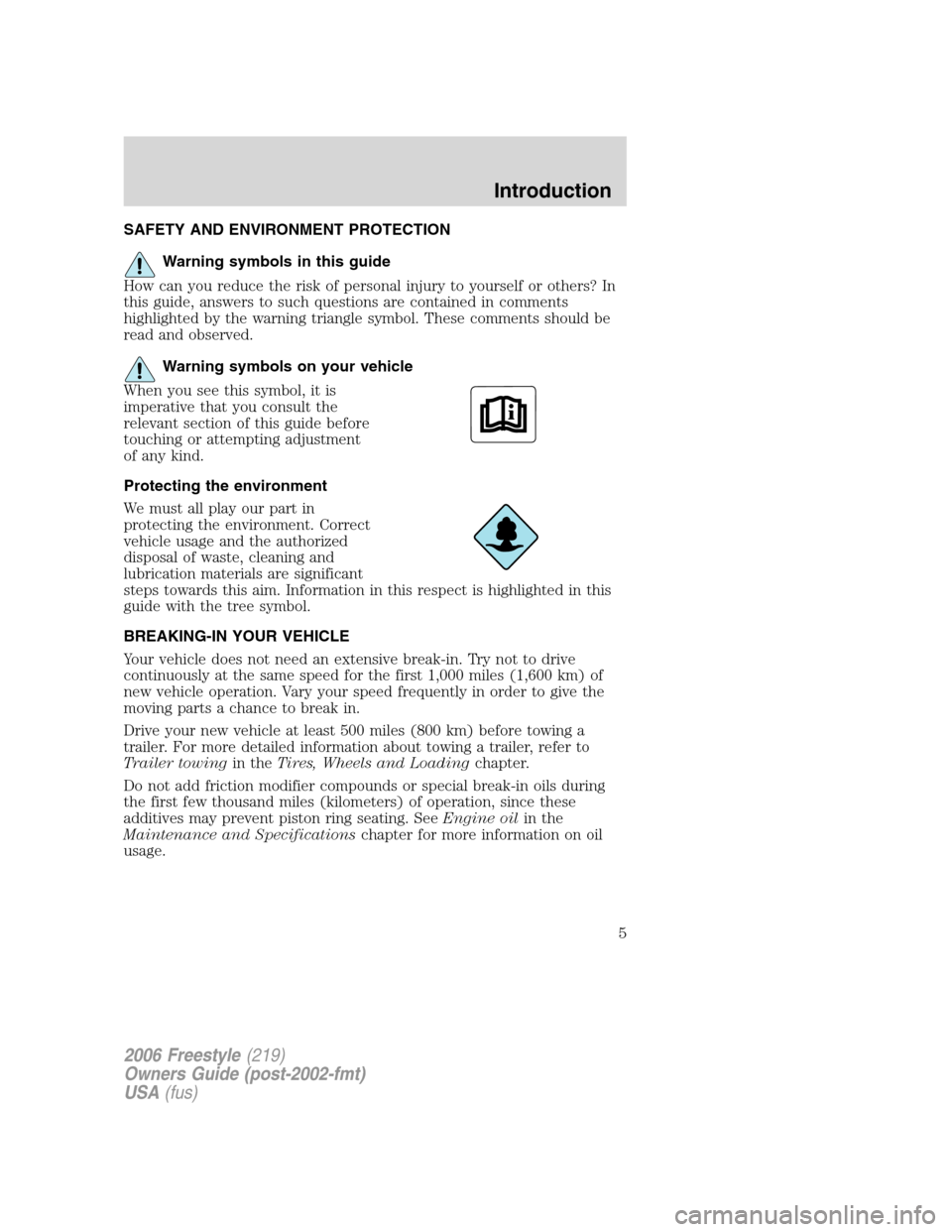
Radio control features
•Press MEDIA to select AM, FM1,
FM2, or CD (if equipped).
In Radio mode:
•Press SEEK to access the
next/previous strong station.
In CD mode:
•Press SEEK to listen to the next
track on the disc.
In any mode:
•Press VOL up or down to adjust
the volume.
•Press MUTE to mute the volume.
MUTE
MEDIA
SEEKVOL
MUTE
MEDIA
SEEKVOL
2006 Freestyle(219)
Owners Guide (post-2002-fmt)
USA(fus)
Driver Controls
73