2006 FORD EXPEDITION light
[x] Cancel search: lightPage 74 of 360
Please proceed
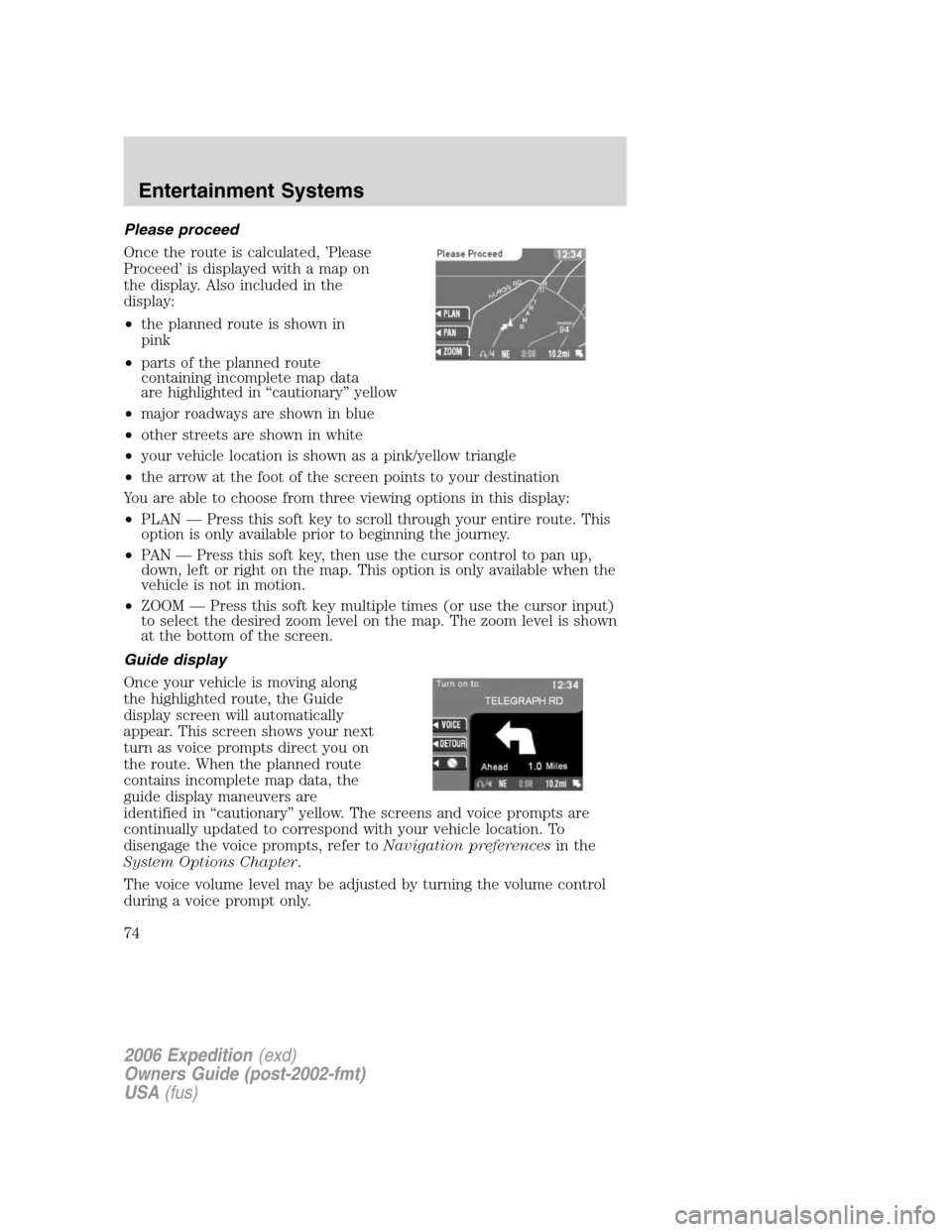
Once the route is calculated, ’Please
Proceed’ is displayed with a map on
the display. Also included in the
display:
•the planned route is shown in
pink
•parts of the planned route
containing incomplete map data
are highlighted in “cautionary” yellow
•major roadways are shown in blue
•other streets are shown in white
•your vehicle location is shown as a pink/yellow triangle
•the arrow at the foot of the screen points to your destination
You are able to choose from three viewing options in this display:
•PLAN — Press this soft key to scroll through your entire route. This
option is only available prior to beginning the journey.
•PAN — Press this soft key, then use the cursor control to pan up,
down, left or right on the map. This option is only available when the
vehicle is not in motion.
•ZOOM — Press this soft key multiple times (or use the cursor input)
to select the desired zoom level on the map. The zoom level is shown
at the bottom of the screen.
Guide display
Once your vehicle is moving along
the highlighted route, the Guide
display screen will automatically
appear. This screen shows your next
turn as voice prompts direct you on
the route. When the planned route
contains incomplete map data, the
guide display maneuvers are
identified in “cautionary” yellow. The screens and voice prompts are
continually updated to correspond with your vehicle location. To
disengage the voice prompts, refer toNavigation preferencesin the
System Options Chapter.
The voice volume level may be adjusted by turning the volume control
during a voice prompt only.
2006 Expedition(exd)
Owners Guide (post-2002-fmt)
USA(fus)
Entertainment Systems
74
Page 78 of 360
Detour options
You may engage the detour option
when in the Guide display, True
view or Map display screens.
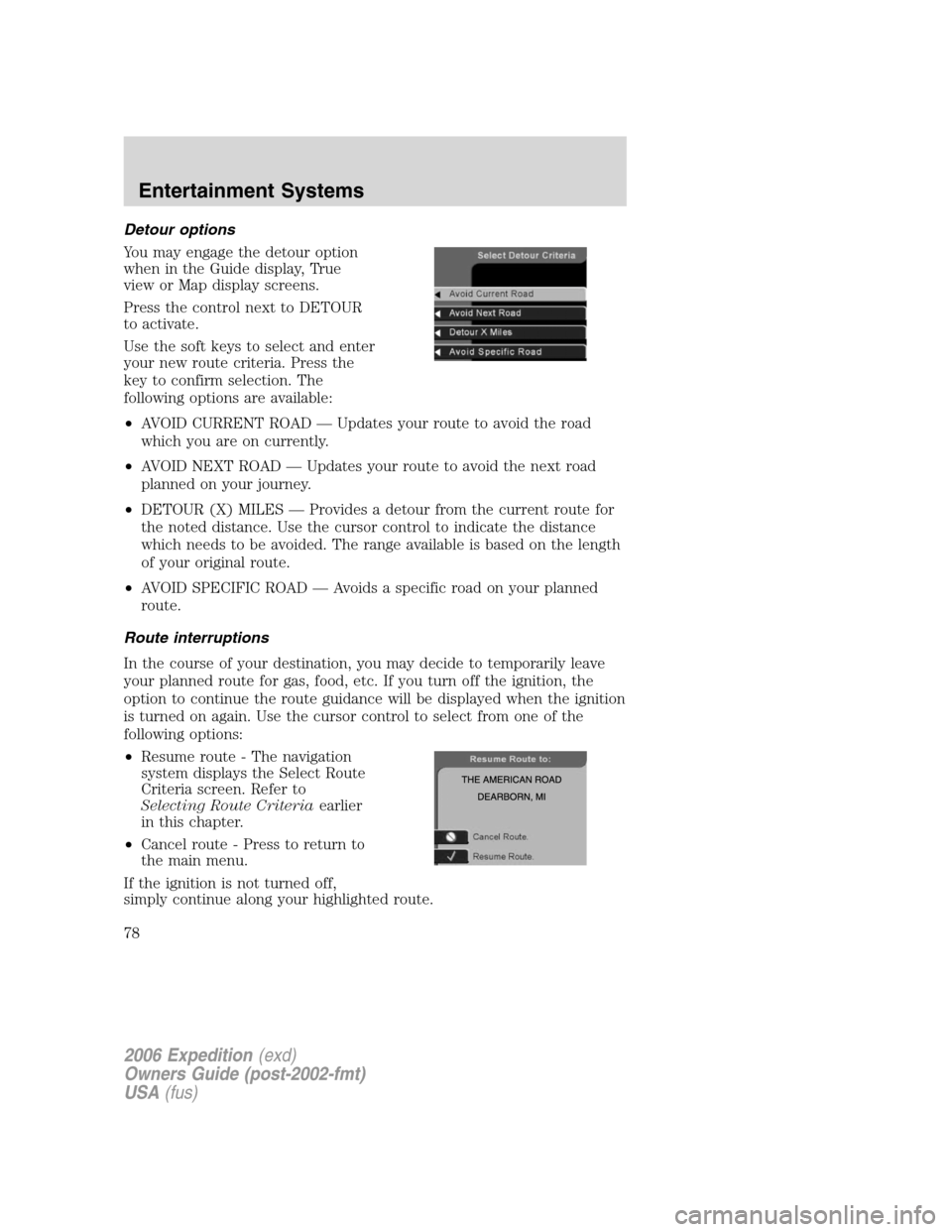
Press the control next to DETOUR
to activate.
Use the soft keys to select and enter
your new route criteria. Press the
key to confirm selection. The
following options are available:
•AVOID CURRENT ROAD — Updates your route to avoid the road
which you are on currently.
•AVOID NEXT ROAD — Updates your route to avoid the next road
planned on your journey.
•DETOUR (X) MILES — Provides a detour from the current route for
the noted distance. Use the cursor control to indicate the distance
which needs to be avoided. The range available is based on the length
of your original route.
•AVOID SPECIFIC ROAD — Avoids a specific road on your planned
route.
Route interruptions
In the course of your destination, you may decide to temporarily leave
your planned route for gas, food, etc. If you turn off the ignition, the
option to continue the route guidance will be displayed when the ignition
is turned on again. Use the cursor control to select from one of the
following options:
•Resume route - The navigation
system displays the Select Route
Criteria screen. Refer to
Selecting Route Criteriaearlier
in this chapter.
•Cancel route - Press to return to
the main menu.
If the ignition is not turned off,
simply continue along your highlighted route.
2006 Expedition(exd)
Owners Guide (post-2002-fmt)
USA(fus)
Entertainment Systems
78
Page 82 of 360
Map coverage
Please refer to theNavigation System Quick Start Guidefor individual
map CD content details.
CDs contain map data for all of the continental United States and parts
of Canada. In some less populated areas, even though a map is displayed,
map data may be incomplete (does not contain one-way street
information, turn restrictions, speed limits, etc.) In these cases, the
system will alert the driver and route guidance directions on the display
are highlighted in “cautionary” yellow.
Ordering additional map CDs
If you wish to order additional maps, or report possible problems with
your current map CD, please callNAVTEQ at 1–(888) NAV-MAPS,
(1–888–628–6277) toll-free or write
NAVTEQ
P.O. Box 543442
Chicago, IL 60654–0442
Website — www.navteq.com
Latest map CDs
The traffic network is constantly changing due to new roads, traffic
restrictions, etc. Therefore, it is not always possible to exactly match the
digital CD map with the current roadways. To help with accuracy, always
use the latest version of the map CD for navigation.
2006 Expedition(exd)
Owners Guide (post-2002-fmt)
USA(fus)
Entertainment Systems
82
Page 88 of 360
Will work in all modes except defrost. In automatic operation, the
recirculated air operates automatically as necessary to achieve the
selected temperature.
3.Passenger side temperature
control:Press to engage the dual
zone feature of the DATC system.
Allows the passenger to choose and
control a different temperature than the driver, if desired.
4.
Passenger heated seat:Press to turn on the passenger side
heated seat. Press once for full heat (three lights above passenger
heated seat control will be illuminated). Press a second time to select
medium heat (two lights). Press a third time to select low heat (one
light). Press a fourth time to disengage the feature (all lights will be off).
Note:The passenger heated seat will turn off automatically after 15
minutes of use.
5.
R(Rear defroster):Press to defrost the rear window. Refer to
theRear window defrostersection in this chapter for more information.
6.
Passenger cooled seat:Press to turn on the passenger side
cooled seat. Press once for full cool (three lights above passenger cooled
seat control will be illuminated). Press a second time to select medium
cool (two lights). Press a third time to select low cool (one light). Press
a fourth time to disengage the feature (all lights will be off).Note:The
passenger cooled seat will turn off automatically after 30 minutes of use.
7.
(Defrost):Distributes outside air through the windshield
defroster ducts and the demister outlets. Can be used to clear ice or fog
from the windshield. The system will automatically provide outside air to
reduce window fogging.
8.
Airflow direction control:Press to toggle through the air
distribution modes listed below. The selected mode will illuminate in the
display.
:Distributes air through the windshield defroster ducts, demister
outlets and the front and rear seat floor ducts. The system will
automatically provide outside air to reduce window fogging.
:Distributes air through the floor and rear seat floor ducts. The
system will automatically provide outside air to reduce window fogging.
:Distributes air through the instrument panel registers and the front
and rear seat floor ducts.
:Distributes air through the instrument panel registers.
2006 Expedition(exd)
Owners Guide (post-2002-fmt)
USA(fus)
Climate Controls
88
Page 89 of 360
9.OFF:Outside air is shut out and
the fan will not operate.
10.Manual override controls:Allows you to manually select where
airflow is directed. To return to full automatic control, press AUTO.
11.AUTO:Press to engage
automatic temperature control. Use
the temperature control to select
the desired temperature setting. The system will automatically determine
fan speed, airflow location, A/C on or off, and outside or recirculated air
to heat or cool the vehicle, allowing it to reach the desired temperature.
Press and hold AUTO for about two seconds to toggle between single
zone and dual zone temperature control.
12.
Driver heated seat:Press to turn on the driver side heated
seat. Press once for full heat (three lights above driver heated seat
control will be illuminated). Press a second time to select medium heat
(two lights). Press a third time to select low heat (one light). Press a
fourth time to disengage the feature (all lights will be off).Note:The
driver heated seat will turn off automatically after 15 minutes of use.
13.
Driver cooled seat:Press to turn on the driver side cooled seat.
Press once for full cool (three lights above driver cooled seat control will
be illuminated). Press a second time to select medium cool (two lights).
Press a third time to select low cool (one light). Press a fourth time to
disengage the feature (all lights will be off).Note:The driver cooled
seat will turn off automatically after 30 minutes of use.
14.Driver’s side temperature
control:Controls the temperature
on the driver side of the vehicle in
dual zone and controls the
temperature of both the driver and passenger sides in single zone.
15.Fan Speed:Press to manually
increase/decrease fan speed. In
manual mode, the display will
show
with a bar graph to
indicate fan speed. Fan speed can be manually adjusted in AUTO mode.
To allow the system to automatically control fan speed, press AUTO.
OFF
AUTO
2006 Expedition(exd)
Owners Guide (post-2002-fmt)
USA(fus)
Climate Controls
89
Page 93 of 360

HEADLAMP CONTROL
Rotate the headlamp control to the
first position
to turn on the
parking lamps. Rotate to the second
position
to turn on the
headlamps.
Autolamp control
The autolamp system provides light
sensitive automatic on-off control of
the exterior lights normally
controlled by the headlamp control.
The autolamp system also keeps the
lights on for approximately 20
seconds or on vehicles equipped
with a message center, you can
select a delay from 0–180 seconds, after the ignition switch is turned to
OFF.
•To turn autolamps on, rotate the control counterclockwise.
•To turn autolamps off, rotate the control clockwise to OFF.
High beams
Push the lever toward the
instrument panel to activate. Pull
the lever towards you to deactivate.
A
INT2OFFOFFINT1
2006 Expedition(exd)
Owners Guide (post-2002-fmt)
USA(fus)
Lights
93
Page 94 of 360

Flash to pass
Pull toward you slightly to activate
and release to deactivate.
Daytime running lamps (DRL) (if equipped)
Turns the foglamps on at full intensity output. To activate:
•the ignition must be in the ON position and
•the headlamp control must be in the OFF or Parking lamps position.
Always remember to turn on your headlamps at dusk or during
inclement weather. The Daytime Running Lamp (DRL) system
does not activate the tail lamps and generally may not provide
adequate lighting during these conditions. Failure to activate your
headlamps under these conditions may result in a collision.
Foglamp control (if equipped)
The headlamp control also operates
the foglamps. The foglamps can be
turned on when the headlamp
control is in the
,or
positions and the high beams are
not turned on.
Pull headlamp control towards you
to turn foglamps on. The foglamp
indicator light
will illuminate.
INT2OFFOFFINT1
A
2006 Expedition(exd)
Owners Guide (post-2002-fmt)
USA(fus)
Lights
94
Page 95 of 360

PANEL DIMMER CONTROL
Use to adjust the brightness of the
instrument panel and all applicable
switches in the vehicle during
headlamp and parklamp operation.
Move the control to the full upright
position, past detent, to turn on the
interior lamps.
Move the control to the full down
position, past detent, to prevent the interior lights from illuminating
when the doors are opened.
VERTICAL AIM ADJUSTMENT
1. Park the vehicle directly in front of a wall or screen on a level surface,
approximately 25 feet (7.6 meters)
away.
•(1) 8 feet (2.4 meters)
•(2) Center height of lamp to
ground
•(3) 25 feet (7.6 meters)
•(4) Horizontal reference line
2. Measure the height from the
center of your headlamp (indicated
by a 3.0 mm circle on the lens) to the ground and mark an 8 foot
(2.4 meter) horizontal reference line on the vertical wall or screen at this
height (a piece of masking tape works well).
3. Turn on the low beam headlamps to illuminate the wall or screen and
open the hood. Cover one of the headlamps so no light hits the wall.
4. On the wall or screen you will
observe a light pattern with a
distinct horizontal edge towards the
right. If this edge is not at the
horizontal reference line, the beam will need to be adjusted so the edge
is at the same height as the horizontal reference line.
A
2006 Expedition(exd)
Owners Guide (post-2002-fmt)
USA(fus)
Lights
95