Page 141 of 344

equipped with steering wheel mounted switches (de-
scribed in this section) will also be equipped with the
EVIC. The EVIC consists of the following:
•System Status
•Vehicle information warning message displays
•Tire Pressure Monitor System
•Personal Settings (customer programmable features)
•Compass display
•Outside temperature display
•Trip computer functions
•UConnect™ hands-free communication system dis-
plays — If Equipped
•Navigation system screens — If Equipped
•Audio mode display
•Check GascapThe system allows the driver to select information by
pressing the following switches mounted on the steering
wheel:
Press and release the MENU button and the
mode displayed will change between Trip
Functions, Navigation (If Equipped), System
Warnings, System Status, Personal Settings,
and Telephone (If Equipped).
Pressing the FUNCTION SELECT button ac-
cepts a selected choice. The Function Select
button also advances the radio preset when the
EVIC is in the Compass/Temp/Audio screen.
Use the SCROLL buttons to scroll through Trip
Functions, Navigation (If Equipped), System
Warnings, System Status Messages, and Per-
sonal Settings (Customer Programmable Fea-
tures). The SCROLL buttons also seek up and down
(radio station or CD track number).
The AUDIO MODE SELECT button is used to
select the Compass/Temp/Audio screen. If
Compass/Temp/Audio is already being dis-
played when the AUDIO MODE SELECT but-
ton is pressed, the radio mode will change from AM to
UNDERSTANDING YOUR INSTRUMENT PANEL 141
4
Page 147 of 344

The EVIC displays this symbol to indicate that
the U-Connect phone is currently not available.
Navigation — If Equipped
Navigation Display Control
Press and release the MENU button until Navigation is
displayed in the EVIC. When the Navigation System is
On, the steering wheel buttons can be used to select the
Map or Menu display on the Navigation Unit. When the
Menu display is active, the SCROLL buttons can be used
to scroll through the list, the FUNCTION SELECT button
can be used to select an item, and the AUDIO MODE
SELECT button can be used to return to the previous
menu. When the Map display is active, pressing the
FUNCTION SELECT button will change the Navigation
Unit Display to the Menu.
Turn By Turn Directions
If Turn by Turn Navigation is enabled through Personal
Settings, the Navigation System will provide turn by turn
directions to the programmed destination in the EVIC
display. The name of the approaching road is displayed
at the top of the screen, followed by an arrow to show the
direction of the turn and the remaining distance to the
turn counted down.
System Warnings (Customer Information
Features)
Press and release the MENU button until “SYSTEM
WARNINGS” is displayed in the EVIC. Use the SCROLL
buttons to display one of the following choices:
•Oil Temperature
Shows the actual oil temperature.
•Oil Pressure
Shows the actual oil pressure.
Phone
Not
Avail-
able
UNDERSTANDING YOUR INSTRUMENT PANEL 147
4
Page 172 of 344

selecting a variety of destinations and routes. The unit
also provides an AM/FM stereo radio and six-disc CD
changer with MP3 capability.
Mapping information for navigation is supplied on a
DVD that is loaded into the unit. One map DVD covers
all of North America. Refer to your “Navigation User’s
Manual” for detailed operating instructions.
REMOTE SOUND SYSTEM CONTROLS
The remote sound system controls are located on the
surface of the steering wheel at the 3 and 9 o’clock
positions.
Some models feature an Electronic Vehicle Information
Center (EVIC) with driver-interactive display. It is lo-
cated in the instrument cluster below the speedometer.
The audio mode of the EVIC can display any one of
twelve radio station preset frequencies, CD disc number,
CD track number, tape, or one of 200 Satellite radio
channels depending on which radio is in the vehicle.The VOLUME switch controls the volume of
the sound system. Pressing the top of the
rocker switch will increase the volume and
pressing the bottom of the rocker switch will
decrease the volume.
The AUDIO MODE SELECT button changes
the mode of the radio from AM to FM to Tape
to CD, or to Satellite (SAT) depending on
which radio is in the vehicle.
Electronic Vehicle Information Center
172 UNDERSTANDING YOUR INSTRUMENT PANEL
Page 174 of 344

RADIO GENERAL INFORMATION
Radio Broadcast Signals
Your new radio will provide excellent reception under
most operating conditions. Like any system, however, car
radios have performance limitations, due to mobile op-
eration and natural phenomena, which might lead you to
believe your sound system is malfunctioning. To help
you understand and save you concern about these “ap-
parent” malfunctions, you must understand a point or
two about the transmission and reception of radio sig-
nals.
Two Types of Signals
There are two basic types of radio signals... AM or
Amplitude Modulation, in which the transmitted sound
causes the amplitude, or height, of the radio waves to
vary... and FM or Frequency Modulation, in which the
frequency of the wave is varied to carry the sound.
Electrical Disturbances
Radio waves may pick up electrical disturbances during
transmission. They mainly affect the wave amplitude,and thus remain a part of the AM reception. They
interfere very little with the frequency variations that
carry the FM signal.
AM Reception
AM sound is based on wave amplitude, so AM reception
can be disrupted by such things as lightning, power lines
and neon signs.
FM Reception
Because FM transmission is based on frequency varia-
tions, interference that consists of amplitude variations
can be filtered out, leaving the reception relatively clear,
which is the major feature of FM radio.
NOTE:On vehicles so equipped the radio, steering
wheel radio controls and 6 disc CD/DVD changer if
equipped, will remain active for 10 minutes after the
ignition has been turned off, and the driver door has not
been opened. This feature is programmable through the
electronic vehicle information center (EVIC) — if
equipped. Refer to “Delay Power Off to Accessories Until
Exit” under “Personal Settings” in the Electronic Vehicle
Information Center section for details.
174 UNDERSTANDING YOUR INSTRUMENT PANEL
Page 187 of 344

STARTING AND OPERATING
CONTENTS
�Starting Procedures....................190
▫Normal Starting......................190
�Transmission Shifting...................192
▫5 Speed Automatic Transmission..........192
▫Automatic Transmission —
General Information...................197
�AutoStick............................199
▫AutoStick Operation...................199
▫AutoStick General Information............200
�Parking Brake.........................201
�Brake System.........................202
▫Anti-Lock Brake System................202
�Power Steering........................205
�Tire Safety Information..................206
▫Tire Markings........................206
▫Tire Identification Number (TIN)..........210
▫Tire Loading And Tire Pressure...........211
�Tires—General Information...............215
▫Tire Pressure.........................215
▫Tire Inflation Pressures.................216
▫Radial-Ply Tires......................218
▫Tire Spinning........................218
▫Tread Wear Indicators..................219
5
Page 203 of 344

The electronic brake force distribution (EBD) prevents the
rear wheels from over-braking and provides greater
control of available braking forces applied to the rear
axle.
WARNING!
Pumping of the Anti-Lock Brakes will diminish
their effectiveness and may lead to an accident.
Pumping makes the stopping distance longer. Just
press firmly on your brake pedal when you need to
slow down or stop.
WARNING!
•Anti-lock system (ABS) cannot prevent the natu-
ral laws of physics from acting on the vehicle, nor
can it increase braking or steering efficiency be-
yond that afforded by the condition of the vehicle
brakes and tires or the traction afforded.
•The ABS cannot prevent accidents, including
those resulting from excessive speed in turns,
following another vehicle too closely, or hydro-
planing. Only a safe, attentive, and skillful driver
can prevent accidents.
•The capabilities of an ABS equipped vehicle must
never be exploited in a reckless or dangerous
manner which could jeopardize the user’s safety
or the safety of others.
STARTING AND OPERATING 203
5
Page 205 of 344
WARNING!
The Anti-Lock Brake System contains sophisticated
electronic equipment that may be susceptible to
interference caused by improperly installed or high
output radio transmitting equipment. This interfer-
ence can cause possible loss of anti-lock braking
capability. Installation of such equipment should be
performed by qualified professionals.
All vehicle wheels and tires must be the same size and
type and tires must be properly inflated to produce
accurate signals for the computer.
POWER STEERING
The standard power steering system will give you good
vehicle response and increased ease of maneuverability
in tight spaces. The system will provide mechanical
steering capability if power assist is lost.
If for some reason, the power assist is interrupted, it will
still be possible to steer your vehicle. Under these condi-
tions you will observe a substantial increase in steering
effort, especially at very low vehicle speeds and during
parking maneuvers.
NOTE:Increased noise levels at the end of the steering
wheel travel are considered normal and does not indicate
that there is a problem with the power steering system.
STARTING AND OPERATING 205
5
Page 206 of 344
WARNING!
Continued operation with reduced power steering
assist could pose a safety risk to yourself and others.
Service should be obtained as soon as possible.
CAUTION!
Prolong operation of the steering system at the end
of the steering wheel travel will increase the steering
fluid temperature and should be avoided when
possible. Damage to the power steering pump may
occur.
TIRE SAFETY INFORMATION
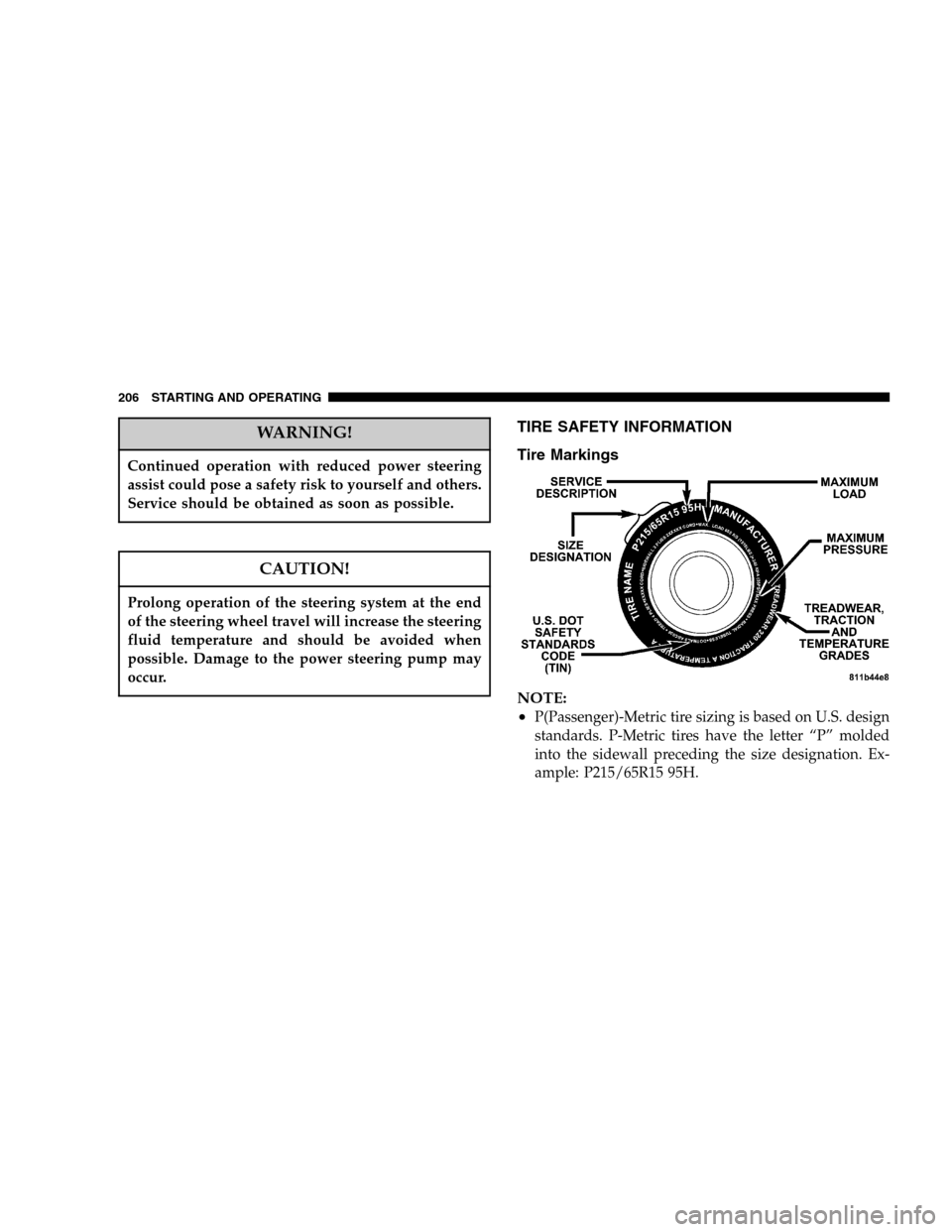
Tire Markings
NOTE:
•
P(Passenger)-Metric tire sizing is based on U.S. design
standards. P-Metric tires have the letter “P” molded
into the sidewall preceding the size designation. Ex-
ample: P215/65R15 95H.
206 STARTING AND OPERATING