Page 108 of 344

GARAGE DOOR OPENER — IF EQUIPPED
The HomeLink�Universal Transceiver replaces up to
three remote controls (hand held transmitters) that oper-
ate devices such as garage door openers, motorized
gates, or home lighting. It triggers these devices at the
push of a button. The Universal Transceiver operates off
your vehicle’s battery and charging system; no batteries
are needed.
NOTE:The HomeLink�Universal Transceiver is dis-
abled when the Vehicle Theft Alarm is active.
For additional information on HomeLink�, call 1–800–
355–3515, or on the internet at www.homelink.com.
WARNING!
A moving garage door can cause injury to people and
pets in the path of the door. People or pets could be
seriously or fatally injured. Only use this transceiver
with a garage door opener that has a “stop and
reverse” feature as required by federal safety stan-
dards. This includes most garage door opener mod-
els manufactured after 1982. Do not use a garage
door opener without these safety features it could
cause injury or death. Call toll-free 1–800–355–3515
or, on the Internet at www.homelink.com for safety
information or assistance.
Programming HomeLink
NOTE:
When programming a garage door opener, it is
advised to park outside the garage. It is also recom-
mended that a new battery be placed in the hand-held
transmitter of the device being programmed to
HomeLink for quicker training and accurate transmis-
sion of the radio-frequency signal.
108 UNDERSTANDING THE FEATURES OF YOUR VEHICLE
Page 117 of 344
NOTE:If desired, the power outlet next to the ash tray
receiver (if equipped) can be converted by your autho-
rized dealer to provide power with the ignition switch in
the LOCK position.The center console outlet is powered directly from the
battery (power available at all times). Items plugged into
this outlet may discharge the battery and/or prevent
engine starting.
Front Power OutletCenter Console Power Outlet
UNDERSTANDING THE FEATURES OF YOUR VEHICLE 117
3
Page 118 of 344
The auxiliary outlet is also powered directly from the
battery (power available at all times). Items plugged into
this outlet may discharge the battery and/or prevent
engine starting.
Auxiliary Power Outlet
118 UNDERSTANDING THE FEATURES OF YOUR VEHICLE
Page 119 of 344
Electrical Outlet Use With Engine Off
CAUTION!
•Many accessories that can be plugged in draw
power from the vehicle’s battery, even when not in
use (i.e. cellular phones, etc.). Eventually, if plugged
in long enough, the vehicle’s battery will discharge
sufficiently to degrade battery life and/or prevent
engine starting.
•Accessories that draw higher power (i.e. coolers,
vacuum cleaners, lights, etc.), will degrade the
battery even more quickly. Only use these inter-
mittently and with greater caution.
•After the use of high power draw accessories, or
long periods of the vehicle not being started (with
accessories still plugged in), the vehicle must be
driven a sufficient length of time to allow the
alternator to recharge the vehicle’s battery.
•Power outlets are designed for accessory plugs
only. Do not hang any type of accessory or acces-
sory bracket from the plug. Improper use of the
power outlet can cause damage.
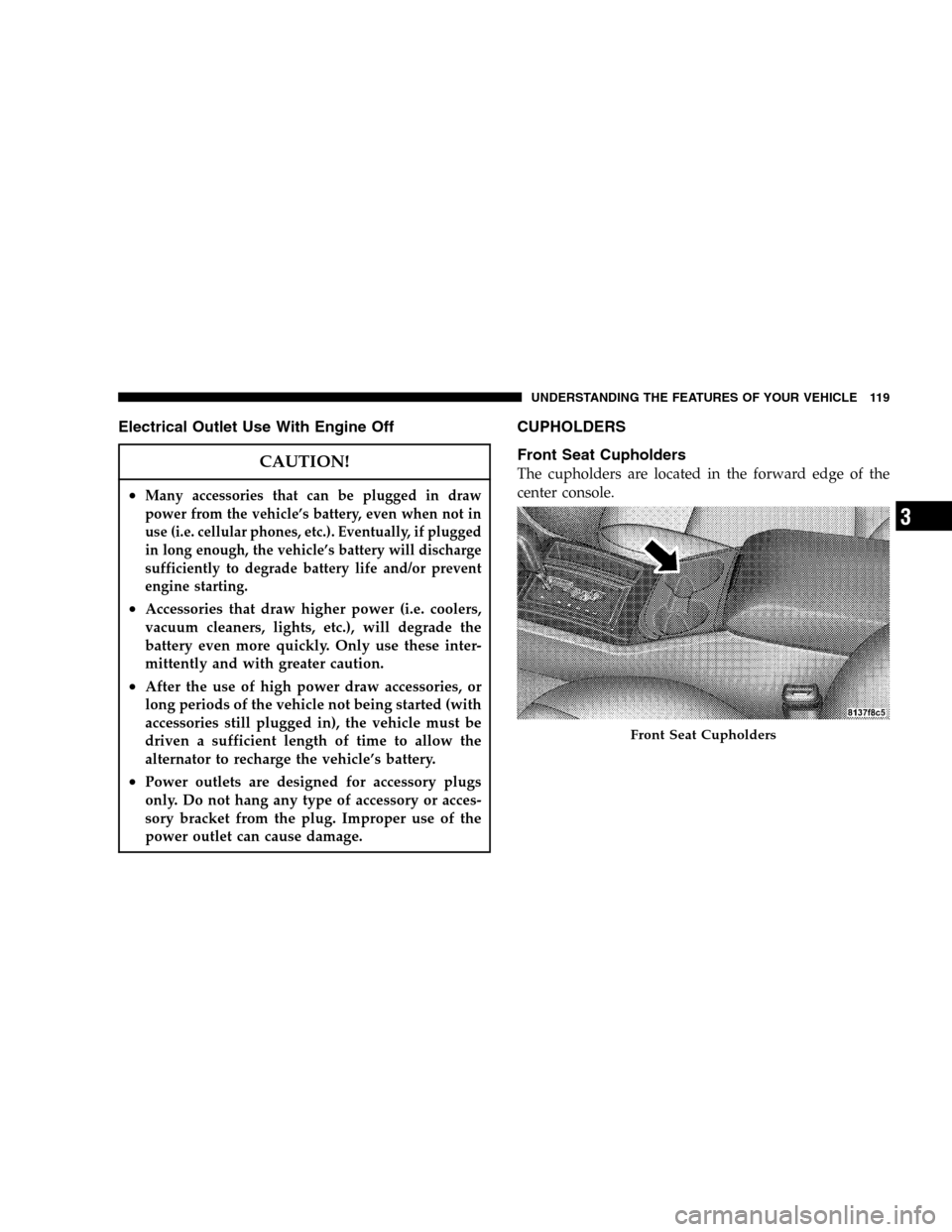
CUPHOLDERS
Front Seat Cupholders
The cupholders are located in the forward edge of the
center console.
Front Seat Cupholders
UNDERSTANDING THE FEATURES OF YOUR VEHICLE 119
3
Page 121 of 344

Cargo Management System — If Equipped
The cargo area has an upper and lower load floor.
Additional innovative features in the cargo area are the
two molded-in bins in the quarter trim panels. Each bin
that hold a gallon of milk and a 2-liter bottle of pop.
A cargo management system that stores on the lower
load floor below the bi-level cargo floor is optional. It
includes the following equipment:
•Waterproof cargo floor liner.
•Folding cargo management container with net separa-
tors.
The bi-level cargo floor includes a removable, tri-fold
load-bearing upper level. Two folds in the panel allow it
to be partially or fully folded for storage flexibility.
Shallow items can be stored underneath the upper load
floor.The lower load floor is hinged to provide access to the
spare tire, battery and rear electrical power distribution
center.
The 60/40 split-folding rear seat provides cargo-carrying
versatility. The seatbacks fold down easily by pulling
nylon tabs between the seatbacks and the bolsters. When
the seats are folded down, they provide a continuous,
nearly flat extension of the removable tri-fold load floor.
Tri-Fold Upper Load Floor
The removable, tri-fold upper load floor has two sur-
faces, one side is carpeted for a plush appearance and the
other is vinyl for easy cleaning. Folding and/or removing
the load floor adds four inches to the height of the cargo
area for increased utility. It is constructed of a lightweight
material that is sandwiched between the carpeted and
washable-vinyl sides, the panel consists of a strong inner
structure to give it load-bearing strength.
UNDERSTANDING THE FEATURES OF YOUR VEHICLE 121
3
Page 142 of 344

FM to Tape to CD, or to Satellite (SAT) depending on
which radio is in the vehicle. This button can also be used
to return to a previous navigation menu selection.
When the appropriate conditions exist, the Electronic
Vehicle Information Center (EVIC) displays the following
messages.
•Turn Signal On (with a continuous warning chime)
•Left Front Turn Signal Lamp Out (with a single chime)
•Left Rear Turn Signal Lamp Out (with a single chime)
•Right Front Turn Signal Lamp Out (with a single
chime)
•Right Rear Turn Signal Lamp Out (with a single
chime)
•RKE Battery Low (with a single chime)
•Personal Settings Not Available – Vehicle Not in Park
•Left/Right Front Door Ajar (one or more, with a single
chime if speed is above 1 mph)
•Left/Right Rear Door Ajar (one or more, with a single
chime if speed is above 1 mph)
•Door (S) Ajar (with a single chime if vehicle is in
motion)
•Low Washer Fluid (with a single chime)
•Channel 1, 2, OR 3 Transmit
•Channel 1, 2, OR 3 Training
•Channel 1, 2, OR 3 Trained
•Clearing Channels
•Channels Cleared
•Channels Defaulted
•Did Not Train
•Left Front Low Pressure (with a single chime). Refer to
“Starting And Operating, Tire Section”
•Left Rear Low Pressure (with a single chime). Refer to
“Starting And Operating, Tire Section”
142 UNDERSTANDING YOUR INSTRUMENT PANEL
Page 145 of 344
To set the variance:Turn the ignition switch ON. Press
and hold the compass button for approximately 2 sec-
onds. Use the SCROLL buttons until “Compass Variance”
is highlighted. The “Compass Variance” message and the
last variance zone number will be displayed. Press and
release FUNCTION SELECT button until the proper
variance zone is selected according to the map. Press and
release the compass button to exit.
Telephone — If Equipped
Press and release the MENU button until Telephone is
displayed in the EVIC.
When the appropriate conditions exist, the EVIC pro-
vides the following telephone information:
•Phone status: idle, voice mail, roaming, battery strength
and signal strength in increments of 20 percent.
•Call status: Incoming call, connecting, connected, air
time in minutes and seconds, call ended, call failed,
roaming and no phone connection.
•U-Connect Active.
•Caller ID phone number display.
UNDERSTANDING YOUR INSTRUMENT PANEL 145
4
Page 146 of 344

When the appropriate conditions exist, and if supported
by the Cell phone the EVIC will display the following
telephone symbols:
The EVIC displays this symbol to indicate the
signal strength of the U-Connect phone. The
number of horizontal bars increase as the
strength of the U-Connect phone signal in-
creases.
The EVIC displays this symbol to indicate an
incoming call.
The EVIC displays this symbol to indicate that
the U-Connect phone is currently in analog
mode.
The EVIC displays this symbol to indicate that
the U-Connect phone is currently in roaming.The EVIC displays this symbol to indicate that
you have voice mail.
The EVIC displays this symbol to indicate a
text message.
The EVIC displays this symbol to indicate the
battery strength of the U-Connect phone.
The EVIC displays this symbol to indicate that
a phone connection has been made.
Signal
Strength
Incom-
ing Call
Analog
Roam-
ing
Voice
Mail
Text
Message
Battery
Strength
Call in
Progress
146 UNDERSTANDING YOUR INSTRUMENT PANEL