Page 261 of 458
DVD Distortion
There may be an experience with video distortion when
operating cellular phones, scanners, CB radios,
Global Position Systems (GPS)*, two-way radios, mobile
fax, or walkie talkies.
It may be necessary to turn off the DVD player when
operating one of these devices in or near the vehicle.
*Excludes the OnStar
®System.
Cleaning the DVD Player
When cleaning the outside DVD faceplate and buttons,
use only a clean cloth dampened with clean water.
Cleaning the Video Screen
When cleaning the video screen, use only a clean cloth
dampened with clean water. Use care when directly
touching or cleaning the screen, as damage may result.
Rear Seat Audio (RSA)
If your vehicle has rear seat audio (RSA), this feature
allows rear seat passengers to listen to and control any of
the following audio sources: AM/FM tuner, front CD
player, and XM™ Satellite Radio Service (if equipped).
However, the rear seat passengers can only control the
sources that the front seat passengers are not listening
to. For example, rear seat passengers may listen to a CD
in the front radio and control it while the driver listens to
the radio through the front speakers. The rear seat
passengers have control of the volume for each set of
headphones.
The front seat audio controls always have priority over
the RSA controls. If the front seat passengers switch
the source for the main radio to a remote source,
the RSA will not be able to control the remote source.
You can operate the RSA when the main radio is off.
The DVD or auxiliary device will always be available on
channel (CHA or CH1) of the wireless headphones.
All other RSA sources are available on CHB or CH2 of
the wireless headphones, as well as the wired
headphones. If the RSA is off, the wired headphones
will provide DVD or auxiliary device audio. The rear seat
passengers will not be able to listen to XM, on CHB
or CH2, if the front passenger is listening to a DVD or
auxiliary device.
3-111
ProCarManuals.com
Page 263 of 458

When a CD is playing in the single CD player, press this
button to select the next track. This function is inactive if
the front seat passengers are listening to a CD.
When a CD is playing in the six-disc CD changer, press
this button to select the next CD, if multiple CDs are
loaded. This function is inactive if the front seat
passengers are listening to a CD.
SRCE (Source):Press this button to switch between
playing the AM/FM tuner, front CD player, and XM™
Satellite Radio Service (if equipped). If one of the
sources are not loaded, the system will skip over the
source when this button is pressed.
X(Headphone):Press the right or the left headphone
button to enable volume control of the wired headphone
connected to the corresponding jack. Press the right
and left arrow buttons to change the volume.
rj(Parental Control):This button is located behind
the video screen, below the auxiliary jacks. Press this
button while using RSA, or when a DVD or CD is playing
to blank the video screen and to mute the audio. The
power indicator lights on the DVD player will ash.Turning on the parental control will also disable all other
button operations from the remote control and the
DVD player, except for the eject button. Press this
button again to restore operation of the RSA, DVD
player, and remote control.
This button may also be used to turn the DVD player
power on and automatically resume play if the vehicle is
on and a disc is in the player. If no disc is in the
player then the system will power up in auxiliary mode.
Theft-Deterrent Feature
THEFTLOCK®is designed to discourage theft of your
vehicle’s radio. The feature works automatically by
learning a portion of the Vehicle Identication Number
(VIN). If the radio is moved to a different vehicle, it
will not operate and LOCKED will appear on the display.
With THEFTLOCK
®activated, the radio will not
operate if stolen.
3-113
ProCarManuals.com
Page 409 of 458
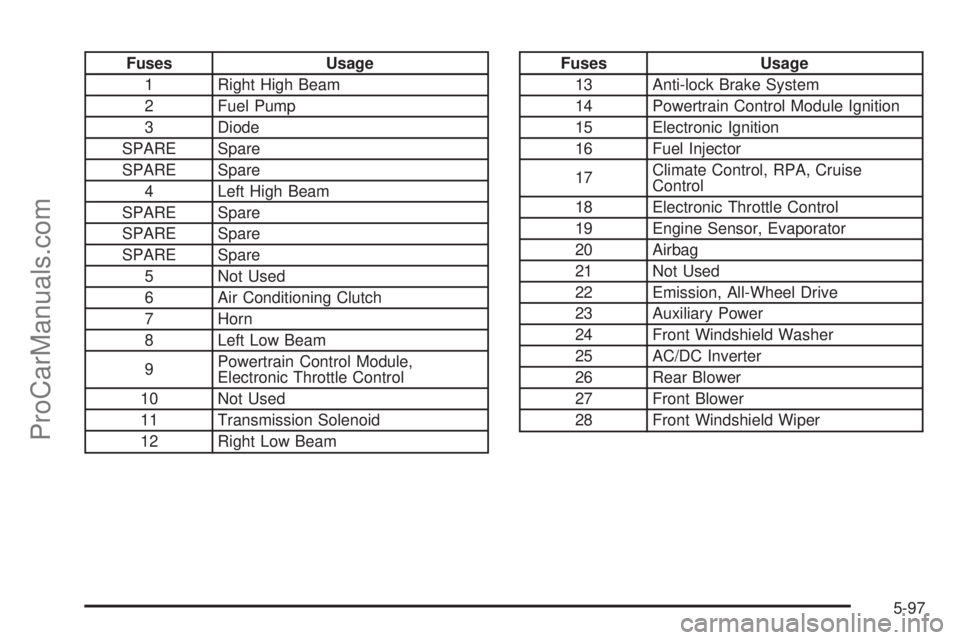
Fuses Usage
1 Right High Beam
2 Fuel Pump
3 Diode
SPARE Spare
SPARE Spare
4 Left High Beam
SPARE Spare
SPARE Spare
SPARE Spare
5 Not Used
6 Air Conditioning Clutch
7 Horn
8 Left Low Beam
9Powertrain Control Module,
Electronic Throttle Control
10 Not Used
11 Transmission Solenoid
12 Right Low BeamFuses Usage
13 Anti-lock Brake System
14 Powertrain Control Module Ignition
15 Electronic Ignition
16 Fuel Injector
17Climate Control, RPA, Cruise
Control
18 Electronic Throttle Control
19 Engine Sensor, Evaporator
20 Airbag
21 Not Used
22 Emission, All-Wheel Drive
23 Auxiliary Power
24 Front Windshield Washer
25 AC/DC Inverter
26 Rear Blower
27 Front Blower
28 Front Windshield Wiper
5-97
ProCarManuals.com
Page:
< prev 1-8 9-16 17-24