Page 90 of 390

Universal Home Remote
System
If your vehicle has this feature, the Universal Home
Remote transmitter buttons are located on the automatic
dimming rearview mirror. The three buttons on the left
side of the mirror are the Universal Home Remote
transmitter buttons.
The Universal Home Remote Wireless Control System,
a combined universal transmitter and receiver,
provides a way to replace up to three hand-held
transmitters used to activate devices such as gate
operators, garage door openers, entry door locks,
security systems, and home lighting.If your vehicle is equipped with the Universal Home
Remote Transmitter, it complies with Part 15 of the
FCC Rules. Operation is subject to the following
two conditions: (1) this device may not cause harmful
interference, and (2) this device must accept any
interference received, including interference that may
cause undesired operation.
This device complies with RSS-210 of Industry Canada.
Operation is subject to the following two conditions:
(1) this device may not cause interference, and
(2) this device must accept any interference received,
including interference that may cause undesired
operation of the device.
Changes and modifications to this system by other than
an authorized service facility could void authorization
to use this equipment.
Universal Home Remote
System Operation
Do not use the Universal Home Remote with any garage
door opener that does not have the “stop and reverse”
feature. This includes any garage door opener model
manufactured before April 1, 1982. If you have a newer
garage door opener with rolling codes, please be sure to
follow Steps 6 through 8 to complete the programming of
your Universal Home Remote Transmitter.
2-30
Page 94 of 390

Reprogramming a Single Universal
Home Remote Button
To program a device to Universal Home Remote using
a Universal Home Remote button previously trained,
follow these steps:
1. Press and hold the desired Universal Home
Remote button. Do not release the button.
2. The indicator light will begin to flash after
20 seconds. While still holding the Universal Home
Remote button, proceed with Step 2 under
“Programming Universal Home Remote” shown
earlier in this section.
For additional information on Universal Home Remote,
seeCustomer Assistance Offices on page 7-4.
Storage Areas
Glove Box
To open the glove box, pull on the lever. Use your door
key to lock or unlock it.
Cupholder(s)
Your vehicle has one cupholder located on your
instrument panel and it may have one cupholder that is
removable and snaps to the passenger’s side of the
center console in the bracket provided.
To open the cupholder on the instrument panel, push in
the center of the cupholder door. The cupholder will
then release and move outward toward you for use. To
return the cupholder to its closed position, push in
the center of the cupholder door near the top. If you
press in the center middle of the cupholder door,
the cupholder will not close properly.
Instrument Panel Storage Area
There is a storage tray located to the right of the
steering wheel on the instrument panel. Press on the
tray to release it. The tray will slide out of the instrument
panel toward you. You can then put small items into
the tray. To close the tray, push forward on the center of
the tray until it latches back into the instrument panel.
2-34
Page 95 of 390

Center Console Storage Area
Your center console has a storage area that can be
locked and unlocked with the center console storage
key. SeeKeys on page 2-3for more information.
Map Pocket
The map/storage pockets are located on both the driver
and passenger side doors.
Cargo Cover
Opening the Cargo Cover
Notice:Opening the cargo cover manually when
the convertible top is not in the full-open or
full-closed position could damage the tonneau
cover and the convertible top. Always make sure
the convertible top is in the full-closed or
full-opened position before manually opening the
cargo cover.Press this button located in
the glovebox to release
the cargo cover.
You can also open the cargo cover using the remote
keyless entry transmitter. SeeRemote Keyless
Entry System Operation on page 2-6for more
information. The tailgate must be open for you to
close the cargo cover. SeeTailgate on page 2-10for
more information.
If you cannot open your cargo cover using your remote
keyless entry transmitter you should first check the
battery. See “Battery Replacement” underRemote
Keyless Entry System Operation on page 2-6.If
changing the battery does not work, you may need to
replace the fuse. SeeFuses and Circuit Breakers
on page 5-86for more information.
2-35
Page 101 of 390
3. Insert a locking tab into the forward end of
each side rail and slide the tabs rearward. Then
reinstall the endcaps on the forward ends of the
side rails.
If your vehicle has an access slot on the forward
end of each side rail, insert the locking tab into the
access slot and slide the tabs rearward.4. Loosen the knobs located on top of the telescoping
cross bar by turning them counterclockwise. Side Rail with End Cap Removed Shown
2-41
Page 103 of 390
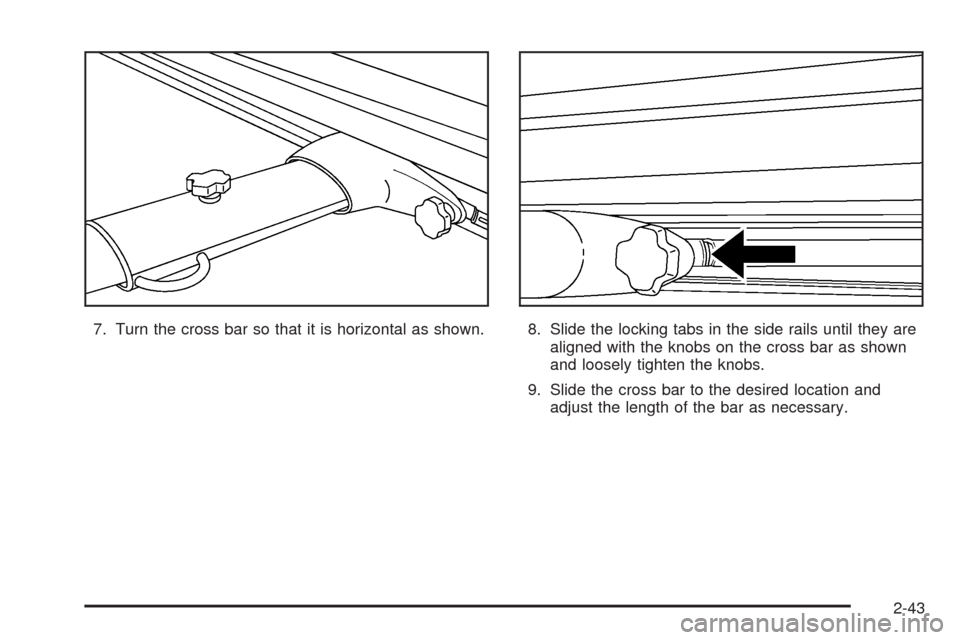
7. Turn the cross bar so that it is horizontal as shown. 8. Slide the locking tabs in the side rails until they are
aligned with the knobs on the cross bar as shown
and loosely tighten the knobs.
9. Slide the cross bar to the desired location and
adjust the length of the bar as necessary.
2-43
Page 112 of 390
13. Insert the convertible top release tool into the latch
closing mechanism between the sun visors and turn
it counterclockwise until the latches are secured
and the convertible top is fully closed.14. From the upright position, push down on the outer
area of the boot cover panel where the hinges and
hydraulic cylinders are located to separate it
from the roof tonneau. Then, continue to push the
boot cover panel down as far as it will go.
2-52
Page 114 of 390

To program memory settings to each button, use the
following steps:
1. Adjust the driver’s seat to the desired position.
2. Press the SET button.
3. Press and hold button 1 (for Driver 1) for
three seconds. A double chime will sound to
let you know that the position has been stored.
A second seating position can be programmed by
repeating the procedure with a second driver and
pressing button 2 for three seconds.
To recall a memory position, do one of the following:
•If you have an automatic transmission vehicle, press
and release the desired button 1 or 2 while the
vehicle is in PARK (P). A single chime will sound
and the memory position will be recalled. If the
vehicle is not in PARK (P), the memory position will
not be recalled.
•If you have a manual transmission vehicle, press and
release the desired button 1 or 2 while the vehicle is
off. A single chime will sound and the memory
position will be recalled. If the vehicle is not off, the
memory position will not be recalled.If you use the unlock button on the remote keyless entry
transmitter to enter your vehicle, the preset driver’s
seat positions will be recalled if programmed to do so
through the Driver Information Center (DIC). The
numbers on the back of the transmitters, 1 or 2,
correspond to the numbers on the memory controls.
The seat positions can also be recalled by placing the
key in the ignition if programmed to do so through
the Driver Information Center (DIC).
To stop recall movement of the memory feature at
any time, press one of the power seat controls or
memory buttons.
Further programming for automatic seat can be done
through the Driver Information Center (DIC). See
DIC Vehicle Personalization on page 3-52for
more information.
2-54
Page 115 of 390

Instrument Panel Overview...............................3-4
Hazard Warning Flashers................................3-6
Other Warning Devices...................................3-6
Horn.............................................................3-6
Tilt Wheel.....................................................3-6
Turn Signal/Multifunction Lever.........................3-7
Turn and Lane-Change Signals........................3-7
Headlamp High/Low-Beam Changer..................3-8
Flash-to-Pass.................................................3-8
Windshield Wipers..........................................3-9
Windshield Washer.........................................3-9
Cruise Control..............................................3-10
Exterior Lamps.............................................3-13
Headlamps on Reminder................................3-14
Daytime Running Lamps (DRL).......................3-14
Automatic Headlamp System..........................3-15
Fog Lamps..................................................3-16
Interior Lamps..............................................3-17
Instrument Panel Brightness...........................3-17
Theater Dimming..........................................3-17
Exit Lighting.................................................3-17
Perimeter Lighting.........................................3-18
Parade Dimming...........................................3-18Map Lamps.................................................3-18
Battery Run-Down Protection..........................3-18
Center Console Switchbank............................3-19
Accessory Power Outlet(s).............................3-19
Ashtray(s) and Cigarette Lighter......................3-20
Climate Controls............................................3-21
Climate Control System.................................3-21
Outlet Adjustment.........................................3-23
Warning Lights, Gages, and Indicators............3-24
Instrument Panel Cluster................................3-25
Speedometer and Odometer...........................3-26
Trip Odometer..............................................3-26
Tachometer.................................................3-26
Engine Speed Limiter....................................3-27
Safety Belt Reminder Light.............................3-27
Airbag Readiness Light..................................3-27
Airbag Off Light............................................3-28
Charging System Light..................................3-30
Brake System Warning Light..........................3-30
Anti-Lock Brake System Warning Light.............3-31
Traction Control System (TCS)
Warning Light...........................................3-32
Section 3 Instrument Panel
3-1