2006 CHEVROLET MALIBU key
[x] Cancel search: keyPage 183 of 442
ENG (Engine) PWR (Power) REDUCED:This
message will display to inform you that the vehicle has
reduced engine power to avoid damaging the engine.
Reduced engine power can affect the vehicle’s ability
to accelerate. If this message is on, but there is no
reduction in performance, proceed to your destination.
The performance may be reduced the next time the
vehicle is driven. The vehicle may be driven at a reduced
speed while this message is on, but acceleration and
speed may be reduced. Anytime this message stays on,
the vehicle should be taken to your GM dealer for service
as soon as possible.
GATE AJAR:If your vehicle has a liftgate, this
message will display when the liftgate of your vehicle
is not closed completely. You should make sure that
the liftgate is closed completely. SeeLiftgate (MAXX)
on page 2-16for more information.
ICE POSSIBLE:This message will display when the
outside air temperature is cold enough to create icy
road conditions.
KEY FOB BATT (Battery) LOW:This message will
display if the remote keyless entry transmitter battery is
low. You should replace the battery in the transmitter.
See “Battery Replacement” underRemote Keyless Entry
System Operation on page 2-6.
LOW COOLANT:This message will display when there
is a low level of engine coolant. Have the cooling system
serviced by your GM dealer as soon as possible.LOW FUEL:This message will display when your
vehicle is low on fuel. You should rell the fuel tank as
soon as possible. You will also see a low fuel warning
light on the instrument panel cluster. SeeFuel on
page 5-5andFilling the Tank on page 5-8.
LOW WASHER FLUID:This message will display
when your vehicle is low on windshield washer uid.
You should rell the windshield washer uid reservoir
as soon as possible. See “Adding Washer Fluid”
underWindshield Washer Fluid on page 5-38.
POWER STEERING:This message will display if a
problem has been detected with the electric power
steering, if equipped. Have your vehicle serviced
immediately by your GM dealer.
PUSH PARK PEDAL:This message is displayed if
the parking brake is left engaged. SeeParking Brake
on page 2-33for more information.
SERVICE AIR BAG:There is a problem with the
airbag system when this message appears. Have your
vehicle serviced immediately by your GM dealer.
TRUNK AJAR:If your vehicle has a trunk, this
message will display when the trunk lid of your vehicle
is not closed completely. You should make sure
that the trunk lid is closed completely. SeeTrunk
(Sedan) on page 2-15for more information.
3-51
Page 184 of 442
DIC Vehicle Personalization
The following personalization options may appear on
your vehicle’s audio display by pressing the MENU
button:
UNITS:When UNITS appears on the display, press the
enter button to move between METRIC or ENGLISH.
When you have made your choice, press the MENU
button to record your selection. The initial setting from
the factory is English for the United States and metric
for Canada.
If you choose English, all information will be displayed
in English units. For example, distance in miles (mi) and
fuel economy in miles per gallon (mpg) is displayed.
If you choose metric, all information will be displayed in
metric units. For example, distance in kilometers
(km) and fuel economy in liters per 100 kilometers
(L/100 km) is displayed.
The unit measurement will also change the trip
odometer, temperature, and average fuel economy
displays.
OIL LIFE RESET:When this option is displayed, you
can reset the engine oil life system. To reset the system,
seeEngine Oil Life System on page 5-20.
REMOTE START:If your vehicle has this feature, the
remote start option can be enabled or disabled.When REMOTE START appears on the display, press
the enter button to move between OFF and ON.
When you have made your choice, press the MENU
button to record your selection. The initial setting from
the factory is ON.
LOCK HORN:If your vehicle has remote keyless entry,
this option which allows the vehicle’s horn to chirp
every time the lock button on the remote keyless entry
transmitter is pressed, can be enabled or disabled.
When LOCK HORN appears on the display, press the
enter button to move between ON and OFF. When
you have made your choice, press the MENU button to
record your selection. The initial setting from the
factory is OFF.
UNLOCK HORN:If your vehicle has remote keyless
entry, this option which allows the vehicle’s horn to chirp
every time the unlock button on the remote keyless
entry transmitter is pressed, can be enabled or disabled.
When UNLOCK HORN appears on the display, press
the enter button to move between ON and OFF.
When you have made your choice, press the MENU
button to record your selection. The initial setting from
the factory is OFF.
LIGHT FLASH:If your vehicle has remote keyless entry,
this option which allows the vehicle’s exterior perimeter
lighting to ash every time the lock or unlock button on
the remote keyless entry transmitter is pressed, can be
enabled or disabled.
3-52
Page 185 of 442
When LIGHT FLASH appears on the display, press the
enter button to move between OFF and ON. When you
have made your choice, press the MENU button to record
your selection. The initial setting from the factory is ON.
DELAY LOCK:The delayed locking option, which
delays the actual locking of the vehicle, can be enabled
or disabled. When DELAY LOCK appears on the
display, press the enter button to move between OFF
and ON. When you have made your choice, press
the MENU button to record your selection. The initial
setting from the factory is ON.
AUTO UNLK (Unlock):The automatic door unlocking
option, which allows the vehicle to automatically
unlock certain doors can be enabled or disabled. When
AUTO UNLK appears on the display, press the enter
button to move between ALL, DRIVER, or NONE. When
you have made your choice, press and the MENU
button to record your selection. The initial setting from
the factory is ALL. SeeProgrammable Automatic
Door Locks on page 2-13for more information.
UNLK (Unlock):This screen displays only if DRIVER
or ALL is selected for the AUTO UNLK option. This
option determines when the automatic door unlocking
will occur, when either the key is turned to OFF or
the vehicle is shifted into PARK (P). When UNLK
appears on the display, press the enter button to
move between KEY OFF and SHIFT TO P (Park).When you have made your choice, press the MENU
button to record your selection. The initial setting from
the factory is SHIFT TO P (Park). SeeProgrammable
Automatic Door Locks on page 2-13for more
information.
EXT (Exterior) LIGHTS:If your vehicle has remote
keyless entry, this option, which allows the vehicle’s
exterior perimeter lighting to turn on each time the
unlock button on the remote keyless entry transmitter
is pressed, can be enabled or disabled. When
EXT LIGHTS appears on the display, press the enter
button to move between ON and OFF. When you have
made your choice, press the MENU button to record
your selection. The initial setting from the factory is ON.
LANGUAGE:To select your choice of language,
press the enter button to move between the optional
languages.
The languages are ENGLISH, FRENCH, SPANISH,
and GERMAN.
Choosing a language will display all of the information
on the DIC in the desired language.
When you have made your choice, press the MENU
button for at least one second to record your selection.
The initial setting from the factory is ENGLISH.
3-53
Page 228 of 442
Menu Bar
The menu bar can be displayed across the top of
the screen by pressing the DISPLAY button on the
remote control. Selecting icons from the menu bar
allows adjustments to the audio and video settings.
Use the remote control left and right arrow buttons
to scroll through the menu bar. A description of
the highlighted icon will appear at the bottom of the
screen. Use the down arrow to display the options
for the highlighted icon.
The movie may stop playing while selections are
being made.
Current Subtitle Language:The subtitle language
may be selected as Off, English, Spanish, or French.
The actual subtitle language is dependent on whether
a DVD supports the selected language.
Current Audio Language:The audio language may
be selected as Off, English, Spanish, or French.
The actual audio language is dependent on whether
a DVD supports the selected language.
Smart Color:This color setting may be selected
without changing the default from the color
settings menu.Sound Mode:This analog output may be changed
without changing the default from the analog
output menu.
Frame-by-Frame:The DVD will pause and may be
viewed frame-by-frame, in forward or reverse, by
using the remote control arrow buttons. Press play to
resume play of the DVD. DVD audio will not be available
during selection.
Slow Motion:The DVD will pause and may be
viewed in slow motion, at various speeds, in forward or
reverse, by using the remote control arrow buttons.
Press play to resume play of the DVD. DVD audio will
not be available during selection.
Scan Speeds:The DVD may be viewed in fast motion,
at various speeds, in forward or reverse, by using the
remote control arrow buttons. Press play to resume play
of the DVD. DVD audio will not be available during
selection.
Enlarge Picture:The DVD will pause and the frame
may be enlarged by using the remote control arrow
key buttons. Pressing the enter button on the remote
control allows panning of the frame using the remote
control arrow buttons. Press play to resume play of the
DVD. DVD audio will not be available during selection.
3-96
Page 244 of 442
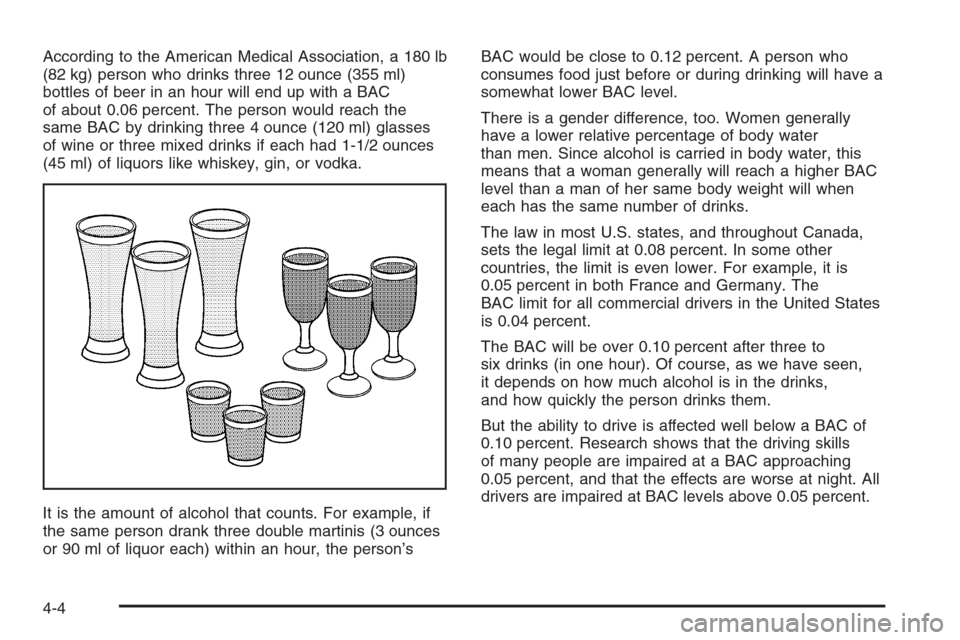
According to the American Medical Association, a 180 lb
(82 kg) person who drinks three 12 ounce (355 ml)
bottles of beer in an hour will end up with a BAC
of about 0.06 percent. The person would reach the
same BAC by drinking three 4 ounce (120 ml) glasses
of wine or three mixed drinks if each had 1-1/2 ounces
(45 ml) of liquors like whiskey, gin, or vodka.
It is the amount of alcohol that counts. For example, if
the same person drank three double martinis (3 ounces
or 90 ml of liquor each) within an hour, the person’sBAC would be close to 0.12 percent. A person who
consumes food just before or during drinking will have a
somewhat lower BAC level.
There is a gender difference, too. Women generally
have a lower relative percentage of body water
than men. Since alcohol is carried in body water, this
means that a woman generally will reach a higher BAC
level than a man of her same body weight will when
each has the same number of drinks.
The law in most U.S. states, and throughout Canada,
sets the legal limit at 0.08 percent. In some other
countries, the limit is even lower. For example, it is
0.05 percent in both France and Germany. The
BAC limit for all commercial drivers in the United States
is 0.04 percent.
The BAC will be over 0.10 percent after three to
six drinks (in one hour). Of course, as we have seen,
it depends on how much alcohol is in the drinks,
and how quickly the person drinks them.
But the ability to drive is affected well below a BAC of
0.10 percent. Research shows that the driving skills
of many people are impaired at a BAC approaching
0.05 percent, and that the effects are worse at night. All
drivers are impaired at BAC levels above 0.05 percent.
4-4
Page 280 of 442
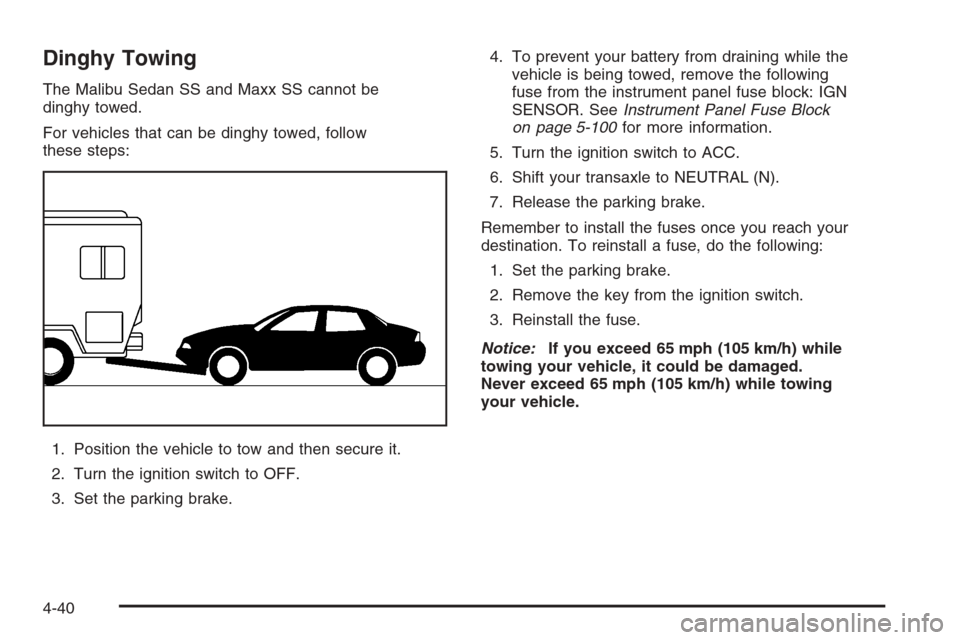
Dinghy Towing
The Malibu Sedan SS and Maxx SS cannot be
dinghy towed.
For vehicles that can be dinghy towed, follow
these steps:
1. Position the vehicle to tow and then secure it.
2. Turn the ignition switch to OFF.
3. Set the parking brake.4. To prevent your battery from draining while the
vehicle is being towed, remove the following
fuse from the instrument panel fuse block: IGN
SENSOR. SeeInstrument Panel Fuse Block
on page 5-100for more information.
5. Turn the ignition switch to ACC.
6. Shift your transaxle to NEUTRAL (N).
7. Release the parking brake.
Remember to install the fuses once you reach your
destination. To reinstall a fuse, do the following:
1. Set the parking brake.
2. Remove the key from the ignition switch.
3. Reinstall the fuse.
Notice:If you exceed 65 mph (105 km/h) while
towing your vehicle, it could be damaged.
Never exceed 65 mph (105 km/h) while towing
your vehicle.
4-40
Page 281 of 442
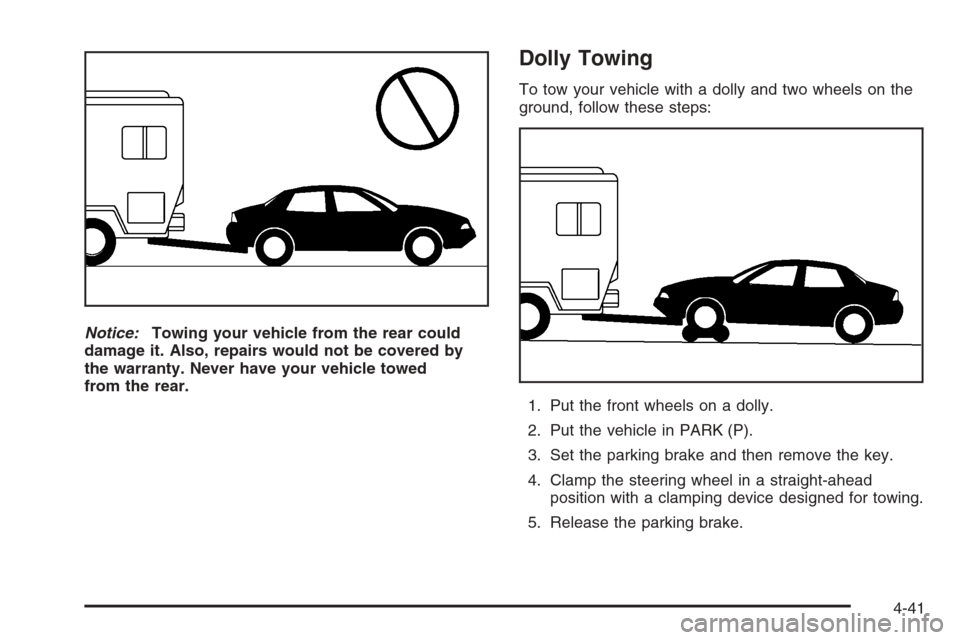
Notice:Towing your vehicle from the rear could
damage it. Also, repairs would not be covered by
the warranty. Never have your vehicle towed
from the rear.
Dolly Towing
To tow your vehicle with a dolly and two wheels on the
ground, follow these steps:
1. Put the front wheels on a dolly.
2. Put the vehicle in PARK (P).
3. Set the parking brake and then remove the key.
4. Clamp the steering wheel in a straight-ahead
position with a clamping device designed for towing.
5. Release the parking brake.
4-41
Page 309 of 442
How to Reset the Engine Oil Life
System
The Engine Oil Life System calculates when to change
your engine oil and lter based on vehicle use. Anytime
your oil is changed, reset the system so it can calculate
when the next oil change is required. If a situation occurs
where you change your oil prior to a Change Oil Soon
message being turned on, reset the system.
After changing the engine oil, reset the system by
performing the following steps:
1. Display OIL LIFE RESET on the DIC.
2. Press and hold the ENTER button for at least
one second. An ACKNOWLEDGED display
message will appear for three seconds or until
the next button is pressed. This will tell you
the system has been reset.
3. Turn the key to OFF.
If the Change Oil Soon message comes back on when
you start your vehicle, the engine oil life system has
not reset. Repeat the procedure.
What to Do with Used Oil
Used engine oil contains certain elements that may be
unhealthy for your skin and could even cause cancer.
Do not let used oil stay on your skin for very long. Clean
your skin and nails with soap and water, or a good
hand cleaner. Wash or properly dispose of clothing or
rags containing used engine oil. See the manufacturer’s
warnings about the use and disposal of oil products.
Used oil can be a threat to the environment. If you
change your own oil, be sure to drain all the oil from the
lter before disposal. Never dispose of oil by putting it in
the trash, pouring it on the ground, into sewers, or into
streams or bodies of water. Instead, recycle it by taking it
to a place that collects used oil. If you have a problem
properly disposing of your used oil, ask your dealer, a
service station or a local recycling center for help.
5-21