2006 CHEVROLET MALIBU keyless
[x] Cancel search: keylessPage 152 of 442
Front Reading Lamps
Push the lens to turn the reading lamps on and off.
The reading lamps will turn on when the door is open
if the dome lamp is in the door position. The reading
lamps will also turn on with the dome lamp switch in
the on position. The lamps will not turn on if the door is
open and the dome lamp is in the off position.
Rear Reading Lamps
The vehicle’s dome lamp may have two reading
lamps. The reading lamps turn on and off by pushing
on the lens.
Trunk Lamp
The trunk lamp comes on when you open your trunk.
Cargo Lamp
If your vehicle is the MAXX model, it has a cargo lamp.
The cargo lamp comes on when the liftgate is opened.
If you want to leave the liftgate open you can turn off
the cargo lamp by pushing on the lens.
Battery Run-Down Protection
Your vehicle has a battery run-down protection feature
designed to protect your vehicle’s battery.
When any interior lamp (trunk, reading, or visor vanity)
is left on while the ignition is turned off, the battery
run-down protection system will automatically shut the
lamp(s) off after 20 minutes. This will avoid draining
the battery.
To reactivate the interior lamps, do one of the following:
Turn on the ignition.
Turn the exterior lamp control off and then on.
Open a door.
Press any remote keyless entry transmitter button
(if equipped).
Press the remote trunk release button.
Press the power door lock switch.
The battery run-down feature will also be activated
when any door on the vehicle is left open and the
ignition is in OFF.
3-20
Page 154 of 442
Cigarette Lighter
Your vehicle may have a cigarette lighter. To use the
lighter, located on the instrument panel below the
climate controls, push it in all the way and let go.
When it is ready, it will pop back out by itself.
Notice:Holding a cigarette lighter in while it is
heating will not allow the lighter to back away from
the heating element when it is hot. Damage from
overheating may occur to the lighter or heating
element, or a fuse could be blown. Do not hold a
cigarette lighter in while it is heating.
Notice:If you put papers, pins, or other ammable
items in the ashtray, hot cigarettes or other
smoking materials could ignite them and possibly
damage your vehicle. Never put ammable items in
the ashtray.
Climate Controls
Climate Control System
With this system you can control the heating, cooling
and ventilation for your vehicle. If your vehicle has
the remote start feature, the climate control system
will function as part of the remote start feature.
SeeRemote Keyless Entry System Operation
on page 2-6.
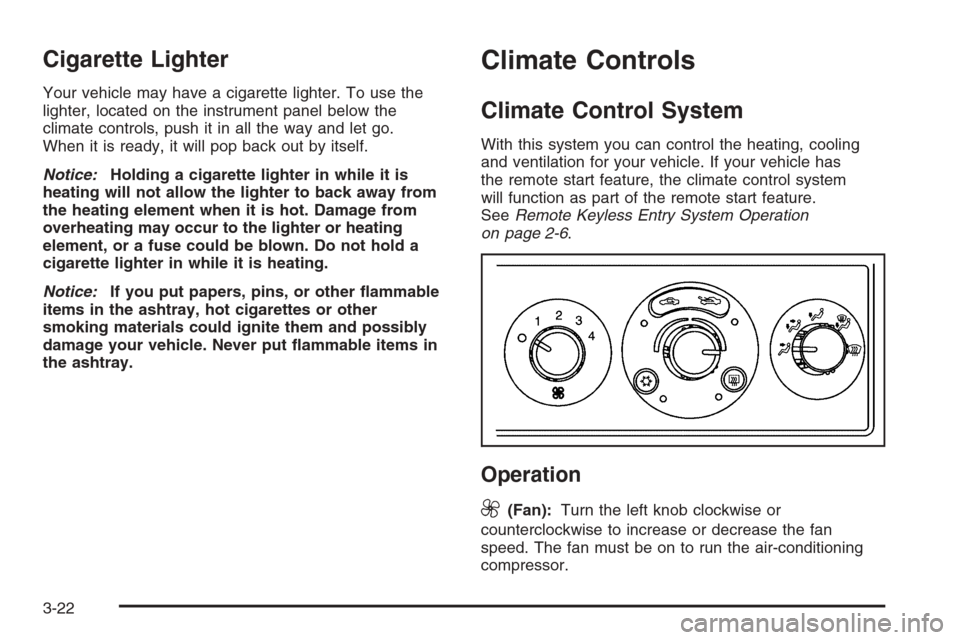
Operation
9
(Fan):Turn the left knob clockwise or
counterclockwise to increase or decrease the fan
speed. The fan must be on to run the air-conditioning
compressor.
3-22
Page 158 of 442
Rear Window Defogger
The rear window defogger uses a warming grid to
remove fog or frost from the rear window.
heated mirror, if equipped. An indicator light will come
on to let you know that the rear window defogger
and heated mirror, if equipped, is activated. Be sure to
clear as much snow from the rear window as possible.
If driving below 50 mph (80 km/h), the rear window
defogger will turn off about 15 minutes after the button
is pressed. If turned on again, the defogger will only
run for about seven minutes before turning off. The
defogger can also be turned off by pressing the button
again or by turning off the engine.If your vehicle’s speed is maintained above 50 mph
(80 km/h), the rear window defogger will remain on
once the button is pressed.
If your vehicle has the remote start feature, the rear
defogger will automatically be turned on if it is cold
outside. When the vehicle transitions out of the
remote start mode, the rear defogger will turn off.
SeeRemote Keyless Entry System Operation on
page 2-6.
Notice:Do not use anything sharp on the inside of
the rear window. If you do, you could cut or damage
the warming grid, and the repairs would not be
covered by your warranty. Do not attach a temporary
vehicle license, tape, a decal or anything similar to
the defogger grid.
3-26
Page 160 of 442
Also be careful not to cover the sensor grille on
the lower right side of the climate control faceplate.
This senses the inside vehicle temperature
needed for proper regulation.
To avoid blowing cold air at start-up in cold weather,
the system will delay turning on the fan until
warm air is available. The length of delay depends
on the engine coolant temperature. Turning the
fan knob will override this delay and change the fan
to a selected speed.
If your vehicle has the remote start feature, the climate
control display will initially show “AS” in place of the
temperature to indicate the remote start has been
activated. The system will automatically regulate the
temperature according to the following:
If inside air temperature is below 72°F (22°C), the
system will automatically adjust to the following
settings: highest fan speed, defrost mode,
recirculation, and the full heat position.
If inside air temperature is above 79°F (26°C) the
system will automatically adjust to the following
settings: highest fan speed, panel mode,
recirculation, and full cold position.
If inside air temperature is between 72°F (22°C) and
79°F (26°C), the system will adjust automatically to
the following settings:medium fan speed, panel
mode, recirculation, and the full cold position.The climate control will change back to manual
operation by turning on the vehicle with the key. See
Remote Keyless Entry System Operation on page 2-6.
The heater works best if you keep the windows
closed while using it.
Manual Operation
You may manually adjust the air delivery mode or
fan speed.
9(Off):Select this position on the fan knob to turn
off the entire climate control system. Outside air will
still enter the vehicle, and will be directed to the
oor. This direction can be changed by changing the
mode position. The temperature can also be adjusted
using either the up or down arrow temperature buttons.
9(Fan):The knob with the fan symbol allows you
to manually adjust the fan speed.
H(Vent):This mode directs air to the instrument
panel outlets.
)(Bi-Level):This mode directs half of the air to
the instrument panel outlets, and the remaining air to
the oor outlets.
3-28
Page 181 of 442
Always reset the engine oil life system after an oil
change. SeeEngine Oil Life System on page 5-20.
In addition to the engine oil life system monitoring the oil
life, additional maintenance is recommended in the
Maintenance Schedule in this manual. SeeScheduled
Maintenance on page 6-4andEngine Oil on page 5-17.
Personalization
MENU:Press this button while the vehicle is in ON
to scroll through each of the personalization options
in the following order. If the vehicle is moving faster
than 2 mph (3 km/h), the personalization menu options
are not available, except for the UNITS option. All of
the personalization options may not be available
on your vehicle. Only the options available will be
displayed on your DIC.
Units Selection (English/Metric)
Oil Life Reset
Remote Start Capability
Horn Chirp During Remote Keyless Entry Locking
Horn Chirp During Remote Keyless Entry Unlocking
Exterior Light Flash During Remote Keyless
Entry Locking or Unlocking
Delayed Locking
Automatic Vehicle Unlocking: Specic Doors
Automatic Vehicle Unlocking: When Key is Off or
When Shift To Park
Exterior Perimeter Lighting During Remote Keyless
Entry Unlock
Select Language: (English, French, Spanish or
German)
When the desired option is reached, press the enter
button to toggle between the modes of that option.
To make a selection, press the MENU button again.
If no selection is made within 10 seconds, the display
will revert back to the previous information displayed.
The MENU mode is exited when the information button
is pressed, a 10 second time period has elapsed,
the ignition is turned to OFF, or the end of the MENU
list is reached.
SeeDIC Vehicle Personalization on page 3-52for
more information on the personalization options.
Enter
ENTER/r(Enter):Press this button to reset certain
functions and to turn off or acknowledge messages
on the DIC display. This button also toggles through
the options available in each personalization menu.
3-49
Page 183 of 442
ENG (Engine) PWR (Power) REDUCED:This
message will display to inform you that the vehicle has
reduced engine power to avoid damaging the engine.
Reduced engine power can affect the vehicle’s ability
to accelerate. If this message is on, but there is no
reduction in performance, proceed to your destination.
The performance may be reduced the next time the
vehicle is driven. The vehicle may be driven at a reduced
speed while this message is on, but acceleration and
speed may be reduced. Anytime this message stays on,
the vehicle should be taken to your GM dealer for service
as soon as possible.
GATE AJAR:If your vehicle has a liftgate, this
message will display when the liftgate of your vehicle
is not closed completely. You should make sure that
the liftgate is closed completely. SeeLiftgate (MAXX)
on page 2-16for more information.
ICE POSSIBLE:This message will display when the
outside air temperature is cold enough to create icy
road conditions.
KEY FOB BATT (Battery) LOW:This message will
display if the remote keyless entry transmitter battery is
low. You should replace the battery in the transmitter.
See “Battery Replacement” underRemote Keyless Entry
System Operation on page 2-6.
LOW COOLANT:This message will display when there
is a low level of engine coolant. Have the cooling system
serviced by your GM dealer as soon as possible.LOW FUEL:This message will display when your
vehicle is low on fuel. You should rell the fuel tank as
soon as possible. You will also see a low fuel warning
light on the instrument panel cluster. SeeFuel on
page 5-5andFilling the Tank on page 5-8.
LOW WASHER FLUID:This message will display
when your vehicle is low on windshield washer uid.
You should rell the windshield washer uid reservoir
as soon as possible. See “Adding Washer Fluid”
underWindshield Washer Fluid on page 5-38.
POWER STEERING:This message will display if a
problem has been detected with the electric power
steering, if equipped. Have your vehicle serviced
immediately by your GM dealer.
PUSH PARK PEDAL:This message is displayed if
the parking brake is left engaged. SeeParking Brake
on page 2-33for more information.
SERVICE AIR BAG:There is a problem with the
airbag system when this message appears. Have your
vehicle serviced immediately by your GM dealer.
TRUNK AJAR:If your vehicle has a trunk, this
message will display when the trunk lid of your vehicle
is not closed completely. You should make sure
that the trunk lid is closed completely. SeeTrunk
(Sedan) on page 2-15for more information.
3-51
Page 184 of 442
DIC Vehicle Personalization
The following personalization options may appear on
your vehicle’s audio display by pressing the MENU
button:
UNITS:When UNITS appears on the display, press the
enter button to move between METRIC or ENGLISH.
When you have made your choice, press the MENU
button to record your selection. The initial setting from
the factory is English for the United States and metric
for Canada.
If you choose English, all information will be displayed
in English units. For example, distance in miles (mi) and
fuel economy in miles per gallon (mpg) is displayed.
If you choose metric, all information will be displayed in
metric units. For example, distance in kilometers
(km) and fuel economy in liters per 100 kilometers
(L/100 km) is displayed.
The unit measurement will also change the trip
odometer, temperature, and average fuel economy
displays.
OIL LIFE RESET:When this option is displayed, you
can reset the engine oil life system. To reset the system,
seeEngine Oil Life System on page 5-20.
REMOTE START:If your vehicle has this feature, the
remote start option can be enabled or disabled.When REMOTE START appears on the display, press
the enter button to move between OFF and ON.
When you have made your choice, press the MENU
button to record your selection. The initial setting from
the factory is ON.
LOCK HORN:If your vehicle has remote keyless entry,
this option which allows the vehicle’s horn to chirp
every time the lock button on the remote keyless entry
transmitter is pressed, can be enabled or disabled.
When LOCK HORN appears on the display, press the
enter button to move between ON and OFF. When
you have made your choice, press the MENU button to
record your selection. The initial setting from the
factory is OFF.
UNLOCK HORN:If your vehicle has remote keyless
entry, this option which allows the vehicle’s horn to chirp
every time the unlock button on the remote keyless
entry transmitter is pressed, can be enabled or disabled.
When UNLOCK HORN appears on the display, press
the enter button to move between ON and OFF.
When you have made your choice, press the MENU
button to record your selection. The initial setting from
the factory is OFF.
LIGHT FLASH:If your vehicle has remote keyless entry,
this option which allows the vehicle’s exterior perimeter
lighting to ash every time the lock or unlock button on
the remote keyless entry transmitter is pressed, can be
enabled or disabled.
3-52
Page 185 of 442
When LIGHT FLASH appears on the display, press the
enter button to move between OFF and ON. When you
have made your choice, press the MENU button to record
your selection. The initial setting from the factory is ON.
DELAY LOCK:The delayed locking option, which
delays the actual locking of the vehicle, can be enabled
or disabled. When DELAY LOCK appears on the
display, press the enter button to move between OFF
and ON. When you have made your choice, press
the MENU button to record your selection. The initial
setting from the factory is ON.
AUTO UNLK (Unlock):The automatic door unlocking
option, which allows the vehicle to automatically
unlock certain doors can be enabled or disabled. When
AUTO UNLK appears on the display, press the enter
button to move between ALL, DRIVER, or NONE. When
you have made your choice, press and the MENU
button to record your selection. The initial setting from
the factory is ALL. SeeProgrammable Automatic
Door Locks on page 2-13for more information.
UNLK (Unlock):This screen displays only if DRIVER
or ALL is selected for the AUTO UNLK option. This
option determines when the automatic door unlocking
will occur, when either the key is turned to OFF or
the vehicle is shifted into PARK (P). When UNLK
appears on the display, press the enter button to
move between KEY OFF and SHIFT TO P (Park).When you have made your choice, press the MENU
button to record your selection. The initial setting from
the factory is SHIFT TO P (Park). SeeProgrammable
Automatic Door Locks on page 2-13for more
information.
EXT (Exterior) LIGHTS:If your vehicle has remote
keyless entry, this option, which allows the vehicle’s
exterior perimeter lighting to turn on each time the
unlock button on the remote keyless entry transmitter
is pressed, can be enabled or disabled. When
EXT LIGHTS appears on the display, press the enter
button to move between ON and OFF. When you have
made your choice, press the MENU button to record
your selection. The initial setting from the factory is ON.
LANGUAGE:To select your choice of language,
press the enter button to move between the optional
languages.
The languages are ENGLISH, FRENCH, SPANISH,
and GERMAN.
Choosing a language will display all of the information
on the DIC in the desired language.
When you have made your choice, press the MENU
button for at least one second to record your selection.
The initial setting from the factory is ENGLISH.
3-53