2006 CHEVROLET KODIAK automatic transmission
[x] Cancel search: automatic transmissionPage 131 of 398

With cruise control, you can maintain a speed of about
30 mph (48 km/h) or more without keeping your foot
on the accelerator. Cruise control does not work
at speeds below about 30 mph (48 km/h).
If you have an automatic transmission and you apply
your brakes, the cruise control will shut off.
If you have a manual transmission and you apply your
brakes or push the clutch pedal, the cruise control
will shut off.
{CAUTION:
Cruise control can be dangerous where you
cannot drive safely at a steady speed. So, do
not use your cruise control on winding roads
or in heavy traffic.
Cruise control can be dangerous on slippery
roads. On such roads, fast changes in tire
traction can cause excessive wheel slip, and
you could lose control. Do not use cruise
control on slippery roads.
Setting Cruise Control
{CAUTION:
If you leave your cruise control on when you
are not using cruise, you might hit a button
and go into cruise when you do not want to.
You could be startled and even lose control.
Keep the cruise control switch off until you
want to use cruise control.
1. Move the cruise control switch to on.
2. Get up to the speed you want.
3. Press in the set button at the end of the lever and
release it.
4. Take your foot off the accelerator pedal. The
accelerator pedal will not go down.
3-11
Page 133 of 398

Passing Another Vehicle While Using
Cruise Control
Use the accelerator pedal to increase your speed.
When you take your foot off the pedal, your vehicle will
slow down to the cruise control speed you set earlier.
Using Cruise Control on Hills
How well your cruise control will work on hills depends
upon your speed, load and the steepness of the
hills. When going up steep hills, you may want to step
on the accelerator pedal to maintain your speed.
When going downhill, you may have to brake or shift to
a lower gear to keep your speed down. Of course,
applying the brake or clutch takes you out of cruise
control. Many drivers find this to be too much trouble
and don’t use cruise control on steep hills.
If your vehicle is equipped with the exhaust brake option
and the exhaust brake is turned on, the exhaust
brake may come on and try to slow down the vehicle to
the set cruise control speed if the vehicle has
accelerated past the set cruise control speed while
going downhill.
Ending Cruise Control
There are four different ways to turn off the cruise
control:
•Step lightly on the brake pedal (manual and
automatic transmissions).
•Press the clutch pedal to the floor (manual
transmissions).
•Move the cruise switch to off, or
•Shift the transmission to NEUTRAL (N).
Erasing Speed Memory
When you turn off the ignition, your cruise control set
speed memory is erased.
3-13
Page 138 of 398
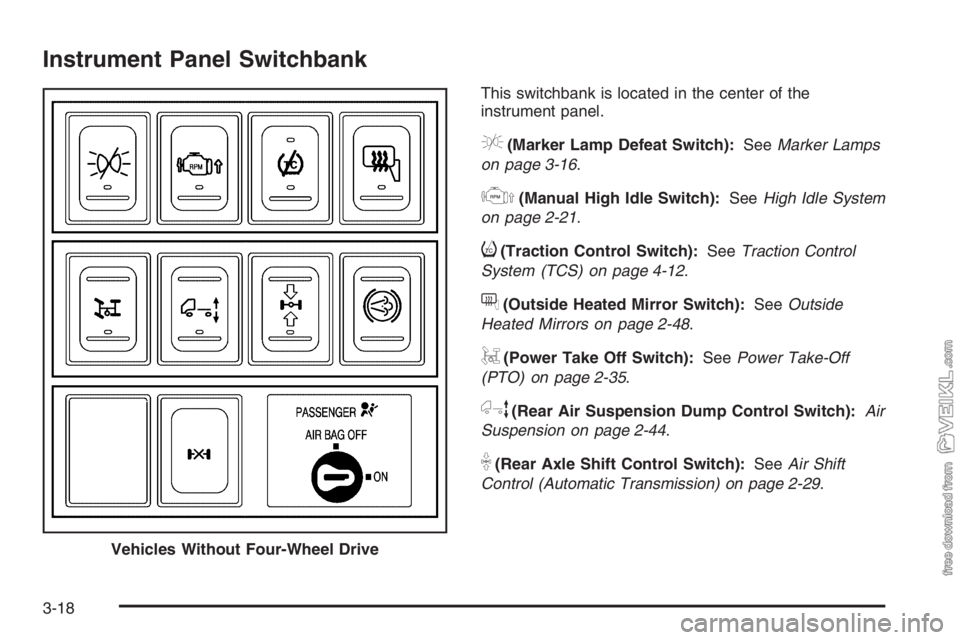
Instrument Panel Switchbank
This switchbank is located in the center of the
instrument panel.
e(Marker Lamp Defeat Switch):SeeMarker Lamps
on page 3-16.
j(Manual High Idle Switch):SeeHigh Idle System
on page 2-21.
i(Traction Control Switch):SeeTraction Control
System (TCS) on page 4-12.
f(Outside Heated Mirror Switch):SeeOutside
Heated Mirrors on page 2-48.
g(Power Take Off Switch):SeePower Take-Off
(PTO) on page 2-35.
h(Rear Air Suspension Dump Control Switch):Air
Suspension on page 2-44.
k(Rear Axle Shift Control Switch):SeeAir Shift
Control (Automatic Transmission) on page 2-29.
Vehicles Without Four-Wheel Drive
3-18
Page 152 of 398

Voltmeter Gage
When your engine is
running, the voltmeter
gage shows the charging
system voltage.
Readings in either warning zone indicate a possible
problem in the electrical system.
Readings in the low warning zone may occur when a
large number of electrical accessories are operating in
the vehicle and the engine is left at an idle for an
extended period. This condition is normal since the
charging system may not be able to provide full power
at engine idle. As engine speeds are increased, this
condition should correct itself because higher engine
speeds allow the charging system to create maximum
power.
You can only drive a short time on the battery. Be sure
to shut off the radio, the fan or any unnecessary
accessories and have the system serviced.
Service Transmission Warning Light
If your vehicle has an Allison®automatic transmission,
certain transmission malfunctions will turn this light on.
This light is located with
the auxiliary warning lights
in the center of the
instrument panel.
If this light comes on while you are driving, do not use
the transmission shift control or you may lose forward
gears. The computer for the transmission senses
a problem and chooses a gear to stay in so that you
can drive the vehicle in that gear. You may not be able
to drive as fast or back up when this light is on.
Notice:If you continue driving your vehicle after
the transmission warning light comes on, you could
damage the transmission. While this light is on,
the transmission cannot operate in all gears. If you
attempt to shift gears, the vehicle may not
continue to move. Do not attempt to shift gears
while the transmission warning light is on. Instead,
drive directly to a GM dealer for service. If you
cannot drive to a dealer immediately, have the
vehicle towed.
3-32
Page 153 of 398

Range Inhibit Warning Indicator
If your vehicle has an Allison 1000/2200/2300/2500
series automatic transmission, a lighted bar under the
current gear selected will flash.
If your vehicle has an Allison 3000/3500 series
automatic transmission, the current gear selected on the
pushbutton display will flash.
The flashing bar or gear selection indicates that
transmission range shifts may not occur.
For detailed information on shift inhibit limitations, see
the Allison Automatic Transmission Operator’s Manual in
your vehicle for further information.
Brake System Warning Light
Your vehicle has either hydraulic or air brakes. Each
system has different warning lights.
Hydraulic Brake System Warning
Lights
Vehicles with hydraulic brake systems have two brake
system warning lights on the instrument panel.
If the BRAKE system
warning light comes on, it
means that the fluid
level in the master cylinder
reservoir is low or there
is another problem
with your hydraulic brakes.
When it comes on, you will also hear a warning tone.
The BRAKE system warning light may come on, and the
warning tone may sound, when you’re turning and
braking at the same time. This is normal. See “Hydraulic
Brake Systems” underBraking on page 4-6.
3-33
Page 161 of 398

Transmission Temperature Gage
If you have an automatic
transmission and this
gage, it is located above
the switchbank in the
center of the instrument
panel.
When your ignition is on, the gage shows the
temperature of the transmission oil. A reading in the
warning zone, the red area beginning at 300°F (150°C),
means you must stop driving and check into the
cause. One possible cause is a low oil level in the
transmission.
Notice:If you drive your vehicle with the
transmission temperature gage above normal
operating range, you can damage the transmission.
This could lead to costly repairs that would not
be covered by your warranty. Do not drive your
vehicle while the transmission temperature gage
reading is above normal. See your dealer for service.
Exhaust Brake Indicator Light
If your vehicle is equipped
with an exhaust brake, you
will have this light,
located above the climate
controls in the center
of the instrument panel.
The exhaust brake indicator light will come on and stay
on whenever the diesel engine exhaust brake or
exhaust restrictor is active. For more information, see
Diesel Engine Exhaust Brake on page 2-27andExhaust
Restrictor (Engine Warm-Up) on page 2-22.
3-41
Page 200 of 398

Traction Control System (TCS)
Your vehicle may have a traction control system that
limits wheel spin. This is especially useful in slippery
road conditions. The system operates only if it senses
that one or both of the rear wheels are spinning or
beginning to lose traction. When this happens,
the system applies the brake(s) at the affected wheel(s).
The bottom light on the TCS on/off button will come
on when the TCS is limiting wheel spin. You may feel or
hear the system working, but this is normal. The TCS
will function at speeds up to about 25 mph (42 km/h).
The TCS may operate on dry roads under some
conditions. When this happens, you may notice a
reduction in acceleration. This is normal and doesn’t
mean there’s a problem with your vehicle. Examples of
these conditions include a hard acceleration in a
turn, an abrupt upshift or downshift of the transmission
or driving on rough roads.When the light in the top of the TCS button is on, the
TCS is off and will not limit wheel spin. Adjust your
driving accordingly.
The light in the top of the TCS button will come on if the
TCS is turned off by pressing the TCS on/off button.
The light may also come on if a problem has been
detected in either the traction control system or
the anti-lock brake system.
The traction control system automatically comes on
whenever you start your vehicle. To limit wheel
spin, especially in slippery road conditions, you should
always leave the system on. But you can turn the
traction control system off if you ever need to. You
should turn the system off if your vehicle ever gets stuck
in sand, mud or snow and rocking the vehicle is
required. SeeRocking Your Vehicle to Get It Out on
page 4-32for more information.
4-12
Page 229 of 398

Service............................................................5-3
California Proposition 65 Warning.....................5-3
Doing Your Own Service Work.........................5-4
Engine Fan Breakage.....................................5-5
Fuel................................................................5-6
Gasoline Octane............................................5-6
Gasoline Specifications....................................5-6
Additives.......................................................5-6
Diesel Engine Fuel.........................................5-7
What Fuel to Use...........................................5-8
Very Cold Weather Operation.........................5-10
Water in Fuel...............................................5-10
Running Out of Fuel.....................................5-17
Fuel Filter Replacement.................................5-18
Fuels in Foreign Countries.............................5-19
Filling the Tank............................................5-20
Filling a Portable Fuel Container.....................5-21
Checking Things Under the Hood....................5-22
Hood Latches...............................................5-22
Engine Oil (Caterpillar
®Diesel Engine).............5-24
Engine Oil (DURAMAX®Diesel)......................5-24
Engine Oil (Gasoline Engine)..........................5-28
Engine Oil Life System (Gasoline Engine)........5-31
Engine Oil Life System (DURAMAX
®Diesel).....5-33
Engine Oil Life System
(Caterpillar
®Diesel Engine).........................5-34Engine Air Cleaner/Filter................................5-35
Automatic Transmission Fluid.........................5-36
Manual Transmission Fluid.............................5-37
Engine Coolant
(Gas and DURAMAX
®Engines)...................5-38
Engine Coolant (Caterpillar®Diesel Engines).....5-40
Coolant Surge Tank Pressure Cap..................5-40
Engine Overheating.......................................5-40
Cooling System
(Gas and DURAMAX
®Engines)...................5-42
Engine Fan Noise.........................................5-47
Power Steering Fluid.....................................5-47
Windshield Washer Fluid................................5-48
Brakes........................................................5-49
Battery........................................................5-58
Jump Starting...............................................5-59
Rear Axle.......................................................5-64
Rear Axle Shift Motor....................................5-65
Four-Wheel Drive............................................5-65
Front Axle......................................................5-66
Noise Control System.....................................5-67
Tampering with Noise Control System
Prohibited.................................................5-67
Bulb Replacement..........................................5-68
Windshield Wiper Blade Replacement..............5-69
Section 5 Service and Appearance Care
5-1