2006 CHEVROLET IMPALA engine
[x] Cancel search: enginePage 105 of 394

A warning chime will sound and a brake warning light
located on the instrument panel cluster will come
on, if the parking brake is set, the ignition is on and the
shift lever is not in PARK (P).
Notice:Driving with the parking brake on can
overheat the brake system and cause premature
wear or damage to brake system parts. Verify that
the parking brake is fully released and the brake
warning light is off before driving.
If you are towing a trailer and parking on any hill, see
Towing a Trailer on page 4-36.Shifting Into Park (P)
{CAUTION:
It is dangerous to get out of your vehicle if the
shift lever is not fully in PARK (P) with the
parking brake rmly set. Your vehicle can roll.
Do not leave your vehicle when the engine is
running unless you have to. If you have left the
engine running, the vehicle can move suddenly.
You or others could be injured. To be sure your
vehicle will not move, even when you are on
fairly level ground, always set your parking
brake and move the shift lever to PARK (P).
SeeShifting Into Park (P) on page 2-29.Ifyou
are pulling a trailer, seeTowing a Trailer on
page 4-36.
2-29
Page 106 of 394
Steering Column Shift Lever
1. Hold the brake pedal down with your right foot and
set the parking brake.
2. Move the shift lever into PARK (P) by pulling the
shift lever toward you and moving it up as far as it
will go.
3. Turn the ignition key to OFF.
4. Remove the key and take it with you. If you can
leave your vehicle with the ignition key in your
hand, your vehicle is in PARK (P).
Console Shift Lever
1. Hold the brake pedal down with your right foot and
set the parking brake.
2. Move the shift lever into PARK (P) by holding in the
button on the shift lever and pushing the lever all
the way toward the front of the vehicle.
3. Turn the ignition key to OFF.
4. Remove the key and take it with you. If you can
leave your vehicle with the ignition key in your
hand, your vehicle is in PARK (P).
Leaving Your Vehicle With the
Engine Running
{CAUTION:
It can be dangerous to leave your vehicle with
the engine running. Your vehicle could move
suddenly if the shift lever is not fully in
PARK (P) with the parking brake rmly set.
And, if you leave the vehicle with the engine
running, it could overheat and even catch re.
You or others could be injured. Do not leave
your vehicle with the engine running.
If you have to leave your vehicle with the engine
running, be sure your vehicle is in PARK (P) and your
parking brake is rmly set before you leave it. After you
have moved the shift lever into the PARK (P) position,
hold the regular brake pedal down. Then, see if you can
move the shift lever away from PARK (P) without rst
pulling it toward you or if you have the console shift
lever, without rst pushing the button. If you can,
it means that the shift lever was not fully locked into
PARK (P).
2-30
Page 107 of 394

Torque Lock
If you are parking on a hill and you do not shift your
transaxle into PARK (P) properly, the weight of the
vehicle may put too much force on the parking pawl in
the transaxle. You may nd it difficult to pull the shift
lever out of PARK (P). This is called “torque lock.”
To prevent torque lock, set the parking brake and then
shift into PARK (P) properly before you leave the
driver’s seat. To nd out how, seeShifting Into Park (P)
on page 2-29.
When you are ready to drive, move the shift lever out of
PARK (P) before you release the parking brake.
If torque lock does occur, you may need to have another
vehicle push yours a little uphill to take some of the
pressure from the parking pawl in the transaxle, so you
can pull the shift lever out of PARK (P).
Shifting Out of Park (P)
Your vehicle has an automatic transaxle shift lock
control system. You must fully apply your regular brakes
before you can shift from PARK (P) when the ignition
is in RUN. SeeAutomatic Transaxle Operation on
page 2-25.
If you cannot shift out of PARK (P), ease pressure on
the shift lever by pushing it all the way into PARK (P)
while keeping the brake pedal pushed down. Release
the shift lever button if you have a console shift.
Then move the shift lever out of PARK (P), being sure
to press the shift lever button if you have a console shift.
If you ever hold the brake pedal down but still cannot
shift out of PARK (P), try this:
1. Turn the ignition key to ACCESSORY.
2. Apply and hold the brake pedal down until the end
of Step 4.
3. Shift to NEUTRAL.
4. Start the engine and shift to the drive gear you want.
5. Have the vehicle xed as soon as you can.
2-31
Page 108 of 394
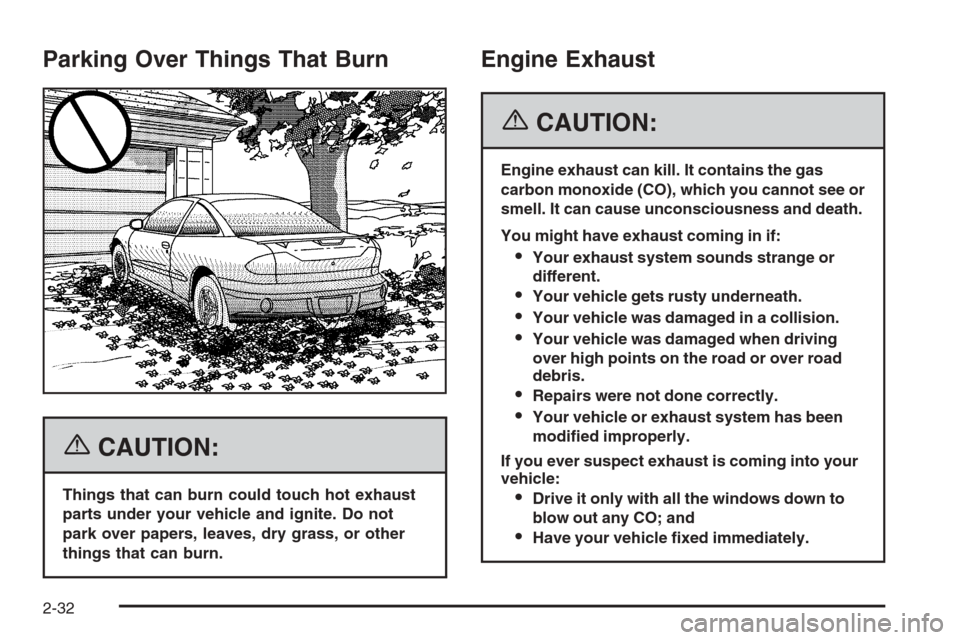
Parking Over Things That Burn
{CAUTION:
Things that can burn could touch hot exhaust
parts under your vehicle and ignite. Do not
park over papers, leaves, dry grass, or other
things that can burn.
Engine Exhaust
{CAUTION:
Engine exhaust can kill. It contains the gas
carbon monoxide (CO), which you cannot see or
smell. It can cause unconsciousness and death.
You might have exhaust coming in if:
Your exhaust system sounds strange or
different.
Your vehicle gets rusty underneath.
Your vehicle was damaged in a collision.
Your vehicle was damaged when driving
over high points on the road or over road
debris.
Repairs were not done correctly.
Your vehicle or exhaust system has been
modied improperly.
If you ever suspect exhaust is coming into your
vehicle:
Drive it only with all the windows down to
blow out any CO; and
Have your vehicle xed immediately.
2-32
Page 109 of 394
Running the Engine While Parked
It is better not to park with the engine running. But if you
ever have to, here are some things to know.
{CAUTION:
Idling the engine with the climate control
system off could allow dangerous exhaust into
your vehicle. See the earlier caution under
Engine Exhaust on page 2-32.
Also, idling in a closed-in place can let deadly
carbon monoxide (CO) into your vehicle even if
the climate control fan is at the highest setting.
One place this can happen is a garage.
Exhaust — with CO — can come in easily.
NEVER park in a garage with the engine
running.
Another closed-in place can be a blizzard. See
Winter Driving on page 4-24.
{CAUTION:
It can be dangerous to get out of your vehicle
if the shift lever is not fully in PARK (P) with
the parking brake rmly set. Your vehicle can
roll. Do not leave your vehicle when the engine
is running unless you have to. If you have left
the engine running, the vehicle can move
suddenly. You or others could be injured.
To be sure your vehicle will not move, even
when you are on fairly level ground, always
set your parking brake and move the shift
lever to PARK (P).
Follow the proper steps to be sure your vehicle will not
move. SeeShifting Into Park (P) on page 2-29.
If you are parking on a hill and if you are pulling a
trailer, also seeTowing a Trailer on page 4-36.
2-33
Page 121 of 394

Instrument Panel Overview...............................3-4
Hazard Warning Flashers................................3-6
Other Warning Devices...................................3-6
Horn .............................................................3-6
Tilt Wheel.....................................................3-6
Turn Signal/Multifunction Lever.........................3-7
Turn and Lane-Change Signals........................3-7
Headlamp High/Low-Beam Changer..................3-8
Flash-to-Pass.................................................3-8
Windshield Wipers..........................................3-8
Windshield Washer.........................................3-9
Cruise Control..............................................3-10
Exterior Lamps.............................................3-12
Delayed Headlamps......................................3-14
Daytime Running Lamps (DRL)/Automatic
Headlamp System......................................3-14
Fog Lamps ..................................................3-15
Instrument Panel Brightness...........................3-15
Courtesy Lamps...........................................3-15
Dome Lamp .................................................3-15
Entry Lighting...............................................3-16
Delayed Entry Lighting...................................3-16
Delayed Exit Lighting.....................................3-16
Parade Dimming...........................................3-17Reading Lamps............................................3-17
Battery Run-Down Protection..........................3-17
Accessory Power Outlet(s).............................3-17
Ashtray(s) and Cigarette Lighter......................3-18
Climate Controls............................................3-19
Climate Control System.................................3-19
Outlet Adjustment.........................................3-22
Passenger Compartment Air Filter...................3-23
Warning Lights, Gages, and Indicators............3-24
Instrument Panel Cluster................................3-25
Speedometer and Odometer...........................3-26
Tachometer.................................................3-26
Safety Belt Reminder Light.............................3-26
Passenger Safety Belt Reminder Light.............3-26
Airbag Readiness Light..................................3-27
Passenger Airbag Status Indicator...................3-28
Charging System Light..................................3-30
Brake System Warning Light..........................3-30
Anti-Lock Brake System Warning Light.............3-31
Traction Control System (TCS) Warning Light . . .3-32
Engine Coolant Temperature Warning Light......3-32
Engine Coolant Temperature Gage..................3-33
Tire Pressure Light.......................................3-33
Section 3 Instrument Panel
3-1
Page 134 of 394

Delayed Headlamps
The delayed headlamps feature provides a period of
exterior lighting as you leave the area around your
vehicle. The feature is activated when the headlamps
are on due to the automatic headlamps control
feature described previously in this section, and when
the ignition is turned off. Your headlamps will then
remain on until the exterior lamps control is moved to
the parking lamps position or until the pre-selected
delayed headlamp lighting period has ended.
If you turn off the ignition with the headlamps switch in
the parking lamps or headlamps position, the delayed
headlamps cycle will not occur.
To disable the delayed headlamps feature or change
the time of delay, seeDIC Vehicle Customization
on page 3-52.
Daytime Running Lamps (DRL)/
Automatic Headlamp System
Daytime Running Lamps (DRL) can make it easier for
others to see the front of your vehicle during the
day. DRL can be helpful in many different driving
conditions, but they can be especially helpful in the short
periods after dawn and before sunset. Fully functional
daytime running lamps are required on all vehicles
rst sold in Canada.A light sensor on top of the instrument panel makes the
DRL work, so be sure it is not covered.
The DRL system’s automatic headlamp control will
make the low-beam headlamps come on at a reduced
brightness when the following conditions are met:
The ignition is in RUN.
The exterior lamps control is in AUTO.
The engine is running.
When the DRL are on, only the low-beam headlamps,
at a reduced level of brightness, will be on. The
headlamps, taillamps, sidemarker, and other lamps will
not be on. The instrument panel and cluster will also
not be lit.
When it is dark enough outside, your low-beam
headlamps will turn off and the headlamps and parking
lamps will turn on. The other lamps that come on
with the headlamps will also come on.
When it is bright enough outside, the headlamps will go
off and the DRL will come on.
As with any vehicle, you should turn on the regular
headlamp system when you need it.
3-14
Page 141 of 394

For quick cool down on hot days, do the following:
1. Select the vent mode.
2. Select the outside air.
3. Select A/C.
4. Select the coolest temperature for both zones.
5. Select the highest fan speeds.
6. Once the vehicle’s interior temperature is below the
outside temperature, select recirculation mode for
enhanced cooling.
Using these settings together for long periods of time
may cause the air inside of your vehicle to become
too dry. To prevent this from happening, after the
air inside of your vehicle has cooled, turn the
recirculation mode off.
The air conditioning system removes moisture from
the air, so you may sometimes notice a small amount
of water dripping underneath your vehicle while idling
or after turning off the engine. This is normal.Defogging and Defrosting
Fog on the inside of the windows is a result of high
humidity (moisture) condensing on the cool window
glass. This can be minimized if the climate control
system is used properly. There are two modes to clear
fog or frost from your windshield. Use the defog
mode to clear the windows of fog or moisture and warm
the passengers. Use the defrost mode to remove fog
or frost from the windshield more quickly.
Turn the right knob clockwise to select the defog or
defrost mode. Do not drive the vehicle until all the
windows are clear.
-(Defog):This mode directs air equally to the
windshield and the oor outlets. When you select this
mode, the system turns off recirculation and runs the air
conditioning compressor unless the outside temperature
is below 40°F (4°C). The recirculation mode cannot
be selected while in the defog mode.
0(Defrost):This mode directs a portion of the air
to the windshield and side window vents and some
to the oor vents. In this mode, the system will
automatically force outside air into your vehicle.
The recirculation mode cannot be selected while in
the defog mode. The air conditioning compressor will
run automatically in this setting, unless the outside
temperature is below 40°F (4°C).
3-21