2006 CHEVROLET CORVETTE buttons
[x] Cancel search: buttonsPage 112 of 426
Using Universal Home Remote
Press and hold the appropriate Universal Home Remote
button for at least half of a second. The indicator light
will come on while the signal is being transmitted.
Erasing Universal Home
Remote Buttons
To erase programming from the three Universal Home
Remote buttons do the following:
1. Press and hold down the two outside buttons until
the indicator light begins to ash, after 20 seconds.
Do not hold the two outside buttons for longer
than 30 seconds.
2. Release both buttons.
The Universal Home Remote is now in the training
(learning) mode and can be programmed at any time
beginning with Step 2 under “Programming Universal
Home Remote” shown earlier in this section.
Individual buttons cannot be erased, but they can be
reprogrammed. See “Reprogramming a Single Universal
Home Remote Button” following this section.
Reprogramming a Single Universal
Home Remote Button
To program a device to Universal Home Remote using
a Universal Home Remote button previously trained,
follow these steps:
1. Press and hold the desired Universal Home
Remote button. Do not release the button.
2. The indicator light will begin to ash after
20 seconds. While still holding the Universal
Home Remote button, proceed with Step 2 under
“Programming Universal Home Remote” shown
earlier in this section.
For additional information on Universal Home Remote,
seeCustomer Assistance Offices on page 7-4.
2-50
Page 134 of 426
Vehicle Personalization
In addition to the following features, your vehicle may
also have features that can be programmed through
the Driver Information Center (DIC). SeeDIC Vehicle
Personalization on page 3-68for more information.
Memory
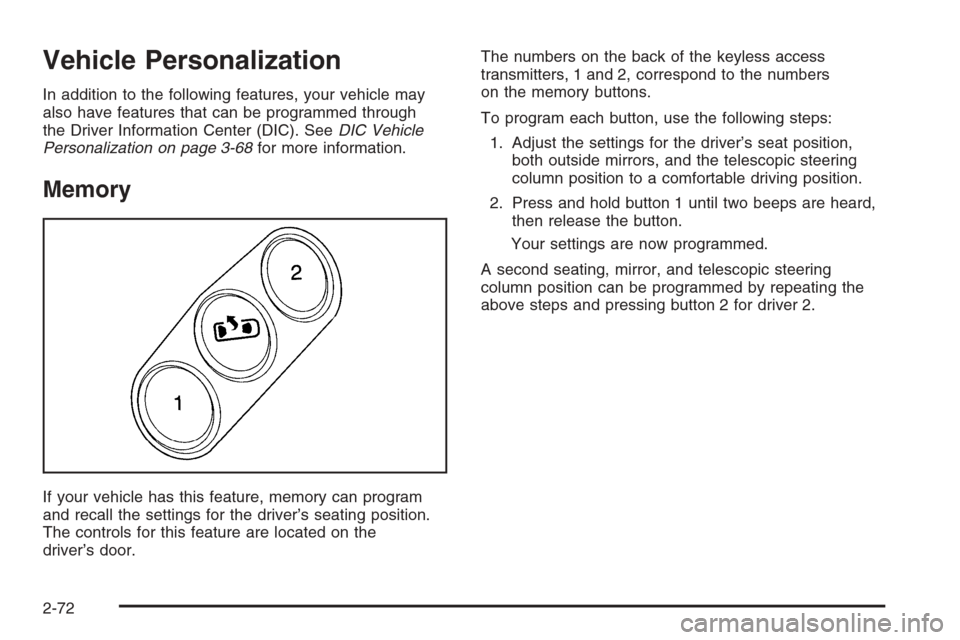
If your vehicle has this feature, memory can program
and recall the settings for the driver’s seating position.
The controls for this feature are located on the
driver’s door.The numbers on the back of the keyless access
transmitters, 1 and 2, correspond to the numbers
on the memory buttons.
To program each button, use the following steps:
1. Adjust the settings for the driver’s seat position,
both outside mirrors, and the telescopic steering
column position to a comfortable driving position.
2. Press and hold button 1 until two beeps are heard,
then release the button.
Your settings are now programmed.
A second seating, mirror, and telescopic steering
column position can be programmed by repeating the
above steps and pressing button 2 for driver 2.
2-72
Page 135 of 426
To recall a memory position, do one of the following:
If you have an automatic transmission vehicle,
press and release the desired button 1 or 2 while
the vehicle is in PARK (P).
A single beep will sound and the memory position
will be recalled after a brief delay.
If the vehicle is not in PARK (P), three beeps will
sound and the memory position will not be recalled.
If you have a manual transmission vehicle, press and
release the desired button 1 or 2. If the vehicle is on,
the parking brake needs to be set to recall the
memory position.
A single beep will sound and the memory position
will be recalled after a brief delay.
If the vehicle is on and the parking brake is not set,
three beeps will sound and the memory position will
not be recalled.If your vehicle has the Auto Memory Recall feature and
it is turned on in the Driver Information Center (DIC),
the seat, mirrors, and telescopic steering column
position will automatically adjust to their programmed
positions when the engine is started. See “Auto Memory
Recall” underDIC Vehicle Personalization on page 3-68
for more information.
To stop recall movement of the memory feature at any
time, press one of the power seat controls, power mirror
control buttons, memory buttons, or the telescopic
steering column switch.
2-73
Page 184 of 426
Driver Information Center (DIC)
The Driver Information Center (DIC) gives you the
status of many of your vehicle’s systems. It is also
used to display driver personalization features
and warning/status messages. The DIC display is
located on the instrument panel cluster below the
speedometer and tachometer, directly above the
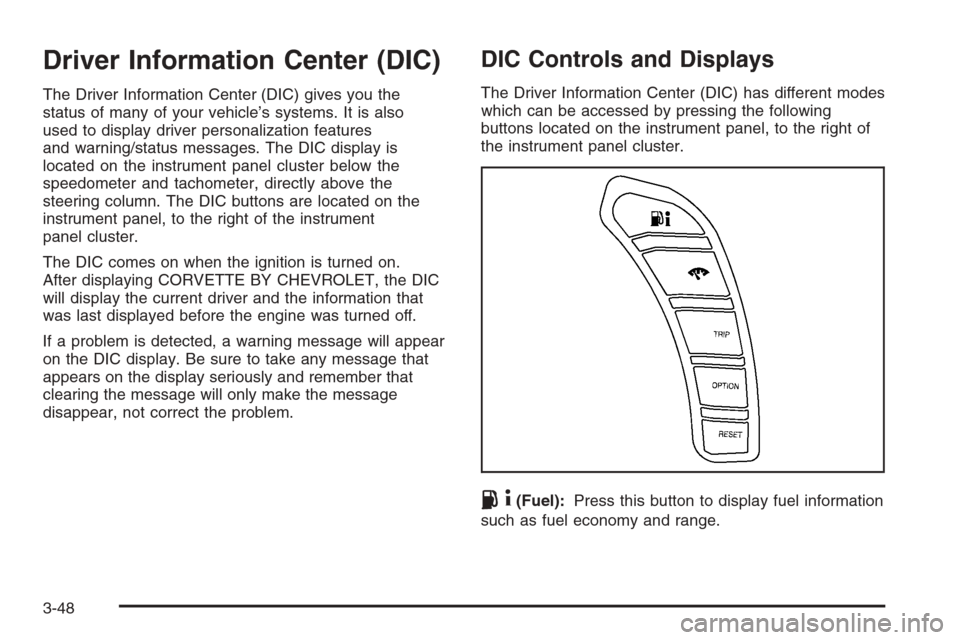
steering column. The DIC buttons are located on the
instrument panel, to the right of the instrument
panel cluster.
The DIC comes on when the ignition is turned on.
After displaying CORVETTE BY CHEVROLET, the DIC
will display the current driver and the information that
was last displayed before the engine was turned off.
If a problem is detected, a warning message will appear
on the DIC display. Be sure to take any message that
appears on the display seriously and remember that
clearing the message will only make the message
disappear, not correct the problem.
DIC Controls and Displays
The Driver Information Center (DIC) has different modes
which can be accessed by pressing the following
buttons located on the instrument panel, to the right of
the instrument panel cluster.
.4(Fuel):Press this button to display fuel information
such as fuel economy and range.
3-48
Page 185 of 426

2(Gages):Press this button to display gage
information like oil pressure and temperature, coolant
temperature, automatic transmission uid temperature, if
equipped, battery voltage, and front/rear tire pressures.
TRIP:Press this button to display your total and
trip distance driven, the elapsed time function, your
average speed, and the engine oil life.
OPTION:Press this button to choose personal options
that are available on your vehicle, depending on the
options your vehicle is equipped with, such as door
locks, easy entry seats, and language.
RESET:Press this button, used along with the other
buttons, to reset system functions, select personal
options, and turn off or acknowledge messages on
the DIC.
FUEL Button
The fuel button displays average fuel economy and
instantaneous fuel economy, calculated for your specic
driving conditions, and range information.
Average Fuel Economy:The average fuel economy is
viewed as a long-term approximation of your overall
driving conditions. You should reset the average fuel
economy display every time you refuel. If you press the
RESET button in this mode while you are driving, the
system will reset this display and begin guring fuel
economy from that point in time.Press the fuel button to display average fuel economy,
such as:
AVERAGE FUEL ECONOMY 20.1 MPG or
AVERAGE FUEL ECONOMY 11.7 L/100 km
Instantaneous Fuel Economy:Instantaneous fuel
economy reects only the fuel economy that the vehicle
has right now and will change frequently as driving
conditions change. Unlike average fuel economy, this
menu item cannot be reset.
Press the fuel button again to display instantaneous fuel
economy, such as:
INSTANT FUEL ECONOMY 20.1 MPG or
INSTANT FUEL ECONOMY 11.7 L/100 km
Fuel Range:The range calculates the remaining
distance you can drive without refueling. It is based on
fuel economy and the fuel remaining in the tank.
Press the fuel button again to display the range,
such as:
RANGE 30 MI or
RANGE 48 km
If the LOW FUEL warning is displayed or if RANGE
is less than 40 miles (64 km), the display will read
RANGE LOW.
3-49
Page 189 of 426
OPTION Button
The OPTION button allows you to access the
PERSONAL OPTIONS menu and customize the
personalization settings on your vehicle. SeeDIC
Vehicle Personalization on page 3-68for more
information.
RESET Button
The RESET button, used along with other buttons, will
reset system functions and turn off or acknowledge
messages on the DIC.
DIC Warnings and Messages
The following messages and warnings may appear in
the DIC display. The DIC display area is located in the
instrument panel cluster below the speedometer and
tachometer, directly above the steering column.
You may receive more than one message at a time.
Messages will appear one behind the other. To
acknowledge a message and remove it from the display,
press the RESET button. You may scroll through the
messages that may have been sent at the same time.
The message center is continuously updated with the
vehicle performance status.
ABS ACTIVE (Anti-Lock Brake System Active):When
your anti-lock system is adjusting brake pressure to help
avoid a braking skid, the ABS ACTIVE message will be
displayed.Slippery road conditions may exist if this message is
displayed, so adjust your driving accordingly. The
message will stay on for a few seconds after the system
stops adjusting brake pressure.
ACTIVE HANDLING:Your vehicle has a computer
controlled system to assist the driver in controlling the
vehicle in difficult driving conditions. You may feel
or hear the system working and see the ACTIVE
HANDLING message displayed in the DIC. This
message will stay on for a few seconds following the
active handling event. This is normal when the system is
operating. SeeActive Handling System on page 4-10
andBraking on page 4-6.
ACTIVE HANDLING CALIBRATING:This message
will display and the active handling system light on the
instrument panel cluster will be on while the system is
calibrating after exceeding 19 mph (30 km/h) for
10 seconds. SeeActive Handling System Light on
page 3-40. The Active Handling System is not functional
yet. The Active Handling System performance is affected
until the next message ACTIVE HANDLING READY is
displayed. The Active Handling System is off until the
ACTIVE HANDLING READY message is displayed.
SeeActive Handling System on page 4-10for more
information.
3-53
Page 195 of 426
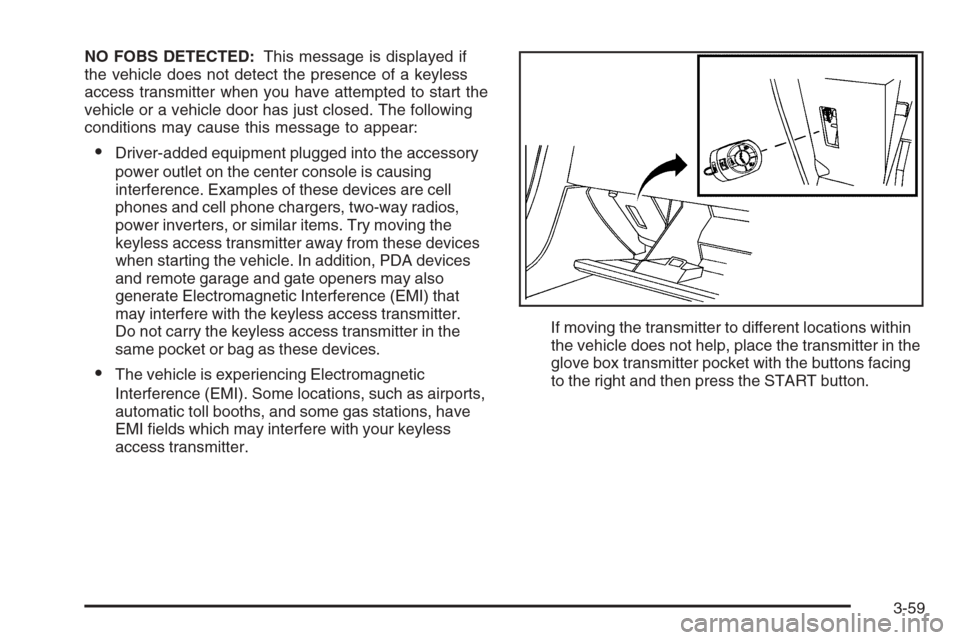
NO FOBS DETECTED:This message is displayed if
the vehicle does not detect the presence of a keyless
access transmitter when you have attempted to start the
vehicle or a vehicle door has just closed. The following
conditions may cause this message to appear:
Driver-added equipment plugged into the accessory
power outlet on the center console is causing
interference. Examples of these devices are cell
phones and cell phone chargers, two-way radios,
power inverters, or similar items. Try moving the
keyless access transmitter away from these devices
when starting the vehicle. In addition, PDA devices
and remote garage and gate openers may also
generate Electromagnetic Interference (EMI) that
may interfere with the keyless access transmitter.
Do not carry the keyless access transmitter in the
same pocket or bag as these devices.
The vehicle is experiencing Electromagnetic
Interference (EMI). Some locations, such as airports,
automatic toll booths, and some gas stations, have
EMI elds which may interfere with your keyless
access transmitter.If moving the transmitter to different locations within
the vehicle does not help, place the transmitter in the
glove box transmitter pocket with the buttons facing
to the right and then press the START button.
3-59
Page 205 of 426
Entering the Personal Options Menu
To enter the personal options menu, use the
following steps:
1. If you have an automatic transmission vehicle, turn
the vehicle on with the shift lever in PARK (P).
If you have a manual transmission vehicle, turn the
vehicle on with the parking brake set.
2. Press the OPTION button and you will enter the
PERSONAL OPTIONS menu.
The DIC will display the current driver
number (1 or 2) for a few seconds and then will
display instructions on which buttons to use
for setting the personalizations. The RESET button
is used to select a setting for a particular feature.
The OPTION button is used to move to the
next feature.
3. Press the OPTION button while the instruction
screen is displayed to enter the rst personalization
menu item.
4. Once you have cycled through all of the personal
options, pressing the OPTION button a nal time
exits the personal options menu. In addition, if
no button is pressed within 45 seconds, the DIC will
exit the personal options menu.
Personal Options
The following options are available for programming:
Display Units:This option allows you to choose
the measurement units.
Press the OPTION button until DISPLAY UNITS
appears on the display, then press the RESET button to
scroll through the following modes:
ENGLISH (default)
METRIC
If you choose ENGLISH, all information will be displayed
in English units.
If you choose METRIC, all information will be displayed
in metric units.
When the mode you want is selected, press the
OPTION button to set your choice and advance to the
next personal option.
Auto Memory Recall (Automatic Transmission
only):If your automatic transmission vehicle has the
memory package, you may have this option. This option
allows the driver’s seat, the telescopic steering
column, if equipped, and the outside rearview mirrors to
automatically move to the current driver’s set position
when the engine starts.
3-69