2006 BMW M3 COUPE remote control
[x] Cancel search: remote controlPage 40 of 170
40
Glass sunroof, electric*
Watch the glass sunroof while it is
closing, to avoid any injuries.
When leaving the vehicle, always take
the ignition key with you and close the
doors, since children could otherwise
operate the sunroof and injure them-
selves.<
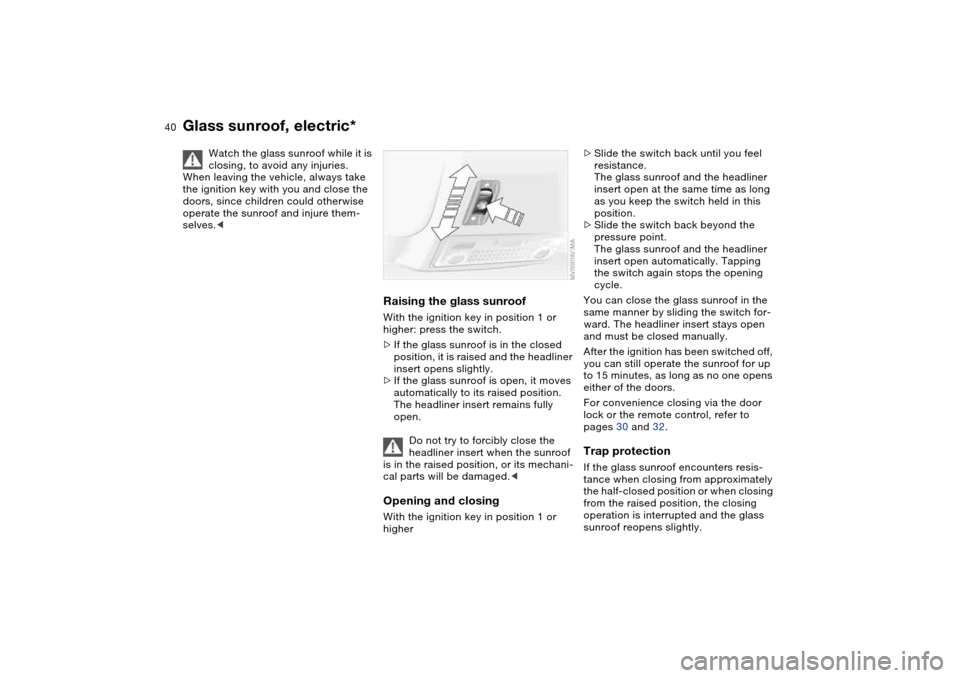
Raising the glass sunroofWith the ignition key in position 1 or
higher: press the switch.
>If the glass sunroof is in the closed
position, it is raised and the headliner
insert opens slightly.
>If the glass sunroof is open, it moves
automatically to its raised position.
The headliner insert remains fully
open.
Do not try to forcibly close the
headliner insert when the sunroof
is in the raised position, or its mechani-
cal parts will be damaged.
>Slide the switch back until you feel
resistance.
The glass sunroof and the headliner
insert open at the same time as long
as you keep the switch held in this
position.
>Slide the switch back beyond the
pressure point.
The glass sunroof and the headliner
insert open automatically. Tapping
the switch again stops the opening
cycle.
You can close the glass sunroof in the
same manner by sliding the switch for-
ward. The headliner insert stays open
and must be closed manually.
After the ignition has been switched off,
you can still operate the sunroof for up
to 15 minutes, as long as no one opens
either of the doors.
For convenience closing via the door
lock or the remote control, refer to
pages 30 and 32.Trap protectionIf the glass sunroof encounters resis-
tance when closing from approximately
the half-closed position or when closing
from the raised position, the closing
operation is interrupted and the glass
sunroof reopens slightly.
Page 48 of 170
48
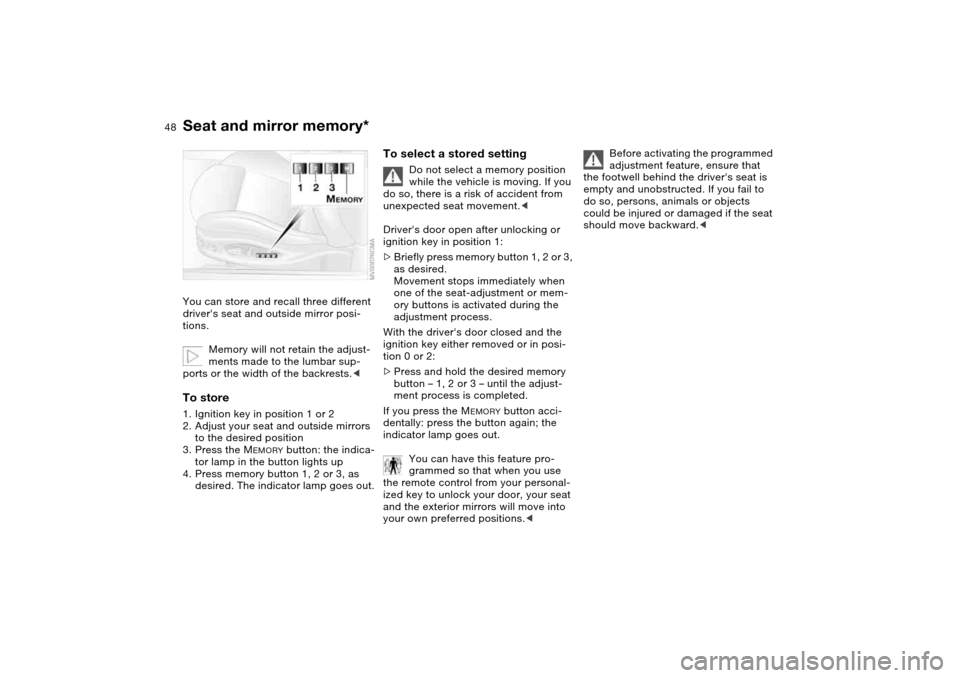
Seat and mirror memory*You can store and recall three different
driver's seat and outside mirror posi-
tions.
Memory will not retain the adjust-
ments made to the lumbar sup-
ports or the width of the backrests.
to the desired position
3. Press the M
EMORY
button: the indica-
tor lamp in the button lights up
4. Press memory button 1, 2 or 3, as
desired. The indicator lamp goes out.
To select a stored setting
Do not select a memory position
while the vehicle is moving. If you
do so, there is a risk of accident from
unexpected seat movement.<
Driver's door open after unlocking or
ignition key in position 1:
>Briefly press memory button 1, 2 or 3,
as desired.
Movement stops immediately when
one of the seat-adjustment or mem-
ory buttons is activated during the
adjustment process.
With the driver's door closed and the
ignition key either removed or in posi-
tion 0 or 2:
>Press and hold the desired memory
button – 1, 2 or 3 – until the adjust-
ment process is completed.
If you press the M
EMORY
button acci-
dentally: press the button again; the
indicator lamp goes out.
You can have this feature pro-
grammed so that when you use
the remote control from your personal-
ized key to unlock your door, your seat
and the exterior mirrors will move into
your own preferred positions.<
Before activating the programmed
adjustment feature, ensure that
the footwell behind the driver's seat is
empty and unobstructed. If you fail to
do so, persons, animals or objects
could be injured or damaged if the seat
should move backward.<
Page 59 of 170

59
Vehicle Memory, Key MemoryHow the system functionsYou have probably frequently wished
that you could configure individual
functions of your vehicles to reflect your
own personal requirements. In engi-
neering your vehicle, BMW has pro-
vided for a number of options for per-
sonal adjustment that can be
programmed into your vehicle at your
BMW center.
The available configuration data fall into
two categories, according to whether
their primary orientation is the vehicle –
Vehicle Memory – or the individual –
Key Memory. You can have up to four
different basic settings adjusted for four
different persons. The only require-
ment is that each person uses his or her
own remote control key.
When your vehicle is unlocked with the
remote control, the vehicle recognizes
the individual user by means of a data
exchange with the key, and makes
adjustments accordingly.
Distinguishing between keysIn order for you to distinguish between
different keys, colored decals are sup-
plied together with the keys.What the system can doYour BMW center can provide you with
details on the possibilities that the Vehi-
cle and Key Memory systems offer:
You will see this symbol through-
out the Owner's Manual. It is to
remind you at appropriate places of the
settings that are available to you.<
Examples for Vehicle Memory:
>Various signals that can serve as
acknowledgment for locking and
unlocking the vehicle, refer to
page 29
>Activates/deactivates the 'Follow me
home' lamps function, refer to
page 87
>Activates/deactivates daytime driv-
ing lamps, refer to page 87
>Sets the units of measure for display-
ing time, outside temperature, dis-
tance traveled and fuel consumption
in the instrument cluster
>When you shift into Reverse, an
acoustic signal indicates that PDC
has been activated, refer to page 81
>Switches on rear window defroster
automatically, refer to page 93
>Activates/deactivates various alarm
system functions, refer to page 38
>After giving an ice warning, the
onboard computer display returns to
the previous setting, refer to page 79.
Examples for Key Memory:
>Locks the vehicle automatically after
you start off, refer to page 33
>Automatically moves the seat and
outside mirror into position for the
programmed driver when unlocking
the vehicle, refer to page 48
>Automatic tilting of the passenger-
side mirror, refer to Automatic curb
monitor, page 49
OverviewControlsMaintenanceRepairsDataIndex
Page 92 of 170

92
Tips for pleasant drivingUse the automatic mode – switch on
with AUTO button 6. Select the desired
interior temperature.
Detailed setting options are described
for you in the following sections.
You can make the settings of your
vehicle in such a manner that,
when you unlock the vehicle with the
remote control of your personal key,
your own personalized setting for the
automatic climate control is initiated.
air supply and the air distribu-
tion to the windshield and the side win-
dows, towards the upper body and to
the footwells, and in addition adapts
the temperature to external influences:
summer, winter.
The cooling function is automatically
switched on when you are using the
AUTO program.
Individual air distribution
You can cancel the AUTO pro-
gram by selecting specific dis-
tribution patterns to suit your
own individual requirements.
While the AUTO program is then deacti-
vated, the automatic airflow control
remains in operation. Air flows onto
the windows , toward the upper
body , and into the footwell . You
can reactivate the automatic air supply
by pressing the AUTO button.Temperature
The interior temperature that
appears in the display panel is a
general figure intended for refer-
ence purposes. We recommend 727/
+226 as a comfortable setting, even if
the air conditioning is on. When you
start the vehicle, the system ensures
that the selected temperature is
reached as quickly as possible. It then
maintains this temperature, regardless
of the season.
To select the units of measure 7/6 of
the display, refer to page 79.
Air supply/Blower
By pressing the upper or lower
button, you can vary the air sup-
ply. This deactivates the auto-
matic air supply – the AUTO display dis-
appears from the panel. Nevertheless,
the automatic air distribution remains
unchanged. You can reactivate the
automatic air supply by pressing the
AUTO button.
When the lowest blower speed is set
and you press the lower button, all of
the displays are canceled: the blower,
heating and air conditioner are
switched off, and the air supply is
stopped. You can reactivate the system
by pressing any button for the auto-
matic climate control.To defrost windows and remove
condensation
This program quickly removes
ice and condensation from the
windshield and the side windows.
Air conditioning
The air is cooled and dehumidi-
fied and – depending on the
temperature setting – rewarmed.
Depending on the weather, the wind-
shield may fog over briefly when the
engine is started. Air conditioning helps
prevent the windows from fogging up.
The cooling function is automatically
switched on when you are using the
AUTO program.
Automatic climate control
Page 156 of 170
Everything from A to ZA
ABS Antilock Brake
System 111
indicator lamp 19
Accessories, refer to For
your own safety 6
Accident, refer to Emer-
gency call 142
Activated-charcoal filter 94
Adaptive brake lamp, refer
to Brake force display 86
Adding brake fluid 125
Additional sources of infor-
mation 4
Air conditioning mode
automatic climate
control 92
Air distribution
automatic climate
control 92
individual 92
Air outlets, refer to Ventila-
tion 90
Air pressure, refer to Tire
inflation pressure 112
Air recirculation, refer to
Recirculated-air mode 93
Air supply
automatic climate
control 92
Air, drying, refer to Air con-
ditioning mode 92Airbags 52
deactivating 52
indicator lamp 18, 54
safe seating position 42
Airing out, refer to Ventila-
tion 90
AKI, refer to Fuel specifica-
tions 25
Alarm system 37
avoiding unintentional
alarms 38
All-season tires, refer to
Winter tires 116
Alternative oil types 123
Antifreeze 124
coolant 124
washer fluid 122
Antilock Brake System
(ABS) 111
indicator lamp 19
Anti-theft system 28
Anti-theft warning system,
refer to Alarm system 37
Approved axle loads, refer
to Weights 152
Approved gross weight,
refer to Weights 152
Armrest
front 96
rear 97Artificial leather, refer to the
Caring for your vehicle
brochure
Ashtray
front 98
rear 98
Assistant systems, refer to
Dynamic Stability Control
(DSC) 82
AUC Automatic recircu-
lated-air control 93
AUTO program 92
Automatic
cruise control 73
headlamp control 87
Automatic air distribution,
refer to AUTO program 92
Automatic air supply, refer
to AUTO program 92
Automatic car wash, refer to
the Caring for your vehicle
brochure
Automatic climate control 90
Automatic curb monitor 49
Automatic dimming, interior
rearview mirror 50
Automatic recirculated-air
control (AUC) 93
Automatic windshield
washer, refer to Rain sen-
sor 72Average fuel
consumption 80
Average speed 80
Avoiding unintentional
alarms 38
Axle loads, refer to
Weights 152
B
Backrest
adjusting 43
unlocking 46
width adjustment 45
Backrest, refer to Seat
adjustment 44
Backup lamps 65
bulb replacement 135
Bandages, refer to First-aid
kit 23
Bar, for towing 145
Battery 140
charge 140
disposal 141
indicator lamp 18
jump-starting 143
remote control 28, 29
Battery charge current 18
Belts, refer to Safety
belts 46
Beverage holders 96, 97
Page 160 of 170

Everything from A to ZGearbox
manual transmission 65
Gearbox malfunction
sequential M gearbox with
Drivelogic 70
Gearbox, sequential 66
Gearshift lever
manual transmission 65
sequential M gearbox with
Drivelogic 66
General driving notes 109
Glass sunroof
closing following an elec-
trical malfunction 41
convenience operation
30, 32
remote control 29, 30
Glass sunroof, electric 40
Glove compartment 95
Gradient assistance 69
Grills, refer to Ventilation 90
Gross weight, refer to
Weights 152
H
Handbrake, refer to Parking
brake 64
Hands-free system 97
Harman Kardon premium
sound system 95
Hazard warning flashers 14
Hazard warning triangle 23Head airbags 52
Head restraints 45
Headlamp cleaning system
cleaning headlamps 73
washer fluid 122, 153
Headlamp control 87
Headlamp flasher 88
indicator lamp 21
Headlamps
bulb replacement 133
care, refer to the Caring
for your vehicle brochure
Heated mirror 50
Heated rear window
automatic climate
control 93
Heated seats 49
Heating
exterior mirrors 50
rear window 93
seats 49
Heating and ventilation 90
Heavy loads, refer to Cargo
loading 103
Height adjustment
seats 44
steering wheel 51
Height, refer to
Dimensions 151High beams 71, 88
bulb replacement 133
headlamp flasher 88
indicator lamp 21
Holder for
beverages 96, 97
litter bag 97
Hood release 119
Horn 14
Hydraulic brake assistant,
refer to DBC 111
Hydroplaning 109
I
Ice warning 79
Ignition 61
Ignition key 28
positions 61
Ignition lock 61
Imprint 4
Indicator lamps 18Indicator/warning lamp
airbags 18
alarm system 38
brakes 18, 19
Check Gas Cap 19
coolant 19, 76
DSC 19
Flat Tire Monitor
18, 19, 85
fog lamps 20
Please fasten safety
belts 18
reserve 76
Service Engine Soon 19
Individual air distribution 92
Individual settings, refer to
Vehicle Memory, Key
Memory 59
Inflation pressure monitor-
ing, refer to Flat Tire Moni-
tor 83
Inflation pressure, tires 112
INSPECTION 77
Instrument cluster 16
Instrument lighting 88
Instrument panel 14
Interface socket for onboard
diagnostics (OBD) 128
event data recorders 128
Interior lamps 89
remote control 30
Page 161 of 170

Everything from A to Z
161
Interior motion sensor 37, 38
switching off 30, 38
Interior rearview mirror
automatic dimming
feature 50
Interior temperature
adjusting 92
Intermittent mode, wipers 72
Interval display, service 77
J
Jump-starting 143
K
Key Memory 59
Keys 28
with remote control 28
L
Lamp defect 133
Lamps and bulbs 133
Lashing down loads, refer to
Cargo loading 102
Lashing eyelets, refer to
Securing cargo 104
Lashing fittings, refer to
Securing cargo 104
LATCH child-restraint
mounting system 57
Leather care, refer to the
Caring for your vehicle
brochureLeaving the vehicle 64
LEDs light-emitting
diodes 136
Length, refer to
Dimensions 151
License plate lamp
bulb replacement 136
Light switch 87
Light-emitting diodes
(LEDs) 136
Lighter 98
LIGHTS ON warning 87
Lights, refer to Parking
lamps/Low beams 87
Litter bag holders 97
Load, determining the maxi-
mum 102
Load, refer to Cargo
loading 102
Loading
vehicle 102
Load-securing devices 104
Lock buttons on doors, refer
to Locking 33
Lock, steering wheel 61
Locking
from inside 33
from outside 29, 32
Locking and unlocking
doors
from inside 33
from outside 29, 32Low beams 87
automatic 87
bulb replacement 133
indicator lamp, defective
lamp 77
Luggage compartment
capacity 152
emergency operation,
refer to Manual
operation 34
floor mat 37
floor panel 36
lid 34
opening from outside 34
opening, remote
control 30
opening/closing, refer to
Luggage compartment
lid 34
remote control 30
volume 152
Luggage compartment lid 34
emergency operation 34
emergency release 36
indicator lamp 77
opening from inside the
vehicle 34, 35
opening from outside 34
remote control 30
securing separately 34
unlocking manually 34Luggage compartment light-
ing 34
Luggage rack, refer to Roof-
mounted luggage rack 105
Lumbar support 44
M
M Engine dynamics
control 85
M Mobility system 137
M Track mode 82
indicator lamp 20
Maintenance 77, 126
Maintenance system 126
Making telephone calls,
refer to the telephone
Owner's Manual
Malfunction
door lock 32
fuel filler door 24
Malfunction displays 77
Manual operation
door lock 32
driver's door 32
fuel filler door 24
glass sunroof 41
luggage compartment
lid 34
Manual transmission 65
Master keys
with remote control 28
OverviewControlsMaintenanceRepairsDataIndex
Page 162 of 170

Everything from A to ZMC operation, refer to the
Owner's Manual for
Radio/Onboard Computer
MD operation, refer to the
Owner's Manual for
Radio/Onboard Computer
Mechanical seats 43
Memory, refer to Seat and
mirror memory 48
Memory, refer to Vehicle
Memory, Key Memory 59
Microfilter
automatic climate
control 94
Microphone 97
Mini disc operation, refer to
the Owner's Manual for
Radio/Onboard Computer
Mirrors 50
automatic curb monitor 49
heated 50
memory, refer to Seat and
mirror memory 48
Mobile Service 143
Modifications, technical,
refer to For your own
safety 6
Multifunction steering
wheel 22Multifunction switch
turn signal indicator/head-
lamp flasher 71
washer/wiper system 72
N
Navigation system, refer to
the Owner's Manual for
Radio/Onboard Computer
Neck restraints, refer to
Head restraints 45
Nets 96
Nozzles, refer to
Ventilation 90
Nylon rope, refer to Towing
and tow-starting the vehi-
cle 145
O
OBD interface socket 128
Odometer 75
Oil
additives, refer to Adding
engine oil 123
alternative oils 123
capacity 153
dipstick 122
quality 123
specified engine oils 123
Oil change interval, refer to
Service interval
display 126Oil change intervals, refer to
the Service and Warranty
Information Booklet for US
models / Warranty and
Service Guide Booklet for
Canadian models
Oil filter change 153
Oil level
checking 122
indicator lamp 18
Oil pressure
indicator lamp 18
OIL SERVICE 77
Oil types 123
Old batteries, refer to Dis-
posal 141
Onboard computer 79
Onboard computer, refer to
the Owner's Manual for
Onboard Computer
Onboard tool kit 132
Opening and closing
from inside 33
from outside 29
via remote control 29
via the door lock 32
Outlets, ventilation 90
Outside temperature dis-
play 79
changing unit of
measure 79P
Paintwork care, refer to the
Caring for your vehicle
brochure
Panic mode, trigger
alarm 30
Park Distance Control
(PDC) 81
Parking aid, refer to Park
Distance Control (PDC) 81
Parking brake 64
indicator lamp 18
Parking lamps 87
bulb replacement 133
Parking lamps/Low
beams 87
Parts and accessories, refer
to Your individual vehicle 5
Passenger-side exterior mir-
ror tilt function 49
PDC Park Distance
Control 81
Plastic, refer to the Caring
for your vehicle brochure
Pollen, refer to Microfil-
ter/activated-charcoal fil-
ter 94
Power output, refer to
Engine data 150
Power seat 44
Power socket 98