2006 BMW 650I COUPE&CONVERTIBLE change time
[x] Cancel search: change timePage 140 of 242
Navigation
Driving tips
139Reference
At a glance
Controls
Communications
Entertainment
Mobility
Destination guidance
through voice instructions
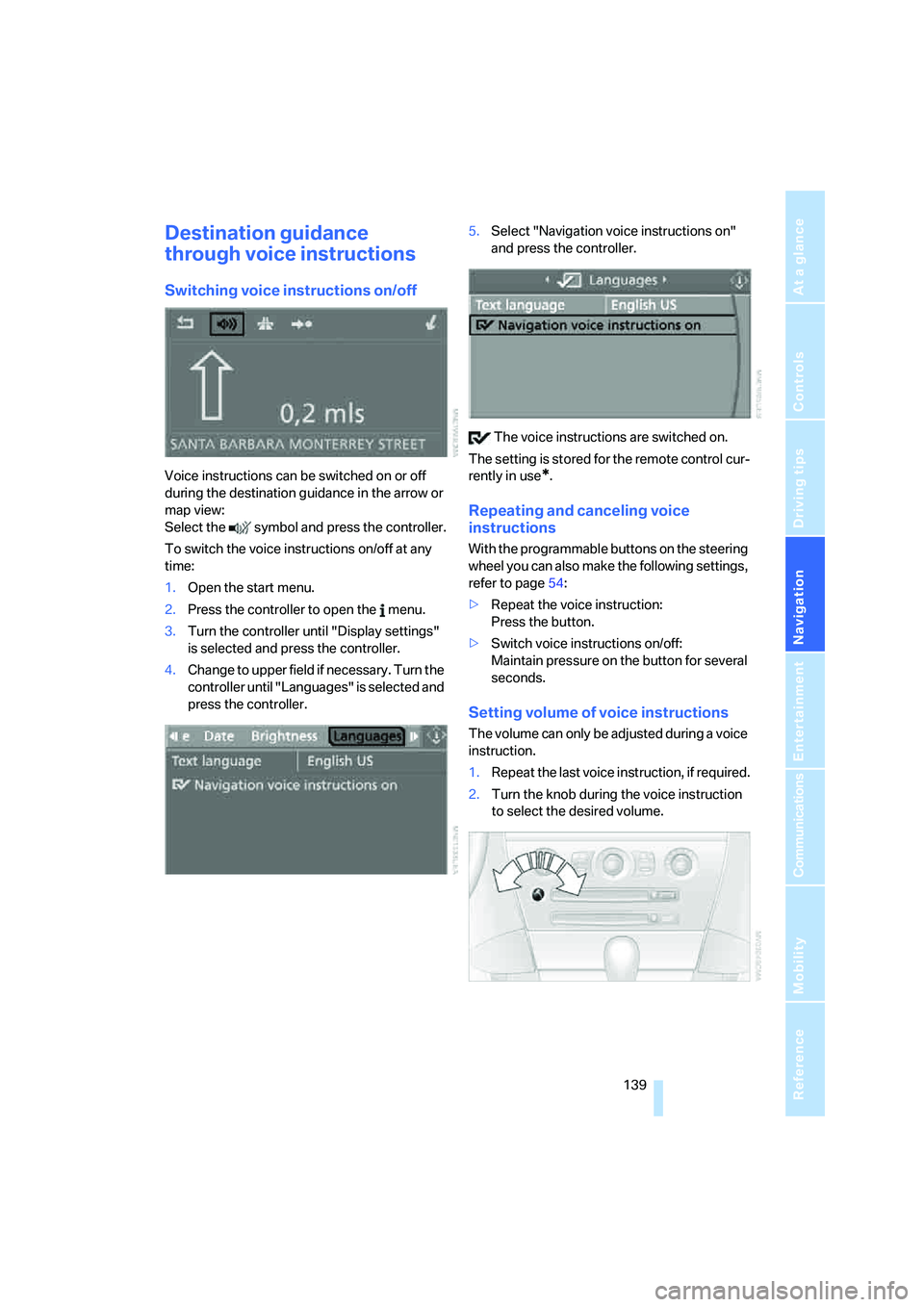
Switching voice instructions on/off
Voice instructions can be switched on or off
during the destination guidance in the arrow or
map view:
Select the symbol and press the controller.
To switch the voice instructions on/off at any
time:
1.Open the start menu.
2.Press the controller to open the menu.
3.Turn the controller until "Display settings"
is selected and press the controller.
4.Change to upper field if necessary. Turn the
controller until "Languages" is selected and
press the controller.5.Select "Navigation voice instructions on"
and press the controller.
The voice instructions are switched on.
The setting is stored for the remote control cur-
rently in use*.
Repeating and canceling voice
instructions
With the programmable buttons on the steering
wheel you can also make the following settings,
refer to page54:
>Repeat the voice instruction:
Press the button.
>Switch voice instructions on/off:
Maintain pressure on the button for several
seconds.
Setting volume of voice instructions
The volume can only be adjusted during a voice
instruction.
1.Repeat the last voice instruction, if required.
2.Turn the knob during the voice instruction
to select the desired volume.
Page 151 of 242
Radio
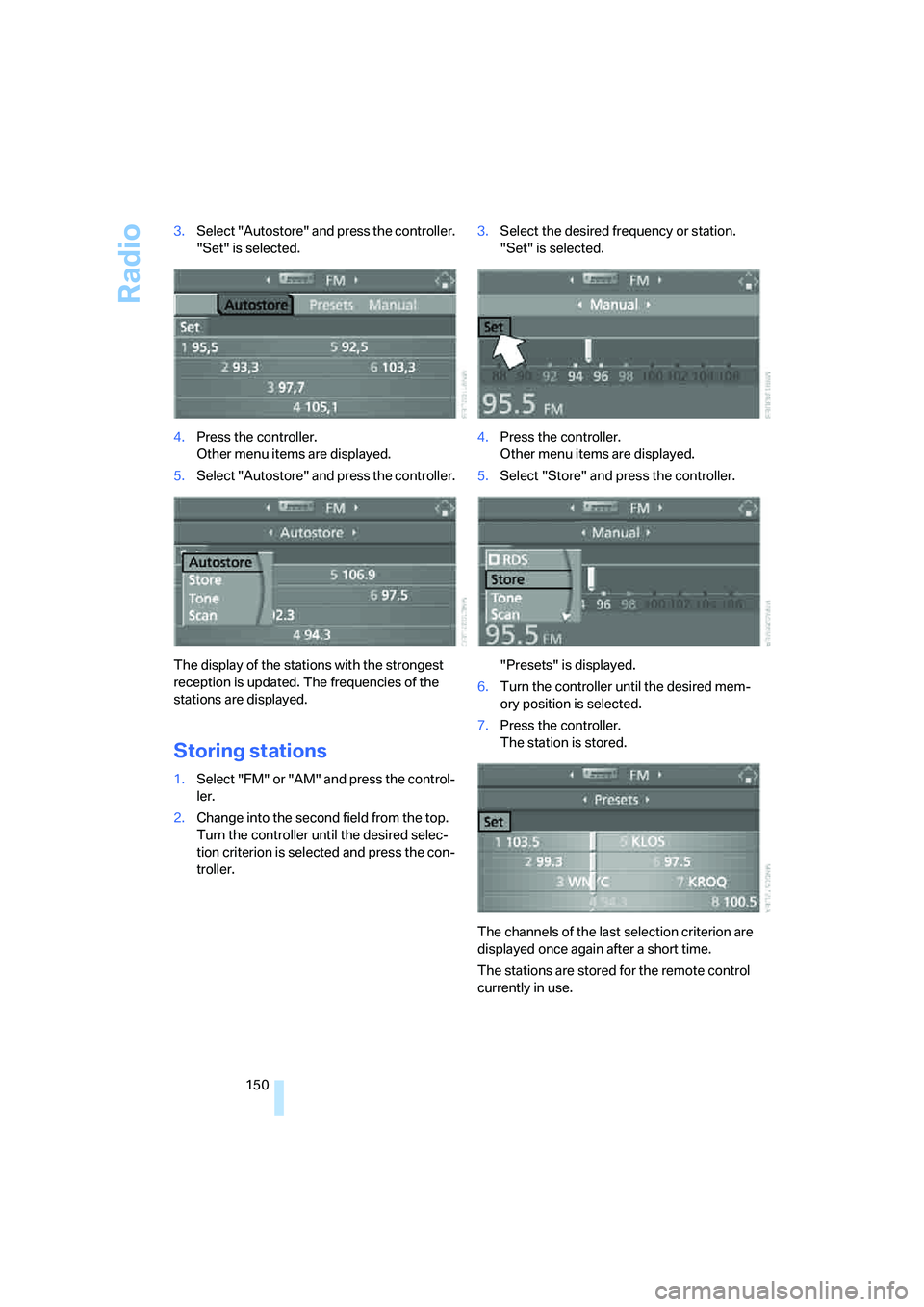
150 3.Select "Autostore" and press the controller.
"Set" is selected.
4.Press the controller.
Other menu items are displayed.
5.Select "Autostore" and press the controller.
The display of the stations with the strongest
reception is updated. The frequencies of the
stations are displayed.
Storing stations
1.Select "FM" or "AM" and press the control-
ler.
2.Change into the second field from the top.
Turn the controller until the desired selec-
tion criterion is selected and press the con-
troller.3.Select the desired frequency or station.
"Set" is selected.
4.Press the controller.
Other menu items are displayed.
5.Select "Store" and press the controller.
"Presets" is displayed.
6.Turn the controller until the desired mem-
ory position is selected.
7.Press the controller.
The station is stored.
The channels of the last selection criterion are
displayed once again after a short time.
The stations are stored for the remote control
currently in use.
Page 169 of 242
Telephoning
168
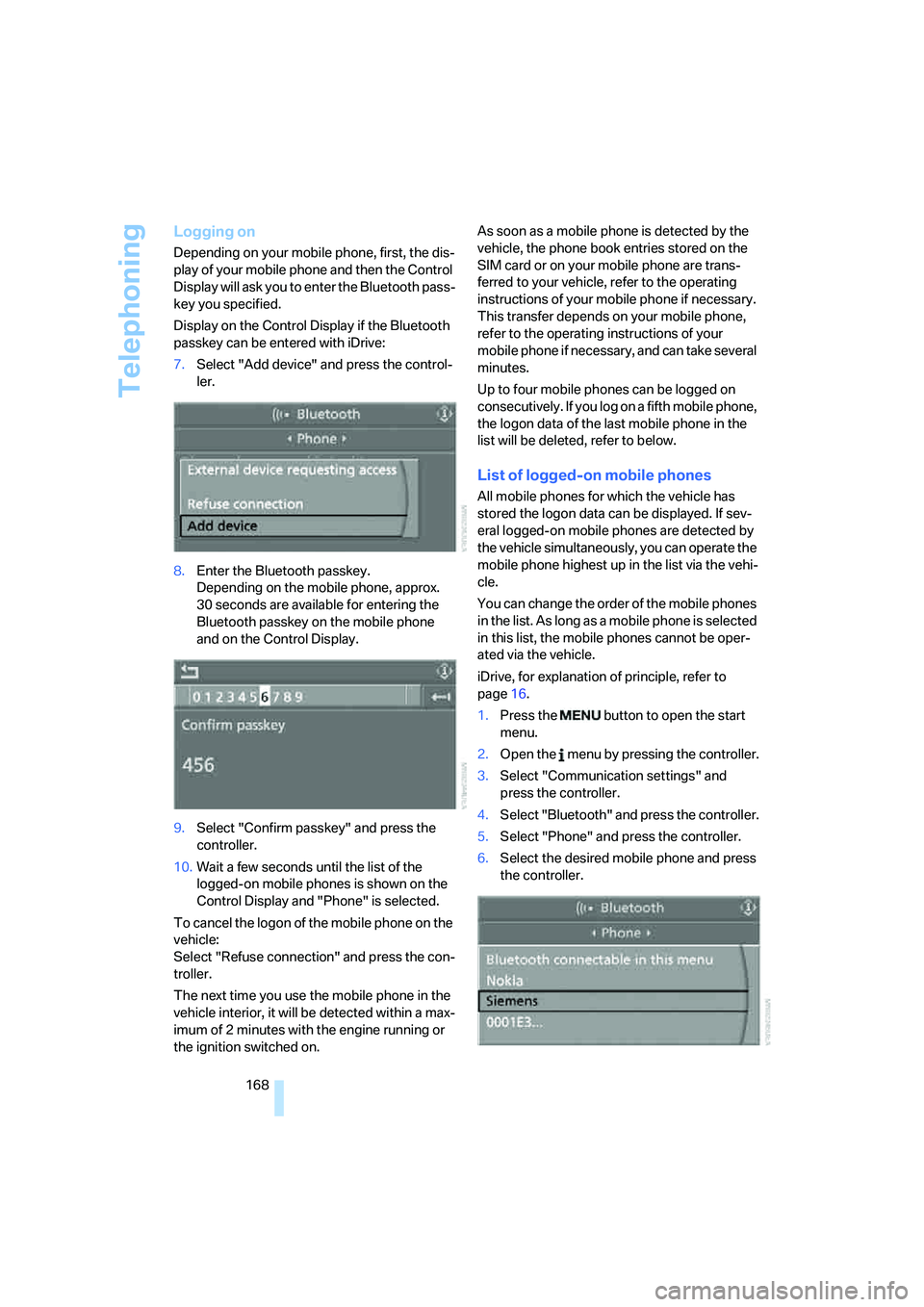
Logging on
Depending on your mobile phone, first, the dis-
play of your mobile phone and then the Control
Display will ask you to enter the Bluetooth pass-
key you specified.
Display on the Control Display if the Bluetooth
passkey can be entered with iDrive:
7.Select "Add device" and press the control-
ler.
8.Enter the Bluetooth passkey.
Depending on the mobile phone, approx.
30 seconds are available for entering the
Bluetooth passkey on the mobile phone
and on the Control Display.
9.Select "Confirm passkey" and press the
controller.
10.Wait a few seconds until the list of the
logged-on mobile phones is shown on the
Control Display and "Phone" is selected.
To cancel the logon of the mobile phone on the
vehicle:
Select "Refuse connection" and press the con-
troller.
The next time you use the mobile phone in the
vehicle interior, it will be detected within a max-
imum of 2 minutes with the engine running or
the ignition switched on.As soon as a mobile phone is detected by the
vehicle, the phone book entries stored on the
SIM card or on your mobile phone are trans-
ferred to your vehicle, refer to the operating
instructions of your mobile phone if necessary.
This transfer depends on your mobile phone,
refer to the operating instructions of your
mobile phone if necessary, and can take several
minutes.
Up to four mobile phones can be logged on
consecutively. If you log on a fifth mobile phone,
the logon data of the last mobile phone in the
list will be deleted, refer to below.
List of logged-on mobile phones
All mobile phones for which the vehicle has
stored the logon data can be displayed. If sev-
eral logged-on mobile phones are detected by
the vehicle simultaneously, you can operate the
mobile phone highest up in the list via the vehi-
cle.
You can change the order of the mobile phones
in the list. As long as a mobile phone is selected
in this list, the mobile phones cannot be oper-
ated via the vehicle.
iDrive, for explanation of principle, refer to
page16.
1.Press the button to open the start
menu.
2.Open the menu by pressing the controller.
3.Select "Communication settings" and
press the controller.
4.Select "Bluetooth" and press the controller.
5.Select "Phone" and press the controller.
6.Select the desired mobile phone and press
the controller.
Page 224 of 242
Reference 223
At a glance
Controls
Driving tips
Communications
Navigation
Entertainment
Mobility
Audio144
– controls144
– switching on/off144
– tone control145
– volume145
"Audio", refer to Tone
control145
Automatic
– air distribution105
– air volume105
– headlamp control100
– service notification180
– steering wheel adjustment,
refer to Easy entry/exit53
– storing stations149
Automatically switching
between high beams and
low beams, refer to High-
beam assistant102
Automatic car washes120
– also refer to Comfort
access38
– also refer to the Caring for
your vehicle brochure
Automatic climate control104
– automatic air
distribution105
– convertible program105
– switching off107
Automatic closing of doors,
see Automatic soft
closing33
Automatic curb monitor53
Automatic lighting
– refer to Automatic headlamp
control100
– refer to Daytime running
lamps101
– refer to High-beam
assistant102
– refer to Interior lamps103
– refer to Pathway lighting100
"Automatic programs"105
Automatic recirculated-air
control AUC107
Automatic soft closing33
Automatic station search149Automatic transmission with
Steptronic62
– deactivating selector lever
interlock63
– Dynamic Driving Control64
– interlock62
– kick-down63
– selector lever lock,
Interlock62
– shiftlock62
– towing209
– tow-starting210
– with comfort access38
"Automatic ventilation"108
AUTO program with
automatic climate
control105
"Autostore" on the
radio148,150
Average fuel consumption75
– setting units84
Average speed75
"Avoid ferries" for
navigation135
"Avoid highways" for
navigation135
Avoiding freeways for
navigation134
Avoiding unintentional
alarms36
"Avoid tollroads" for
navigation135
Axle loads, refer to
Weights217
"A - Z"171,172
B
Backrest contour, refer to
Lumbar support48
Backrests, refer to Seats48
Backup lamps
– refer to Reverse gear61
– replacing bulbs, refer to Tail
lamps203
"Balance", refer to Tone
control146Balance, refer to Tone
control146
Balance adjustment in audio
mode, right/left146
Band-aids, refer to First-aid
kit207
Bass, refer to Tone
control145
"Bass", tone control146
Battery
– disposal38
– jump starting207
– refer to Vehicle battery204
Battery change38
Being towed209
Belts, refer to Safety belts51
Blower, refer to Air
volume106
"BMW Assist"181
BMW Assist179
– enabling179
– services offered180
"BMW Contact"173
"BMW Contact
Numbers"173
BMW homepage4
BMW Maintenance
System199
BMW Night Vision97
– activating98
– cleaning camera99
– cleaning camera, refer to
Wiper system66
– deactivating98
– making settings98
"BMW Service"181
"BMW Service settings"180
BMW website4
Brake Assistant, refer to DBC
Dynamic Brake Control86
Brake fluid197
– level197
– warning lamp197
Brake force display92
Brake hydraulic system197
Brake lamps
– brake force display92
– replacing bulbs, refer to Tail
lamps203
Page 226 of 242
Reference 225
At a glance
Controls
Driving tips
Communications
Navigation
Entertainment
Mobility
Central locking system29
– comfort access36
– from inside vehicle32
Changes, technical, refer to
For your own safety6
Changing a wheel204
Changing language on
Control Display84
Changing units of measure on
Control Display84
Changing wheels192
CHECK button80
Check Control79
"Check Control
messages"80
Check Gas Cap186
Checking air pressure, refer to
Tire inflation pressure188
Children's seats, refer to Child
restraint systems56
Child-restraint fixing system
LATCH57
Child restraint systems56
Chrome parts, care, refer to
the Caring for your vehicle
brochure
Cigarette lighter113
Cigarette lighter socket, refer
to Connecting electrical
devices114
Cleaning, refer to Caring for
your vehicle brochure
"Climate"105
Clock74
– 12h/24h mode83
– setting time and date82
Closing
– from inside32
– from outside30
Closing fuel filler cap186
Clothes hooks, Coupe113
Cockpit10
Cold start, refer to Starting
engine59
Comfort access36
– observe in car wash38
– replacing battery38Comfort closing
– windows, with comfort
access with Coupe37
– with comfort access37
"Communication"170,181
"Communication
settings"180
Compact disc
– refer to CD changer157
– refer to CD player157
Compartment for remote
control, refer to Ignition
lock58
Compartments, refer to
Storage compartments112
Compressed audio files157
Computer75
– displays on Control
Display76
– hour signal83
"Concert hall", refer to Tone
control146
Condition Based Service
CBS199
"Confirmation"31
Connecting car vacuum
cleaner, refer to Connecting
electrical devices114
Consumption display, refer to
Average fuel
consumption75
Consumption statistics, refer
to Average fuel
consumption75
"Continue guidance to
destination?"136
"Contrast" with BMW Night
Vision99
Control Center, refer to
iDrive16
Control Display, refer to
iDrive16
– setting brightness83
Controller, refer to iDrive16
Controls, refer to Cockpit10
Convenience operation
– convertible top31,32
– glass sunroof31,32
– windows31,32Convertible
– convertible program for
automatic climate
control105
– opening and closing
windows38
– rollover protection
system94
– top42
– wind deflector45
– window and convertible top
operation with comfort
access37
Convertible top
– care, refer to the Caring for
your vehicle brochure
– convenience operation32
– emergency closing43
– manual closing43
– opening and closing42
Coolant197
– checking level197
– temperature74
Cooling, maximum107
Cornering Brake Control
CBC86
Country of destination for
navigation126
Courtesy lamps, refer to
Interior lamps103
Cruise control66,67
– active cruise control67
Cruising range75
Curb weight, refer to
Weights217
"Current position"140
Current position
– displaying140
– entering132
– storing132
"Curve mode" with
BMW Night Vision99
"Customer
Relations"173,182
Cylinders, refer to Engine
data214
Page 230 of 242
Reference 229
At a glance
Controls
Driving tips
Communications
Navigation
Entertainment
Mobility
Headlamps
– care, refer to the Caring for
your vehicle brochure
– cleaning, refer to Wiper
system66
– replacing bulbs201
Head Light, refer to Adaptive
Head Light101
Head restraints
– front50
– removing50
– sitting safely47
"Head-Up Display"96
Head-Up Display95
Heated
– mirrors, refer to Automatic
functions53
– rear window106
– seats52
– steering wheel54
Heater105
Heating
– exterior mirrors53
– interior104
– rear window106
– residual heat107
– seats52
– steering wheel54
Heating with engine switched
off, refer to Residual
heat107
Heavy cargo, refer to Securing
cargo121
Height, refer to
Dimensions215
Height adjustment
– seats48
– steering wheel53
High-beam assistant102
High beams101
– headlamp flasher101
– indicator lamp13
– replacing bulbs202
High Definition Radio152
High water, refer to Driving
through water119
Hills119
"Home address" in
navigation134Homepage4
Hood194
Horn10
Hotel function33
– unlocking manually33
Hot exhaust system118
"Hour memo"83
"House number" for desti-
nation entry128
Hydraulic brake assistant,
refer to DBC Dynamic Brake
Control86
Hydroplaning119
– also refer to Minimum tread
depth191
I
IBOC, refer to High Definition
Radio152
Ice, refer to Outside temper-
ature warning74
ID3-Tag, refer to Information
about track159
iDrive16
– adjusting brightness83
– assistance window20
– changing date and time82
– changing language84
– changing menu page19
– changing settings82
– changing unit of measure
units and display form84
– controller16
– controls16
– displaying menus17
– selecting menu item19
– selecting or confirming
entry19
– start menu17
– status information20
– symbols18
Ignition58
– switched off58
– switched on58
Ignition key, refer to Keys/
remote control28
Ignition key position 1, refer to
Radio readiness58Ignition key position 2, refer to
Ignition on58
Ignition lock58
– starting engine with comfort
access37
Indicator/warning lamps
– active steering92
– airbags94
– DSC13,87
– DTC13,87
– Flat Tire Monitor89
– fog lamps13,103
– handbrake13,60
– safety belt warning52
– TPM Tire Pressure
Monitor91
Indicator and warning lamps,
overview13
Individually programmable
buttons on steering
wheel54
Individual settings, refer to
Personal Profile29
Inflation pressure, refer to Tire
inflation pressure188
Inflation pressure monitoring
– refer to Flat Tire Monitor88
– refer to Tire Pressure
Monitor89
Information
– on another location130
– on current position130
– on destination location130
"Information" for
navigation130
"Information on
destination"132
Initializing
– Flat Tire Monitor88
– radio, refer to Storing
stations150
– refer to Power failure204
– seat, mirror and steering
wheel memory49
– time and date82
"Input map"130
Installation location
– CD changer161
– navigation drive124
Page 233 of 242

Everything from A to Z
232 "Navigation voice instructions
on"139
Neck support, refer to Front
head restraints50
"New address" for
navigation132
"New destination"125,129
New remote control28
"New route"140
New wheels and tires192
"Next entertainment
source"54
Night Vision, refer to
BMW Night Vision97
Night vision device, refer to
BMW Night Vision97
"Night Vision on / off"54
Nozzles
– refer to Ventilation107
– refer to Windshield washer
nozzles66
Nylon rope, refer to Tow-
starting and towing208
O
OBD Socket200
Octane ratings, refer to Fuel
specifications187
Odometer74
Oil
– additives196
– approved engine oils196
– capacity217
– consumption195
– consumption, refer to
Engine oil, checking195
– level195
– topping off196
Oil change intervals
– refer to Service
requirements77
– refer to the Service and
Warranty Information
Booklet for US models or to
the Warranty and Service
Guide Booklet for Canadian
models"On a new destination" for
navigation131
"Onboard info"76
Onboard monitor, refer to
iDrive16
Onboard tool kit201
"On destination"131
"On location"131
Opening and closing
– comfort access36
– from inside32
– from outside30
– using door lock32
– using the remote control30
Operation by voice for mobile
phone174
– adjusting volume175
– canceling175
– commands175
– correcting phone
number176
– dialing phone number176
– placing a call176
– redialing177
– voice phone book176
"Options"182
Orientation menu, refer to
Start menu17
Output, refer to Engine
data214
Outside air, refer to AUC
Automatic recirculated-air
control107
Outside temperature
display74
– changing unit of measure84
P
Panic mode31
Park Distance Control PDC85
"Parked car operation"108
"Parked car ventilation"108
Parked car ventilation
– activating an activation
time109
– setting activation time108
– switching on and off
directly108Parking, vehicle60
Parking aid, refer to PDC Park
Distance Control85
Parking assistant, refer to
PDC Park Distance
Control85
Parking brake, refer to
Handbrake60
Parking lamps100
– replacing bulbs202
Parts and accessories6
Passenger airbags, deacti-
vating, refer to Exception for
front passenger seat56
Passenger-side exterior
mirror, tilting down53
"Pathway lighting"101
Pathway lighting100
"PDC"86
"PDC display on"86
PDC Park Distance Control85
Personal Profile29
"Perspective"138
"Phone"171
Phone book170
Phone numbers
– deleting from phone
book173
– dialing171
– most recent numbers172
– selecting in phone book172
– Top 8172
Pinch protection system
– glass sunroof40
– power windows40
Plasters, refer to First-aid
kit207
"Play"
– in audio mode158
– on the radio, selecting155
Plug-in unit for remote
control, refer to Ignition
lock58
Pollen, refer to Microfilter/
activated-charcoal filter108
Position
– displaying140
– storing132
Power failure204
Page 234 of 242
Reference 233
At a glance
Controls
Driving tips
Communications
Navigation
Entertainment
Mobility
Power windows, refer to
Windows38
"Presets" on the
radio148,154
Presetting parked car venti-
lation activation times108
Pressure, tires188
Pressure monitoring of tires,
refer to TPM Tire Pressure
Monitor89
"Profile"183
Programmable buttons on
steering wheel54
Protective function, refer to
Pinch protection system
– glass sunroof40
– windows40
R
Radio
– Autostore149
– controls144
– High Definition Radio152
– playing stations149
– satellite radio153
– selecting frequency
manually149
– selecting
waveband144,148
– station search149
– station selection148
– station with best
reception149
– storing stations150
– switching on/off144
– tone control145
– volume145
– Weather Band, refer to
Weather news flashes151
Radio key, refer to Keys/
remote control28
Radio position, refer to Radio
readiness58
Radio readiness58
– switched off58
– switched on58
– with comfort access37Rain sensor, windshield
washer system65
"Random", random play
sequence, selecting160
"Random all" in audio
mode160
"Random directory" in audio
mode160
Random play sequence
– CD changer160
– CD player160
"RDS"151
Reading lamps103
Rear lamps, refer to Tail
lamps203
Rearview mirrors, refer to
Mirrors52
Rear window
– heating106
– opening and closing39
"Received calls"172
Reception
– quality151
– radio stations151
– regional station149
Reception quality of mobile
phone, refer to Status
information20
Rechargeable flashlight111
Recirculated-air mode, refer
to AUC Automatic recircu-
lated-air control
107
Recirculation of air, refer to
AUC Automatic recircu-
lated-air control107
Reclining seat, refer to
Backrest48
Recording times, refer to
Stopwatch81
"Redial" for mobile phone171
Reflectors, refer to Tail
lamps203
Refueling186
Releasing, hood194
"Relock door if not
opened"32
Remaining distance, refer to
Cruising range75Remaining distance to desti-
nation, refer to Computer76
Remote control28
– battery replacement38
– comfort access36
– garage-door opener110
– luggage compartment lid31
– malfunction31,38
Removing condensation from
windows106
"Repeat directory" in audio
mode160
"Repeat" in audio mode160
"Repeat track" in audio
mode160
Replacement fuses205
Replacing bulbs, refer to
Lamps and bulbs201
Replacing tires
– changing a wheel204
– new wheels and tires192
Reporting an accident, refer to
Initiating emergency
call206
Reporting safety defects7
Required fuel187
Reserve warning, refer to Fuel
gauge75
Reservoir for washer
systems66
"Reset"90
– for stopwatch81
– tone settings147
Reset, refer to Resetting tone
settings147
Residual heat107
Restraint systems
– for children56
– refer to Safety belts51
Retreaded tires192
Reverse, fast
– CD changer161
– CD player161
Reverse gear
– automatic transmission with
Steptronic
63
– manual transmission61
– SMG Sequential Manual
Transmission61