2006 BMW 325XI SPORTS WAGON reset
[x] Cancel search: resetPage 145 of 236
Radio
144
Radio
Your radio provides reception of the FM and AM
wavebands:
Listening to the radio
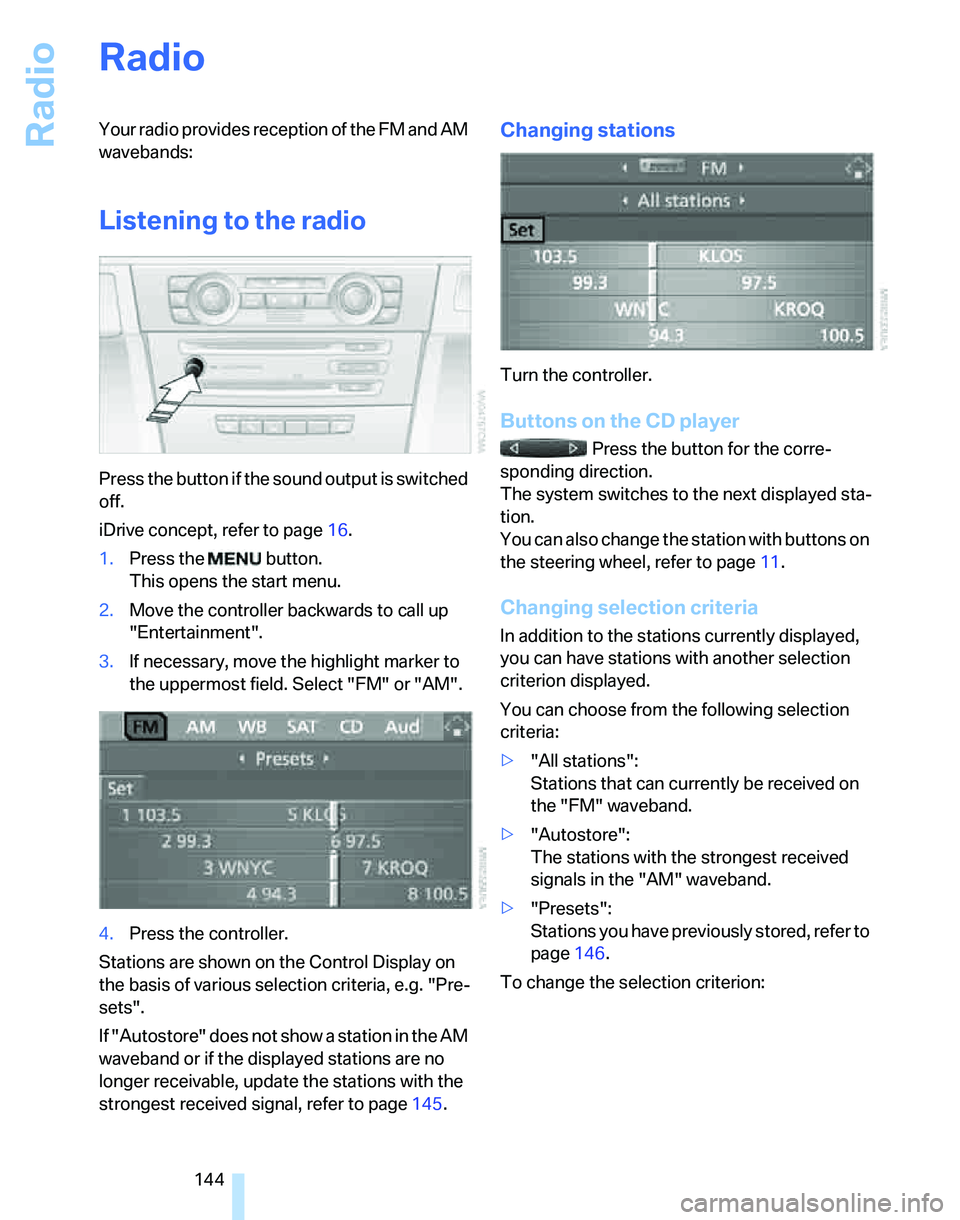
Press the button if the sound output is switched
off.
iDrive concept, refer to page16.
1.Press the button.
This opens the start menu.
2.Move the controller backwards to call up
"Entertainment".
3.If necessary, move the highlight marker to
the uppermost field. Select "FM" or "AM".
4.Press the controller.
Stations are shown on the Control Display on
the basis of various selection criteria, e.g. "Pre-
sets".
If "Autostore" does not show a station in the AM
waveband or if the displayed stations are no
longer receivable, update the stations with the
strongest received signal, refer to page145.
Changing stations
Turn the controller.
Buttons on the CD player
Press the button for the corre-
sponding direction.
The system switches to the next displayed sta-
tion.
You can also change the station with buttons on
the steering wheel, refer to page11.
Changing selection criteria
In addition to the stations currently displayed,
you can have stations with another selection
criterion displayed.
You can choose from the following selection
criteria:
>"All stations":
Stations that can currently be received on
the "FM" waveband.
>"Autostore":
The stations with the strongest received
signals in the "AM" waveband.
>"Presets":
Stations you have previously stored, refer to
page146.
To change the selection criterion:
Page 147 of 236
Radio
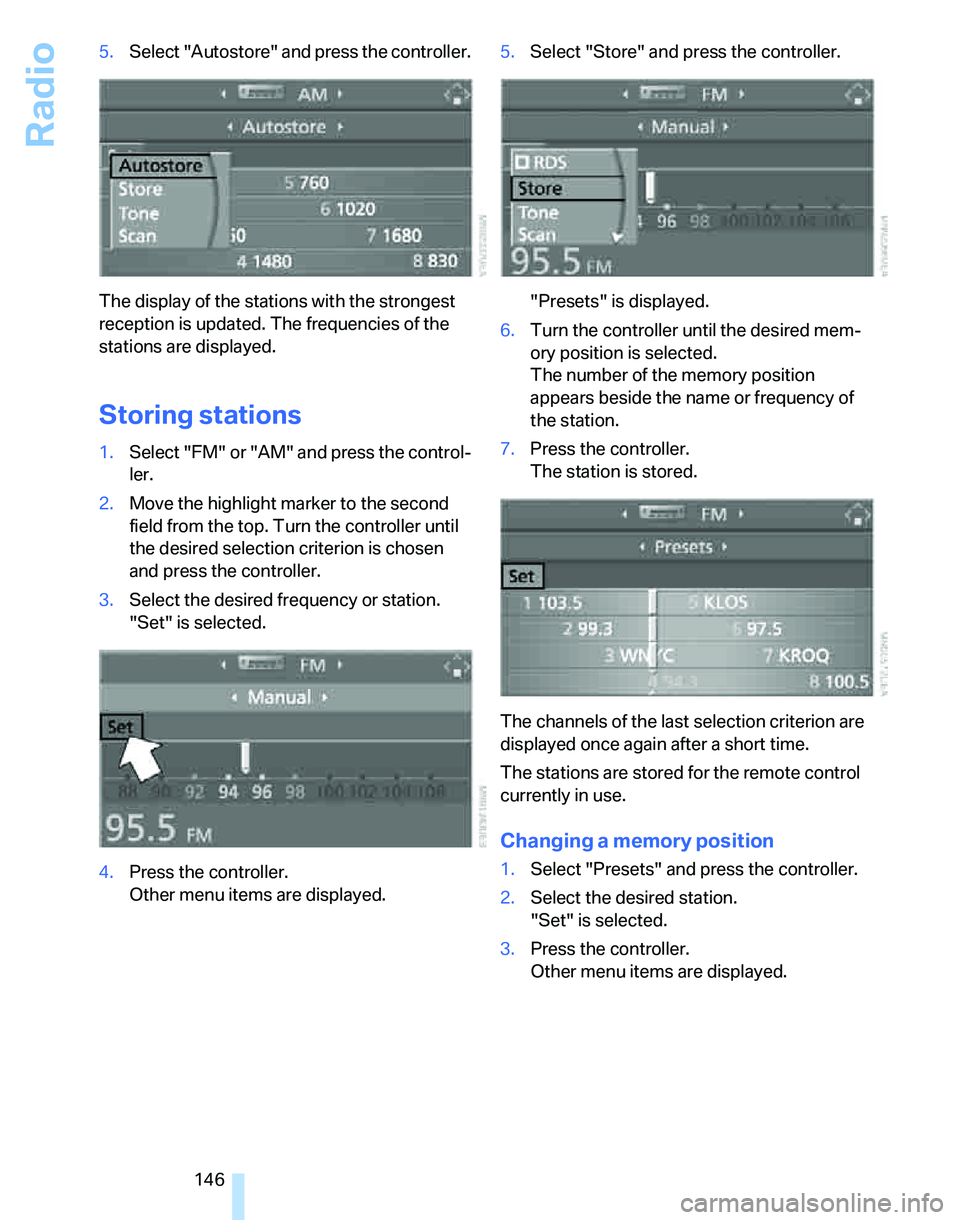
146 5.Select "Autostore" and press the controller.
The display of the stations with the strongest
reception is updated. The frequencies of the
stations are displayed.
Storing stations
1.Select "FM" or "AM" and press the control-
ler.
2.Move the highlight marker to the second
field from the top. Turn the controller until
the desired selection criterion is chosen
and press the controller.
3.Select the desired frequency or station.
"Set" is selected.
4.Press the controller.
Other menu items are displayed.5.Select "Store" and press the controller.
"Presets" is displayed.
6.Turn the controller until the desired mem-
ory position is selected.
The number of the memory position
appears beside the name or frequency of
the station.
7.Press the controller.
The station is stored.
The channels of the last selection criterion are
displayed once again after a short time.
The stations are stored for the remote control
currently in use.
Changing a memory position
1.Select "Presets" and press the controller.
2.Select the desired station.
"Set" is selected.
3.Press the controller.
Other menu items are displayed.
Page 151 of 236
Radio
150
Disabling
1.Select an enabled channel and press the
controller.
2.Select "ESN" and press the controller.
The electronic serial number, ESN, is dis-
played.
The electronic serial number is
required to disable.<
3.To disable the channel:
Dial the phone number.
Selecting and storing a channel
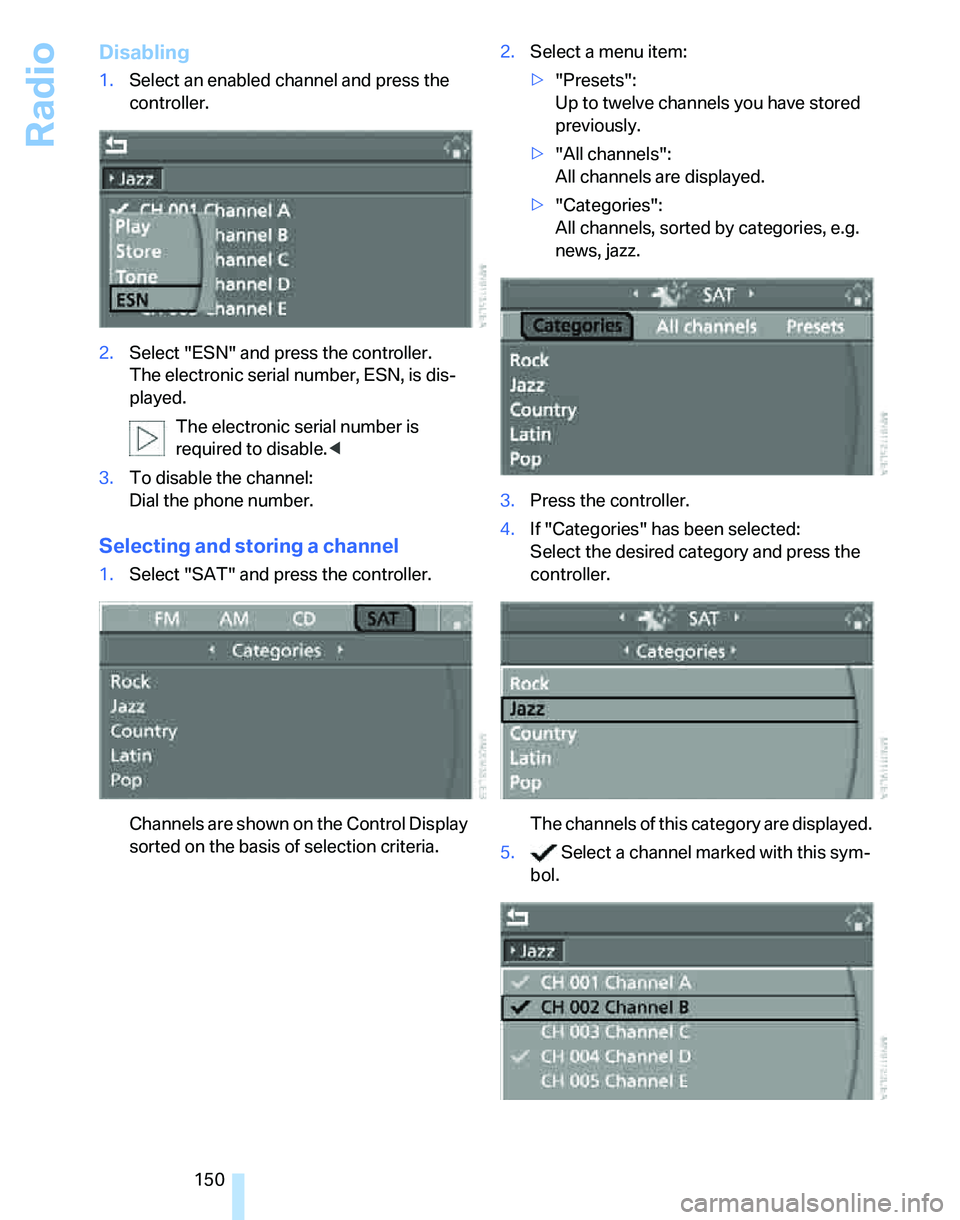
1.Select "SAT" and press the controller.
Channels are shown on the Control Display
sorted on the basis of selection criteria.2.Select a menu item:
>"Presets":
Up to twelve channels you have stored
previously.
>"All channels":
All channels are displayed.
>"Categories":
All channels, sorted by categories, e.g.
news, jazz.
3.Press the controller.
4.If "Categories" has been selected:
Select the desired category and press the
controller.
The channels of this category are displayed.
5. Select a channel marked with this sym-
bol.
Page 152 of 236
Navigation
Entertainment
Driving tips
151Reference
At a glance
Controls
Communications
Mobility
6.Press the controller.
Other menu items are displayed.
7.Select "Play" and press the controller.
Additional information
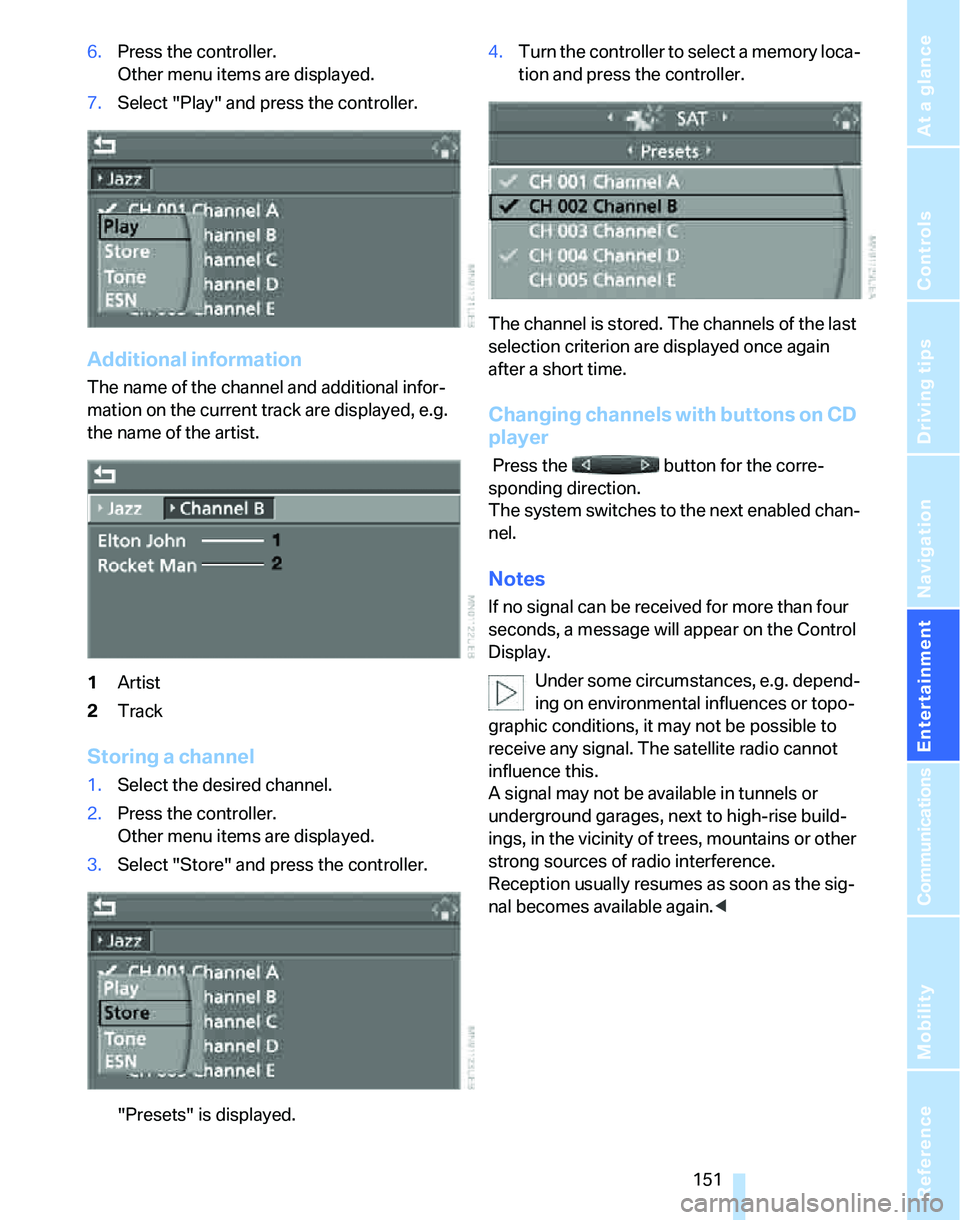
The name of the channel and additional infor-
mation on the current track are displayed, e.g.
the name of the artist.
1Artist
2Track
Storing a channel
1.Select the desired channel.
2.Press the controller.
Other menu items are displayed.
3.Select "Store" and press the controller.
"Presets" is displayed.4.Turn the controller to select a memory loca-
tion and press the controller.
The channel is stored. The channels of the last
selection criterion are displayed once again
after a short time.
Changing channels with buttons on CD
player
Press the button for the corre-
sponding direction.
The system switches to the next enabled chan-
nel.
Notes
If no signal can be received for more than four
seconds, a message will appear on the Control
Display.
Under some circumstances, e.g. depend-
ing on environmental influences or topo-
graphic conditions, it may not be possible to
receive any signal. The satellite radio cannot
influence this.
A signal may not be available in tunnels or
underground garages, next to high-rise build-
ings, in the vicinity of trees, mountains or other
strong sources of radio interference.
Reception usually resumes as soon as the sig-
nal becomes available again.<
Page 217 of 236
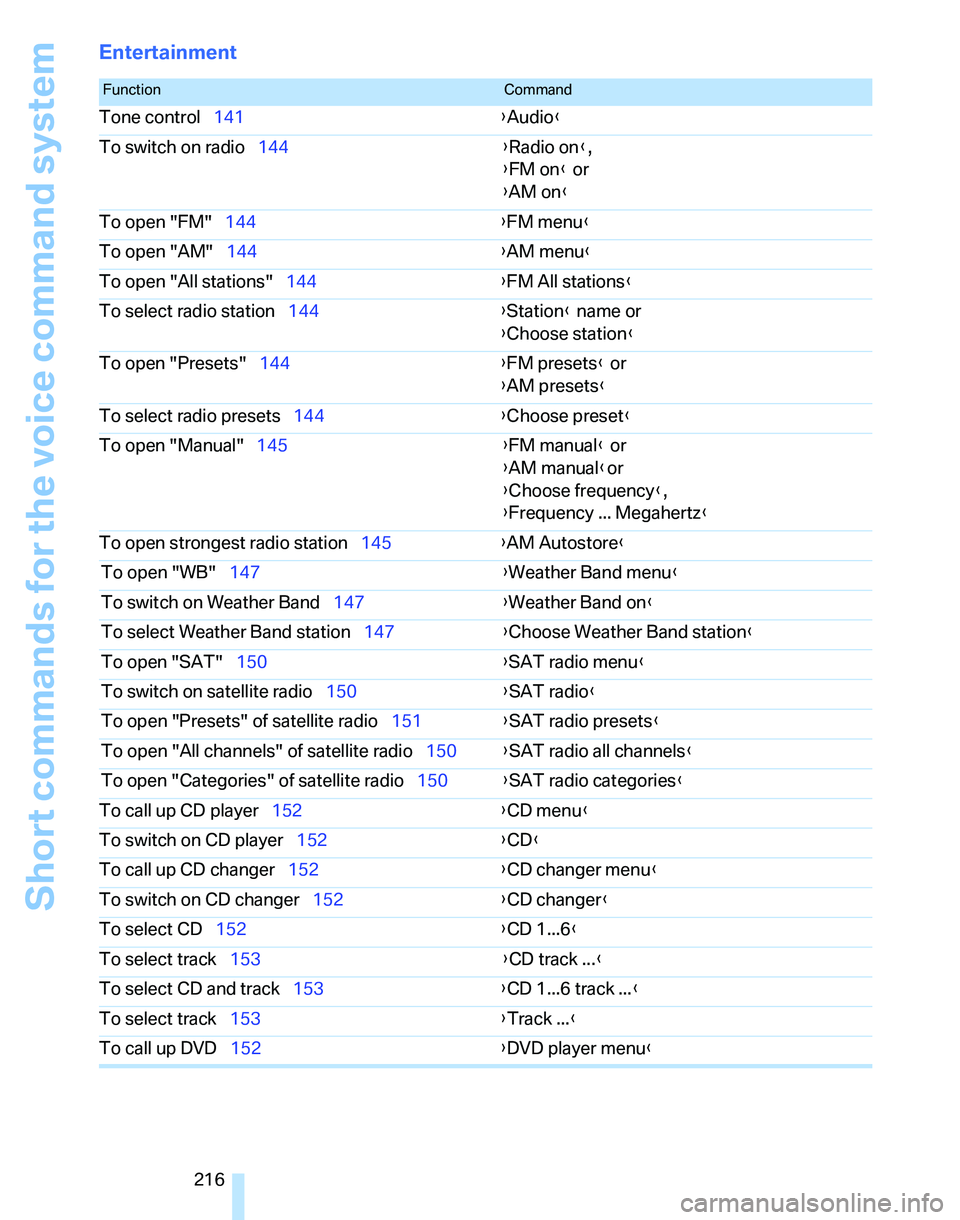
Short commands for the voice command system
216
Entertainment
FunctionCommand
Tone control141{Audio}
To switch on radio144{Radio on},
{FM on} or
{AM on}
To open "FM"144{FM menu}
To open "AM"144{AM menu}
To open "All stations"144{FM All stations}
To select radio station144{Station} name or
{Choose station}
To open "Presets"144{FM presets} or
{AM presets}
To select radio presets144{Choose preset}
To open "Manual"145{FM manual} or
{AM manual}or
{Choose frequency},
{Frequency ... Megahertz}
To open strongest radio station145{AM Autostore}
To open "WB"147{Weather Band menu}
To switch on Weather Band147{Weather Band on}
To select Weather Band station147{Choose Weather Band station}
To open "SAT"150{SAT radio menu}
To switch on satellite radio150{
SAT radio}
To open "Presets" of satellite radio151{SAT radio presets}
To open "All channels" of satellite radio150{SAT radio all channels}
To open "Categories" of satellite radio150{SAT radio categories}
To call up CD player152{CD menu}
To switch on CD player152{CD}
To call up CD changer152{CD changer menu}
To switch on CD changer152{CD changer}
To select CD152{CD 1...6}
To select track153{CD track ...}
To select CD and track153{CD 1...6 track ...}
To select track153{Track ...}
To call up DVD152{DVD player menu}
Page 229 of 236
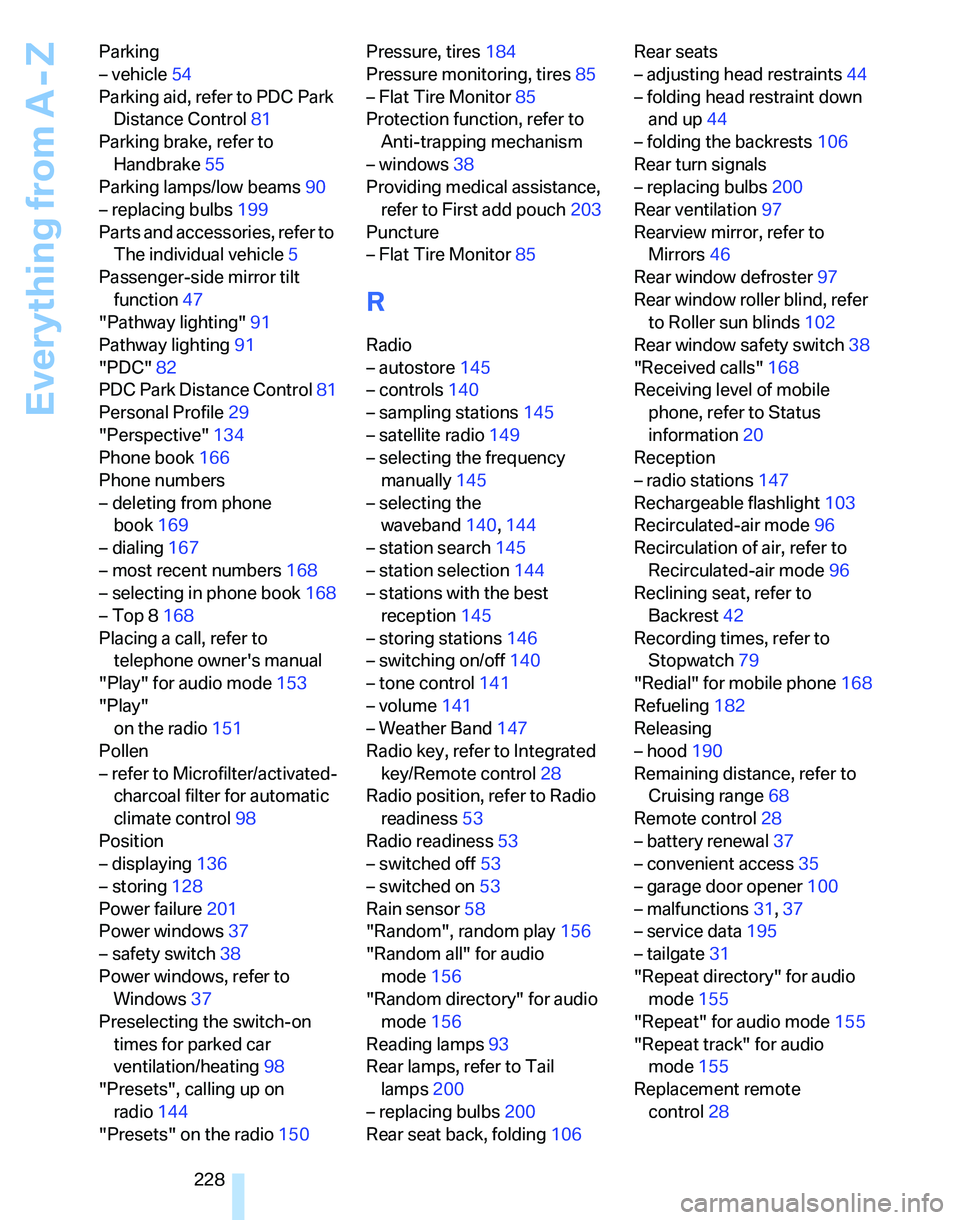
Everything from A - Z
228 Parking
– vehicle54
Parking aid, refer to PDC Park
Distance Control81
Parking brake, refer to
Handbrake55
Parking lamps/low beams90
– replacing bulbs199
Parts and accessories, refer to
The individual vehicle5
Passenger-side mirror tilt
function47
"Pathway lighting"91
Pathway lighting91
"PDC"82
PDC Park Distance Control81
Personal Profile29
"Perspective"134
Phone book166
Phone numbers
– deleting from phone
book169
– dialing167
– most recent numbers168
– selecting in phone book168
– Top 8168
Placing a call, refer to
telephone owner's manual
"Play" for audio mode153
"Play"
on the radio151
Pollen
– refer to Microfilter/activated-
charcoal filter for automatic
climate control98
Position
– displaying136
– storing128
Power failure201
Power windows37
– safety switch38
Power windows, refer to
Windows37
Preselecting the switch-on
times for parked car
ventilation/heating98
"Presets", calling up on
radio144
"Presets" on the radio150Pressure, tires184
Pressure monitoring, tires85
– Flat Tire Monitor85
Protection function, refer to
Anti-trapping mechanism
– windows38
Providing medical assistance,
refer to First add pouch203
Puncture
– Flat Tire Monitor85
R
Radio
– autostore145
– controls140
– sampling stations145
– satellite radio149
– selecting the frequency
manually145
– selecting the
waveband140,144
– station search145
– station selection144
– stations with the best
reception145
– storing stations146
– switching on/off140
– tone control141
– volume141
– Weather Band147
Radio key, refer to Integrated
key/Remote control28
Radio position, refer to Radio
readiness53
Radio readiness53
– switched off53
– switched on53
Rain sensor58
"Random", random play156
"Random all" for audio
mode156
"Random directory" for audio
mode156
Reading lamps93
Rear lamps, refer to Tail
lamps200
– replacing bulbs200
Rear seat back, folding106Rear seats
– adjusting head restraints44
– folding head restraint down
and up44
– folding the backrests106
Rear turn signals
– replacing bulbs200
Rear ventilation97
Rearview mirror, refer to
Mirrors46
Rear window defroster97
Rear window roller blind, refer
to Roller sun blinds102
Rear window safety switch38
"Received calls"168
Receiving level of mobile
phone, refer to Status
information20
Reception
– radio stations147
Rechargeable flashlight103
Recirculated-air mode96
Recirculation of air, refer to
Recirculated-air mode96
Reclining seat, refer to
Backrest42
Recording times, refer to
Stopwatch79
"Redial" for mobile phone168
Refueling182
Releasing
– hood190
Remaining distance, refer to
Cruising range68
Remote control28
– battery renewal37
– convenient access35
– garage door opener100
– malfunctions31,37
– service data195
– tailgate31
"Repeat directory" for audio
mode155
"Repeat" for audio mode155
"Repeat track" for audio
mode155
Replacement remote
control28
Page 230 of 236
Reference 229
At a glance
Controls
Driving tips
Communications
Navigation
Entertainment
Mobility
Replacing bulbs, refer to
Lamps and bulbs197
Replacing tires, refer to New
wheels and tires188
Reporting an accident, refer to
Initiating an emergency
call203
Reporting safety defects6
Reserve warning, refer to Fuel
gauge68
Reservoir for washer
systems59
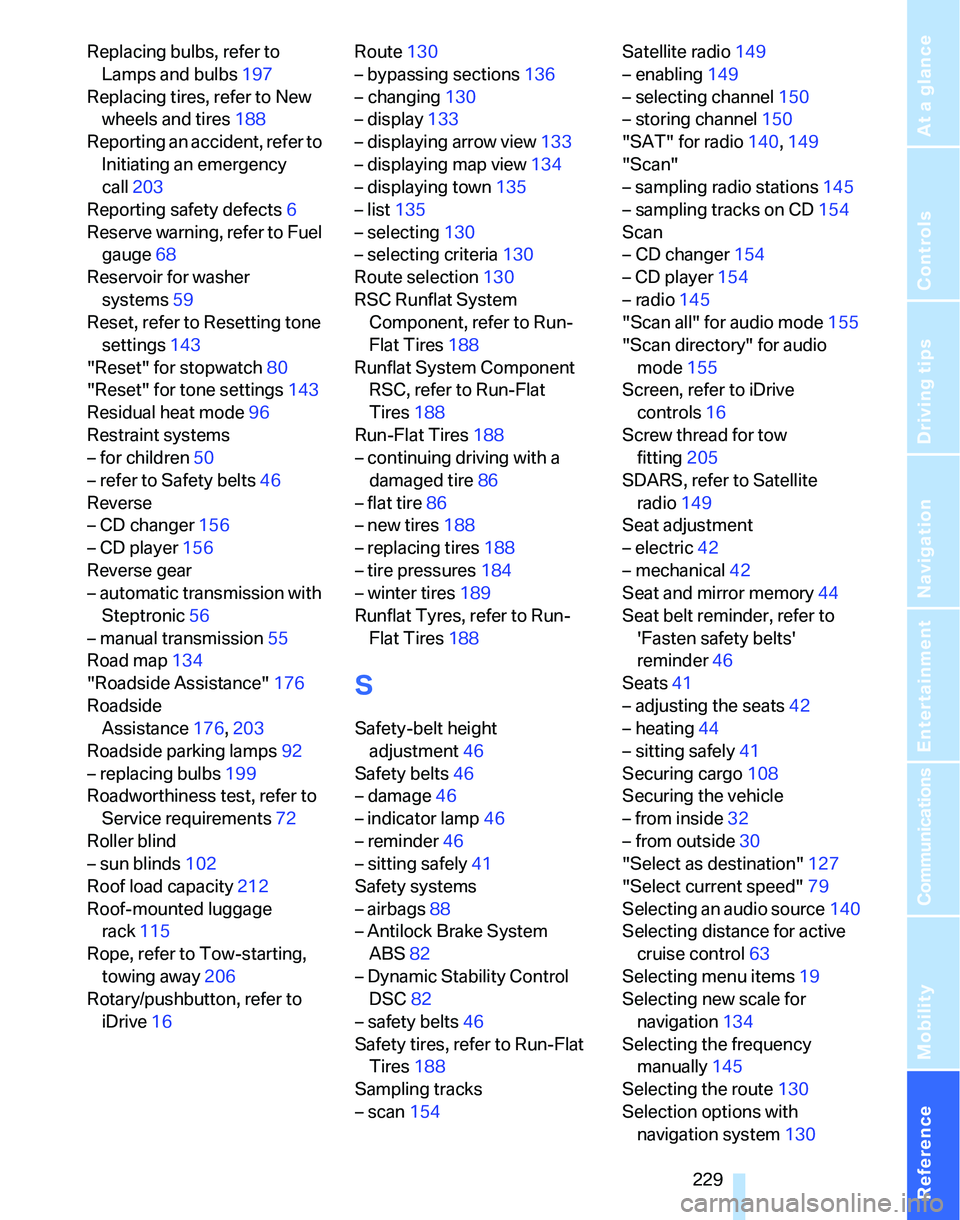
Reset, refer to Resetting tone
settings143
"Reset" for stopwatch80
"Reset" for tone settings143
Residual heat mode96
Restraint systems
– for children50
– refer to Safety belts46
Reverse
– CD changer156
– CD player156
Reverse gear
– automatic transmission with
Steptronic56
– manual transmission55
Road map134
"Roadside Assistance"176
Roadside
Assistance176,203
Roadside parking lamps92
– replacing bulbs199
Roadworthiness test, refer to
Service requirements72
Roller blind
– sun blinds102
Roof load capacity212
Roof-mounted luggage
rack115
Rope, refer to Tow-starting,
towing away206
Rotary/pushbutton, refer to
iDrive16Route130
– bypassing sections136
– changing130
– display133
– displaying arrow view133
– displaying map view134
– displaying town135
– list135
– selecting130
– selecting criteria130
Route selection130
RSC Runflat System
Component, refer to Run-
Flat Tires188
Runflat System Component
RSC, refer to Run-Flat
Tires188
Run-Flat Tires188
– continuing driving with a
damaged tire86
– flat tire86
– new tires188
– replacing tires188
– tire pressures184
– winter tires189
Runflat Tyres, refer to Run-
Flat Tires188
S
Safety-belt height
adjustment46
Safety belts46
– damage46
– indicator lamp46
– reminder46
– sitting safely41
Safety systems
– airbags88
– Antilock Brake System
ABS82
– Dynamic Stability Control
DSC82
– safety belts46
Safety tires, refer to Run-Flat
Tires188
Sampling tracks
– scan154Satellite radio149
– enabling149
– selecting channel150
– storing channel150
"SAT" for radio140,149
"Scan"
– sampling radio stations145
– sampling tracks on CD154
Scan
– CD changer154
– CD player154
– radio145
"Scan all" for audio mode155
"Scan directory" for audio
mode155
Screen, refer to iDrive
controls16
Screw thread for tow
fitting205
SDARS, refer to Satellite
radio149
Seat adjustment
– electric42
– mechanical42
Seat and mirror memory44
Seat belt reminder, refer to
'Fasten safety belts'
reminder46
Seats41
– adjusting the seats42
– heating44
– sitting safely41
Securing cargo108
Securing the vehicle
– from inside32
– from outside30
"Select as destination"127
"Select current speed"79
Selecting an audio source140
Selecting distance for active
cruise control63
Selecting menu items19
Selecting new scale for
navigation134
Selecting the frequency
manually145
Selecting the route130
Selection options with
navigation system130