Page 109 of 454
�Û�Ý�Û�Ý
When KEYLESS ACCESS LIGHT
FLASH is set to ON, some exterior
lights blink twice when you unlock
thedoorsbygrabbingthedriver’s
door handle while carrying the
remote.
While the multi-information display
is in the KEYLESS ACCESS SETUP
screen of the CUSTOMIZE GROUP,
press the SEL/RESET button. The
screen changes to CUSTOMIZE
MENU. Press the INFO ( / )
button until you see the above
display.
The same exterior lights blink once
when you lock the doors by touching
the door lock sensor while carrying
the remote.
Press the SEL/RESET button. The
screen changes as shown above.
Select ON or OFF by pressing the
INFO ( / ) button, then press the
SEL/RESET button to enter your
selection.
Multi-Inf ormation Display
K eyless A ccess L ight Flash
108
Page 111 of 454
�Û�Ý�Û�Ý
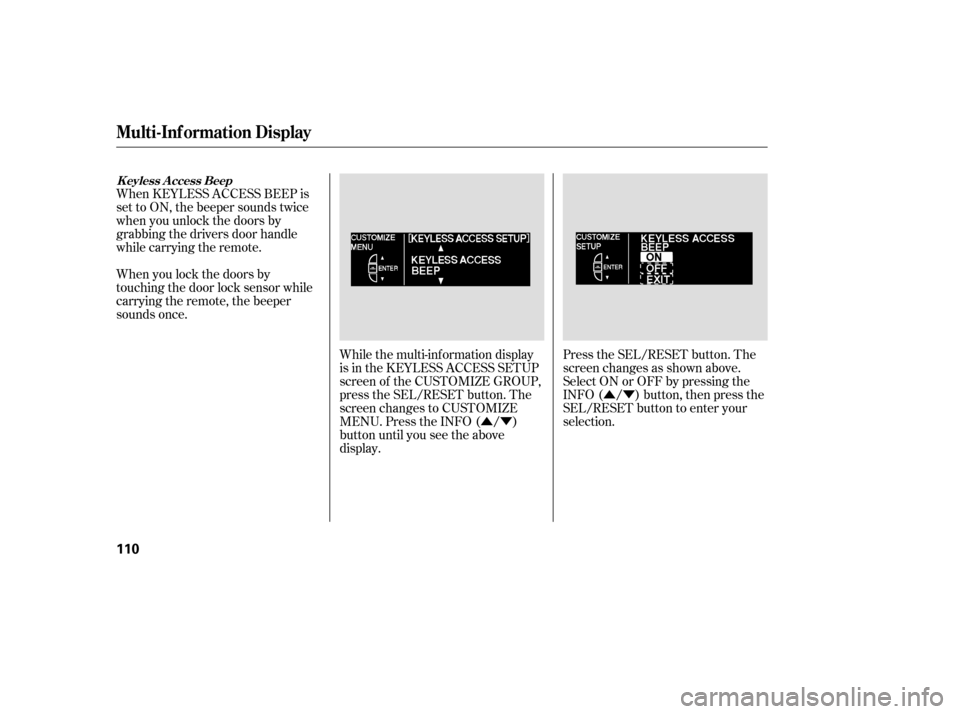
When KEYLESS ACCESS BEEP is
set to ON, the beeper sounds twice
when you unlock the doors by
grabbing the drivers door handle
while carrying the remote.
When you lock the doors by
touching the door lock sensor while
carrying the remote, the beeper
sounds once.
While the multi-information display
is in the KEYLESS ACCESS SETUP
screen of the CUSTOMIZE GROUP,
press the SEL/RESET button. The
screen changes to CUSTOMIZE
MENU. Press the INFO ( / )
button until you see the above
display.Press the SEL/RESET button. The
screen changes as shown above.
Select ON or OFF by pressing the
INFO ( / ) button, then press the
SEL/RESET button to enter your
selection.
Multi-Inf ormation Display
K eyless A ccess Beep
110
Page 120 of 454
�Û
�Ý
�Û
�Ý
�Û�Ý
�Û�Ý
CONT INUED
AUTO DOOR LOCK
AUTO DOOR UNLOCK
KEYLESS LOCK
ACKNOWLEDGEMENT
SECURITY RELOCK TIMER
While the multi-information display
is in the CUSTOMIZE GROUP
screen, select DOOR/WINDOW
SETUP by pressing the INFO ( / ) button, and then press the SEL/
RESET button. There are five settings to choose
f rom in the door/window setup:
Each time you press the INFO ( / ) button, the screen changes as
shown in the illustration. Press the
INFO ( / ) button, until you see
the setting you want to customize,
then press the SEL/RESET button
to enter your selection.
Multi-Inf ormation Display
Door/Window Setup
Inst rument s and Cont rols
119
Press the or button.
Press the SEL/RESET button. seepage120
see page122
seepage124
seepage126
seepage128
Page 121 of 454
�µ�µ
�µ �Û�Ý
There are three settings you can
choose f rom:
SHIFT FROM P
The doors lock whenever you move
the shift lever out of Park.
WITH VEH SPD
The doors lock when the vehicle
speed reaches about 10 mph (about
15 km/h).
OFF
The auto door lock is deactivated all
the time.
While the multi-information display
is in the DOOR/WINDOW screen of
the CUSTOMIZE GROUP, press the
SEL/RESET button. The screen
changes to the above display.Press the SEL/RESET button. The
screen changes as shown above.
Select the desired setting by
pressing the INFO ( / ) button,
then press the SEL/RESET button
to enter your selection.
Multi-Inf ormation Display
A ut o Door L ock
120
Page 122 of 454
�Û�Ý
To exit AUTO DOOR LOCK without
changing the current setting, select
EXIT by pressing the INFO ( / )
button, then press the SEL/RESET
button. The screen goes back to
CUSTOMIZE MENU.
When your choice is set, you will see
the above display f or several seconds,
then the screen goes back to
CUSTOMIZE ENTRY.
If your choice is not set, you will see
the above display f or several seconds,
then the screen goes back to
CUSTOMIZE ENTRY. If this
happens, you need to repeat the auto
door lock setup.
CONT INUED
Multi-Inf ormation Display
Inst rument s and Cont rols
121
Page 123 of 454
�Û�Ý
�µ
�µ �Û�Ý
�µ
There are three settings you can
choose f rom:
While the multi-information display
is in the DOOR/WINDOW SETUP
screen of the CUSTOMIZE GROUP,
press the SEL/RESET button. The
screen changes to CUSTOMIZE
MENU. Press the INFO ( / )
button until you see the above
display.
SHIFT TO P The driver’s door or
all the doors, depending on the door
lock mode setting ( see page ),
unlock when you move the shif t
lever to Park.
IGN OFF The driver’s door or all
the doors, depending on the door
lock mode setting ( see page ),
unlock when you turn the ignition
switch to the LOCK (0) position.
Press the SEL RESET button. The
screen changes as shown above.
Select the desired setting by
pressing the INFO ( / ) button,
then press the SEL/RESET button
to enter your selection.
OFF The auto door unlock is
deactivated all the time. This is the
factory default setting. 124 124
Multi-Inf ormation Display
A ut o Door Unlock
122
Page 124 of 454
�Û�Ý
To exit AUTO DOOR UNLOCK
without changing the current setting,
select EXIT by pressing the INFO
( / ) button, then press the SEL/
RESET button. The screen goes
back to CUSTOMIZE MENU.
When your choice is set, you will see
the above display f or several seconds,
then the screen goes back to
CUSTOMIZE ENTRY.
If your choice is not set, you will see
the above display f or several seconds,
then the screen goes back to
CUSTOMIZE ENTRY. If this
happens, you need to repeat the auto
door unlock setup.
CONT INUED
Multi-Inf ormation Display
Inst rument s and Cont rols
123
Page 125 of 454
�Û�Ý�Û
�Ý
To select whether the driver’s door
unlocks or all the doors unlock when
you unlock the doors with the
remote, f ollow these instructions.
While the multi-information display
is in the DOOR/WINDOW SETUP
screen of the CUSTOMIZE GROUP,
press the SEL/RESET button. The
screen changes to CUSTOMIZE
MENU. Press the INFO ( / )
button until you see above display.Press the SEL/RESET button. The
screen changes as shown above.
Select DRIVER DOOR or ALL
DOORS by pressing the INFO ( /
) button, then press the SEL/
RESET button to enter your
selection.
Multi-Inf ormation Display
Door L ock Mode
124