Page 192 of 263
2005 VOLVO XC90
CAUTION
- Do not touch the glass on the halogen bulbs with your fingers. Grease,\
oil, or any other impurities
can be carbonized onto the bulb and cause damage to the reflector.
- Be sure to use bulbs of the correct type and voltage.
Location of the bulbs in the headlight housing
1. Low beam headlight/Bi-Xenon headlight (option)
2. High beam headlight
3. Turn signal
4. Parking light
5. Side marker light
pg. 151 Maintenance
file:///K|/ownersdocs/2005/2005_XC90/05xc90_09b.htm (7 of 25)12/30/200\
6 4:42:40 PM
Page 194 of 263
2005 VOLVO XC90
5. Insert the new bulb (without touching the glass) in the holder.
6. Move the retaining spring up and push it slightly to the left until i\
t seats properly.
7. Press the bulb holder into place on the headlight housing.
8. Press the rubber cover into place.
Replacing the parking light/side marker light bulbs
1. Turn the lamp holder approximately 1/4 turn counterclockwise and pull\
it out of the headlight housing.
2. Pull the bulb straight out.
3. Align the guide lugs on the side of the base of the new bulb in the g\
rooves in the holder and press it
into place.
4. Press the lamp holder into the place in the headlight housing and tur\
n it approximately 1/4 turn
clockwise.
pg. 152 Maintenance
Bulbs (contd)
file:///K|/ownersdocs/2005/2005_XC90/05xc90_09b.htm (9 of 25)12/30/200\
6 4:42:40 PM
Page 196 of 263
2005 VOLVO XC90
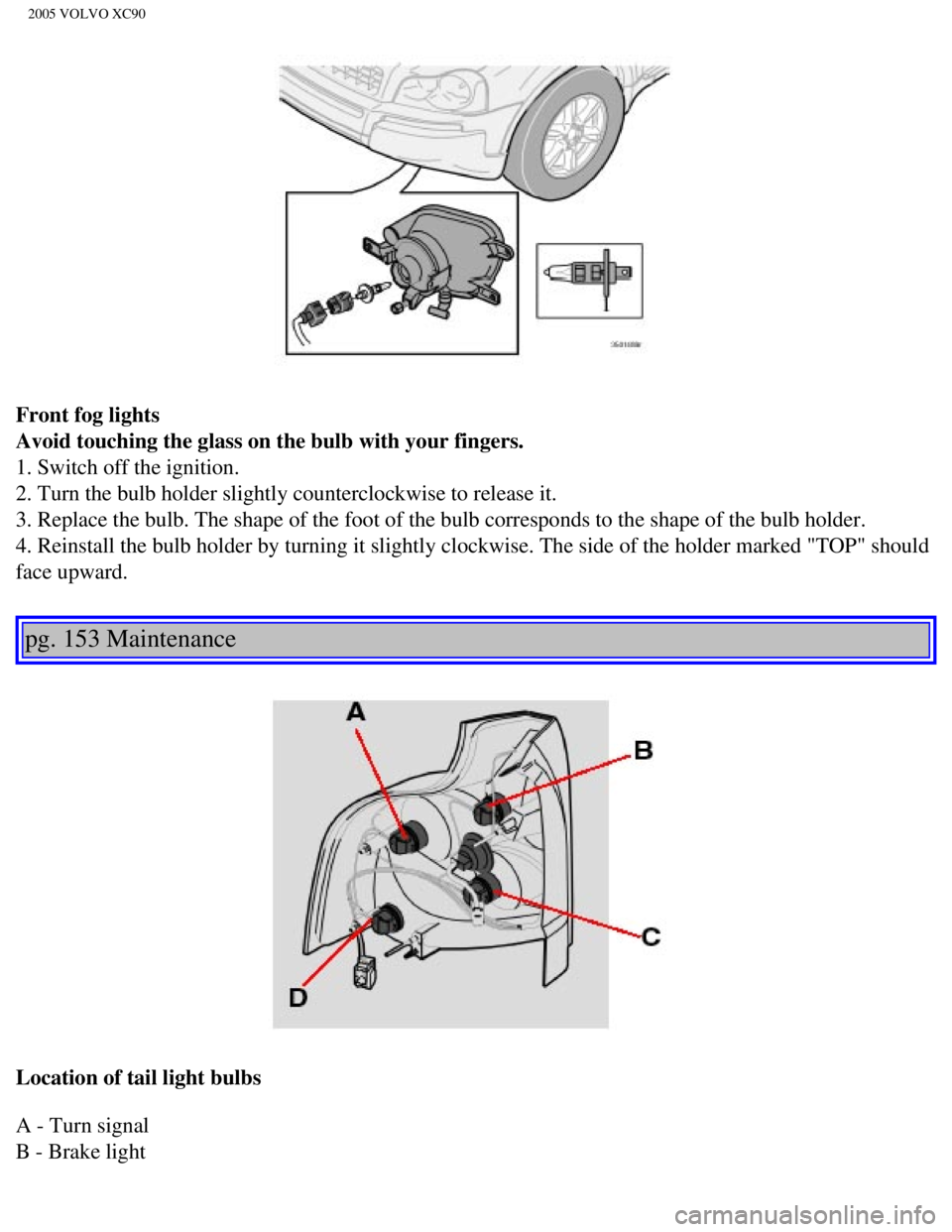
Front fog lights
Avoid touching the glass on the bulb with your fingers.
1. Switch off the ignition.
2. Turn the bulb holder slightly counterclockwise to release it.
3. Replace the bulb. The shape of the foot of the bulb corresponds to th\
e shape of the bulb holder.
4. Reinstall the bulb holder by turning it slightly clockwise. The side \
of the holder marked "TOP" should
face upward.
pg. 153 Maintenance
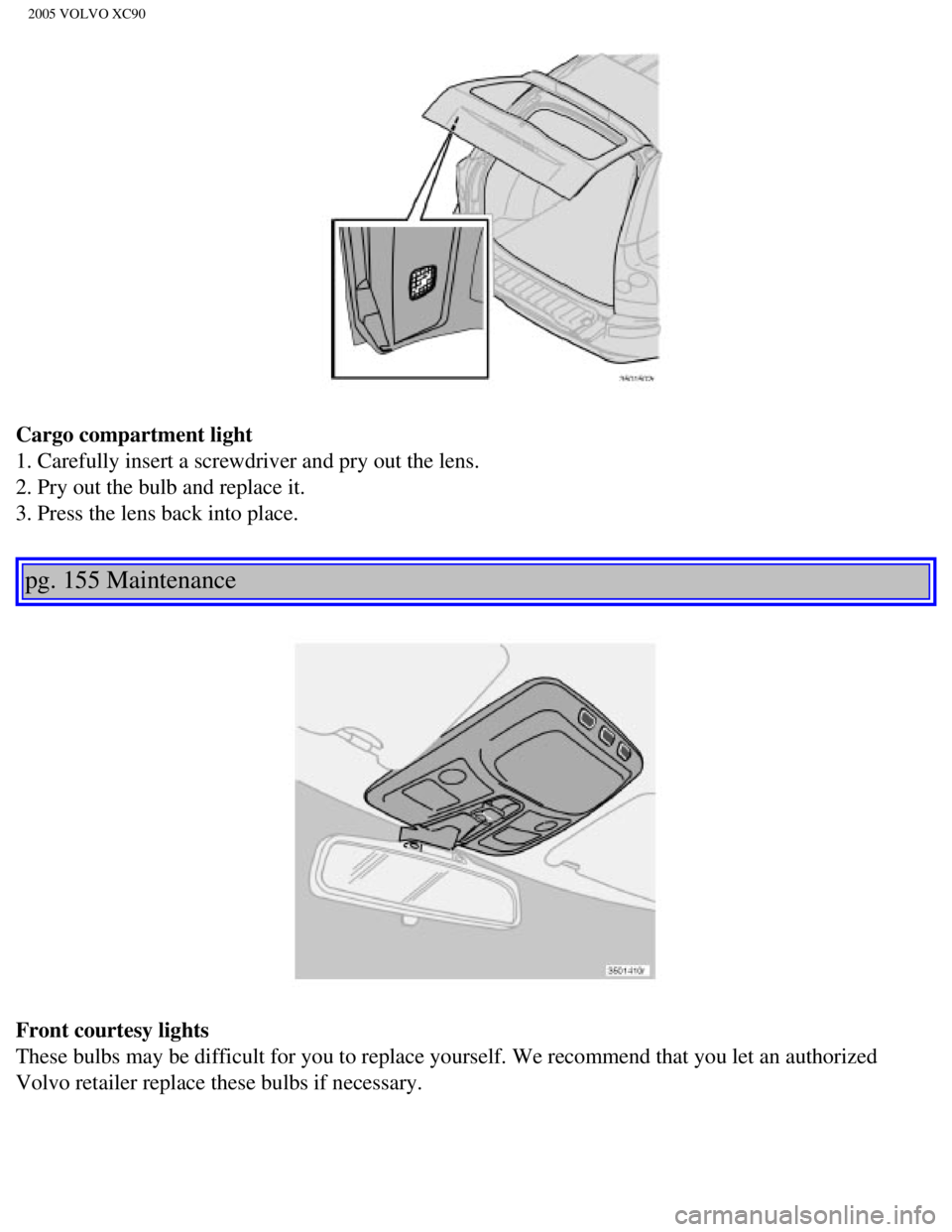
Location of tail light bulbs
A - Turn signal
B - Brake light
file:///K|/ownersdocs/2005/2005_XC90/05xc90_09b.htm (11 of 25)12/30/20\
06 4:42:40 PM
Page 197 of 263
2005 VOLVO XC90
C - Back-up light
D - Parking light
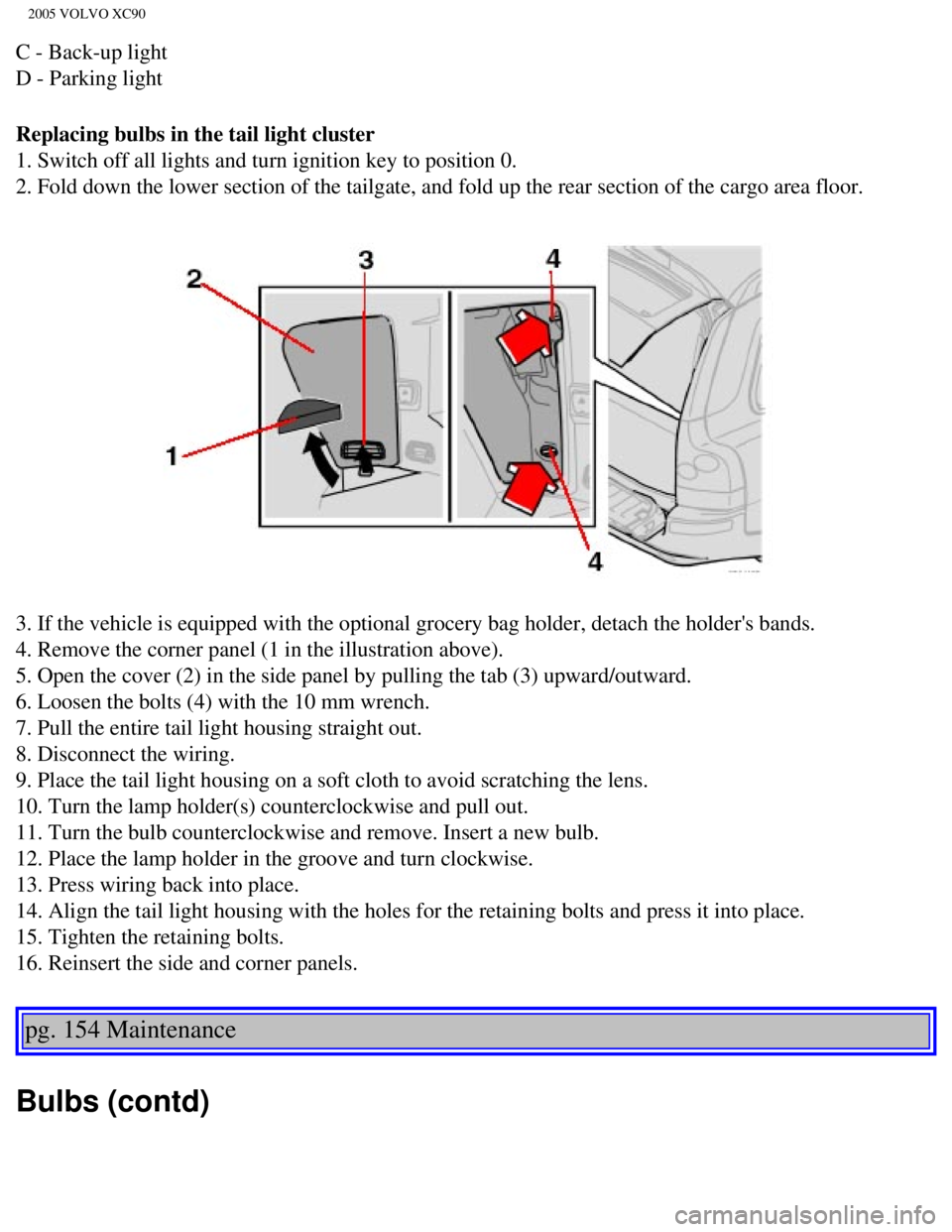
Replacing bulbs in the tail light cluster
1. Switch off all lights and turn ignition key to position 0.
2. Fold down the lower section of the tailgate, and fold up the rear sec\
tion of the cargo area floor.
3. If the vehicle is equipped with the optional grocery bag holder, deta\
ch the holder's bands.
4. Remove the corner panel (1 in the illustration above).
5. Open the cover (2) in the side panel by pulling the tab (3) upwar\
d/outward.
6. Loosen the bolts (4) with the 10 mm wrench.
7. Pull the entire tail light housing straight out.
8. Disconnect the wiring.
9. Place the tail light housing on a soft cloth to avoid scratching the \
lens.
10. Turn the lamp holder(s) counterclockwise and pull out.
11. Turn the bulb counterclockwise and remove. Insert a new bulb.
12. Place the lamp holder in the groove and turn clockwise.
13. Press wiring back into place.
14. Align the tail light housing with the holes for the retaining bolts \
and press it into place.
15. Tighten the retaining bolts.
16. Reinsert the side and corner panels.
pg. 154 Maintenance
Bulbs (contd)
file:///K|/ownersdocs/2005/2005_XC90/05xc90_09b.htm (12 of 25)12/30/20\
06 4:42:40 PM
Page 199 of 263
2005 VOLVO XC90
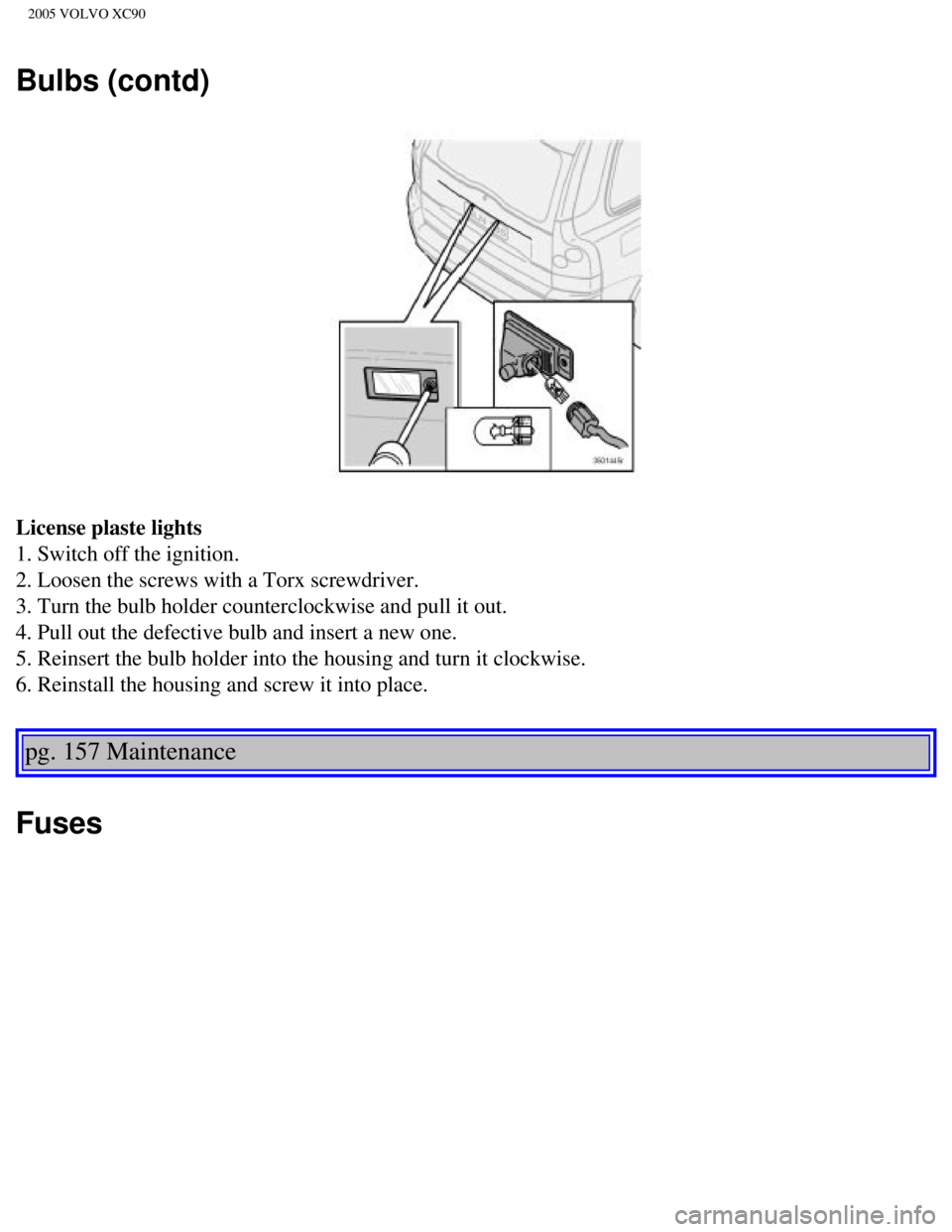
Cargo compartment light
1. Carefully insert a screwdriver and pry out the lens.
2. Pry out the bulb and replace it.
3. Press the lens back into place.
pg. 155 Maintenance
Front courtesy lights
These bulbs may be difficult for you to replace yourself. We recommend t\
hat you let an authorized
Volvo retailer replace these bulbs if necessary.
file:///K|/ownersdocs/2005/2005_XC90/05xc90_09b.htm (14 of 25)12/30/20\
06 4:42:40 PM
Page 200 of 263
2005 VOLVO XC90
Rear reading lights
These bulbs may be difficult for you to replace yourself. We recommend t\
hat you let an authorized
Volvo retailer replace these bulbs if necessary.
NOTE: Other bulbs may be difficult for you to replace yourself. Let an authori\
zed Volvo retailer
replace these bulbs if necessary.
Vanity mirror lights
1. Carefully insert a screwdriver and pry out the lens.
2. Pry out the bulb and replace it.
3. Carefully press the lower edge of lens onto the four tabs and press t\
he upper edge of the lens into
place.
pg. 156 Maintenance
file:///K|/ownersdocs/2005/2005_XC90/05xc90_09b.htm (15 of 25)12/30/20\
06 4:42:40 PM
Page 201 of 263
2005 VOLVO XC90
Bulbs (contd)
License plaste lights
1. Switch off the ignition.
2. Loosen the screws with a Torx screwdriver.
3. Turn the bulb holder counterclockwise and pull it out.
4. Pull out the defective bulb and insert a new one.
5. Reinsert the bulb holder into the housing and turn it clockwise.
6. Reinstall the housing and screw it into place.
pg. 157 Maintenance
Fuses
file:///K|/ownersdocs/2005/2005_XC90/05xc90_09b.htm (16 of 25)12/30/20\
06 4:42:40 PM
Page 203 of 263
2005 VOLVO XC90
WARNING!
Never use fuses with higher amperage than those stated on the following \
pages. Doing so could
overload the vehicle's electrical system.
pg. 158 Maintenance
Fuses (contd)
file:///K|/ownersdocs/2005/2005_XC90/05xc90_09b.htm (18 of 25)12/30/20\
06 4:42:40 PM

 in the holder.
6. Move the retaining spring up and push it slightly to the left until i\
t seats properly.
7. Press the bulb hold")