2005 VOLVO XC90 door lock
[x] Cancel search: door lockPage 111 of 263

2005 VOLVO XC90
Power child locks (option)
To prevent the rear doors from being opened from the inside:
1. Turn the vehicle's ignition key to at least position 1.
2. Press the button shown above.
Indicator light in the button ON: the doors cannot be opened from the inside. Normal operation from
the outside.
Indicator light in the button OFF: the doors can be opened from the inside.
pg. 82 Locks and Alarms
Alarm
Alarm
The alarm is automatically armed whenever you lock your vehicle.
When armed, the alarm continuously monitors a number of points on the ve\
hicle. The following
conditions will set off the alarm:
l The hood is forced open.
l The tailgate is forced open.
l A door is forced open.
l The ignition switch is tampered with.
l If there is movement in the passenger compartment (if the vehicle is eq\
uipped with the optional
movement sensor).
l The vehicle is lifted or towed (if the vehicle is equipped with the opt\
ional inclination sensor).
l The battery is disconnected (while the alarm is armed).
l The siren is disconnected when the alarm is disarmed.
Arming the alarm
Press the LOCK button on the remote control, lock the vehicle using the \
key in the driver's door or press
the central lock button on one of the front doors with the door open. On\
e long flash of the turn signals
will confirm that the alarm is armed.
Disarming the alarm
Press the UNLOCK button on the remote control or unlock the doors with t\
he key.
Turning off (stopping) the alarm
If the alarm is sounding, it can be stopped by pressing the UNLOCK butto\
n on the remote control or by
unlocking the driver's door with the key.
file:///K|/ownersdocs/2005/2005_XC90/05xc90_05.htm (10 of 13)12/30/200\
6 4:42:32 PM
Page 113 of 263

This device may not cause harmful interference, and (2)")
2005 VOLVO XC90
FCC ID: MAYDA5823
This device complies with part 15 of the FCC rules. Operation is subject\
to the following conditions: (1)
This device may not cause harmful interference, and (2) this device mu\
st accept any interference
received, including interference that may cause undesired operation.
Canadian IC: 4405A-DA5823
Movement sensor DA5823 by Dynex
Operation is subject to the following conditions: (1) this device may \
not cause interference, and (2) this
device must accept any interference, including interference that may cau\
se undesired operation of the
device.
In certain situations it may be desirable to turn off the accessory incl\
ination and movement alarm
sensors if, for example, you drive your vehicle onto a ferry where the r\
ocking of the boat could trigger
the alarm or if a pet is left in the vehicle with the doors locked.
To temporarily turn off the inclination and movement alarm sensors from \
the alarm system:
From the time the ignition key is turned from the Drive position (posit\
ion II) until you lock the vehicle,
you can press the button in the center console. The LED in the switch wi\
ll light up and a message will be
displayed in the text window to indicate that the sensors are disconnect\
ed.
The vehicle can then be locked in the usual way to set the alarm.
NOTE:
l This function will not turn off the vehicle's standard alarm.
l The optional sensors are automatically reconnected to the alarm system t\
he next time the vehicle is
unlocked and then locked again.
LED alarm status signals
The status of the alarm system is indicated by the red LED at the top of\
the dash:
l LED off - the alarm is not armed
l LED flashes once per second - the alarm is armed
l LED flashes rapidly before the ignition is switched on - the alarm has b\
een triggered
l Fault in the alarm system: If a fault has been detected in the alarm system, a message will be
displayed in the text window. Contact your Volvo retailer.
Automatic re-lock/re-arm system
If the vehicle is unlocked with the remote, the vehicle will re-lock and\
the alarm will re-arm after 2
minutes unless a door or the tailgate has been opened.
pg. 84 Locks and Alarms
file:///K|/ownersdocs/2005/2005_XC90/05xc90_05.htm (12 of 13)12/30/200\
6 4:42:32 PM
Page 118 of 263

2005 VOLVO XC90
engine, and some of these additives contain organically volatile chemica\
ls. Do not needlessly expose
yourself to these chemicals.
pg. 88 Starting and driving
Fuel filler door
Press the button on the light switch panel (see illustration on
page 33) when the vehicle is at a standstill
to unlock the fuel filler door. Please note that the fuel filler door wi\
ll remain unlocked until the vehicle
begins to move forward. An audible click will be heard when the fuel fil\
ler door relocks.
If you intend to leave your vehicle while it is being refueled, this fea\
ture enables you to lock the doors/
tailgate while leaving the fuel filler door unlocked.
You can also keep the vehicle locked if you remain inside it during refu\
eling. The central locking button
does not lock the fuel filler door.
Be sure the fuel filler door is not obstructed and is completely closed \
after refueling.
Open the fuel filler cap slowly during hot weather.
NOTE: During a transitional period, a small number of service stations may st\
ill have fuel nozzles that
are not compatible with the fuel filler neck on vehicles equipped with t\
he evaporative control system.
Refueling
Fuel tank capacity:
6-cylinder turbo - 19 US gallons (72 liters), 5-cylinder turbo - 18 US\
gallons (68 liters) with sufficient
volume left over to accommodate possible expansion of the fuel in hot we\
ather. Be aware that the
"usable" tank capacity will be somewhat less than the specified maximum.\
When the fuel level is low,
such factors as ambient temperature, the fuel's "Reid vapor pressure" ch\
aracteristics, and terrain can
file:///K|/ownersdocs/2005/2005_XC90/05xc90_06a.htm (4 of 16)12/30/200\
6 4:42:33 PM
Page 150 of 263
. Do not spray into the locks.
- When washing or steam cleaning t")
2005 VOLVO XC90
CAUTION
- During high pressure washing, the spray mouthpiece must never be close\
r to the vehicle than
13" (30 cm). Do not spray into the locks.
- When washing or steam cleaning the engine, avoid spraying water or ste\
am directly on the electrical
components or toward the rear side of the engine.
Special moonroof cautions:
- Always close the moonroof and visor before washing your vehicle.
- Never use abrasive cleaning agents on the moonroof.
- Never use wax on the rubber seals around the moonroof.
l After cleaning the engine, the spark plug wells should be inspected for \
water and blown dry if
necessary.
Suitable detergents: Special vehicle washing detergents should be used. A suitable mixture i\
s about 2.5
fl. oz. (8.5 cl) of detergent to 2.6 US gal. (10 liters) of warm wat\
er. After washing with a detergent the
vehicle should be well rinsed with clean water.
Bumpers: Wash the bumpers with the same cleaning agent used on the rest of the v\
ehicle. Never clean
the bumpers with gasoline or paint thinner. Difficult spots can be remov\
ed with denatured alcohol. To
avoid scratches, do not dry the bumpers with paper.
NOTE: When washing the vehicle, remember to remove dirt from the drain holes i\
n the doors and sills.
WARNING!
When the vehicle is driven immediately after being washed, apply the bra\
kes several times in order to
remove any moisture from the brake linings.
Engine cleaning agents should not be used when the engine is warm. This \
constitutes a fire risk.
pg. 131 Vehicle care
Automatic washing - simple and quick
l We do NOT recommend washing your vehicle in an automatic wash during the\
first six months
(because the paint will not have hardened sufficiently).
l An automatic wash is a simple and quick way to clean your vehicle, but i\
t is worth remembering that
it may not be as thorough as when you yourself go over the vehicle with \
sponge and water. Keeping the
underbody clean is most important, especially in the winter. Some automa\
tic washers do not have
facilities for washing the underbody.
l Before driving into an automatic car wash, make sure that side view mirr\
ors, auxiliary lamps, etc, are
secure, and that any antenna(s) are retracted or removed. Otherwise th\
ere is risk of the machine
file:///K|/ownersdocs/2005/2005_XC90/05xc90_07.htm (2 of 6)12/30/2006 \
4:42:36 PM
Page 198 of 263
2005 VOLVO XC90
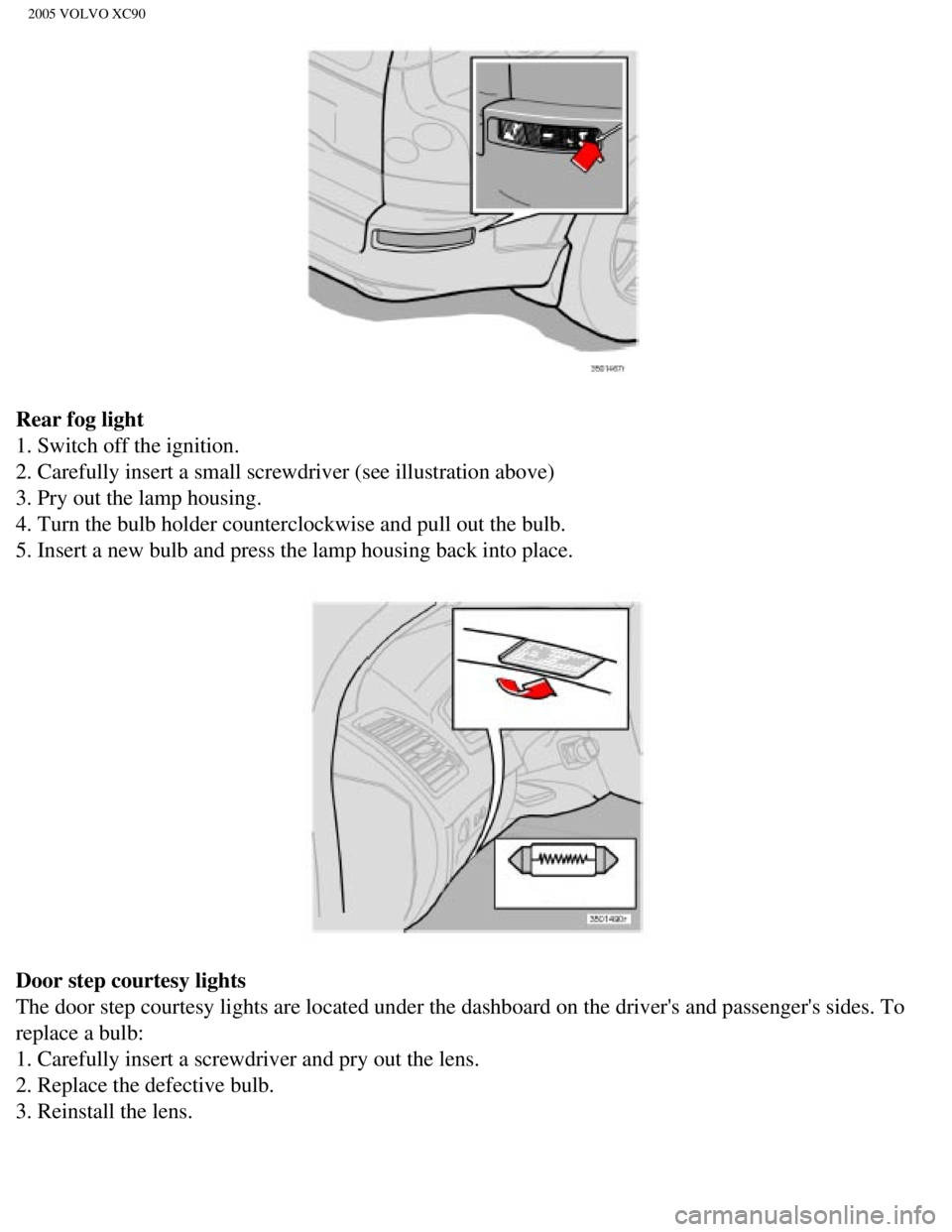
Rear fog light
1. Switch off the ignition.
2. Carefully insert a small screwdriver (see illustration above)
3. Pry out the lamp housing.
4. Turn the bulb holder counterclockwise and pull out the bulb.
5. Insert a new bulb and press the lamp housing back into place.
Door step courtesy lights
The door step courtesy lights are located under the dashboard on the dri\
ver's and passenger's sides. To
replace a bulb:
1. Carefully insert a screwdriver and pry out the lens.
2. Replace the defective bulb.
3. Reinstall the lens.
file:///K|/ownersdocs/2005/2005_XC90/05xc90_09b.htm (13 of 25)12/30/20\
06 4:42:40 PM
Page 206 of 263

2005 VOLVO XC90
5. Driver's door - central locking, power windows, door mirror25A
6. Front passenger's door - central locking, power windows, door mirror \
25A
7. -
8. -
9. Audio, navigation system (option) 10A
10. On-board diagnostics, headlight switch, steering wheel angle sensor,\
steering wheel
module 5A
11. Ignition switch, SRS, engine control module, immobilizer 7.5A
12. Ceiling lighting, upper electronic control module 10A
13. Moonroof (option) 15A
14. -
15. -
16. -
17. -
18. -
19. -
20. -
21. -
22. -
23. -
24. -
25. -
26. -
27. -
28. -
29. -
30. -
31. -
32. -
33. -
34. -
35. -
36. -
37. -
38.-
file:///K|/ownersdocs/2005/2005_XC90/05xc90_09b.htm (21 of 25)12/30/20\
06 4:42:40 PM
Page 246 of 263

2005 VOLVO XC90
can be dried with a clean, lint-free cloth. Optical components in the CD\
changer may, however, take up
to one hour to dry off.
l Never attempt to play a disc which is damaged in any way.
l When not in use, the discs should be stored in their covers. Avoid stori\
ng discs in excessive heat,
direct sunlight or dusty locations.
pg. 196 Audio
HomeLink® Universal Transceiver
Hand-held transmitter
HomeLink® Universal Transceiver
HomeLink® is an advanced system that can be programmed to learn the c\
odes of three different remote
controlled-devices (e.g., garage door openers, remote lighting, entry d\
oor lock). HomeLink®'s sun visor-
mounted transceiver, powered by your vehicle's electrical system, may th\
en be used in place of your
hand-held remote controls.
NOTE: For your security, the HomeLink® Universal Transceiver is designed to\
not function if you lock
your vehicle from the outside.
Programming the transceiver
1. The ignition switch must be turned to the "accessory" position (II)\
before programming the
HomeLink® Universal Transceiver.
2. Begin by erasing all 3 factory default channels. Hold down the two ou\
tside buttons (buttons 1 and 3 in
the illustration) on the HomeLink® Universal Transceiver for about 2\
0 seconds, until HomeLink®'s
indicator light begins to flash. Then release the buttons.
file:///K|/ownersdocs/2005/2005_XC90/05xc90_11b.htm (8 of 11)12/30/200\
6 4:42:44 PM
Page 247 of 263
 2\
to 5 in. (5 to 12 cm) away from
the HomeLink® surface, keeping the indicator light in view. For place\
ment")
2005 VOLVO XC90
3. Hold your hand-held transmitter (garage door opener, for example) 2\
to 5 in. (5 to 12 cm) away from
the HomeLink® surface, keeping the indicator light in view. For place\
ment questions, contact
HomeLink® toll-free 1-800-355-3515 (Internet:
www.HomeLink.com).
4. Using two hands, push and hold both your hand-held transmitter's butt\
on and the transceiver button
you wish to program. The indicator light will flash first slowly, then r\
apidly. Rapid flashing tells you the
HomeLink® button has been successfully programmed. Release both butto\
ns.
5. If you are programming a rolling code-equipped device (e.g., garage \
door opener or entry door lock),
refer to "Programming rolling codes" on the next page to complete the pr\
ogramming process.
Repeat steps 3 and 4 to program the other two transceiver buttons.
If, after several attempts, you are unable to successfully train the Hom\
eLink® Universal Transceiver to
learn your hand-held transmitter's signal, contact HomeLink® toll-fre\
e 1-800-355-3515 (Internet:
www.
HomeLink.com).
pg. 197 Audio
WARNING!
- If you use HomeLink® to open a garage door or gate, be sure no one \
is near the gate or door while it
is in motion.
- Do not use the HomeLink® Universal Transceiver with any garage door\
opener that lacks safety
"stop" and "reverse" features as required by federal safety standards. (\
This includes any garage door
opener model manufactured before April 1, 1982). A garage door opener t\
hat cannot "detect" an
object, signalling the door to "stop" and "reverse" does not meet curren\
t federal safety standards.
Using a garage door opener without these features increases the risk of \
serious injury or death. For
more information on this matter, call toll-free 1-800-355-3515 (Interne\
t:
www.HomeLink.com).
NOTE: Canadian residents: During programming, your hand-held transmitter may automatically stop
transmitting. To successfully train HomeLink®, continue to hold the H\
omeLink® button. At the same
time, repeatedly press and hold your hand-held transmitter's button at t\
wo-second intervals until
HomeLink® has learned your transmitter's code. The HomeLink® indic\
ator light will flash first slowly,
and then rapidly to indicate that the button has been successfully progr\
ammed.
Determining if your garage door uses a rolling code
Determine, in one of the following ways, if your garage door uses a roll\
ing code system and is
manufactured after 1996:
file:///K|/ownersdocs/2005/2005_XC90/05xc90_11b.htm (9 of 11)12/30/200\
6 4:42:44 PM