Page 206 of 263
2005 VOLVO XC90
5. Driver's door - central locking, power windows, door mirror25A
6. Front passenger's door - central locking, power windows, door mirror \
25A
7. -
8. -
9. Audio, navigation system (option) 10A
10. On-board diagnostics, headlight switch, steering wheel angle sensor,\
steering wheel
module 5A
11. Ignition switch, SRS, engine control module, immobilizer 7.5A
12. Ceiling lighting, upper electronic control module 10A
13. Moonroof (option) 15A
14. -
15. -
16. -
17. -
18. -
19. -
20. -
21. -
22. -
23. -
24. -
25. -
26. -
27. -
28. -
29. -
30. -
31. -
32. -
33. -
34. -
35. -
36. -
37. -
38.-
file:///K|/ownersdocs/2005/2005_XC90/05xc90_09b.htm (21 of 25)12/30/20\
06 4:42:40 PM
Page 217 of 263

2005 VOLVO XC90
Conserving.
Oil additives must not be used.
Transmission
Oil grade:
JWS 3309
Different types of oil should never be mixed.
Power steering
Grade: Volvo synthetic power steering fluid (Pentosin CHF 11S) P/N 1161529 \
or equivalent.
Brake fluid
Fluid type: DOT 4+ boiling point >536°F (280°C), P/N 9437433
Cooling system
Type Positive pressure, closed system.
Coolant Volvo original coolant/antifreeze
Volume 5-cyl. turbo 9.5 US qts. (9.0 liters)
6-cyl. turbo 11.0 US qts (10.5 liters)
The thermostat begins to open at 194°F (90°C).
pg. 169 Specifications
Suspension
Rear suspension
Individual rear wheel suspension with longitudinal support arms, double \
link arms and track rods.
Front suspension
Spring strut suspension with integrated shock absorbers and control arms\
linked to the support frame.
Power-assisted rack and pinion steering. Safety type steering column.
pg. 170 Specifications
Three-way catalytic converter cautions
file:///K|/ownersdocs/2005/2005_XC90/05xc90_10.htm (7 of 10)12/30/2006\
4:42:41 PM
Page 223 of 263
2005 VOLVO XC90
Steering wheel keypad (option)
The four buttons on the steering wheel keypad can be used to control the\
audio system. The steering
wheel keypad can be used to adjust volume, shift between preset stations\
and change CD tracks.
l Press the or buttons briefly to search for a radio station, or to go to the next/pre\
vious
track on a CD
l Press and hold down these buttons to search within a track.
Display
The display (1) shows the currently selected function, menu selections\
, etc.
Clean the display with a dry, soft, lint-free cloth. Do not use cleaning\
agents.
Accessing and using menus
In menu mode, you can change settings and program new functions in the a\
udio system. The various
file:///K|/ownersdocs/2005/2005_XC90/05xc90_11a.htm (3 of 18)12/30/200\
6 4:42:43 PM
Page 227 of 263
 clockwise or counterclockwise to raise or lower the \
volume. The volume control is
electronic and has no end positio")
2005 VOLVO XC90
ignition is switched on again.
Volume control
Turn the knob (2) clockwise or counterclockwise to raise or lower the \
volume. The volume control is
electronic and has no end position. Volume can also be raised (+) or l\
owered (-) using the optional
steering wheel keypad.
Pause mode
If the volume is turned off, the CD player will go into pause mode. Re-a\
ctivate the player by turning up
the volume.
Selecting a sound source
A sound source can be selected either with the function buttons (3) - \
CD, AM/FM, or with the
SELECTOR control (4).
To select a sound source:
l Turn the SELECTOR control to choose FM1, FM2, AM, CD, CD changer (optio\
n)
l Press the AM/FM button repeatedly to choose between FM1, FM2, AM
l Press the CD button to change to the CD player or optional CD changer
The selected sound source will be shown in the display.
pg. 181 Audio
Sound settings
1. Press the SOUND button (1) repeatedly until you come to the setting\
that you wish to change. Choose
BASS, TREBLE, FADER, BALANCE, SUBWOOFER (option), CENTER (option) or\
SURROUND
file:///K|/ownersdocs/2005/2005_XC90/05xc90_11a.htm (7 of 18)12/30/200\
6 4:42:43 PM
Page 231 of 263
2005 VOLVO XC90
Station search
1. Choose radio mode AM/FM1/FM2 using the SELECTOR control (1) or the \
AM/FM button (2).
2. Press briefly on
or to search for the next strong station. The radio will search for the ne\
xt
audible station and then stop.
3. Press one of the buttons again to start a new search.
Manually search for a known frequency
1. Press and hold the
or button (or the corresponding buttons on the steering wheel
keypad). MAN will be shown in the display. The radio will slowly scroll\
in the desired direction and
then increase speed after a few seconds.
2. Release the button when the desired frequency is displayed.
3. If you need to adjust the frequency, press briefly on
or .
4. The manual search function is available for five seconds after you la\
st pressed the button.
pg. 185 Audio
file:///K|/ownersdocs/2005/2005_XC90/05xc90_11a.htm (11 of 18)12/30/20\
06 4:42:43 PM
Page 241 of 263
 or the CD button \
(2).
2. Insert a CD into the player.
CD Pause
To pause CD playback, turn the volume all the")
2005 VOLVO XC90
Starting the CD
1. Select the CD mode using the SELECTOR control (1) or the CD button \
(2).
2. Insert a CD into the player.
CD Pause
To pause CD playback, turn the volume all the way down. "CD paused" will\
be displayed. This will not
occur if someone in the rear seat is listening to the CD through the opt\
ional headphones.
Play will resume when the volume is turned up again.
Changing tracks
Press
to go to the next track or to go to the previous track. The track number is shown in the
display. If you have a keypad in the steering wheel, you can use the arr\
ow keys in the same way.
Searching within a track
Press and hold down
or to search within a track or the whole disc. The search continues as
long as the buttons are depressed. If you have a keypad in the steering \
wheel, you can use the arrow keys
in the same way.
Random play
This function plays the tracks on a CD in random order (shuffle).
1. Press the MENU button.
2. Select RANDOM and press ENTER.
3. RND is shown in the display as long as the function is activated.
4. Go into the menu and select RANDOM OFF to stop random play, or press \
EXIT.
file:///K|/ownersdocs/2005/2005_XC90/05xc90_11b.htm (3 of 11)12/30/200\
6 4:42:44 PM
Page 244 of 263
2005 VOLVO XC90
Changing tracks
Press
to go to the next track or to go to the previous track. The track number is shown in
the display. If you have a keypad in the steering wheel, you can use the\
arrow keys in the same way.
Searching within a track
Press and hold down
or to search within a track or the whole disc. The search continues as
long as the buttons are depressed. If you have a keypad in the steering \
wheel, you can use the arrow keys
in the same way.
pg. 194 Audio
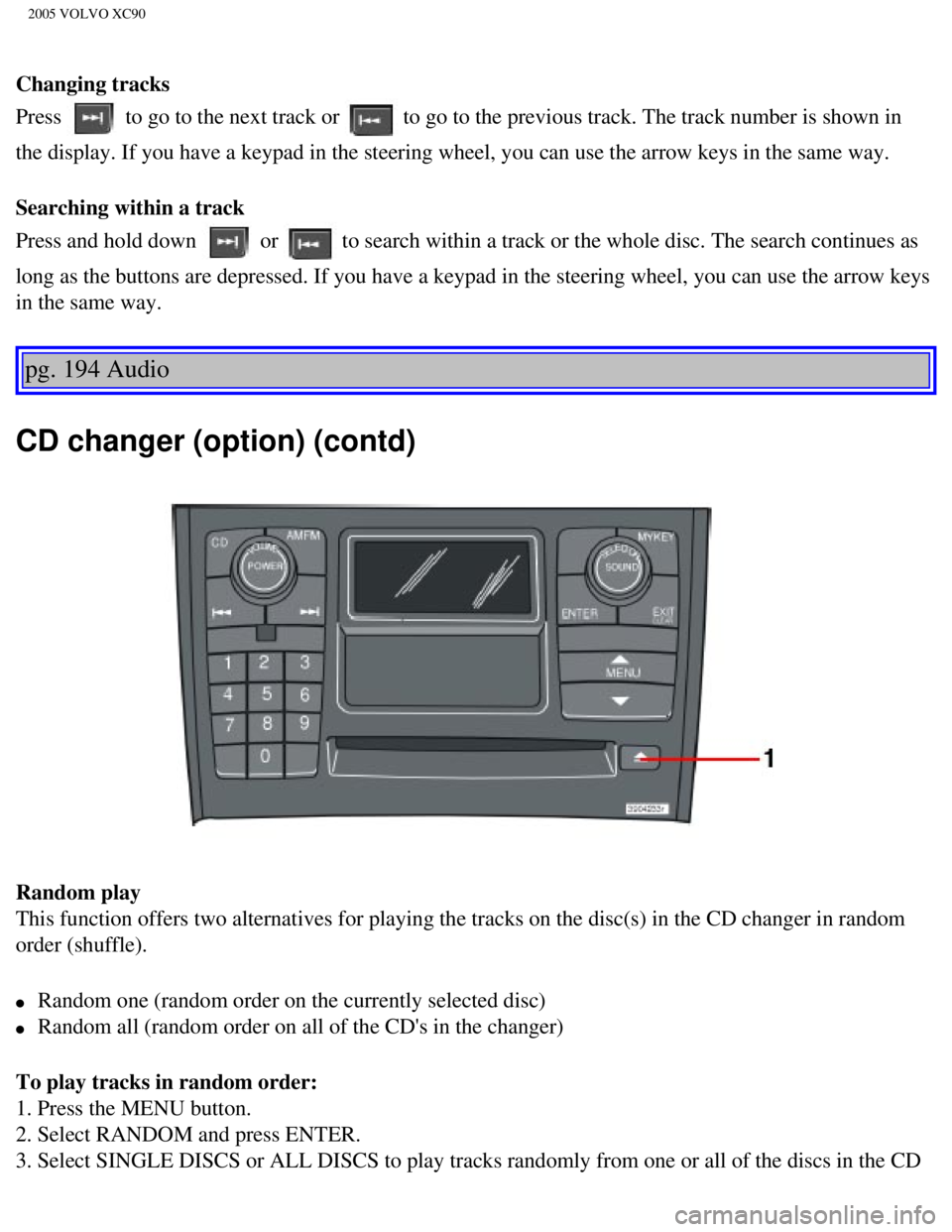
CD changer (option) (contd)
Random play
This function offers two alternatives for playing the tracks on the disc\
(s) in the CD changer in random
order (shuffle).
l Random one (random order on the currently selected disc)
l Random all (random order on all of the CD's in the changer)
To play tracks in random order:
1. Press the MENU button.
2. Select RANDOM and press ENTER.
3. Select SINGLE DISCS or ALL DISCS to play tracks randomly from one or \
all of the discs in the CD
file:///K|/ownersdocs/2005/2005_XC90/05xc90_11b.htm (6 of 11)12/30/200\
6 4:42:44 PM
Page 250 of 263
2005 VOLVO XC90
2 0 0 5
VOLVO XC90
Index
pg. 199-203 Index
A
A/C (air conditioning)
54
ABS
ii, 27, 98
Adjustable steering wheel
35
Air bags - dual threshold/stage
5
Air cleaner
140
Air distribution
51, 54
Air Quality sensor
55
Air vents
51
Airbag - Side Impact (SIPS)
12
Alarm
82
All Wheel Drive
96
All Wheel Drive - towing
103
Anchorages, for child seats
21
Anti-lock Brake System (ABS)
ii, 27
Approach lighting
35
Ashtray
43, 68
Audio system
175
AUTO (climate control)
53
Automatic climate control, ECC
52
Automatic gearbox
91
Automatic Locking Retractor
22
file:///K|/ownersdocs/2005/2005_XC90/05xc90_12.htm (1 of 14)12/30/2006\
4:42:46 PM


The four buttons on the steering wheel keypad can be used to control the\
audio system. The steering
wheel keypad can be used to adjust volume, shift")
 or the \
AM/FM button (2).
2. Press briefly on
or to search for the next strong station. The radio wi")
