Page 256 of 480

05_SEQUOIA_U (L/O 0409)
246
2005 SEQUOIA from Sep. ’04 Prod. (OM34431U)
2. “” and “” (TUNE/TRACK) buttons
Radio
Push the “
” or “” (TUNE/TRACK) but-
ton to tune or seek.
Tuning:
Quickly push and release the “
” or “”
(TUNE/TRACK) button. Each time you
push the button, the radio will step up or
down to another frequency. If you push
and hold the button, and the radio will go
into the seek mode.
Seeking:
Push and hold the “
” or “” (TUNE/
TRACK) button. The radio will seek up or
down for a station of the nearest frequen-
cy and will stop on reception. Each time
you push the button, the stations will be
searched one after another.
Cassette tape player
This button has the following features—
To fast forward or reverse:
Push and hold the “
” (TUNE/TRACK)
button until “FF” will appears on the dis-
play to forward a tape. Push and hold the
“
” (TUNE/TRACK) button until “REW”
appears on the display to rewind a tape. To stop the tape while it is fast forward-
ing, push the “
” (TUNE/TRACK) button.
To stop the tape while it is rewinding,
push the “
” (TUNE/TRACK) button.
If a tape rewinds completely, the cassette
player will stop and then play that same
side. If a tape fast forwards completely,
the cassette will play the other side of the
tape using the auto −reverse feature.
To skip up or down to locate a song or
recording:
You can select up to nine recordings (in-
cluding current one).
Push the “
” or “” (TUNE/TRACK) but-
ton. “FF 1” or “REW 1” will appear on the
screen.
Next, push either side of the track button
until the number on the screen reaches
the number of tracks you want to skip. If
you push the button 10 times, the skip
feature will be turned off.
For the skip feature to work correctly a
blank space of at least 3 seconds is con-
sidered to be a start of a recording.
When a beginning of a tape is reached,
the player automatically resumes play.
When the end of the tape is reached, the
player automatically reverses sides and
resumes normal play. In addition, the feature may not work well
with some spoken, live, or classical re-
cordings.
Compact disc player
This button has the following features—
To skip up or down to a different track:
Push the “
” or “” (TUNE/TRACK) but-
ton until the number of the track you want
to listen to appears on the display. If you
want to return to the beginning of the
current track, quickly push the “
”
(TUNE/TRACK) button one time.
To fast forward or reverse:
Push and hold the “
” or “” (TUNE/
TRACK) button to fast forward or reverse
within a compact disc. When you release
the button, the compact disc player will
resume playing.
Page 260 of 480
05_SEQUOIA_U (L/O 0409)
250
2005 SEQUOIA from Sep. ’04 Prod. (OM34431U)
The indicator light turns on while the disc
is loaded.
The player will play the track or chapter,
and it will play from the beginning of the
track or chapter again after it reaches the
end.
NOTICE
Never try to disassemble or oil any
part of the DVD player. Do not insert
anything other than a disc into the
slot.
EJECTING THE DISC
Push the lid backward to open the DVD
player. Push the disc eject button to
eject a disc.
CAUTION
To reduce the chance of injury in
case of an accident or a sudden stop,
always keep the console box closed
while driving.
—Selecting the DVD mode
Page 265 of 480

05_SEQUOIA_U (L/O 0409)
255
2005 SEQUOIA from Sep. ’04 Prod. (OM34431U)
NOTE: The playback condition of some
DVD video discs may be determined by
a DVD video software producer. This
DVD player plays a disc as the software
producer intended. So, some functions
may not work properly. Be sure to read
the instruction manual for the DVD vid-
eo disc separately provided. For de-
tailed information about DVD video
discs, see “—DVD video disc informa-
tion” on page 278 in this Section.
Precautions for DVD video discs
When recording on a DVD video, DVD
audio, video CD or audio tracks may not
record in some cases while the menu is
displayed. As audio will not play in this
case, verify that the video tracks are play-
ing and then activate playback.
When playback of a disc is completed:
�If an audio CD is playing, the first
track starts.
�If a DVD video, DVD audio or video
CD is playing, playback will stop or the
menu screen will be displayed.
The title/chapter number and playback
time display may not appear while playing
back certain DVD video discs.
CAUTION
Conversational speech on some DVDs
is recorded at a low volume to em-
phasize the impact of sound effects.
If you adjust the volume assuming
that the conversations represent the
maximum volume level available for
the DVD, you may be startled by
louder sound effects or when you
change to a different audio source.
Loud sounds may have a significant
impact on the human body or pose a
driving hazard. Keep this in mind
when you adjust the volume.
DVD video
DVD audio
—DVD player operation (DVD
video/DVD audio)
Page 267 of 480
05_SEQUOIA_U (L/O 0409)
257
2005 SEQUOIA from Sep. ’04 Prod. (OM34431U)
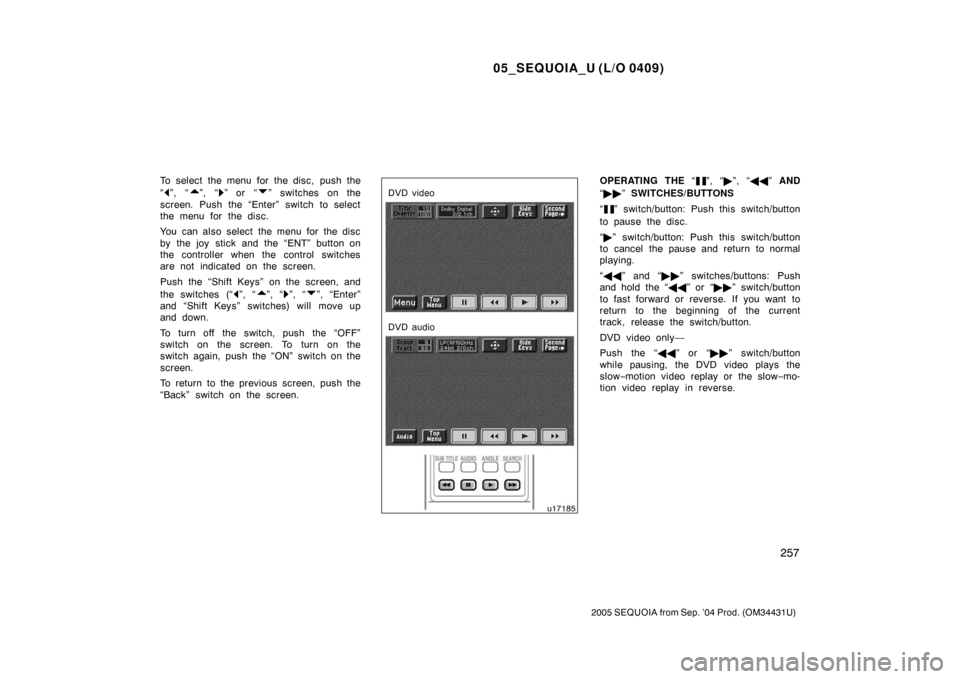
To select the menu for the disc, push the
“
”, “”, “” or “” switches on the
screen. Push the “Enter” switch to select
the menu for the disc.
You can also select the menu for the disc
by the joy stick and the “ENT” button on
the controller when the control switches
are not indicated on the screen.
Push the “Shift Keys” on the screen, and
the switches (“
”, “”, “”, “”, “Enter”
and “Shift Keys” switches) will move up
and down.
To turn off the switch, push the “OFF”
switch on the screen. To turn on the
switch again, push the “ON” switch on the
screen.
To return to the previous screen, push the
“Back” switch on the screen.
DVD video
DVD audio
OPERATING THE “”, “ �”, “ �� ” AND
“ �� ” SWITCHES/BUTTONS
“
” switch/button: Push this switch/button
to pause the disc.
“ � ” switch/button: Push this switch/button
to cancel the pause and return to normal
playing.
“ �� ” and “�� ” switches/buttons: Push
and hold the “ ��” or “�� ” switch/button
to fast forward or reverse. If you want to
return to the beginning of the current
track, release the switch/button.
DVD video only—
Push the “�� ” or “��” switch/button
while pausing, the DVD video plays the
slow −motion video replay or the slow −mo-
tion video replay in reverse.
Page 275 of 480
05_SEQUOIA_U (L/O 0409)
265
2005 SEQUOIA from Sep. ’04 Prod. (OM34431U)
CHANGING THE INITIAL SETTING
Push the “Set Up” switch on the screen,
and then the initial setting screen will ap-
pear. You can also display the screen by
pushing the “SET UP” button on the con-
troller. You can change the initial setting.
After the setting is done, the player plays
from the beginning of the chapter or the
track.
Setup Menu 1 screen
Setup Menu 2 screen
There are initial setting switches on the
“Setup Menu 1” and “Setup Menu 2”
screens.
To change the screen, push the “Top
Page” or “Second Page” switch on the
screen.
After you change the initial setting, push
the “Enter” switch. The initial setting
switch will be turned off and return to the
picture previously.
When the “Initial Setting” switch on “Setup
Menu 2” is pushed, all menus are initial-
ized.
Page 282 of 480

05_SEQUOIA_U (L/O 0409)
272
2005 SEQUOIA from Sep. ’04 Prod. (OM34431U)
SELECTING THE CHAPTER/TRACK
To select the chapter/track, push the “
”
or “
” (TUNE/TRACK) button on the con-
troller until the number of the chapter/
track you want to select appears on the
screen.
DVD video
DVD audio
USING THE CONTROL SCREEN
When playing a disc, push the “DVD” but-
ton on the controller. The control screen
will appear on the screen.
Details of the specific switches, controls
and features are described below.
1. “PICTURE” switch
Push the “PICTURE” switch to turn off
the control screen and return to the
picture previously displayed.
2. “RPT” switch (DVD audio only) Push the “RPT” switch while the track
is playing. When the track ends, it will
automatically replay. To turn off the re-
peat feature, push this switch again.
3. “RAND” switch (DVD audio only) Push the “RAND” switch. The player
will play the tracks on the disc in ran-
dom order. To turn off the random fea-
ture, push this switch again.
4. “SCAN” switch (DVD audio only) Push the “SCAN” switch. The player
will scan all the tracks on the disc you
are listening to. To stop scanning, push
this switch again. If the player scanned
all the tracks on the disc, it will stop
scanning.
Page 284 of 480

05_SEQUOIA_U (L/O 0409)
274
2005 SEQUOIA from Sep. ’04 Prod. (OM34431U)
OPERATING THE “”, “�”, “ �� ” AND
“ �� ” SWITCHES
“
” switch: Push this switch to pause the
disc.
“ � ” switch: Push this switch to cancel the
pause and return to normal playing.
“ �� ” and “�� ” switches: Push this
switch to fast forward or reverse. If you
want to return to the beginning of the
current track, release the switch.
Video CD only—
Push the “�� ” switch/button while paus-
ing, the video CD plays the slow −motion
video replay.
TURNING ON THE DISC MENU (video
CD only)
Push the “Return” switch to turn on the
menu screen for the disc. You can also
turn on the menu screen by pushing the
“RETURN” button on the controller.
For the operation of the menu screen, see
the manual for the video CD.CHANGING MENU PAGE OR TRACK
(video CD only)
Push the “D. Menu Next” or “D. Menu
Prev.” switch while the disc menu is dis-
played. The next or previous page will
appear on the screen.
Push the “D. Menu Next” or “D. Menu
Prev.” switch while the player is playing
video. The next or previous track will be
searched and played.
Page 285 of 480
05_SEQUOIA_U (L/O 0409)
275
2005 SEQUOIA from Sep. ’04 Prod. (OM34431U)
CHANGING A MULTIPLEX
TRANSMISSION (video CD only)
Push the “Main/Sub” switch to change a
multiplex transmission. The mode changes
from Main/Sub to Main to Sub and back
to Main/Sub by pushing the “Main/Sub”
switch.CHANGING THE INITIAL SETTING (video
CD only)
Push the “Set Up” switch on the screen
and then the initial setting screen will ap-
pear. You can also display the screen by
pushing the “SET UP” button on the con-
troller. You can change the initial setting.
(See “CHANGING THE INITIAL SETTING”
on page 265 in this Section for details.)
After the setting is done, the player plays
from the beginning of the chapter or the
track.Video CD
Audio CD


