Page 35 of 336

35
The wireless remote control key is an
electronic component. Observe the follow-
ing instructions in order not to cause dam-
age to the key.
�Do not leave the key in places where
the temperature becomes high such as
on the dashboard.
�Do not disassemble it.
�Avoid knocking it hard against other
objects or dropping it.
�Avoid putting it in water.
If your vehicle is equipped with smart
entry and start system, you can use up
to 5 master keys for the same vehicle. In
case of the vehicle not equipped with
smart entry and start system, up to 4
master keys are available. Contact your
Toyota dealer for detailed information.
If the wireless remote control key does
not actuate the doors or alarm or operate
from a normal distance, or indicator light
on the key is dimmed or does not come
on:
�Check for closeness to a radio trans-
mitter such as a radio station or an
airport which can interfere with normal
operation of the key.
�The battery may have been consumed.
Check the battery in the key. To re-
place the battery, see “—Replacing bat-
tery” on page 37.
If you lose your key, contact your Toyota
dealer as soon as possible to avoid the
possibility of theft, or an accident. (See “If
you lose your keys” on page 261.)
21p013f
Locking operation
21p014f
Unlocking operation
—Locking and unlocking
doors
Page 36 of 336

36
To lock and unlock all the doors, push
the switches slowly and securely.
To lock: Push the lock switch. All the side
doors and back door are locked simulta-
neously. At this time, the turn signal lights
will flash once.
Check to see that the doors are securely
locked.
If any of the doors is not securely closed
or if the key is in the key slot, locking
cannot be performed by the lock switch.
At this time, a beep will sound for 10
seconds on the vehicle with smart entry
and smart system. However, if the key is
in the key slot, a beep will not sound. To
stop the beep, close all the side doors
and back door securely or push the un-
lock switch.
The buzzer can be disabled. For details,
contact your Toyota dealer.
To unlock: Push the unlock switch once to
unlock the driver ’s door alone. Pushing
the switch twice within 3 seconds unlocks
all the doors simultaneously. Each time
the unlock switch is pushed, the turn sig-
nal lights will flash twice.This double switch operation to unlock all
the side doors and back door can be
changed to a single switch operation. For
details, contact your Toyota dealer.
When the unlock switch is pressed the
interior light comes on. The light remains
on for about 15 seconds unless any of the
doors is opened and then closed. (For
further information, see “Interior lights” on
page 107.)
You have 30 seconds to open a door after
using the wireless remote unlock feature.
If a door is not opened by then, all the
doors will be automatically locked again.
The timing for the automatic door lock
function can be changed. For details, con-
tact your Toyota dealer.
If the lock or unlock switch is kept
pressed in, the locking or unlocking opera-
tion is not repeated. Release the switch
and then push it again.
The following adjustments can be made in
this system. For details, contact your
Toyota dealer:
�Cancelling the wireless door locking or
unlocking function
�Cancelling the flash of the turn signal
lights
21p015a
Pushing the panic switch for 1 second
blows the horn intermittently and
flashes the headlights, tail lights and
emergency flashers and turns on the
interior light.
The panic switch is used to deter vehicle
theft when you witness anyone attempting
to break into or damage your vehicle.
The alarm will last for one minute. To stop
the alarm midway, do the follows:
�Push any switch on the key.
�Put the hybrid system in the “IG
−ON”
mode.
—Activating panic mode
Page 38 of 336
38
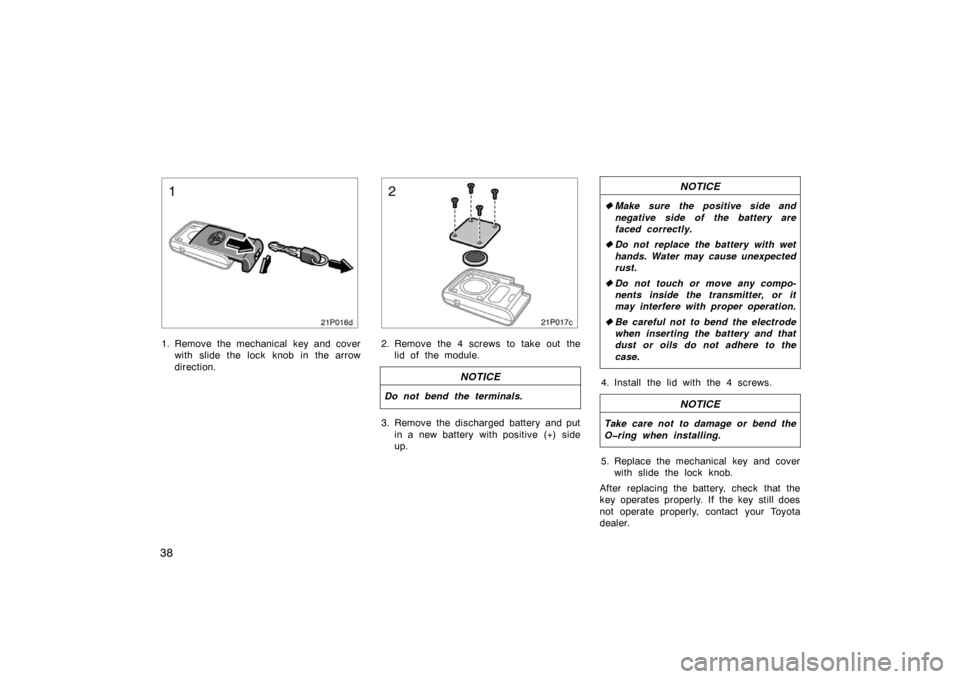
21p016d
1. Remove the mechanical key and coverwith slide the lock knob in the arrow
direction.
21p017c
2. Remove the 4 screws to take out thelid of the module.
NOTICE
Do not bend the terminals.
3. Remove the discharged battery and put
in a new battery with positive (+) side
up.
NOTICE
�Make sure the positive side and
negative side of the battery are
faced correctly.
� Do not replace the battery with wet
hands. Water may cause unexpected
rust.
� Do not touch or move any compo-
nents inside the transmitter, or it
may interfere with proper operation.
� Be careful not to bend the electrode
when inserting the battery and that
dust or oils do not adhere to the
case.
4. Install the lid with the 4 screws.
NOTICE
Take care not to damage or bend the
Oring when installing.
5. Replace the mechanical key and cover
with slide the lock knob.
After replacing the battery, check that the
key operates properly. If the key still does
not operate properly, contact your Toyota
dealer.
Page 39 of 336
39
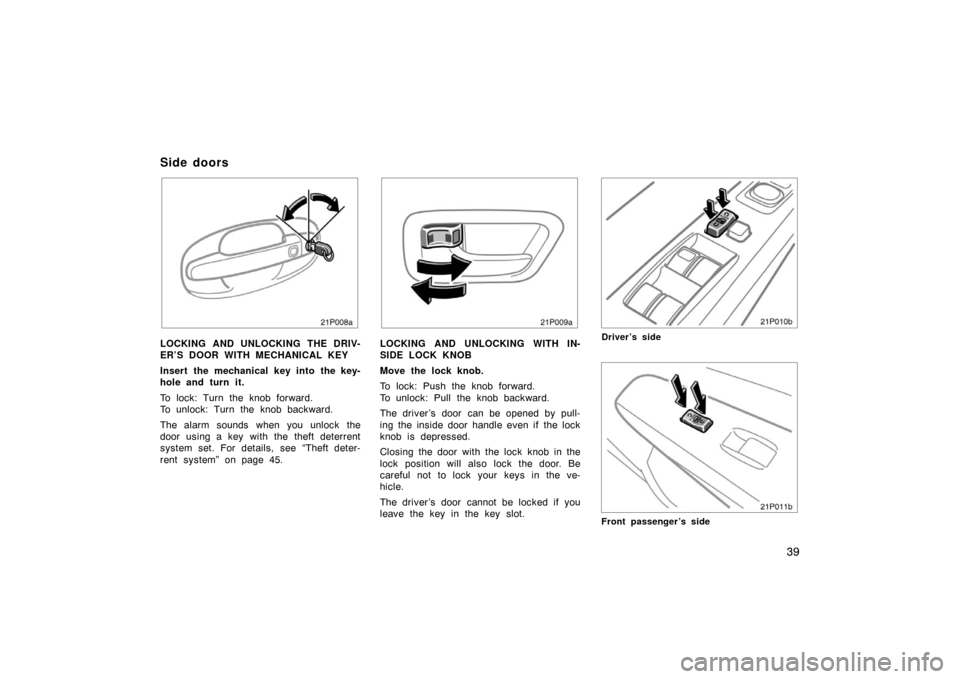
21p008a
LOCKING AND UNLOCKING THE DRIV-
ER’S DOOR WITH MECHANICAL KEY
Insert the mechanical key into the key-
hole and turn it.
To lock: Turn the knob forward.
To unlock: Turn the knob backward.
The alarm sounds when you unlock the
door using a key with the theft deterrent
system set. For details, see “Theft deter-
rent system” on page 45.
21p009a
LOCKING AND UNLOCKING WITH IN-
SIDE LOCK KNOB
Move the lock knob.
To lock: Push the knob forward.
To unlock: Pull the knob backward.
The driver ’s door can be opened by pull-
ing the inside door handle even if the lock
knob is depressed.
Closing the door with the lock knob in the
lock position will also lock the door. Be
careful not to lock your keys in the ve-
hicle.
The driver ’s door cannot be locked if you
leave the key in the key slot.
21p010a
Driver’s side
21p011a
Front passenger’s side
Side doors
Page 40 of 336
40
LOCKING AND UNLOCKING WITH
POWER DOOR LOCK SWITCH
Push the switch.
To lock: Push the switch down on the
front side.
To unlock: Push the switch down on the
rear side.
All the doors lock or unlock simultaneous-
ly.
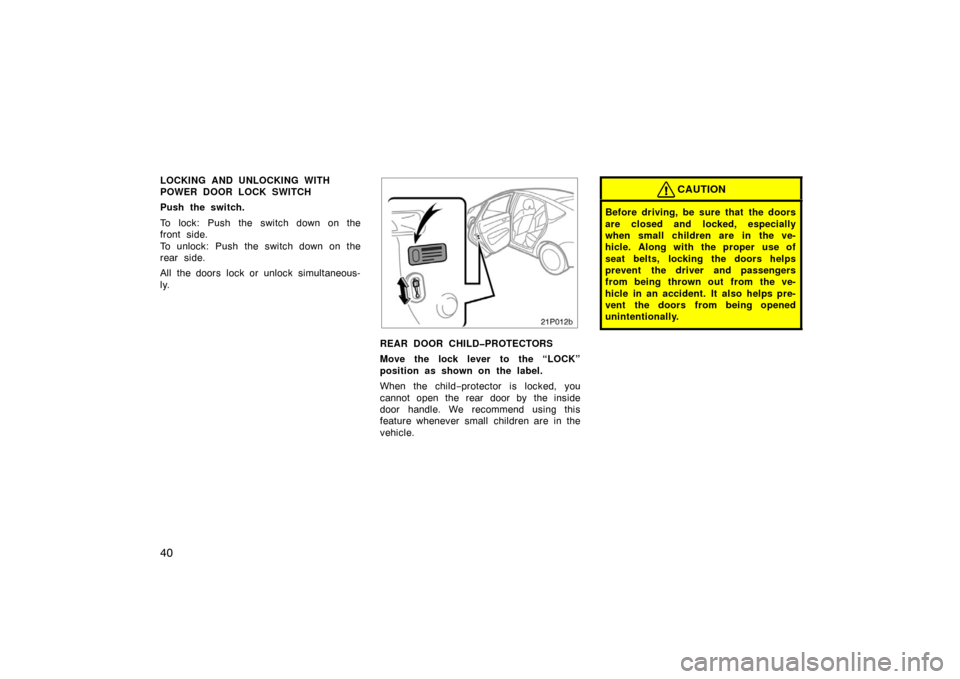
21p012b
REAR DOOR CHILDPROTECTORS
Move the lock lever to the “LOCK”
position as shown on the label.
When the child−protector is locked, you
cannot open the rear door by the inside
door handle. We recommend using this
feature whenever small children are in the
vehicle.
CAUTION
Before driving, be sure that the doors
are closed and locked, especially
when small children are in the ve-
hicle. Along with the proper use of
seat belts, locking the doors helps
prevent the driver and passengers
from being thrown out from the ve-
hicle in an accident. It also helps pre-
vent the doors from being opened
unintentionally.
Page 41 of 336
41
12p032
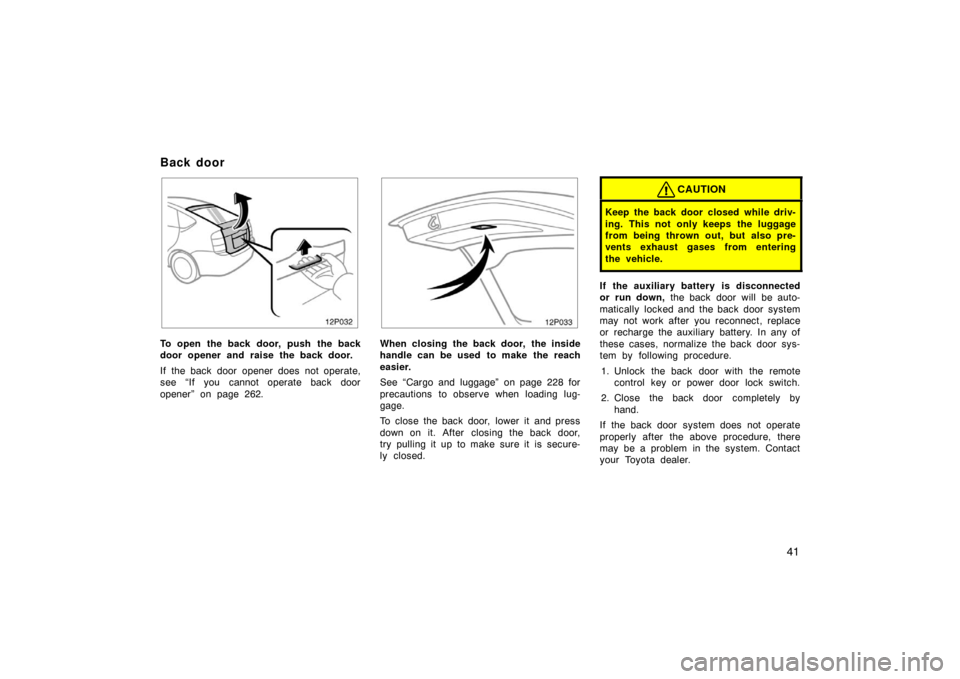
To open the back door, push the back
door opener and raise the back door.
If the back door opener does not operate,
see “If you cannot operate back door
opener” on page 262.
12p033
When closing the back door, the inside
handle can be used to make the reach
easier.
See “Cargo and luggage” on page 228 for
precautions to observe when loading lug-
gage.
To close the back door, lower it and press
down on it. After closing the back door,
try pulling it up to make sure it is secure-
ly closed.
CAUTION
Keep the back door closed while driv-
ing. This not only keeps the luggage
from being thrown out, but also pre-
vents exhaust gases from entering
the vehicle.
If the auxiliary battery is disconnected
or run down, the back door will be auto-
matically locked and the back door system
may not work after you reconnect, replace
or recharge the auxiliary battery. In any of
these cases, normalize the back door sys-
tem by following procedure.
1. Unlock the back door with the remote control key or power door lock switch.
2. Close the back door completely by hand.
If the back door system does not operate
properly after the above procedure, there
may be a problem in the system. Contact
your Toyota dealer.
Back door
Page 43 of 336
43
21p021b
Window lock
switch
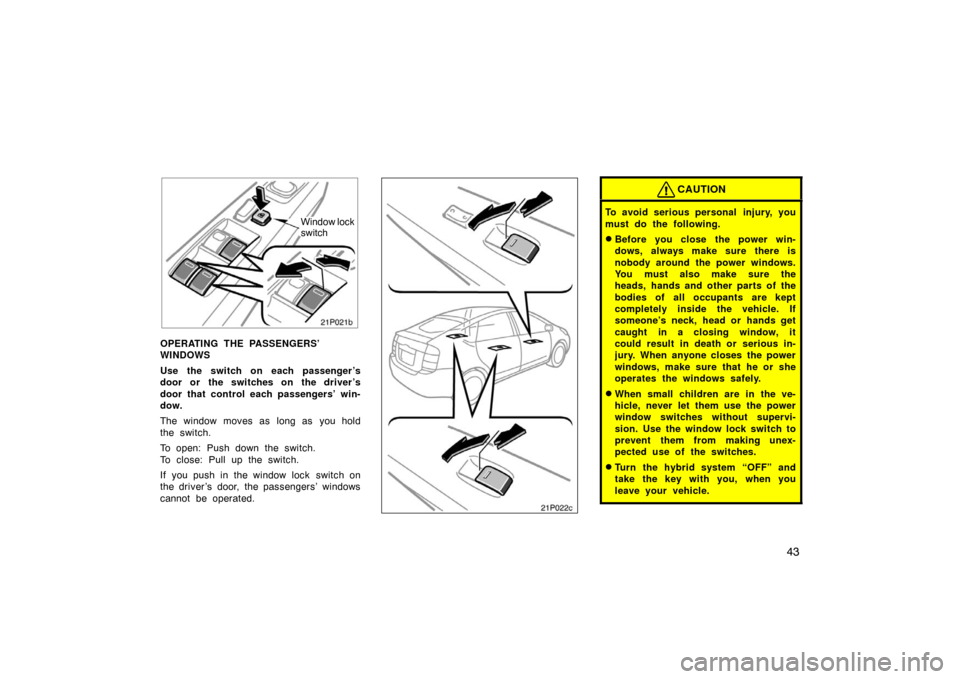
OPERATING THE PASSENGERS’
WINDOWS
Use the switch on each passenger ’s
door or the switches on the driver ’s
door that control each passengers’ win-
dow.
The window moves as long as you hold
the switch.
To open: Push down the switch.
To close: Pull up the switch.
If you push in the window lock switch on
the driver ’s door, the passengers’ windows
cannot be operated.21p022b21p022c
CAUTION
To avoid serious personal injury, you
must do the following.
�Before you close the power win-
dows, always make sure there is
nobody around the power windows.
You must also make sure the
heads, hands and other parts of the
bodies of all occupants are kept
completely inside the vehicle. If
someone’s neck, head or hands get
caught in a closing window, it
could result in death or serious in-
jury. When anyone closes the power
windows, make sure that he or she
operates the windows safely.
�When small children are in the ve-
hicle, never let them use the power
window switches without supervi-
sion. Use the window lock switch to
prevent them from making unex-
pected use of the switches.
�Turn the hybrid system “OFF” and
take the key with you, when you
leave your vehicle.
Page 44 of 336
44
�Never leave anyone (particularly a
small child) alone in your vehicle,
especially with the key still inserted
or with the hybrid system other
than “OFF”. Otherwise, he/she
could use the power window
switches and get trapped in a win-
dow. Unattended person (particular-
ly a small child) can be involved in
a serious accident.
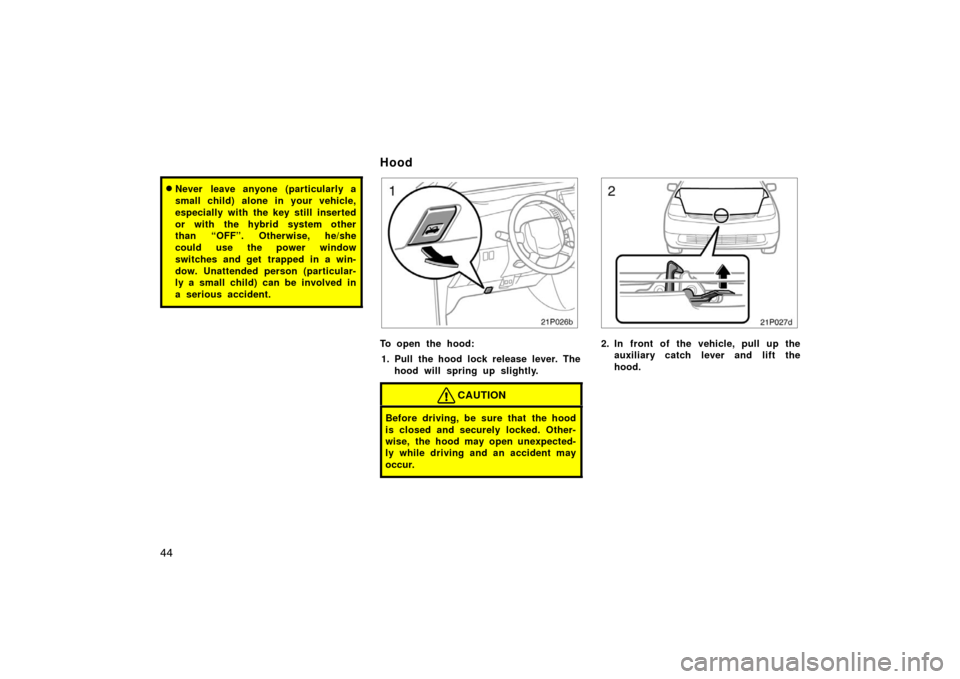
21p026b
To open the hood:1. Pull the hood lock release lever. The hood will spring up slightly.
CAUTION
Before driving, be sure that the hood
is closed and securely locked. Other-
wise, the hood may open unexpected-
ly while driving and an accident may
occur.
21p027d
2. In front of the vehicle, pull up theauxiliary catch l ever and lift the
hood.
Hood