153
How to subscribe:
You must enter into a separate service
agreement with the XM radio in order to
receive satellite broadcast programming in
the vehicle. Additional activation and ser-
vice subscription fees apply that are not
included in the purchase price of the ve-
hicle and optional digital satellite tuner.
For complete information on subscription
rates and terms, or to subscribe to the
XM radio, visit XM on the web at
www.xmradio.com
or call an XM’s Listener
Care at (800) 852 −9696. The XM radio is
solely responsible for the quality, availabil-
ity and content of the satellite radio ser-
vices provided, which are subject to the
terms and conditions of the XM radio cus-
tomer service agreement.
Customers should have their radio ID
ready; the radio ID can be found by tun-
ing to “channel 000” on the radio. For
details, see “Displaying the radio ID” be-
low.
All fees and programming are the respon-
sibility of the XM satellite radio and are
subject to change. Satellite tuner technology notice:
Toyota’s satellite radio tuners are awarded
Type Approval Certificates from XM Satel-
lite Radio Inc. on “March 10, 2003” and
“April 15, 2003” as proof of compatibility
with the services offered by the XM satel-
lite radio.
Displaying the radio ID
Each XM tuner is identified with a unique
radio ID. You will need the radio ID when
activating XM service or when reporting a
problem.
If you select the “CH 000” using the
“AUDIO
−TUNE” knob, the ID code of 8
alphanumeric characters appears. If you
select another channel, display of the ID
code is canceled. The channel (000) alter-
nates the display between the radio ID
and the specific radio ID code.
*: Use of satellite radio requires XM tuner
and service. Contact your Toyota dealer
for details. TONE AND BALANCE
For details about your system’s tone and
balance controls, see the description of
your own system.
Tone
How good an audio program sounds to
you is largely determined by the mix of
the treble, midrange, and bass levels. In
fact, different kinds of music and vocal
programs usually sound better with differ-
ent mixes of treble, midrange, and bass.
Balance
A good balance of the left and right stereo
channels and of the front and rear sound
levels is also important.
Keep in mind that if you are listening to
a stereo recording or broadcast, changing
the right/left balance will increase the vol-
ume of one group of sounds while de-
creasing the volume of another.
172
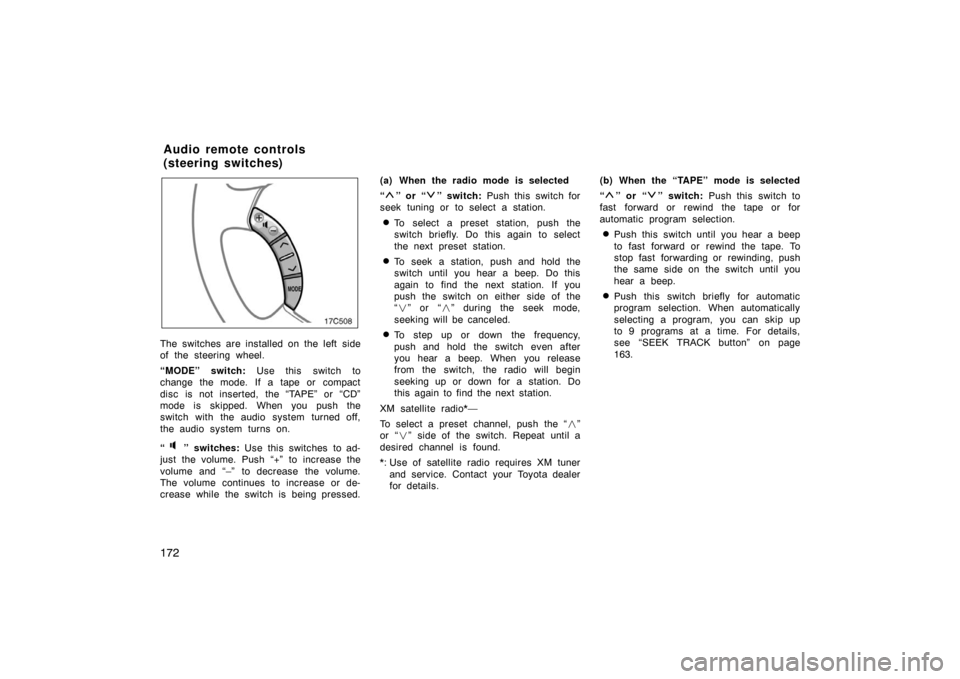
The switches are installed on the left side
of the steering wheel.
“MODE” switch: Use this switch to
change the mode. If a tape or compact
disc is not inserted, the “TAPE” or “CD”
mode is skipped. When you push the
switch with the audio system turned off,
the audio system turns on.
“
” switches: Use this switches to ad-
just the volume. Push “+” to increase the
volume and “–” to decrease the volume.
The volume continues to increase or de-
crease while the switch is being pressed. (a) When the radio mode is selected
“
” or “” switch:
Push this switch for
seek tuning or to select a station.
�To select a preset station, push the
switch briefly. Do this again to select
the next preset station.
�To seek a station, push and hold the
switch until you hear a beep. Do this
again to find the next station. If you
push the switch on either side of the
“ � ” or “ �” during the seek mode,
seeking will be canceled.
�To step up or down the frequency,
push and hold the switch even after
you hear a beep. When you release
from the switch, the radio will begin
seeking up or down for a station. Do
this again to find the next station.
XM satellite radio*—
To select a preset channel, push the “ �”
or “ �” side of the switch. Repeat until a
desired channel is found.
*: Use of satellite radio requires XM tuner and service. Contact your Toyota dealer
for details. (b) When the “TAPE” mode is selected
“
” or “” switch:
Push this switch to
fast forward or rewind the tape or for
automatic program selection.
�Push this switch until you hear a beep
to fast forward or rewind the tape. To
stop fast forwarding or rewinding, push
the same side on the switch until you
hear a beep.
�Push this switch briefly for automatic
program selection. When automatically
selecting a program, you can skip up
to 9 programs at a time. For details,
see “SEEK TRACK button” on page
163.
Audio remote controls
(steering switches)