2005 SUBARU FORESTER locking
[x] Cancel search: lockingPage 117 of 477
2-6
Keys and doors
Door locks „
Locking and unlocking from the out- side
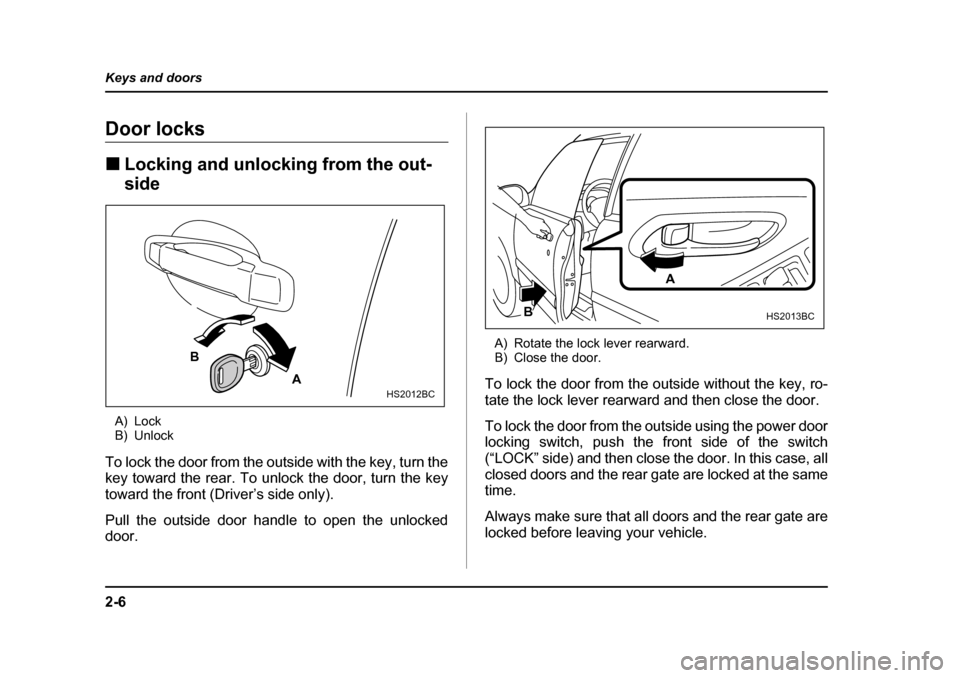
A) Lock
B) Unlock
To lock the door from the outside with the key, turn the
key toward the rear. To unlock the door, turn the key
toward the front (Driver’s side only).
Pull the outside door handle to open the unlocked
door. A) Rotate the lock lever rearward.
B) Close the door.
To lock the door from the outside without the key, ro-
tate the lock lever rearward and then close the door.
To lock the door from the outside using the power door
locking switch, push the front side of the switch
(“LOCK” side) and then close the door. In this case, all
closed doors and the rear gate are locked at the same time.
Always make sure that all doors and the rear gate are
locked before leaving your vehicle.
A
BHS2012BC
A
B
HS2013BC
Page 118 of 477
2-7
Keys and doors
– CONTINUED –
NOTE
Make sure that you do not leave the key inside the
vehicle when locking the doors from the outside
without the key. „Locking and unlocking from the inside
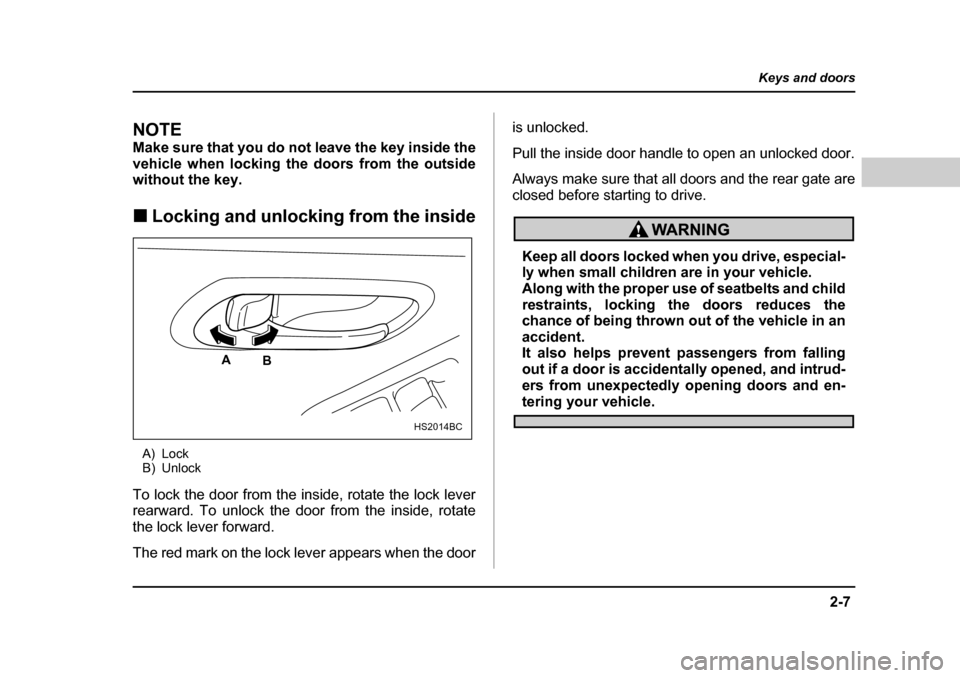
A) Lock
B) Unlock
To lock the door from the inside, rotate the lock lever
rearward. To unlock the door from the inside, rotate
the lock lever forward.
The red mark on the lock lever appears when the door is unlocked.
Pull the inside door handle to open an unlocked door.
Always make sure that all doors and the rear gate are
closed before starting to drive.
Keep all doors locked when you drive, especial-
ly when small children are in your vehicle.
Along with the proper use of seatbelts and child
restraints, locking the doors reduces the
chance of being thrown out of the vehicle in an
accident.
It also helps prevent passengers from falling
out if a door is accidentally opened, and intrud-
ers from unexpectedly opening doors and en-
tering your vehicle.
HS2014BC
A
B
Page 119 of 477
2-8
Keys and doors
Power door locking switches
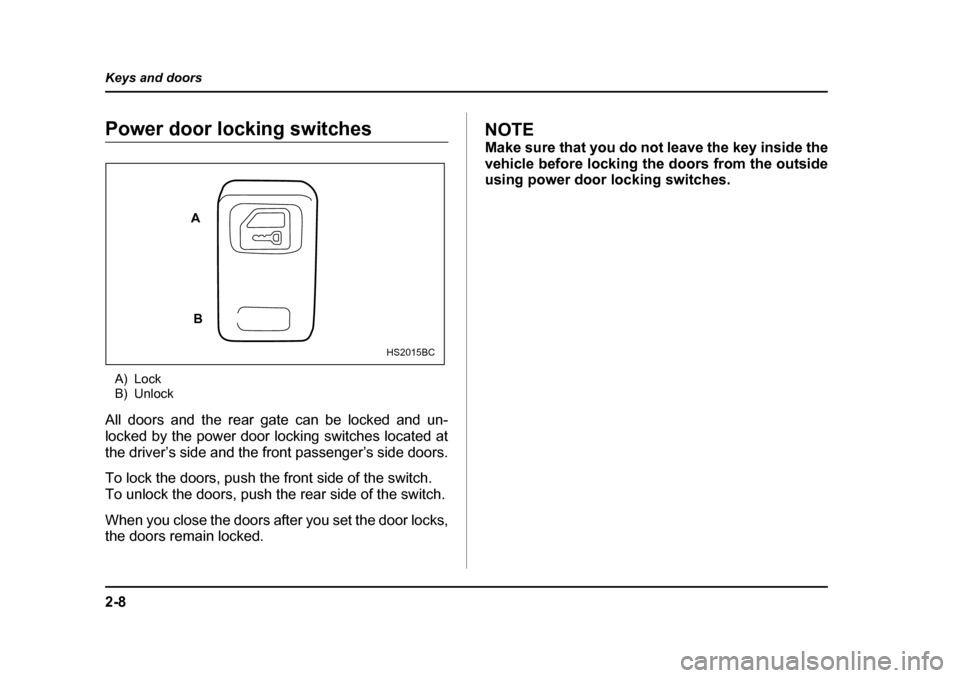
A) Lock
B) Unlock
All doors and the rear gate can be locked and un-
locked by the power door locking switches located at
the driver’s side and the front passenger’s side doors.
To lock the doors, push the front side of the switch.
To unlock the doors, push the rear side of the switch.
When you close the doors after you set the door locks,
the doors remain locked.NOTE
Make sure that you do not leave the key inside the
vehicle before locking the doors from the outside
using power door locking switches.
A
B
HS2015BC
Page 120 of 477
2-9
Keys and doors
– CONTINUED –
Remote keyless entry system (if
equipped)
Two transmitters are provided for your vehicle.
The remote keyless entry system has the following
functions. yLocking and unlocking the doors and rear gate with-
out a key y Sounding a panic alarm
y Arming and disarming the security system (if your
vehicle is equipped with an optional security system).
See the next section “Security system (if equipped)”
for detailed information.
This device complies with Part 15 of the FCC
Rules and with RSS-210 of Industry Canada. Oper-
ation is subject to the following two conditions: (1)
This device may not cause harmful interference,
and (2) this device must accept any interference
received, including interference that may cause
undesired operation.
Changes or modifications not expressly approved
by the party responsible for compliance could
void the user’s authority to operate the equipment.
The operable distance of the keyless entry system is
approximately 30 feet (10 meters). However, this dis- tance will vary depending on environmental condi-
tions. The system’s operable distance will be shorter
in areas near a facility or electronic equipment emitting
strong radio waves such as a power plant, broadcast
station, TV tower, or remote controller of home elec-
tronic appliances.
The keyless entry system does not operate when the key is inserted in the ignition switch to prevent acci-
dental lockout.
y
Do not expose the transmitter to severe
shocks, such as those experienced as a result
of dropping or throwing. y Do not take the transmitter apart except when
replacing the battery.y Do not get the transmitter wet. If it gets wet,
wipe it dry with a cloth immediately.
Page 121 of 477
2-10
Keys and doors
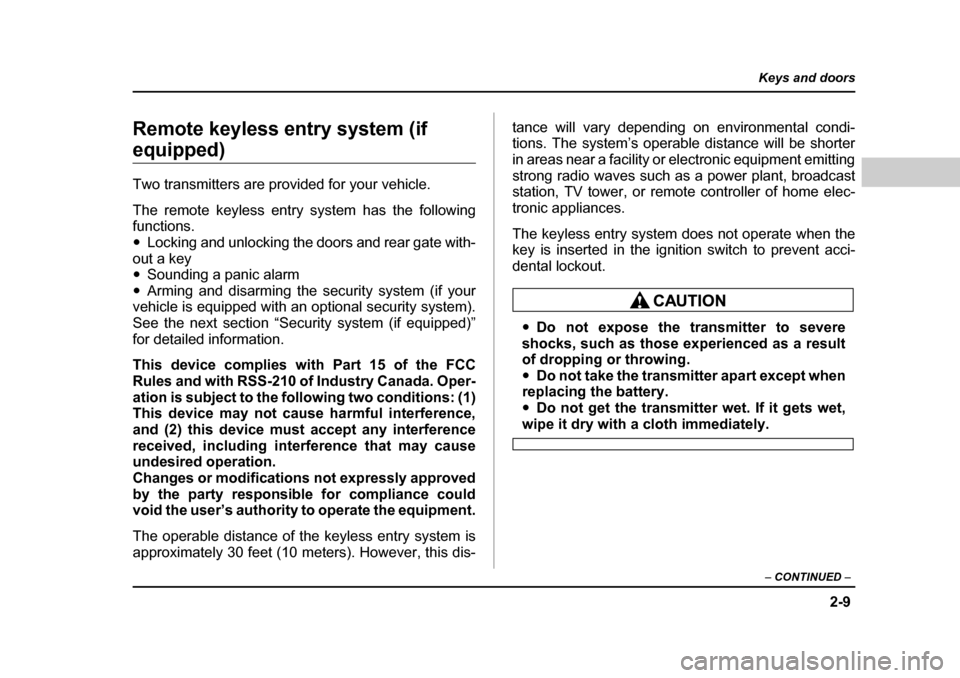
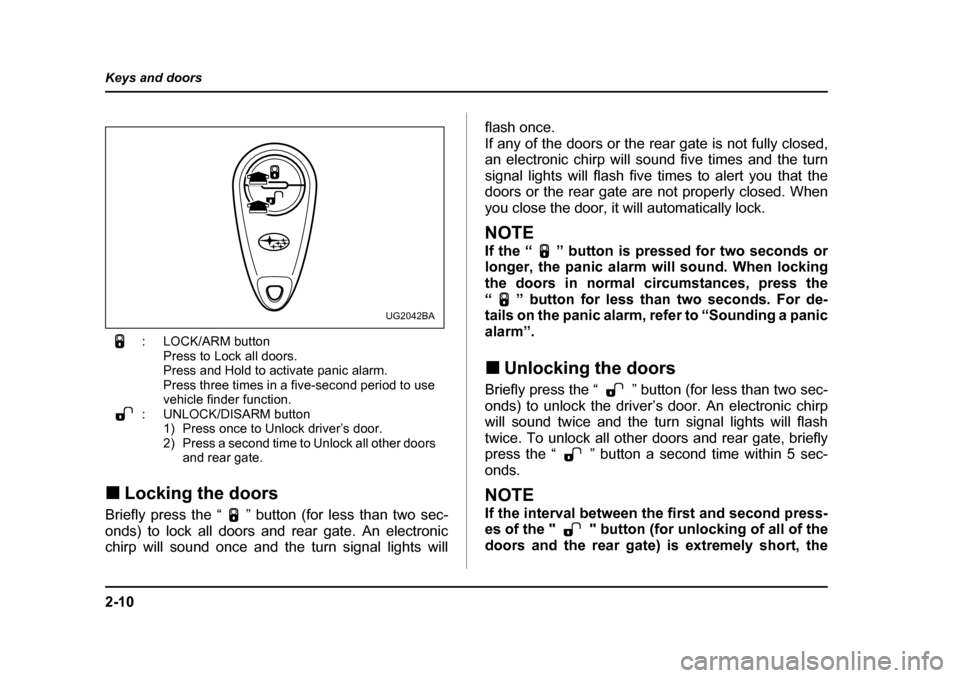
: LOCK/ARM button
Press to Lock all doors.
Press and Hold to activate panic alarm.
Press three times in a five-second period to use
vehicle finder function.
: UNLOCK/DISARM button 1) Press once to Unlock driver’s door.
2) Press a second time to Unlock all other doors and rear gate.
„ Locking the doors
Briefly press the “ ” button (for less than two sec-
onds) to lock all doors and rear gate. An electronic
chirp will sound once and the turn signal lights will flash once.
If any of the doors or the rear gate is not fully closed,
an electronic chirp will sound five times and the turn
signal lights will flash five times to alert you that the
doors or the rear gate are not properly closed. When
you close the door, it will automatically lock.
NOTE
If the “ ” button is pressed for two seconds or
longer, the panic alarm will sound. When locking
the doors in normal circumstances, press the
“ ” button for less than two seconds. For de-
tails on the panic alarm, refer to “Sounding a panic
alarm”. „
Unlocking the doors
Briefly press the “ ” button (for less than two sec-
onds) to unlock the driver’s door. An electronic chirp
will sound twice and the turn signal lights will flash
twice. To unlock all other doors and rear gate, briefly
press the “ ” button a second time within 5 sec-
onds.
NOTE
If the interval between the first and second press-
es of the " " button (for unlocking of all of the
doors and the rear gate) is extremely short, the
UG2042BA
Page 128 of 477
2-17
Keys and doors
– CONTINUED –
Security system (if equipped)
The security system helps to protect your vehicle and
valuables from theft. The horn sounds and the turn
signal lights flash if someone attempts to break into
your vehicle. The starter motor is also interrupted to
prevent starting the vehicle without a key.
The system can be armed and disarmed with the re-
mote transmitter.
The system does not operate when the key is inserted
into the ignition switch. „System operation
The security system will give the following alarm indi-
cations when triggered: y The turn signal lights will flash and the horn will
sound intermittently. In addition, the starter motor will
not operate. y The alarm automatically resets after 30 seconds;
however, the alarm will reactivate if the vehicle is tam-
pered with again. The alarm will continue for six times
if any sensor continues to be activated.
The alarm is triggered by: y Opening a door or the rear gate.
y Application of physical shock to the vehicle (e.g. forced entry). Note that there are two alarm levels for
shock: warning and alarm. In warning mode, the alarm
detects lower level vibrations and triggers 2 warning
chirps on the horn and two flashes on the lights as a
deterrent to would be vandals. In alarm mode, higher
levels of shock are detected and the system will go into full alarm. y
Ignition switch being turned on while in armed state.
NOTE
With the valet mode selected, the security system
does not operate when the remote transmitter is
used for locking and unlocking. The security indi-
cator light in the combination meter flashes twice
per second to show that the valet mode is select-
ed. For details, refer to “Valet mode” in this sec- tion. „ Arming the system
T To arm the system using remote transmitter
1. Close all windows.
2. Remove the key from the ignition switch.
3. Open the doors and get out of the vehicle.
4. Make sure that the engine hood is locked.
5. Close all doors and the rear gate.
Page 130 of 477
2-19
Keys and doors
– CONTINUED –
rear gate are not properly closed. When you close the
door, the system will automatically arm and doors will
automatically lock. TTo arm the system using power door locking
switches
1. Close all windows.
2. Remove the key from the ignition switch.
3. Open the doors and get out of the vehicle.
4. Make sure that the engine hood is locked.
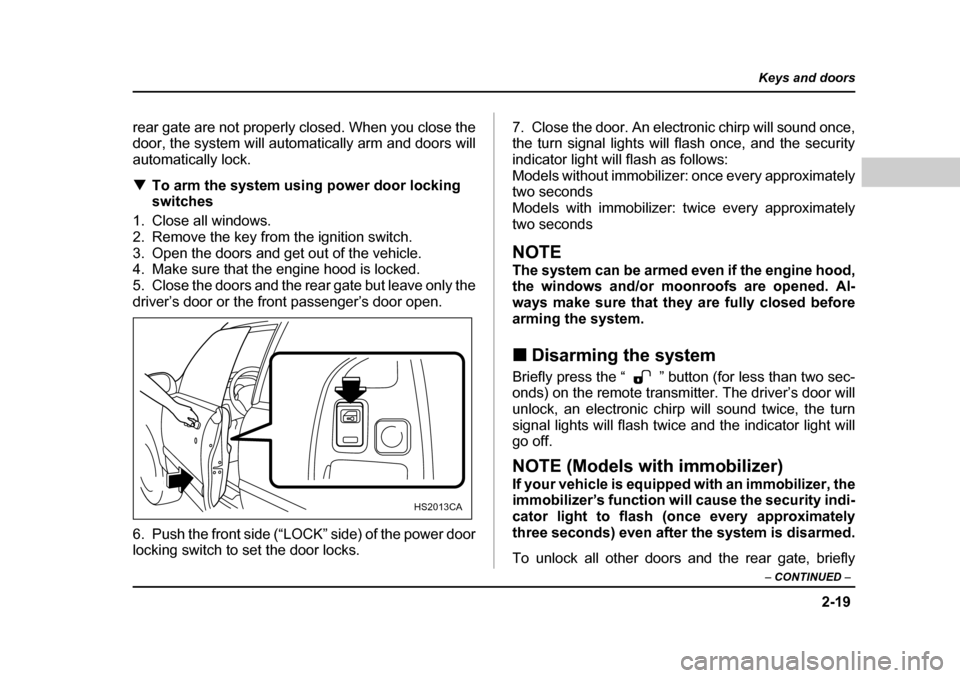
5. Close the doors and the rear gate but leave only the
driver’s door or the front passenger’s door open.
6. Push the front side (“LOCK” side) of the power door
locking switch to set the door locks. 7. Close the door. An electronic chirp will sound once,
the turn signal lights will flash once, and the security
indicator light will flash as follows:
Models without immobilizer: once every approximately
two seconds
Models with immobilizer: twice every approximately
two seconds
NOTE
The system can be armed even if the engine hood,
the windows and/or moonroofs are opened. Al-
ways make sure that they are fully closed before
arming the system. „
Disarming the system
Briefly press the “ ” button (for less than two sec-
onds) on the remote transmitter. The driver’s door will
unlock, an electronic chirp will sound twice, the turn
signal lights will flash twice and the indicator light willgo off.
NOTE (Models with immobilizer)
If your vehicle is equipped with an immobilizer, the
immobilizer’s function will cause the security indi-
cator light to flash (once every approximately
three seconds) even after the system is disarmed.
To unlock all other doors and the rear gate, briefly
HS2013CA
Page 131 of 477
2-20
Keys and doors
press the “ ” button a second time. T
Emergency disarming
If you cannot disarm the system using the transmitter
(i.e. the transmitter is lost, broken or the transmitter
battery is too weak), you can disarm the system with-
out using the transmitter. To disarm the system:
1. Unlock the door with the key and then open the
door.
2. The alarm will sound.
3. Insert the key into the ignition switch and cycle it
from the “LOCK” to the “ON” position three (3) times
within 5 seconds .
„ Valet mode
When you choose the valet mode, the security system
does not operate. In valet mode, the remote transmit-
ter is used only for locking and unlocking the doors
and rear gate and panic activation.
To enter the valet mode, open the driver’s door and
keep the “ ” button depressed for more than two
seconds . The security system status indicator light
will continue to flash twice per second indicating that
the system is in the valet mode. To exit valet mode, open the driver’s door and keep
the “ ” button pressed
for more than two sec-
onds . The indicator will stop flashing.
NOTE If the remote transmitter is used to lock or unlock
the doors while the valet mode is selected, the
turn signal lights do not flash but an electronic
chirp is emitted. „Passive arming
When passive arming mode has been programmed by
the dealer, arming of the system is automatically ac-
complished without using the remote transmitter. Note
that in this mode, DOORS MUST BE MANUALLYLOCKED. T To enter the passive mode
Since programming the passive arming mode is a
complicated procedure, have it done by your nearestSUBARU dealer. T Arming the system
1. Turn the ignition switch to the “ON” position.