2005 Seat Toledo maintenance
[x] Cancel search: maintenancePage 83 of 290

Cockpit81
Safety First
Operating instructions
Tips and Maintenance
Te c h n i c a l D a t a
Power steering system*
For vehicles with power steering, the level of steering assistance depends on
the vehicle's speed and on the steering angle.
The warning lamp should light up for a few seconds when the ignition is
switched on. It should go out when the engine has started running.
If the battery is disconnected, the indicator remains lit, even with the engine
running. The warning light only goes of f after a distance of approx. 50 m.
There is a fault in the electromechanica l steering system if the lamp does not
go out or lights up whilst the vehicle is in motion. The indicator may appear
in two different colours to indicate faults. If it lights yellow, this indicates a
minor fault. If it lights red, seek wo rkshop assistance immediately, if no
assistance is available stop driving. Stop the vehicle and seek technical
assistance. The power steering does not work if the battery is flat or if the
engine is off (for example, for towing). You should take into account that you
will need considerably more power than normal to steer the vehicle if the
steering assistance is reduced or has failed completely.
For those vehicles fitted with ESP* the function “Recommended steering
manoeuvre” is included. See ⇒ page 177.Brake pad wear indicator*
As the brake pad wear indicator only monitors the front brake pads, it is advis-
able to have the rear brake pads inspected at the same time.
The me ssage displayed in t he instrument panel d isplay
is
17): CHECK BRAKE
PADS .
WARNING
Have the brake pads inspected immediately by a qualified dealership if the
warning display
lights up.
Indicator for open doors or tailgate
This indicator lights if one of th e doors or the tailgate is open.The warning light
should go off when all the doors are closed correctly.
The system also works when the ignition is switched off. It should go off
about 15 seconds after the vehicle is locked.
Electronic immobiliser* “Safe”
This warning lamp flashes if an unauthorised key is used.Inside the key there is a chip that deactivates the electronic immobiliser auto-
matically when the key is inserted into the ignition. The immobiliser will be
activated again automatically as soon as you pull the key out of the ignition
lock.
The message displ ayed in
the in
strument panel di spla
y is
18)
: SA FE. The
vehicle cannot be used in that case ⇒page 160.
The engine can, however, be started if the appropriate coded SEAT genuine
key is used.
17)Depending on the model version
18)Depending on the model version
Toledo angles Seite 81 Mittwoch, 5. Oktober 2005 9:43 09
Page 85 of 290

Steering wheel controls83
Safety First
Operating instructions
Tips and Maintenance
Te c h n i c a l D a t a
Steering wheel controlsUsing these instructionsThe vehicle includes a multifunction mo dule from where it is possible to
control the audio, telephone and radio / navigation functions without
needing to distract the driver.
There are two versions of the multifunction module:
•
Audio version, to control the available audio functions from the steering
wheel.
•
Audio + Telephone version, to control the available audio functions and
the telephone system from the steering wheel.
Both versions may be used to control the Audio system (Radio, CD Audio, CD
mp3, CD Changer) and the radio / naviga tion System, in which case they also
control the Navigation system.
Audio systemSteering wheel audio version controls
Fig. 49 Controls on the
steering wheel
Fig. 50 Controls on the
steering wheel
Toledo angles Seite 83 Mittwoch, 5. Oktober 2005 9:43 09
Page 87 of 290

Steering wheel controls85
Safety First
Operating instructions
Tips and Maintenance
Te c h n i c a l D a t a
Steering wheel Audio + Telephone version controls
Fig. 51 Controls on the
steering wheel
Fig. 52 Controls on the
steering wheel
Button Short press
Long press
Radio CD Audio CD mp3
a)
CDCRadio CD Audio
CD mp3
a)
CDC
Volume up Continue volume up
Volume down Continue volume down
Station search. Higher fre-quency. Following track Station search.
Higher fre-quency. Fast forward
Change folder
(forward) Fast forward
Station search. Lower
frequency Previous track Station search.
Lower
frequency Rewind
Change folder
(Back) Rewind
AAABACAD
Toledo angles Seite 85 Mittwoch, 5. Oktober 2005 9:43 09
Page 89 of 290

Steering wheel controls87
Safety First
Operating instructions
Tips and Maintenance
Te c h n i c a l D a t a
Radio navigation systemSteering wheel audio version controls
Fig. 53 Controls on the
steering wheel
Fig. 54 Controls on the
steering wheel
Button Short press
Long press
Radio CD
CD mp3
a)
CDC Radio CD
CD mp3
a)
CDC
Increase the source volume and the navigation message Increase the source volume and the navigation message continuously
Decrease the source volume and the navigation message Decrea se the source volume and the navigation message continuously
Station search. Higher fre-quency. Following track Station search.
Higher fre-quency. Fast forward
AAABAC
Toledo angles Seite 87 Mittwoch, 5. Oktober 2005 9:43 09
Page 91 of 290

Steering wheel controls89
Safety First
Operating instructions
Tips and Maintenance
Te c h n i c a l D a t a
Steering wheel Audio + Telephone controls
Fig. 55 Controls on the
steering wheel
Fig. 56 Steering wheel
Audio + Telephone
controls
Button Short press
Long press
Radio CD
CD mp3
a)
CDC Radio CD
CD mp3
a)
CDC
Increase the source volume and the navigation message Increase the source volume and the navigation message continuously
Decrease the source volume and the navigation message Decrea se the source volume and the navigation message continuously
Station search. Higher fre-quency. Following track Station search.
Higher fre-quency. Fast forward
Change folder
(forward) Fast forward
Station search. Lower
frequency Previous track Station search.
Lower
frequency Rewind
Change folder
(Back) Rewind
AAABACAD
Toledo angles Seite 89 Mittwoch, 5. Oktober 2005 9:43 09
Page 93 of 290
Steering wheel controls91
Safety First
Operating instructions
Tips and Maintenance
Te c h n i c a l D a t a
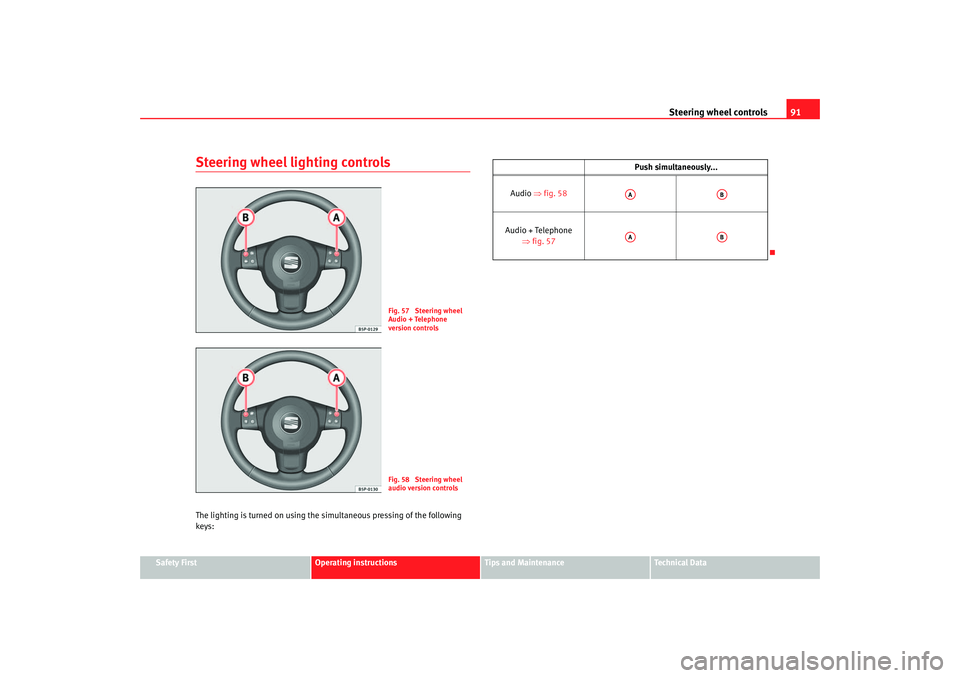
Steering wheel lighting controlsThe lighting is turned on using the si multaneous pressing of the following
keys:
Fig. 57 Steering wheel
Audio + Telephone
version controlsFig. 58 Steering wheel
audio version controls
Push simultaneously...
Audio ⇒fig. 58
Audio + Telephone ⇒fig. 57AA
AB
AA
AB
Toledo angles Seite 91 Mittwoch, 5. Oktober 2005 9:43 09
Page 95 of 290

Unlocking and locking93
Safety First
Operating instructions
Tips and Maintenance
Te c h n i c a l D a t a
When the “Safe” system is deactivated, the doors are locked using the simple
locking system, meaning that
they may be opened from the interior but not
from the exterior.
Involuntary deactivation
The methods described for deactivation of the “Safe” system may be
executed involuntarily (for example, if we press the button because we
want to lock the vehicle, and it locks as a result, however, we are not sure that
it is locked and we press the button once more within 2 seconds, we will have
deactivated the “Safe” system).
Deactivation when opening
To deactivate the system on opening, see “Selective unlocking system*”
“Safe” status
On the front left hand side door, there is a light indicator visible from the
outside of the vehicle that indicates the “Safe” system status.
We can see that the “Safe” system is activated, by the flashing of the light
indicator . The indicator will flash on all vehicles, whether they are fitted with
an alarm or not, and until the vehicle is unlocked.
We can see that the “Safe” system is deactivated, when the light indicator
flashes about seven times and turns off. If the vehicle is not fitted with an
alarm then it remains off. If the vehicle is fitted with an alarm, once 28
seconds have passed since the indicator is switched off, it will start to flash
again and continue until the vehicle is unlocked once more.
Remember:
Safe activated with or without alarm: Continuous flashing of the indicator.
Safe deactivated without alarm: The indicator flashes about seven times and
turns off.
Safe deactivated with alarm: The indicator flashes seven times, turns off and
then continues to flash after 28 seconds.
WARNING
No one should remain in the vehicle if the “Safe” deadlock mechanism has
been activated. It is not possible to open the doors from the inside or the
outside and this would make any outside intervention difficult in case of
emergency. Danger of death. People could become trapped inside in an
emergency.Selective unlocking system*
This system allows for unlocking only the driver's door, or all
the vehicle.Driver's door unlock button
This is done by a simple unlocking (o nce). This can be done with the key or
the remote control.
With the key, rotate the key once in the lock cylinder in the unlock direction.
The driver's door will be released from the “Safe” system, unlocked and may
be opened. Once the door is opened, 15 seconds remain for turning on the
ignition, in which moment, the “Safe” system will be deactivated on the
remaining doors and the light indicator wi ll be turned off. For vehicles fitted
with an alarm, this system is deactivated.
Using the remote control, press the unlock button on the remote once. The
“Safe” system is deactivated for all the vehicle, only the driver's door is
unlocked for opening, the alarm is tu rned off as is the light indicator.
Unlocking all doors and the boot
So that all the doors and the boot ca n be opened, the unlock button on
the remote must be pressed twice.
The button must be pressed twice in under 2 seconds and this will deactivate
the “Safe” system for all the vehicle, all doors will be unlocked and the boot
Toledo angles Seite 93 Mittwoch, 5. Oktober 2005 9:43 09
Page 97 of 290

Unlocking and locking95
Safety First
Operating instructions
Tips and Maintenance
Te c h n i c a l D a t a
Emergency manual locking
This permits mechanical locking of the doors in case of
central locking system failure.Locking the driver's door manually
Insert the key in the door lock cylinder and rotate in a clockwise direction for
the left hand side door and anti-clockwise for the right hand side door.
Once the door has been closed it can no longer be opened from the outside.
Manual (emergency) locking of the remaining doors
Open the door and remove the cap ⇒fig. 59 printed with a lock image.
This will expose a circular element with a groove in the centre. Insert the key
into the groove and rotate the element clockwise for the right hand side doors
and anticlockwise for the left hand side doors.
Replace the cap and close the door. Once the door has been closed it can no
longer be opened from the outside. Unlocking the manually (emergency) locked driver's door
Insert the key in the door lock cylinder and rotate anti-clockwise for the left
hand side doors and clockwise for the right hand side doors.
The door lock is released and the door may be opened using the exterior door
handle.
Unlocking the remaining manually (emergency) locked doors
First the driver's door must be unlocked to gain entry to the vehicle. Operate
the internal door handle for the required door. If the child safety lock is acti-
vated on the rear doors, when the interi
or door release lever is operated the
door is unlocked but does not open. The exterior door handle may now be
used to open the door.
Note
Once the vehicle is open, if you wish to lock it manually (emergency locking),
repeat the previous instructions.
Fig. 59 Locking the doors
manually
AA
Toledo angles Seite 95 Mittwoch, 5. Oktober 2005 9:43 09