2005 Seat Ibiza 5D locking
[x] Cancel search: lockingPage 86 of 252

Unlocking and locking
84Buttons in the driver door
Button for window in front left door
Button for window in front right door
Buttons for rear windows* Safety switch for deactivating the electric window buttons in the rear
doors
Button for window in rear left door
Button for window in rear right door
Safety switch
*
Safety switch in the driver door can be used to disable the electric window
buttons in the rear doors.
Safety switch not pushed in: the buttons in the rear doors are enabled.
Safety switch pushed in: the buttons in the rear doors are disabled.
WARNING
•
Incorrect use of the electric windows can result in injury.
•
Never close the tailgate without observin g a n d e n s u r i n g i t i s c l e a r, t o d o
otherwise could cause serious injury to you and others. Make sure that no
one is in the path of a window.
•
Always take the vehicle key with you when you leave the vehicle.
•
Never leave children or disabled persons in the vehicle, particularly if
they have access to the keys. Unsupervised use of a key could mean that
the engine is started or that electrical equipment is used (e.g. electric
windows). Risk of accident. The door s can be locked using the remote
control key. This could result in people being trapped in the vehicle in an
emergency.
•
The electric windows will work until the key has been removed from the
ignition and one of the front doors has been opened.
•
If necessary, use the safety switch to disable the rear electric windows.
Make sure that they have been disabled.Note
If the window is not able to close becaus e it is stiff or because of an obstruc-
tion, the window will automatically open again ⇒page 85. If this happens,
check why the window could not be closed before attempting to close it
again.One-touch opening and closing*
The one-touch opening and closing function is only possible
on the front doors and can only be activated from the driver's
door.One-touch closing
– Pull up the button for the window briefly to the second position. The window closes fully.
One-touch opening
– Push down the button for the window briefly to the second posi- tion. The window opens fully.
Restoring one-touch opening and closing
– Close all windows.
A1A2A3A4A5
A3
WARNING (continued)
ibiza_ingles Seite 84 Mittwoch, 5. Oktober 2005 5:17 17
Page 87 of 252

Unlocking and locking85
Safety First
Operating instructions
Tips and Maintenance
Te c h n i c a l D a t a
– Use the key to lock the vehicle from outside and hold the key in
the lock position for at least one second. The one-touch function
is now ready for operation.The buttons ⇒ page 83, fig. 52 and have two levels for opening the
window and two for closing it. This makes it easier to open or close windows
to the desired position.
One-touch closing does not work when the ignition has been switched off,
even if the key is in the ignition.
The automatic open and close function wi ll not work if the battery has been
temporarily disconnected, or if the battery is flat. The function then has to be
reactivated.
The one-touch function and roll-back fu nction will not work if there is a
malfunction in the electric windows. Contact an Authorised Service Centre.Roll-back function
The windows have a roll-back function. This reduces the risk
of injuries when the windows are closing.•
If a window is obstructed when closing automatically, the window stops
at this point and lowers immediately ⇒ .
•
If this happens, check immediately (within 10 seconds) why the window
could not be closed before attempting to close it again. After 10 seconds the
normal automatic function resumes.
•
If the window is still obstructed, the window stops at this point.
•
If there is no obvious reason why the window cannot be closed, try to
close it again within five seconds.
If you wait longer than 10 / 5 seconds, the window will open fully when you
operate one of the buttons. One-touch closing is reactivated. The one-touch function and roll-back function will not work if there is a
malfunction in the electric windows. Contact an Authorised Service Centre.
WARNING
•
Incorrect use of the electric windows can result in injury.
•
Always take the key with you when leaving the vehicle, even if you only
intend to be gone for a short time. Plea se ensure that children are never left
unsupervised in the vehicle.
•
The electric windows will work until the key has been removed from the
ignition and one of the front doors has been opened.
•
Never close the tailgate without observin g and ensuring it is clear, to do
otherwise could cause serious injury to you and others. Make sure that no
one is in the path of a window.
•
Never allow people to remain in th e vehicle when you close the vehicle
from the outside. The windows cannot be opened even in an emergency.Note
The roll-back function is deactivate d if the windows are closed from the
outside of the vehicle using the ignition key for convenience closing
⇒ page 85.Convenience opening and closing*Using the door lock
– Hold the key in the door lock of the driver door in either the
locking or the unlocking position until all windows are either
opened or closed.
– Release the key to interrupt this function.
A1
A2
ibiza_ingles Seite 85 Mittwoch, 5. Oktober 2005 5:17 17
Page 88 of 252
Unlocking and locking
86Sliding/tilting roof*Opening and closing the sliding/tilting roof
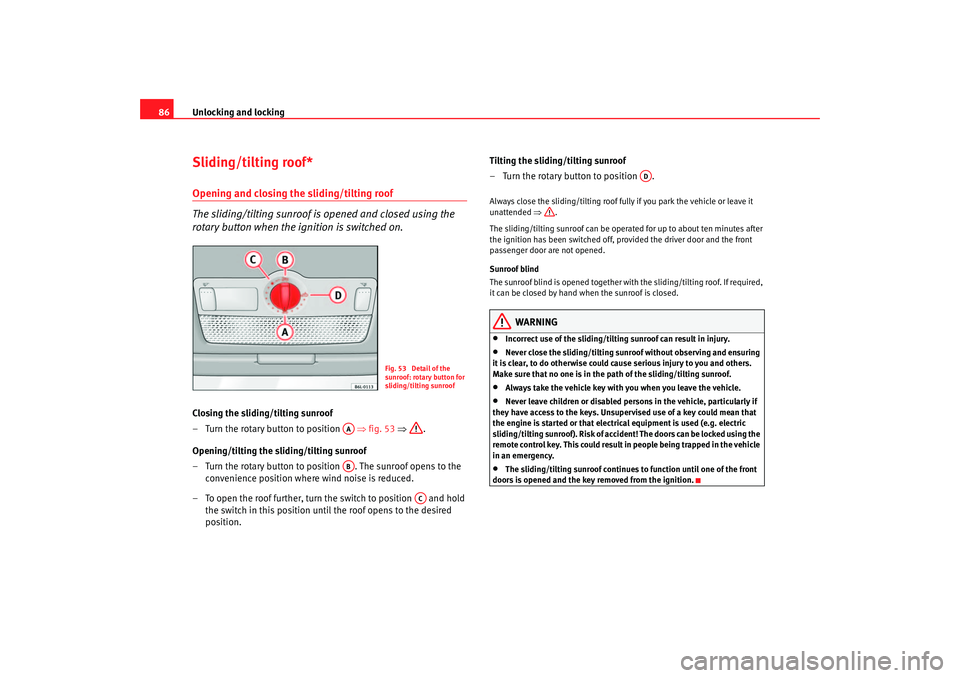
The sliding/tilting sunroof is opened and closed using the
rotary button when the ignition is switched on.Closing the sliding/tilting sunroof
– Turn the rotary button to position ⇒fig. 53 ⇒ .
Opening/tilting the sliding/tilting sunroof
– Turn the rotary button to position . The sunroof opens to the convenience position where wind noise is reduced.
– To open the roof further, turn the switch to position and hold the switch in this position until the roof opens to the desired
position. Tilting the sliding/tilting sunroof
– Turn the rotary button to position .
Always close the sliding/tilting roof fully if you park the vehicle or leave it
unattended
⇒.
The sliding/tilting sunroof can be operated for up to about ten minutes after
the ignition has been switched off, provided the driver door and the front
passenger door are not opened.
Sunroof blind
The sunroof blind is opened together with the sliding/tilting roof. If required,
it can be closed by hand when the sunroof is closed.
WARNING
•
Incorrect use of the sliding/tilting sunroof can result in injury.
•
Never close the sliding/tilting sunroof without observing and ensuring
it is clear, to do otherwise could c ause serious injury to you and others.
Make sure that no one is in the path of the sliding/tilting sunroof.
•
Always take the vehicle key with you when you leave the vehicle.
•
Never leave children or disabled persons in the vehicle, particularly if
they have access to the keys. Unsupervised use of a key could mean that
the engine is started or that electric al equipment is used (e.g. electric
sliding/tilting sunroof). Risk of accide nt! The doors can be locked using the
remote control key. This could result in people being trapped in the vehicle
in an emergency.
•
The sliding/tilting sunroof continues to function until one of the front
doors is opened and the key removed from the ignition.
Fig. 53 Detail of the
sunroof: rotary button for
sliding/tilting sunroof
AAAB
AC
AD
ibiza_ingles Seite 86 Mittwoch, 5. Oktober 2005 5:17 17
Page 89 of 252
Unlocking and locking87
Safety First
Operating instructions
Tips and Maintenance
Te c h n i c a l D a t a
Convenience closing*Using the door lock
– Hold the key in the door lock of the driver's door in the locking
position until the sliding/tilting sunroof is closed.
– Release the key to interrupt this function.
NoteThe sliding/tilting sunroof rotary button remains in the last position selected
if the roof is closed using convenience closing from outside the vehicle and
will have to be re-positio ned the next time you drive.Roll-back function of the sliding/tilting roof*
The sliding/tilting roof has a roll-back function which prevents larger objects
getting trapped when the roof is closed. The roll-back function does not
prevent fingers getting pinched against the roof opening. The sliding/tilting
sunroof stops and opens again immediately if it is obstructed when closing.
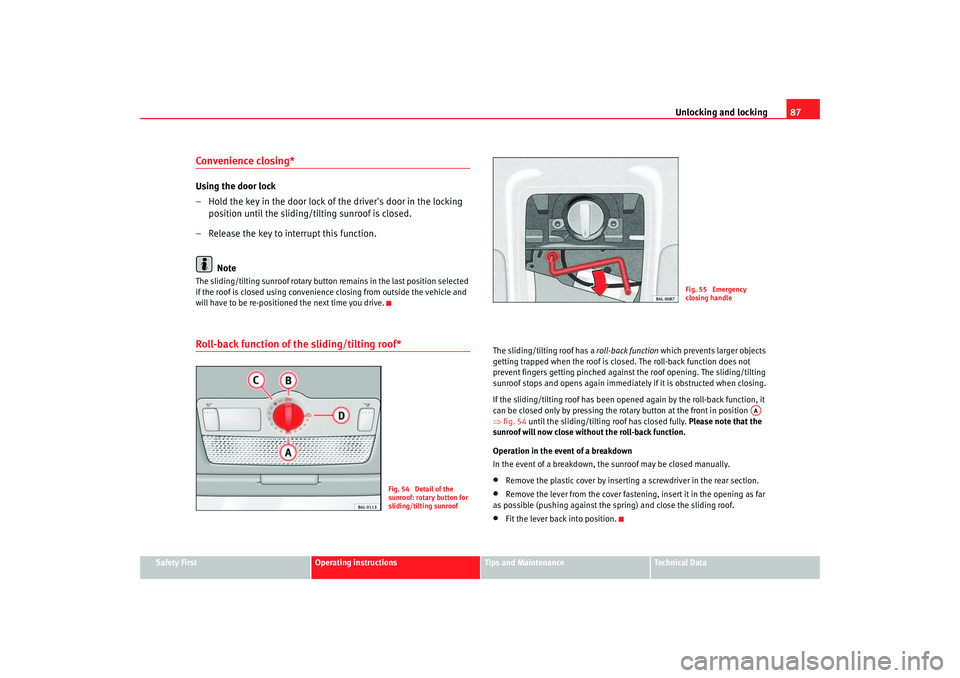
If the sliding/tilting roof has been opened again by the roll-back function, it
can be closed only by pressing the rotary button at the front in position
⇒ fig. 54 until the sliding/tilting roof has closed fully. Please note that the
sunroof will now close without the roll-back function.
Operation in the event of a breakdown
In the event of a breakdown, the sunroof may be closed manually.•
Remove the plastic cover by inserting a screwdriver in the rear section.
•
Remove the lever from the cover fastening, insert it in the opening as far
as possible (pushing against the spring) and close the sliding roof.
•
Fit the lever back into position.
Fig. 54 Detail of the
sunroof: rotary button for
sliding/tilting sunroof
Fig. 55 Emergency
closing handle
AA
ibiza_ingles Seite 87 Mittwoch, 5. Oktober 2005 5:17 17
Page 107 of 252
Seats and stowage105
Safety First
Operating instructions
Tips and Maintenance
Te c h n i c a l D a t a
– Turn the appropriate thumb wheel ⇒page 104, fig. 73 to switch
on the seat heating. The seat heating is switched off in the 0
position.The seat heating only works when the ignition is switched on. The left thumb
wheel controls the left seat and the right thumb wheel the right seat.
Caution
To avoid damaging the heating elements, please do not kneel on the seat or
apply sharp pressure at a single poin t to the seat cushion and backrest.Rear seat benchFolding down rear seats
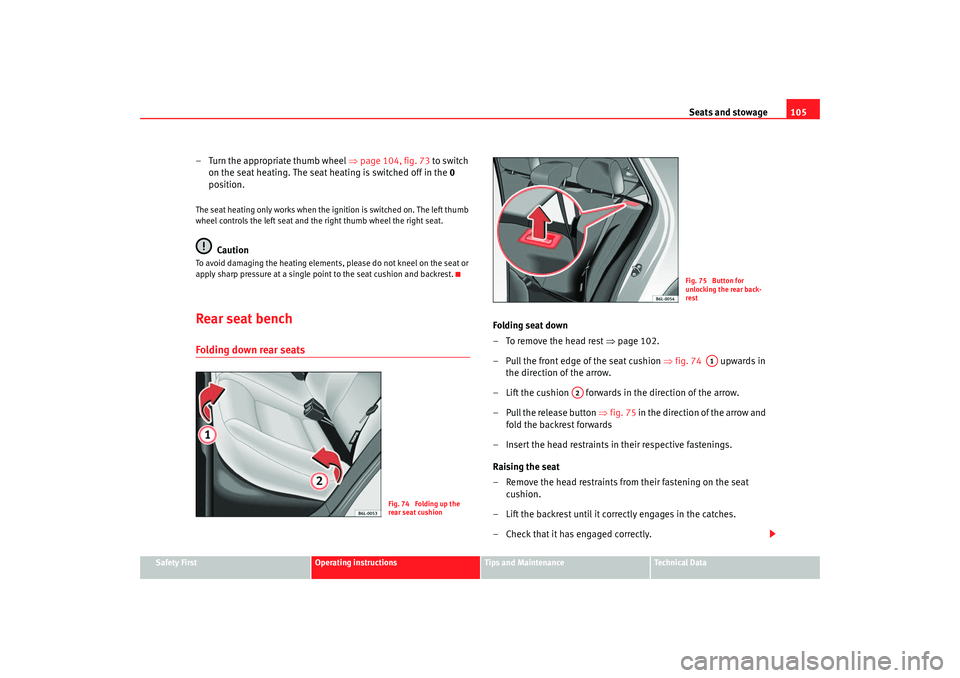
Folding seat down
– To remove the head rest ⇒ page 102.
– Pull the front edge of the seat cushion ⇒fig. 74 upwards in
the direction of the arrow.
– Lift the cushion forwards in the direction of the arrow.
– Pull the release button ⇒ fig. 75 in the direction of the arrow and
fold the backrest forwards
– Insert the head restraints in their respective fastenings.
Raising the seat
– Remove the head restraints from their fastening on the seat cushion.
– Lift the backrest until it correctly engages in the catches.
– Check that it has engaged correctly.
Fig. 74 Folding up the
rear seat cushion
Fig. 75 Button for
unlocking the rear back-
rest
A1
A2
ibiza_ingles Seite 105 Mittwoch, 5. Oktober 2005 5:17 17
Page 133 of 252

Driving131
Safety First
Operating instructions
Tips and Maintenance
Te c h n i c a l D a t a
Selector lever lock functions
The selector lever lock in positi on P or N prevents gears from
being engaged inadvertently, which would cause the vehicle
to move.
The selector lever lock is released as follows:
– Switch on the ignition.
– Press and hold the brake pedal and press the selector lever lock
on the left of the selector lever at the same time.A delay device prevents the lever form blocking, on gently passing through
position N (f or example, from R to D). T
his ma
kes it possible, if the car is
stuck, to remove it “by swinging it”. Only when the lever is in position N for
more than 1 second, without pressing th e brake, does the lever block come
into operation.
At speeds of over 5 km/h the selector lever lock is automatically blocked in
posit ion N.
Selector lever positionsP - parking lock
This is the correct position for parking the vehicle. To enga ge and disengage P
press the button on the gearstick knob and depress the brake pedal, while
the car is running.
If the car is not running, it can be unlocked by pressing the knob button.
R - reverse gear
This should only be engaged when the vehicle is at a standstill and the
engine idling. Before engaging position R, starting from position P or N,
depress the brake pedal and press the button on the gearstick knob.
In position R and with the ignition on, th e reversing lights come on.
Fig. 97 Section of centre
console: selector lever on
cars with an automatic
gearboxFig. 98 Instrument panel
display: selector lever
locked in position P
ibiza_ingles Seite 131 Mittwoch, 5. Oktober 2005 5:17 17
Page 135 of 252

Driving133
Safety First
Operating instructions
Tips and Maintenance
Te c h n i c a l D a t a
If, while driving, the selector lever accidentally moves to position
N, first
release the accelerator pedal and wait un til the engine slows to idling before
selecting a forwards gear ⇒ .
Starting
Select a range ( R, D, 3, 2, 1). Wait until the change has taken place and the
power transmission of the drive wheels has stabilised (slight pressure is
noticeable). Then depress the accelerator.
Stopping
In the case of a temporary stop, for example at a traffic lights, it is not neces-
sary to move to position N, it is sufficent to brake using the brake pedal. The
engine should only run at idle speed.
Parking
On slopes, first pull handbrake on firmly and then connect block. This
prevents overloading the blocking mechanism, making the subsequent
disconnection easier ⇒ .
Emergency start
in vehicles fitted with an automatic gearbox the engine can not be started by
towing or pushing the vehicle ⇒page 217
If the vehicle battery is flat, a battery from another car can be used to jump-
start the car using a set of jump leads ⇒ page 126
To w i n g
If the vehicle requires towing at any time, observe the instructions of
⇒ page 217, “Towing and tow-starting”.
Back-up programme
In the event of a malfunction of the gearbox electronics, emergency
programmes are activated, according to the type of fault.
•
The gearbox continues to connect gears automatically, but the operations
are jerky. Consult the Authorised Service Centre.
•
The gearbox does not automatically engage gears.
In this case they can be changed manually. 3rd gear is only ava ilable in posi-
tions D, 3 and 2 of the selector lever.
In positions 1 and R of the selector lever 1st gear and reverse gear are availa ble
respectively as normal
As the torque converter is required to work more, especially due to the lack of
2nd gear, it is possible that the gearbox oil may overheat. In this case, consult
the Authorised Service Centre as soon as possible.
WARNING
•
In all the ranges the vehicle must always be held with the foot brake
when the engine is running. This is because an automatic gearbox still
transmits power even at idling speed, and the vehicle tends to “creep”.
•
If, when the car is at a standstill and the engine is idling, a range is
connected, take care not to accelerate accidentally (for example, when
working in the engine compartment), as the car will start to move immedi-
ately.
•
Before working on a running engine, place the selector lever in position
P and apply the handbrake.
•
To prevent the vehicle from moving out of control, the handbrake
should always be applied when the vehi cle is at a standstill. In addition
move the selector lever to position P.
ibiza_ingles Seite 133 Mittwoch, 5. Oktober 2005 5:17 17
Page 136 of 252
Driving
134HandbrakeUsing the handbrake
The handbrake should be applied firmly to prevent the
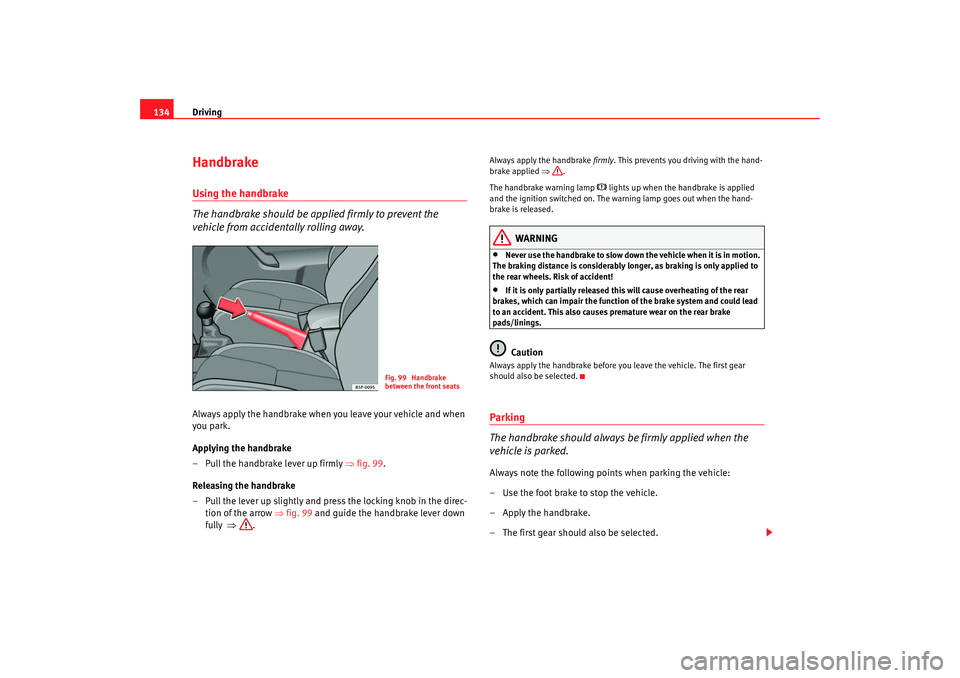
vehicle from accidentally rolling away.Always apply the handbrake when you leave your vehicle and when
you park.
Applying the handbrake
– Pull the handbrake lever up firmly ⇒fig. 99 .
Releasing the handbrake
– Pull the lever up slightly and press the locking knob in the direc- tion of the arrow ⇒fig. 99 and guide the handbrake lever down
fully ⇒ .
Always apply the handbrake firmly. This prevents you driving with the hand-
brake applied ⇒.
The handbrake warning lamp
lights up when the handbrake is applied
and the ignition switched on. The warning lamp goes out when the hand-
brake is released.
WARNING
•
Never use the handbrake to slow down the vehicle when it is in motion.
The braking distance is considerably longer, as braking is only applied to
the rear wheels. Risk of accident!
•
If it is only partially released this will cause overheating of the rear
brakes, which can impair the function of the brake system and could lead
to an accident. This also causes premature wear on the rear brake
pads/linings.Caution
Always apply the handbrake before you leave the vehicle. The first gear
should also be selected.Parking
The handbrake should always be firmly applied when the
vehicle is parked.Always note the following points when parking the vehicle:
– Use the foot brake to stop the vehicle.
–Apply the handbrake.
– The first gear should also be selected.
Fig. 99 Handbrake
between the front seats
ibiza_ingles Seite 134 Mittwoch, 5. Oktober 2005 5:17 17