2005 Seat Altea ECO mode
[x] Cancel search: ECO modePage 91 of 286

Steering wheel controls89
Safety First
Operating instructions
Tips and Maintenance
Te c h n i c a l D a t a
Button
Short press
Long press
Radio CDCDCRadio CDCDC
Increase the source volume and the navigation message Increase the source volume and the navigation message continuously
Decrease the source volume and the navigation message Decrease the source volume and the navigation message continuously
Station search. Higher frequency Following trackStation search. Higher
frequency Fast forward
Station search. Lower frequency Previous trackStation search. Lower
frequency Rewind
Cyclic change of source
Radio - CD / CDC - Radio - ...
When in Navigation mode the system leaves the navigation screen. Repeat the last Navigation instruction
Only if the Navigation function is activated.
Voice recognition activation Press to speak No specified function
Make a call or
Direct access to the phone book or
Accept a call No specified function
Terminate call or
Refuse call
or
Quite telephone menu No specified function
AAABACADAEAFAGAH
altea_ingles Seite 89 Donnerstag, 19. Mai 2005 3:02 15
Page 153 of 286

Air conditioning151
Safety First
Operating instructions
Tips and Maintenance
Te c h n i c a l D a t a
The air conditioning system only works when the engine is running
and the blower is switched on.
– Press the temperature control buttons ⇒page 150, fig. 126
or in order to adjust the temperature on the left hand side or
the right hand side respectively.
– The functions will be switched on when the buttons are pressed. When these functions are activated, they are indicated in the
display. Also, the de-icing and re ar heated window functions will
turn on along with their corres ponding yellow symbol. Press the
button again to switch off the function.The temperature can be adjusted separately for the left and right sides of the
vehicle interior.
Display of the selected interior temperature for the left side.
Button – Manual air recirculation mode
Button – Central air distribution
Button – Downward air distribution
Button – Upward air distribution
Display of the selected interior temperature for the right side.
Button – defrost function for the windscreen. The air drawn in from
outside the vehicle is directed at the windscreen. The air recirculation
mode, if switched on, will be switched off as soon as the defrost function
is switched on. At temperatures over 3° C, the air conditioning system
will be switched on automatically and the blower speed will be increased
by one level in order to dry the air. The button lights up yellow and the
symbol appears in the display.
Button – Rear window heating. The heating will be switched off auto-
matically approximately 20 minutes after switching on. However, it may
be turned off by pushing the button. The button lights up yellow and the
symbol appears in the display.
Temperature selector for the left side ⇒page 151 Blower control
⇒page 152
Button – Switches the 2C-Climatronic on and off ⇒page 152
Button – Automatic temperature, ventilation and air distribution
control ⇒page 151
Button – Switches cooling system off
Temperature selector for the right side ⇒page 151
WARNING
For road safety all windows must be clear of ice, snow, and condensation.
This is essential to ensure good visibility. Please familiarize yourself with
the correct operation of the heating and ventilation system, including the
anti-fog/defrost functions for the windows.
Note
Please observe the general notes ⇒page 154.Automatic mode
In automatic mode air temperatur e, air flow and distribution
are automatically regulated so that a specified temperature is
attained as quickly as possible and then maintained.The temperature can be adjusted separately for the left and right
sides of the vehicle interior.
Switching on automatic mode
– Press the button ⇒page 150, fig. 126 .“AUTO” is shown
on the display.
A9
A14
A1A2
A3
A4
A5
A6A7
A8
A9
A10A11
OFF
A12
AUTO
A13
ECON
A14
AUTO
altea_ingles Seite 151 Donnerstag, 19. Mai 2005 3:02 15
Page 154 of 286

Air conditioning
152
– Turn the temperature selectors to set the desired temperatures for the left and right sides of the interior. We recommend 22°C
(72°F).A comfortable interior climate is quickly reached when a temperature of
+22° C (72° F) is set in automatic mode. It can be changed as necessary to
suit individual preferences or particular circumstances. It is possible to select
interior temperatures from +16° C ( 61° F) to +29.5° C (86° F). These are
approximate temperatures and the actual temperature may be slightly higher
or lower depending on the ambient conditions. Climatronic maintains a constant temperature level fully automatically. The
temperature of the air supplied to the interior, the blower speed and the air
distribution are regulated automatically. The system also allows for the effect
of strong sunlight, so there is no need for manual adjustment. Therefore,
automatic mode
provides the best comfort for the vehicle occupants in virtu-
ally all conditions throughout the year.
Automatic mode is switched off whenever an adjustment is made using the
buttons for the air distribution, air flow or . The temperature continues
to be regulated.Manual mode
In manual mode you can adjust the air temperat ure, air flow and distribution as required.Switching on manual mode
– To enter manual mode, press one of the buttons ⇒fig. 127 to , or turn the air flow control . The symbol will
disappear from the display.
ECON
Fig. 127 On the dash panel: 2C Climatronic controls
A3
A5
ECON
A10
AUTO
altea_ingles Seite 152 Donnerstag, 19. Mai 2005 3:02 15
Page 155 of 286

Air conditioning153
Safety First
Operating instructions
Tips and Maintenance
Te c h n i c a l D a t a
Temperature
There are separate temperature selectors for the left and right sides of the
vehicle interior. The selected temperature is displayed above the selector. It
is possible to select interior temper
atures from +16° C (61° F) to +29.5° C
(86° F). These are approximate temperat ures and the actual temperature may
be slightly higher or lower depending on the ambient conditions.
If a temperature below 16° C (61° F) is selected, the display switches to LO. In
this setting the system runs at maximum cooling output and the temperature
is not regulated.
If a temperature above 29.5 °C (86 °F) is selected the display switches to HI.
In this setting the system runs at maximum heating output and the tempera-
ture is not regulated.
Blower
The air flow may be adjusted freely using the control . Always have the
blower running at a low setting to ensure a constant flow of fresh air into the
vehicle. Pushing the button
to the minimum -1, tu rns the Climatronic off.
Air distribution
The air distribution is adjusted using the buttons , and . Also, it is
also possible to open and close some of the air vents separately.
Switching the cooling system on and off
Pressing the button switches off the cooling system to save fuel. The
temperature continues to be regulated. The set temperature can then only be
reached if it is higher than the ambient temperature.
Air recirculation mode
Air recirculation mode prevents fumes or unpleasant smells
from entering the vehicle.– Press the button ⇒page 152, fig. 127 to switch air recir-
culation mode on or off. It is switched on if the following symbol
appears in the display
.
Air recirculation mode prevents strong odours in the ambient air from
entering the vehicle interior, for example when passing through a tunnel or in
queuing traffic.
With low ambient temperatures, the air recirculation increases the effective-
ness of the heating system by heating the air inside the passenger compart-
ment rather than the ambient air.
With high ambient temperatures, the air recirculation increases the effective-
ness of the air cooling system by cooling the air inside the passenger
compartment rather than the ambient air.
For reasons of safety, air recirculation is not possible when the control for air
distribution is set to the windscreen setting
.
WARNING
In air recirculation mode, no ambient air enters the vehicle interior. If the
air conditioning system is switched off, the windows can quickly mist over.
Therefore, you should never leave the air recirculation mode switched on
for longer periods, as this increases the risk of an accident.
A10
ECON
A2
altea_ingles Seite 153 Donnerstag, 19. Mai 2005 3:02 15
Page 156 of 286

Air conditioning
154General notesThe pollution filter
The pollution filter (a combined particle filter and active carbon filter) serves
as a barrier against impurities in the ambient air, including dust and pollen.
For the air conditioning system to work with maximum efficiency, the pollu-
tion filter must be replaced at the intervals specified in the Service Schedule.
If the filter loses efficiency prematurely due to use in areas with very high
levels of air pollution, the pollution filter must be changed more frequently
than stated in the Service Schedule.
Caution
•
If you suspect that the air conditioner is damaged, switch off the air condi-
tioner with button to prevent further damage and have it checked by a
qualified workshop.
•
Repairs to the air conditioning system require specialist knowledge and
special tools. Therefore, we recommend that you take the vehicle to a quali-
fied workshop should problems occur.Note
•
If the humidity and temperature outside the vehicle are high, condensa-
tion can drip off the evaporator in the cooling system and form a pool under-
neath the vehicle, this is completely normal and there is no need to suspect
a leak.
•
Keep the air intake slots in front of the windscreen free of snow, ice and
leaves to ensure heating and cooling is not impaired, and to prevent the
windows misting over.
•
The air from the vents flows through the passenger compartment and is
extracted by slots designed for this purpose. Do not cover these slots with
articles of clothing or other objects.
•
The air conditioning system operates most effectively with the windows
and the sliding/tilting roof* closed. Howe ver, if the sun has heated up the
vehicle, the air inside can be cooled more quickly by opening the windows for
a short period.
•
Do not smoke while air recirculation mode is on, as smoke drawn into the
air conditioning system leaves a r esidue on the evaporator, producing a
permanent unpleasant odour.
ECON
altea_ingles Seite 154 Donnerstag, 19. Mai 2005 3:02 15
Page 165 of 286
Driving163
Safety First
Operating instructions
Tips and Maintenance
Te c h n i c a l D a t a
Selecting the sport program
– Move the lever to position S .If you have selected the normal driving programme D, you will drive in a more
economical driving mode. This program selects a higher gear earlier rather
than remain in a lower gear.
If you select the sport programme, S, the program is designed for a sports
mode, that is, a programme which changes up at higher engine speeds to use
the full power of the engine. This program is not recommended for use on the
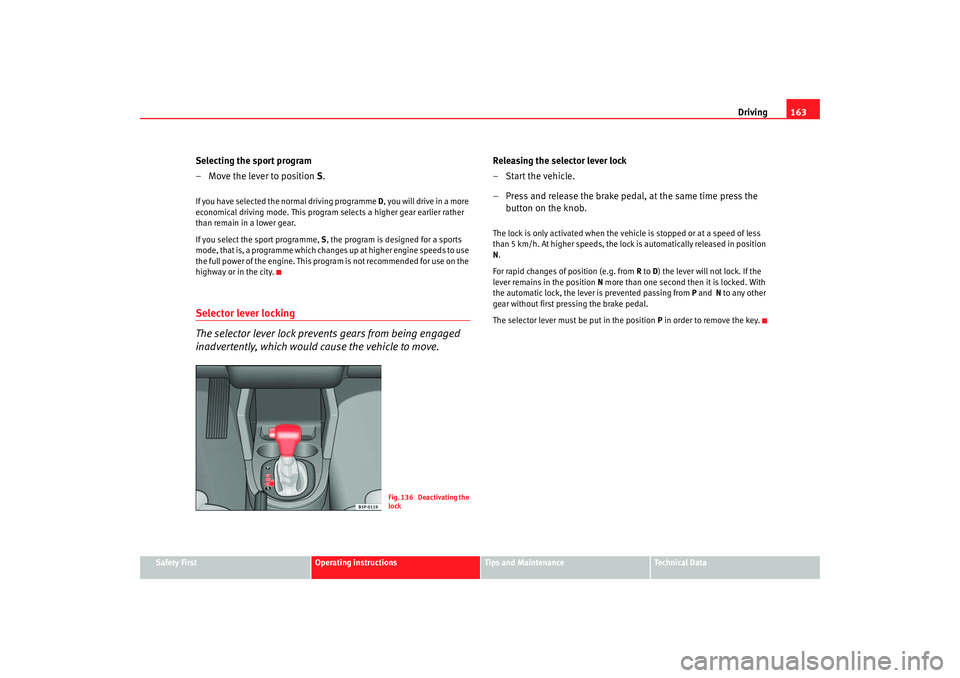
highway or in the city.Selector lever locking
The selector lever lock prevents gears from being engaged
inadvertently, which would cause the vehicle to move.
Releasing the selector lever lock
–Start the vehicle.
– Press and release the brake pedal, at the same time press the button on the knob.The lock is only activated when the vehicle is stopped or at a speed of less
than 5 km/h. At higher speeds, the lock is automatically released in position
N.
For rapid changes of position (e.g. from R to D) the lever will not lock. If the
lever remains in the position N more than one second then it is locked. With
the automatic lock, the lever is prevented passing from P and N to any other
gear without first pressing the brake pedal.
The selector lever must be put in the position P in order to remove the key.
Fig. 136 Deactivating the
lock
altea_ingles Seite 163 Donnerstag, 19. Mai 2005 3:02 15
Page 166 of 286

Driving
164Driving with an automatic gearbox*
The drive and reverse gears are automatically engaged.Driving
– Press and hold the foot brake.
– Press on the button on the selector lever knob (on the left,
⇒fig. 137.
– Select a gear for driving ( R, D or S).
– Release the button and wait a few seconds for the gear to engage, a light jerk will be felt.
– Release the brake and accelerate. Short stop
– Hold the vehicle stationary with the brake pressed down (for
example at traffic lights). The sele ctor lever does not need to be
put into the positions P or N for this.
– Do not press the accelerator.
Parking the vehicle
– Press the foot brake and hold to bring the vehicle to a stop.
–Apply the handbrake firmly.
– Press in the button on the selector lever knob, move the lever to the position P and release the button.
Driving slowly
– Move the selector lever to the position D and press to the right to
put the lever into Tiptronic mode.
– Press the gear lever towards (-) to select a lower gear.
Hill stop
– Hold the vehicle, in all cases, using the foot brake to prevent rolling back.
– Do not try to slow the vehicle using another forward gear (engine braking).
Descending gradients
– With the gear engaged, release the brake and accelerate.
The steeper the gradient the lower the gear must be for effective engine
braking. For example, if 3rd gear is used on a very steep gradient, the engine
Fig. 137 Driving
altea_ingles Seite 164 Donnerstag, 19. Mai 2005 3:02 15
Page 183 of 286

Driving and the environment181
Safety First
Operating instructions
Tips and Maintenance
Te c h n i c a l D a t a
On the right headlight, if you are changing from driving on the left-hand side
to the right-hand side.
On the left headlight, if you are changing from driving on the left-hand side to
the right-hand side.
Trailer towingWhat do you need to bear in mind when towing a trailer?Your vehicle may be used to tow a trailer when fitted with the correct equip-
ment.
If the car is supplied with a
factory-fitted towing bracket it will already have
the necessary technical modifications and meet the statutory requirements
for towing a trailer. For the posterior fitting of a trailer towing bracket see
⇒ page 196.
Connectors
Your vehicle is fitted with a 12-pin co nnector for the electrical connection
between the trailer and the vehicle.
If the trailer has a 7-pin plug you will need to use an adapter cable. This is
available from any Technical Service.
Trailer weight / draw bar loading
Never exceed the authorised towing limit. If you do not load the trailer up to
the maximum permitted trailer weight , you can then climb correspondingly
steeper gradients.
The maximum trailer weights listed are only applicable for altitudes up to
1,000 m above sea level. With increasing altitude the engine power and
therefore the vehicle's climbing ability are impaired because of the reduced
air density. The maximum trailer weight has to be reduced accordingly. The weight of the vehicle and trailer combination must be reduced by 10% for
every further 1,000m (or part thereof).
The gross combination weight is the
actual weight of the laden vehicle plus the actual weight of the laden trailer.
Where possible, operate the trailer with the maximum permitted draw bar
weight on the ball joint of the towing bracket, but do not exceed the specified
limit.
The figures for trailer weights and draw bar weights that are given on the
data plate of the towing bracket are for certification purposes only. The
correct figures for your specific model, which may be lower than these figures
for the towing bracket, are given in the registration documents an d
⇒ Section “Technical data”.
Distributing the load
Distribute loads in the trailer so that heavy objects are as near to the axle as
possible. Loads carried in the trailer must be secured to prevent them
moving.
Tyre pressure
Set tyre pressure to the maximum permissible pressure shown on the sticker
on the inside of the fuel tank flap. Set the tyre pressure of the trailer tyres in
accordance with the trailer manufacturer's recommendations.
Exterior mirrors
Check whether you can see enough of the road behind the trailer with the
standard mirrors. If this is not the case you should have additional mirrors
fitted. Both exterior mirrors should be mounted on hinged extension
brackets. Adjust the mirrors to give sufficient vision to the rear.
WARNING
Never transport people in a trailer. This could result in fatal accidents.
altea_ingles Seite 181 Donnerstag, 19. Mai 2005 3:02 15