2005 SATURN L-SERIES battery
[x] Cancel search: batteryPage 119 of 330

Battery Warning Light
The battery warning light
will come on briefly as a
check, when you turn
on the ignition. Then it
should go out when
the engine is started.
If the light does not come on when you start your
vehicle, have your vehicle serviced right away. This
condition may indicate your battery warning light is not
functioning properly. If this light comes on while you
are driving, be sure to turn off accessories such as the
radio and climate control system. Have your vehicle
serviced right away.
Brake System Warning Light
Your vehicle’s hydraulic brake system is divided into
two parts. If one part isn’t working, the other part can still
work and stop you. For good braking, though, you
need both parts working well.If the brake system warning light comes on, there is
a brake problem. Have your brake system inspected
right away.
The BRAKE light is
located in the instrument
panel cluster.
This light should come on briefly when you turn the
ignition key to RUN. If it doesn’t come on then, have it
fixed so it will be ready to warn you if there’s a
problem.
When the ignition is on, the BRAKE light will come on
when you set your parking brake. The light will stay on if
your parking brake doesn’t release fully. A chime will
also sound if the parking brake is not fully released and
the vehicle is moving. If it stays on after your parking
brake is fully released, it means you have a brake
problem.
The BRAKE light will also come on to indicate a low
brake fluid level. SeeBrakes on page 5-33for
more information.
3-27
ProCarManuals.com
Page 125 of 330

If you experience one or more of these conditions,
change the fuel brand you use. It will require at least
one full tank of the proper fuel to turn the light off.
If none of the above steps have made the light turn off,
your retailer can check the vehicle. Your retailer has the
proper test equipment and diagnostic tools to fix any
mechanical or electrical problems that may have
developed.
Emissions Inspection and Maintenance
Programs
Some state/provincial and local governments have or
may begin programs to inspect the emission control
equipment on your vehicle. Failure to pass this
inspection could prevent you from getting a vehicle
registration.
Here are some things you need to know in order to help
your vehicle pass an inspection:
Your vehicle will not pass this inspection if the SERVICE
ENGINE SOON light is on or not working properly.
Your vehicle will not pass this inspection if the
OBD (on-board diagnostic) system determines that
critical emission control systems have not been
completely diagnosed by the system. The vehicle
would be considered not ready for inspection.This can happen if you have recently replaced your
battery or if your battery has run down. The diagnostic
system is designed to evaluate critical emission
control systems during normal driving. This may take
several days of routine driving. If you have done this and
your vehicle still does not pass the inspection for lack
of OBD system readiness, your retailer can prepare the
vehicle for inspection.
Oil Pressure Light
If you have a low engine
oil pressure problem,
this light will stay on after
you start your engine,
or come on when you are
driving. This indicates
that your engine is
not receiving enough oil.
The engine could be low on oil, or could have some
other oil problem. Have it fixed immediately.
3-33
ProCarManuals.com
Page 132 of 330

Setting Preset Stations
Up to 18 stations (six FM1, six FM2, and six AM), can
be programmed on the six numbered pushbuttons,
by performing the following steps:
1. Turn the radio on.
2. Press AM FM to select FM1, FM2, or AM.
3. Tune in the desired station.
4. Press and hold one of the six numbered
pushbuttons until you hear a beep. Whenever
that numbered pushbutton is pressed, the station
that was set will return.
5. Repeat the steps for each pushbutton.
If the battery has been disconnected or a radio fuse
has been removed, the preset stations and time of day
will need to be reset.
Using Automatic Set
A.SET (Automatic Set):Press this button to have
the radio automatically select the first 12 strongest
radio stations for FM and the six strongest radio
stations for AM.To select the stations, perform the following:
1. Press AM FM to select FM1, FM2, or AM.
2. Press and hold AM FM until you hear a beep.
The radio will begin to search the current band.
The radio will store the stations, starting from the
lowest frequency, to each preset pushbutton. A.SET
will appear on the display when the radio is
finished storing the stations.
Cancelling Automatic Set
The radio retains the previously stored stations so they
can be recalled when automatic set is canceled.
Press and hold A.SET until you hear a beep. A.SET will
no longer appear on the display.
Setting the Tone (Bass/Treble)
MODE:Press this button until BAS or TRE appears
on the display. Press the plus or minus buttons to
increase or to decrease. The display will show the bass
or the treble level. If a station is weak or noisy,
decrease the treble.
3-40
ProCarManuals.com
Page 136 of 330

Setting Preset Stations
Up to 18 stations (six FM1, six FM2, and six AM), can
be programmed on the six numbered pushbuttons,
by performing the following steps:
1. Turn the radio on.
2. Press AM FM to select FM1, FM2, or AM.
3. Tune in the desired station.
4. Press the AUTO TONE arrow to select the
equalization.
5. Press and hold one of the six numbered
pushbuttons until you hear a beep. Whenever that
numbered pushbutton is pressed, the station
that was set will return and the equalization that
was selected will be stored for that pushbutton.
6. Repeat the steps for each pushbutton.
If the battery has been disconnected or a radio fuse has
been removed, the preset stations and time of day
will need to be reset.
Using Automatic Set
A.SET (Automatic Set):Press this button to have the
radio automatically select the first 12 strongest radio
stations for FM and the six strongest radio stations
for AM.
To select the stations, perform the following:
1. Press AM FM to select FM1, FM2, or AM.
2. Press and hold AM FM until you hear a beep.
The radio will begin to search the current band.
The radio will store the stations, starting from the
lowest frequency, to each preset pushbutton. A.SET
will appear on the display when the radio is
finished storing the stations.
Cancelling Automatic Set
The radio retains the previously stored stations so they
can be recalled when automatic set is canceled.
Press and hold A.SET until you hear a beep. A.SET will
no longer appear on the display.
3-44
ProCarManuals.com
Page 144 of 330

Rear Seat Entertainment System
Your vehicle may have a DVD Rear Seat Entertainment
(RSE) system. The RSE system works with the
vehicles audio system and includes a DVD radio, a
video display screen, two sets of wireless headphones,
and a remote control.
Before You Drive
The RSE system is designed for rear seat passengers
only. The driver cannot safely view the video screen
while driving and should not try to do so.
In severe or extreme weather conditions the RSE
system may or may not work until the temperature is
within the operating range. The operating range for the
RSE system is above−4°F (−20°C) or below
140°F (60°C). If the temperature of your vehicle is
outside of this range, heat or cool the vehicle until the
temperature is within the operating range of the
RSE system. To resume operation, shut off the RSE,
pull down the video screen and then heat or cool
the vehicle until the temperature is within the
operating range.
Headphones
The RSE system includes two sets of wireless
headphones. The headphones are used to listen to the
DVD radio or an auxiliary device connected to the
RCA jacks. The wireless headphones have an ON/OFF
switch and a volume control.
To use the headphones, turn the switch, located on the
left side, to ON. An indicator light located on the
headphones will illuminate. If the light does not illuminate,
the batteries may need to be replaced. See “Battery
Replacement” later in this section for more information.
Switch the headphones to OFF when not in use.
3-52
ProCarManuals.com
Page 145 of 330

The transmitters are located in the display above the
video screen. The headphones will shut off automatically
to save the battery power if the DVD system is shut
off or if the headphones are out of range of the
transmitters for more than three minutes. If you move
too far forward or step out of the vehicle, the
headphones will lose the audio signal.
If the RSE system is shut off or if the headphones are
out of range of the transmitters, located at the top of the
video screen, for more than three minutes, the
headphones will shut off automatically to save battery
power. If you move too far forward or step out of
the vehicle, the headphones will lose the audio signal.
To adjust the volume on the headphones, use the
volume control located on the right side.
Notice:Do not store the headphones in heat or
direct sunlight. This could damage the headphones
and repairs would not be covered by your warranty.
Keep the headphones stored in a cool, dry place.Battery Replacement
To change the batteries, do the following:
1. Slide open the battery door located on the left side
of the headphones.
2. Replace the two AAA batteries in the compartment.
Make sure that they are installed correctly.
3. Slide the battery door shut.
If the headphones are to be stored for a long period of
time, remove the batteries and keep them in a cool,
dry place.
Stereo RCA Jacks
The RCA jacks are located on the faceplate of the DVD
player. The RCA jacks allow audio or video signals
to be connected from an auxiliary device such as
a camcorder or a video game unit to the RSE system.
Adapter connectors or cables may be required to
connect the auxiliary device to the RCA jacks. Refer to
the manufacturer’s instructions for proper usage.
The RCA jacks are color coded to match typical home
entertainment system equipment. The yellow jack (top)
is for the video input. The white jack (middle) is for the
left audio input. The red jack (bottom) is for the right
audio input.
3-53
ProCarManuals.com
Page 149 of 330
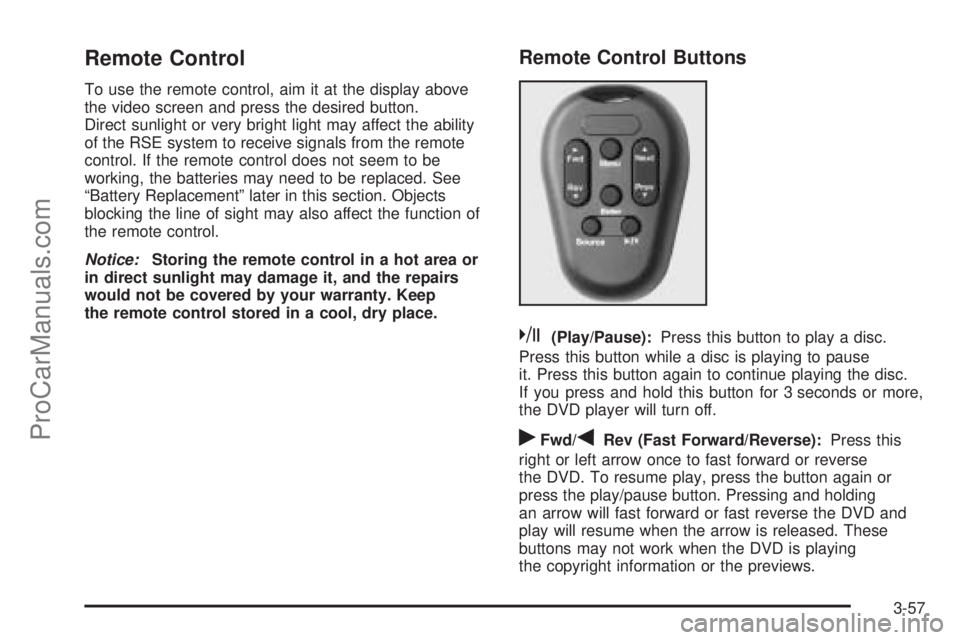
Remote Control
To use the remote control, aim it at the display above
the video screen and press the desired button.
Direct sunlight or very bright light may affect the ability
of the RSE system to receive signals from the remote
control. If the remote control does not seem to be
working, the batteries may need to be replaced. See
“Battery Replacement” later in this section. Objects
blocking the line of sight may also affect the function of
the remote control.
Notice:Storing the remote control in a hot area or
in direct sunlight may damage it, and the repairs
would not be covered by your warranty. Keep
the remote control stored in a cool, dry place.
Remote Control Buttons
k(Play/Pause):Press this button to play a disc.
Press this button while a disc is playing to pause
it. Press this button again to continue playing the disc.
If you press and hold this button for 3 seconds or more,
the DVD player will turn off.
rFwd/qRev (Fast Forward/Reverse):Press this
right or left arrow once to fast forward or reverse
the DVD. To resume play, press the button again or
press the play/pause button. Pressing and holding
an arrow will fast forward or fast reverse the DVD and
play will resume when the arrow is released. These
buttons may not work when the DVD is playing
the copyright information or the previews.
3-57
ProCarManuals.com
Page 150 of 330

QNext/RPrev (Next/Previous):Press the up or the
down arrow to select the next or the previous chapter.
These buttons may not work when the DVD is playing
the copyright information or the previews.
Menu:Press this button to view the media menu.
The media menu is different for every disc. Use the up,
down, right, and left arrow buttons to move the cursor
around the media menu. After making the selection,
press Enter. Some discs may contain a short skit leading
up to the media menu.
Source:Press this button to switch the source for the
RSE system between the auxiliary device (connected
to the RCA jacks) and the DVD player. Pressing
this button has no effect when there is no auxiliary
device connected.
Battery Replacement
To change the remote control batteries, do the following:
1. Remove the screw and open the battery
compartment door located on the back of the
remote control.
2. Replace the two AAA batteries in the compartment.
Make sure that they are installed correctly.
3. Replace the battery door and the screw.If the remote control is to be stored for a long period of
time, remove the batteries and keep them in a cool,
dry place.
DVD Distortion
There may be an experience with video distortion
when operating cellular phones, scanners, CB radios,
Global Position Systems (GPS)*, two-way radios, mobile
fax, or walkie talkies.
It may be necessary to turn off the DVD player when
operating one of these devices in or near the vehicle.
*Excludes the OnStar
®System.
Cleaning the DVD Player
When cleaning the outside DVD faceplate and buttons,
use only a clean cloth dampened with clean water.
Cleaning the Video Screen
When cleaning the video screen, use only a clean cloth
dampened with clean water. Use care when directly
touching or cleaning the screen, as damage may result.
Theft-Deterrent Feature
The Radio with Cassette and CD and the Radio with
Cassette and Six-Disc CD have a theft deterrent feature.
3-58
ProCarManuals.com