2005 PONTIAC GTO instrument panel
[x] Cancel search: instrument panelPage 112 of 318
Certain electrical accessories may not be compatible
with the accessory power outlet and could result
in blown vehicle or adapter fuses. If you experience a
problem, see your dealer for additional information
on accessory power outlets.
Notice:Adding any electrical equipment to your
vehicle may damage it or keep other components
from working as they should. The repairs would not
be covered by your warranty. Check with your
dealer before adding electrical equipment.
When adding electrical equipment, be sure to follow the
proper installation instructions included with the
electrical equipment you install.
Notice:Improper use of the power outlet can cause
damage not covered by your warranty. Do not
hang any type of accessory or accessory bracket
from the plug because the power outlets are
designed for accessory power plugs only.
Ashtrays and Cigarette Lighter
Notice:If you put papers, pins, or other ammable
items in the ashtray, hot cigarettes or other
smoking materials could ignite them and possibly
damage your vehicle. Never put ammable items in
the ashtray.
Ashtray
If your vehicle has this accessory, the front ashtray is
located in the center of the instrument panel under
the audio controls. The rear ashtray is located at the rear
of the center console. To use the ashtray, push the
cover inwards and the ashtray will slide open.
To empty the ashtray, open it and grip it at the
depressions located on each side. Then pull the
ashtray out.
Cigarette Lighter
Notice:Holding a cigarette lighter in while it is
heating will not allow the lighter to back away from
the heating element when it is hot. Damage from
overheating may occur to the lighter or heating
element, or a fuse could be blown. Do not hold a
cigarette lighter in while it is heating.
If your vehicle has this accessory, the cigarette lighter is
located inside the ashtray and can be operated
whenever the ignition is turned on.
Press the lighter all the way in and release it. It will pop
back out once the element is ready for use.
The cigarette lighter should not be used as an accessory
power outlet. Use the accessory power outlet provided
in the center console.
3-18
Page 113 of 318

Climate Controls
Climate Control System
With this system you can control the heating, cooling,
and ventilation for your vehicle.
Operation
To change the current mode, turn the right control to
select one of the following:
Y(Vent):This mode directs air to the instrument
panel outlets.
%(Bi-Level):This mode directs the air to the
instrument panel outlets and the floor outlets. This
position can be used for most winter driving.
[(Floor):This mode directs the air to the
floor outlets.
The right control can also be used to select defog or
defrost modes. Information on defogging and defrosting
can be found later in this section.
9(Fan):Turn the left control clockwise or
counterclockwise to increase or decrease the fan speed.
The fan must be on to run the air-conditioning
compressor.
>(Recirculation):This mode keeps outside air from
coming into the vehicle. It can be used to prevent
outside air and odors from entering your vehicle or to
help heat or cool the air inside your vehicle more quickly.
Move the right control to this position to turn recirculation
on. Turn the air conditioning on when using recirculation.
Recirculation is not recommended for use over long
periods of time.
Temperature Control:Turn the center control
clockwise or counterclockwise to increase or decrease
the temperature inside your vehicle.
3-19
Page 116 of 318

Warning Lights, Gages, and
Indicators
This part describes the warning lights and gages
that may be on your vehicle. The pictures will help you
locate them.
Warning lights and gages can signal that something is
wrong before it becomes serious enough to cause
an expensive repair or replacement. Paying attention to
your warning lights and gages could also save you
or others from injury.
Warning lights come on when there may be or is a
problem with one of your vehicle’s functions. As you will
see in the details on the next few pages, some
warning lights come on briefly when you start the
engine just to let you know they’re working. If you are
familiar with this section, you should not be alarmed
when this happens.
Gages can indicate when there may be or is a problem
with one of your vehicle’s functions. Often gages
and warning lights work together to let you know when
there’s a problem with your vehicle.When one of the warning lights comes on and stays on
when you are driving, or when one of the gages
shows there may be a problem, check the section that
tells you what to do about it. Please follow this
manual’s advice. Waiting to do repairs can be
costly – and even dangerous. So please get to know
your warning lights and gages. They’re a big help.
Your vehicle also has a trip computer that works along
with the warning lights and gages. The trip computer
display provides visual information. SeeTrip Computer
on page 3-33. The warning message are displayed
through the trip computer or as an illuminated symbol or
sometimes both ways.
If a Service Error Contact Dealer message appears on
the trip computer display while driving, a fault in the
instrument panel is indicated. Contact your dealer
as soon as possible. This message will remain until the
MODE button on the trip computer is pressed.
3-22
Page 117 of 318
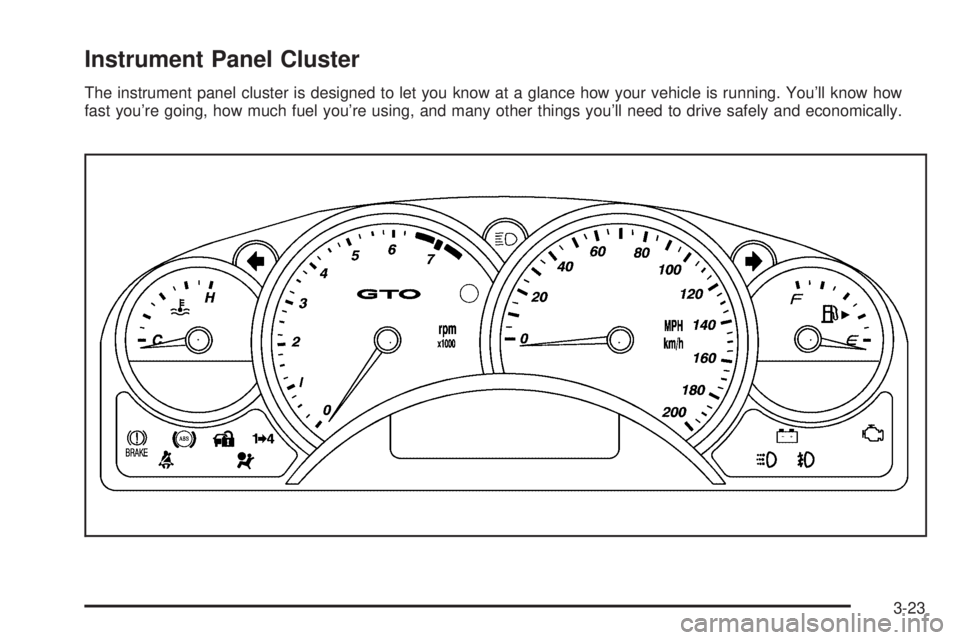
Instrument Panel Cluster
The instrument panel cluster is designed to let you know at a glance how your vehicle is running. You’ll know how
fast you’re going, how much fuel you’re using, and many other things you’ll need to drive safely and economically.
3-23
Page 119 of 318

Airbag Readiness Light
There is an airbag
readiness light on the
instrument panel which
shows the airbag symbol.
This light will come on when you start your vehicle, and
it will flash for a few seconds. Then the light should
go out. This means the system is ready.
The system checks the airbag’s electrical system for
malfunctions. The light tells you if there is an electrical
problem. The system check includes the airbag
sensors, the airbag modules, the wiring and the
diagnostic module. SeeAirbag System on page 1-44for
more information.If the airbag readiness light stays on after you start the
vehicle or comes on when you are driving, your
airbag system may not work properly. Have your vehicle
serviced right away. The light comes on after an
accident where the airbags were activated.
{CAUTION:
If the airbag readiness light stays on after you
start your vehicle, it means the airbag system
may not be working properly. The airbags in
your vehicle may not inate in a crash, or they
could even inate without a crash. To help avoid
injury to yourself or others, have your vehicle
serviced right away if the airbag readiness light
stays on after you start your vehicle.
3-25
Page 127 of 318

Trip Computer
The buttons for the trip
computer are located on
the instrument panel, to the
right of the instrument
panel cluster.
The trip computer displays are located directly beneath
the instrument panel cluster gages. Speed related
information appears in the left display, distance related
information appears in the center display, and fuel
related information appears in the right display.
The basic, more commonly used functions of the trip
computer are shown following. Tap the MODE button to
scroll between the different sets of displays.
When the ignition is turned to ON, the trip computer
displays the same functions as when the ignition
was last turned off.The trip computer can be reset when AVG SPEED or
TRIP TIME are shown on the left display. To reset, press
the SET button for less than two seconds. Resetting
does not affect the Odometer, Overspeed, Range, Time
to Arrival, Distance to Arrival, Instantaneous Fuel, or
Fuel Remaining.
Vehicle personalization is available through the trip
computer controls and display. SeeVehicle
Personalization on page 2-30.
AVG (Average) SPEED
This function shows the average speed, while the
engine is running, since the trip computer was reset.
Odometer
This function records miles travelled since the car
was built.
AVG (Average) FUEL
This function shows the average fuel used since the trip
computer was reset. After resetting, a high number
may initially be shown, due to the short distance
travelled and the high fuel used when accelerating.
3-33
Page 130 of 318

Underspeed Chime
Overspeed provides a chime when your vehicle’s
travelling speed exceeds the overspeed value, whereas
underspeed provides a chime to indicate when your
vehicle’s travelling speed drops below the overspeed.
Range
Range is an estimate of how far your current fuel level
will last. It is based on your previous fuel usage and is
frequently updated. Therefore, as conditions become
suited to more economical driving, the range may actually
increase, for example from city to highway driving.
INST (Instantaneous) FUEL
This function shows instantaneous fuel usage in miles
per gallon or liters per 100 km when driving. When
speed drops below 6 mph (10 km/h) the usage is shown
in gallons per hour or liters per hour.
Display Units
Display units allows you to select the units of
measurement in which the trip computer and instrument
panel cluster will display information. Tap the up or
down arrows to select between ENG (English) or
MET (metric) units.
DIGITAL SPEEDO (Speedometer)
If digital speedo mode is activated, the mph (km/h) are
shown in a large digital mode.
Stop Watch
The stop watch function, when enabled, records
elapsed time. It can be used, for example, to measure
the time taken to travel between two points on a
trip. If you will be starting and stopping your vehicle, the
stop watch will automatically start timing where it left
off when you last stopped.
To start or stop the stop watch, press the SET button.
To reset the stop watch, press and hold the MODE
button for more than three seconds. The trip computer
must be on Trip Time for this function to work.
3-36
Page 132 of 318

Trip Computer Warning Messages
The following messages may appear on the center trip
computer display located on the instrument panel
cluster. If a message is active, it will appear on the
display for 10 seconds, unless the trip computer MODE
button is pressed. Pressing the MODE button will
acknowledge and clear messages from the display.
ABS (Anti-Lock Brake System) Fault
If this symbol and the ABS
Fault message come on,
there is a malfunction
of the anti-lock brake
system. See your
GM dealer for service.
Your vehicle’s brake system will still operate without
ABS. The ABS Fault message will remain until the
MODE button is pressed, but the symbol will remain
until the condition is repaired.
ALARM ACTIVATED
If the ALARM ACTIVATED message comes on, it
indicates that the content theft-deterrent alarm has been
set off because a door, the hood, or the trunk has
been opened, or that your vehicle’s electrical system
has been tampered with. See “How to Detect a Tamper
Condition” underContent Theft-Deterrent on page 2-14
for more information.
Brake
If this symbol and the
Brake message come on
while driving and the
park brake is released, a
fault with the brakes is
indicated.
You should immediately stop your vehicle on the side of
the road as carefully as possible. Do not proceed
until satisfied that braking is possible or the condition is
repaired. A warning will chime if you attempt to drive
off without releasing the park brake. The Brake message
will remain until the MODE button is pressed, but the
symbol will remain until the condition is repaired.
This message will also come on to indicate low
brake fluid.
3-38