2005 PONTIAC BONNEVILLE lights
[x] Cancel search: lightsPage 145 of 438
Warning Lights, Gages, and
Indicators
This part describes the warning lights and gages that may
be on your vehicle. The pictures will help you locate them.
Warning lights and gages can signal that something is
wrong before it becomes serious enough to cause
an expensive repair or replacement. Paying attention to
your warning lights and gages could also save you
or others from injury.
Warning lights come on when there may be or is a
problem with one of your vehicle’s functions. As you will
see in the details on the next few pages, some
warning lights come on briey when you start the
engine just to let you know they are working. If you are
familiar with this section, you should not be alarmed
when this happens.
Gages can indicate when there may be or is a problem
with one of your vehicle’s functions. Often gages
and warning lights work together to let you know when
there is a problem with your vehicle.When one of the warning lights comes on and stays on
when you are driving, or when one of the gages shows
there may be a problem, check the section that tells you
what to do about it. Please follow this manual’s advice.
Waiting to do repairs can be costly — and even
dangerous. So please get to know your warning lights
and gages. They are a big help.
Your vehicle may also have a DIC that works along with
the warning lights and gages. SeeDriver Information
Center (DIC) on page 3-59.
The volume of your vehicle’s warning chimes can be
adjusted. For information seeChime Level Adjustment
on page 3-103.
Instrument Panel Cluster
The instrument panel clusters are designed to let you
know at a glance how your vehicle is running. You
will know how fast you are going, how much fuel you
are using, and many other things you will need to drive
safely and economically.
3-33
Page 146 of 438
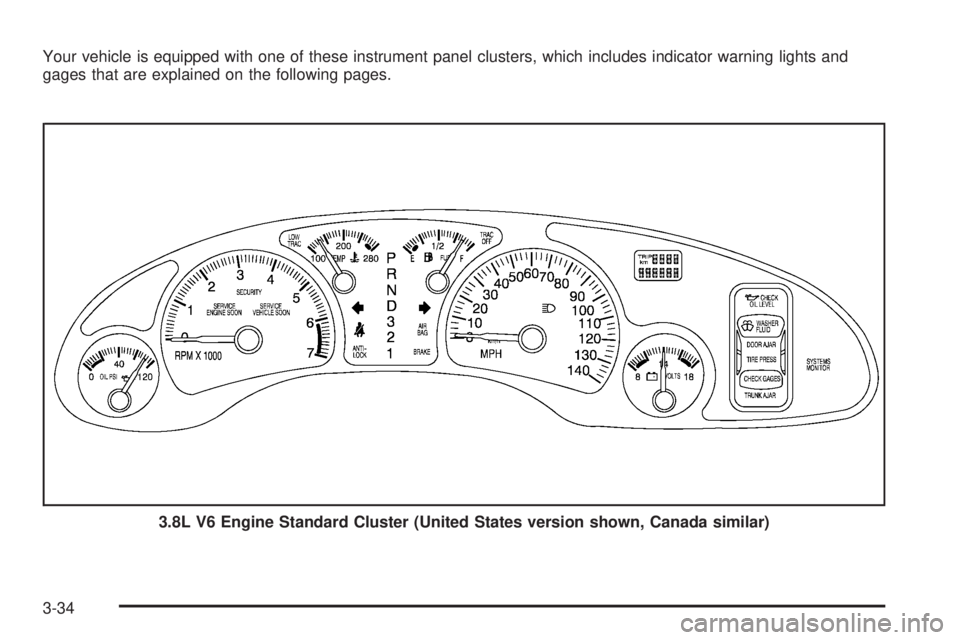
Your vehicle is equipped with one of these instrument panel clusters, which includes indicator warning lights and
gages that are explained on the following pages.
3.8L V6 Engine Standard Cluster (United States version shown, Canada similar)
3-34
Page 170 of 438
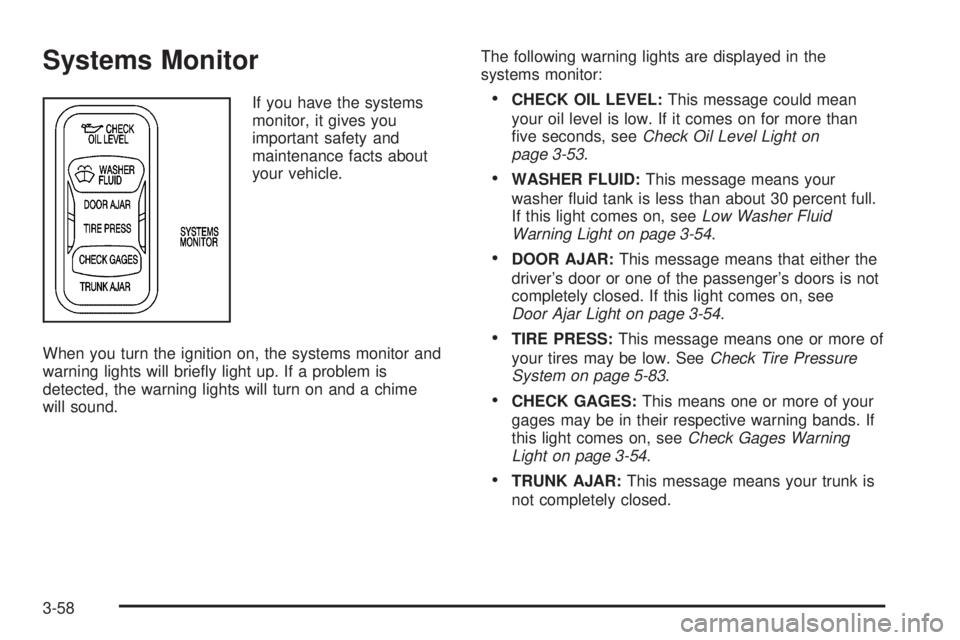
Systems Monitor
If you have the systems
monitor, it gives you
important safety and
maintenance facts about
your vehicle.
When you turn the ignition on, the systems monitor and
warning lights will briey light up. If a problem is
detected, the warning lights will turn on and a chime
will sound.The following warning lights are displayed in the
systems monitor:CHECK OIL LEVEL:This message could mean
your oil level is low. If it comes on for more than
ve seconds, seeCheck Oil Level Light on
page 3-53.
WASHER FLUID:This message means your
washer uid tank is less than about 30 percent full.
If this light comes on, seeLow Washer Fluid
Warning Light on page 3-54.
DOOR AJAR:This message means that either the
driver’s door or one of the passenger’s doors is not
completely closed. If this light comes on, see
Door Ajar Light on page 3-54.
TIRE PRESS:This message means one or more of
your tires may be low. SeeCheck Tire Pressure
System on page 5-83.
CHECK GAGES:This means one or more of your
gages may be in their respective warning bands. If
this light comes on, seeCheck Gages Warning
Light on page 3-54.
TRUNK AJAR:This message means your trunk is
not completely closed.
3-58
Page 177 of 438
When you press the unlock button on your remote
keyless entry transmitter, the DIC will change driver
numbers and the vehicle will recall the personalization
settings that were last made to correspond to your
remote keyless entry transmitter, including your radio
and climate control settings. SeeClimate Controls
Personalization on page 3-32.
If you unlock the vehicle using your door key instead of
your remote keyless entry transmitter, the DIC will
not change drivers and will recall the information from
the last remote keyless entry transmitter used or the last
driver change using the memory seat controls. If this
happens and you were not the last driver of the vehicle,
press your correct driver number on the memory seat
controls or press the unlock button on your remote
keyless entry transmitter or select the personalization
programming mode and choose the correct driver
number.
Use the following steps for personalization programming
instructions.
1. Turn the ignition on and keep the transaxle in
PARK (P).
2. Press the MODE button to reach personalization
programming display.
3. Press the SELECT button to enter personalization
programming mode.4. The rst choice to be made will be DRIVER ID 1 or 2.
Press the RESET button to toggle between your
selections within a display and press the SELECT
button to choose the current selection and move on
to the next personalization feature.
You are now in the selection mode and the DIC is ready
to program your personal choices in memory.
Each feature that can be personalized will appear in the
display. Once you have made a selection for a
feature, the DIC will move on to the next personalization
feature.
Scroll through the following messages and feature
options:
AUTO DOOR LOCKS – OFF/ON
UNLOCK – OFF/ON
UNLOCK – KEY OFF/PARK
DOOR TO UNLOCK – DRIVER/ALL
WINDOW LOCKOUT–R+PASS/REAR
KEYLESS FEEDBACK – OFF/ON
LIGHTS FEEDBACK – OFF/ON
HORN FEEDBACK – OFF/ON
DELAYED LOCKING – OFF/ON
PERIMETER LIGHTS – OFF/ON
3-65
Page 178 of 438
PERIMETER LIGHTS – TIMEOUT 15 SEC
SEAT RECALL – OFF/ON
RECALL POSITION – MEMORY/EXIT
TILT MIRROR – OFF/ON
DRIVER ID – OFF/ON
If you would like to exit the selection mode without
moving through each of the personalization features,
press a different button on the DIC or turn off the
ignition. The personal choices you made will still be
retained, even without passing through each of
the features. In order for your personal choices to save,
you must press SELECT after making your selections.
If you happen to move past a selection you would like to
make a personal choice for, press unlock on your
remote keyless entry transmitter or press the appropriate
driver number on the memory seat control. This will
return you to the beginning of the option feature
programming mode.
A description of each feature programmable through the
DIC follows.
Automatic Door Locks
The door lock modes when shifting in and out of
PARK (P), can be changed through the DIC. You can
change these modes using different selections of
the following DIC displays:
AUTO DOOR LOCKS – OFF/ON
UNLOCK – OFF/ON
UNLOCK – KEY OFF/PARK
DOOR TO UNLOCK – DRIVER/ALL
If you choose OFF for AUTO DOOR LOCKS, your door
locks will operate normally with no automatic feature.
If you choose ON for AUTO DOOR LOCKS, ON
for UNLOCK and KEY OFF, your doors will lock every
time you shift out of PARK (P), and the doors will unlock
every time you stop and turn the ignition to OFF.
If you choose ON for AUTO DOOR LOCKS, ON for
UNLOCK and PARK, your doors will lock every time you
shift out of PARK (P), and the doors will unlock every
time you stop and shift into PARK (P).
If you choose ON for AUTO DOOR LOCKS, and OFF
for UNLOCK, your doors will lock every time you
shift out of PARK (P), and there will be no automatic
door unlock when shifting back into PARK (P).
3-66
Page 179 of 438
If you choose ON for UNLOCK and DRIVER for DOOR
TO UNLOCK, only the driver’s door will automatically
unlock when shifting into PARK (P) or turning the key
to OFF.
If you choose ON for UNLOCK and ALL for DOOR TO
UNLOCK, all doors will automatically unlock when
shifting into PARK (P) or turning the key to OFF.
To change modes, do the following:
1. Move the arrow on the display between the
selections by pressing the RESET button.
2. Once you have made your selection, press the
SELECT button and your choice will be retained
in memory.
SeeProgrammable Automatic Door Locks on page 2-12
for more information about this feature.
Window Lock Out
The number of passenger windows locked out by the
window LOCK switch can be programmed through
the DIC.
If you choose R + PASS, all three passenger window
switches will be inactive when the window LOCK switch
is enabled.
If you choose REAR, only the two rear passenger
window switches will be locked out when the window
LOCK switch is enabled.To change modes, do the following:
1. Move the arrow on the display between R + PASS
and REAR by pressing the RESET button.
2. Once you have made your selection, press the
SELECT button. Your choice will be retained in
memory.
For more information on this feature, see “Window Lock
Out” underPower Windows on page 2-18.
Security Feedback
By choosing different combinations of these selections,
you can choose the type of remote keyless entry
transmitter activated feedback when locking and
unlocking your vehicle with your remote keyless entry
transmitter. Each time you make a selection by pressing
the RESET button, press the SELECT button to
record your choice.
KEYLESS FEEDBACK – OFF/ON
LIGHTS FEEDBACK – OFF/ON
HORN FEEDBACK – OFF/ON
If you choose ON for KEYLESS FEEDBACK you will
also need to choose LIGHTS and/or HORN FEEDBACK.
3-67
Page 180 of 438
You can select the following modes:
If you choose OFF for KEYLESS FEEDBACK, you
will receive no security feedback when locking or
unlocking your vehicle.
If you choose ON for KEYLESS FEEDBACK and
ON for LIGHTS FEEDBACK, the exterior lamps
will ash twice when unlocking your vehicle
and once when locking your vehicle.
If you choose ON for KEYLESS FEEDBACK and
ON for HORN FEEDBACK, your horn will chirp
when locking and unlocking your vehicle.
If you choose ON for KEYLESS, LIGHTS and
HORN FEEDBACK, your exterior lamps will
ash twice at the rst unlock button press, your
exterior lamps will ash twice and your horn
will chirp once at the second unlock button press,
and the exterior lamps will ash once and the
horn will chirp once when locking your vehicle.
For more information on this feature, see “Security
Feedback” underRemote Keyless Entry System
Operation on page 2-5.
Delayed Locking
The delayed locking feature, which delays the actual
locking of the vehicle, can be made active or inactive
through the DIC. When DELAYED LOCKING – OFF/ON
appears on the display, use the RESET button totoggle the arrow between OFF and ON. When you have
made your choice, press the SELECT button to record
your selection.
For more information on this feature, seeDelayed
Locking on page 2-11.
Perimeter Lighting
When the unlock button on the remote keyless entry
transmitter is pressed, the Daytime Running Lamps
(DRL), parking lamps and back-up lamps will turn on if it
is dark enough according to the Twilight Sentinel
®.
You can control activation of this feature by choosing
OFF or ON when the PERIMETER LIGHTS choice
is displayed on the DIC. Make your choice by pressing
the RESET button and record your choice by pressing
the SELECT button. You will then be prompted to
choose a TIMEOUT period.
The PERIMETER LIGHTS TIMEOUT feature can be
changed to the desired setting by using the RESET
button to toggle from 5 to 30 seconds. Each toggle will
increase the time by ve seconds. Once the desired
timeout is displayed, press the SELECT button to record
your choice and move on to the next personalization
feature.
For more information on this feature, seePerimeter
Lighting on page 3-18.
3-68
Page 232 of 438
You can be temporarily blinded by approaching
headlamps. It can take a second or two, or even several
seconds, for your eyes to re-adjust to the dark. When
you are faced with severe glare, as from a driver
who does not lower the high beams, or a vehicle with
misaimed headlamps, slow down a little. Avoid
staring directly into the approaching headlamps.
Keep your windshield and all the glass on your vehicle
clean — inside and out. Glare at night is made much
worse by dirt on the glass. Even the inside of the glass
can build up a lm caused by dust. Dirty glass makes
lights dazzle and ash more than clean glass would,
making the pupils of your eyes contract repeatedly.
Remember that your headlamps light up far less of a
roadway when you are in a turn or curve. Keep
your eyes moving; that way, it is easier to pick out dimly
lighted objects. Just as your headlamps should be
checked regularly for proper aim, so should your eyes
be examined regularly. Some drivers suffer from
night blindness — the inability to see in dim light — and
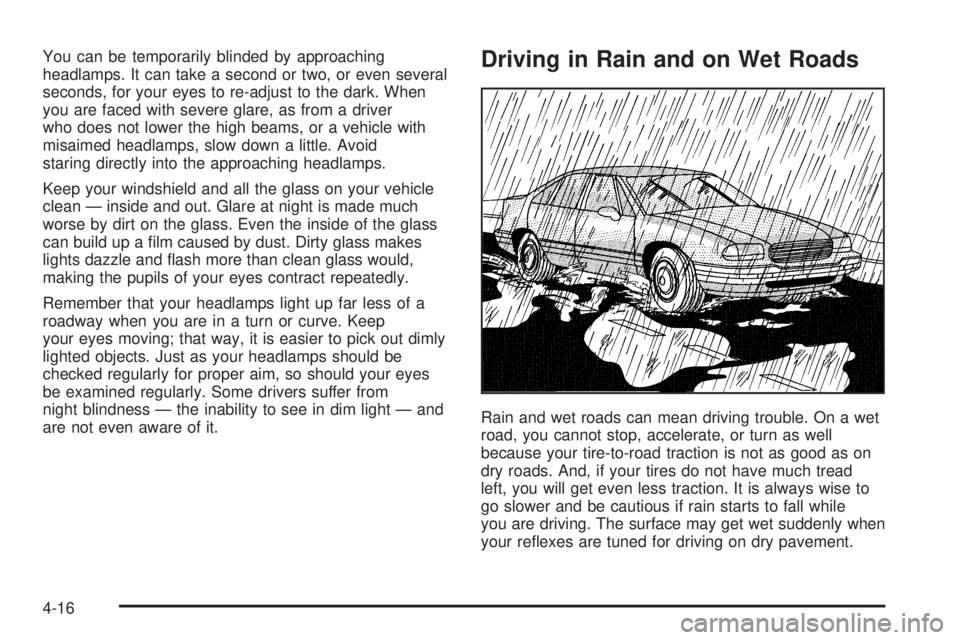
are not even aware of it.Driving in Rain and on Wet Roads
Rain and wet roads can mean driving trouble. On a wet
road, you cannot stop, accelerate, or turn as well
because your tire-to-road traction is not as good as on
dry roads. And, if your tires do not have much tread
left, you will get even less traction. It is always wise to
go slower and be cautious if rain starts to fall while
you are driving. The surface may get wet suddenly when
your reexes are tuned for driving on dry pavement.
4-16