2005 PONTIAC BONNEVILLE horn
[x] Cancel search: hornPage 177 of 438
When you press the unlock button on your remote
keyless entry transmitter, the DIC will change driver
numbers and the vehicle will recall the personalization
settings that were last made to correspond to your
remote keyless entry transmitter, including your radio
and climate control settings. SeeClimate Controls
Personalization on page 3-32.
If you unlock the vehicle using your door key instead of
your remote keyless entry transmitter, the DIC will
not change drivers and will recall the information from
the last remote keyless entry transmitter used or the last
driver change using the memory seat controls. If this
happens and you were not the last driver of the vehicle,
press your correct driver number on the memory seat
controls or press the unlock button on your remote
keyless entry transmitter or select the personalization
programming mode and choose the correct driver
number.
Use the following steps for personalization programming
instructions.
1. Turn the ignition on and keep the transaxle in
PARK (P).
2. Press the MODE button to reach personalization
programming display.
3. Press the SELECT button to enter personalization
programming mode.4. The rst choice to be made will be DRIVER ID 1 or 2.
Press the RESET button to toggle between your
selections within a display and press the SELECT
button to choose the current selection and move on
to the next personalization feature.
You are now in the selection mode and the DIC is ready
to program your personal choices in memory.
Each feature that can be personalized will appear in the
display. Once you have made a selection for a
feature, the DIC will move on to the next personalization
feature.
Scroll through the following messages and feature
options:
AUTO DOOR LOCKS – OFF/ON
UNLOCK – OFF/ON
UNLOCK – KEY OFF/PARK
DOOR TO UNLOCK – DRIVER/ALL
WINDOW LOCKOUT–R+PASS/REAR
KEYLESS FEEDBACK – OFF/ON
LIGHTS FEEDBACK – OFF/ON
HORN FEEDBACK – OFF/ON
DELAYED LOCKING – OFF/ON
PERIMETER LIGHTS – OFF/ON
3-65
Page 179 of 438
If you choose ON for UNLOCK and DRIVER for DOOR
TO UNLOCK, only the driver’s door will automatically
unlock when shifting into PARK (P) or turning the key
to OFF.
If you choose ON for UNLOCK and ALL for DOOR TO
UNLOCK, all doors will automatically unlock when
shifting into PARK (P) or turning the key to OFF.
To change modes, do the following:
1. Move the arrow on the display between the
selections by pressing the RESET button.
2. Once you have made your selection, press the
SELECT button and your choice will be retained
in memory.
SeeProgrammable Automatic Door Locks on page 2-12
for more information about this feature.
Window Lock Out
The number of passenger windows locked out by the
window LOCK switch can be programmed through
the DIC.
If you choose R + PASS, all three passenger window
switches will be inactive when the window LOCK switch
is enabled.
If you choose REAR, only the two rear passenger
window switches will be locked out when the window
LOCK switch is enabled.To change modes, do the following:
1. Move the arrow on the display between R + PASS
and REAR by pressing the RESET button.
2. Once you have made your selection, press the
SELECT button. Your choice will be retained in
memory.
For more information on this feature, see “Window Lock
Out” underPower Windows on page 2-18.
Security Feedback
By choosing different combinations of these selections,
you can choose the type of remote keyless entry
transmitter activated feedback when locking and
unlocking your vehicle with your remote keyless entry
transmitter. Each time you make a selection by pressing
the RESET button, press the SELECT button to
record your choice.
KEYLESS FEEDBACK – OFF/ON
LIGHTS FEEDBACK – OFF/ON
HORN FEEDBACK – OFF/ON
If you choose ON for KEYLESS FEEDBACK you will
also need to choose LIGHTS and/or HORN FEEDBACK.
3-67
Page 180 of 438
You can select the following modes:
If you choose OFF for KEYLESS FEEDBACK, you
will receive no security feedback when locking or
unlocking your vehicle.
If you choose ON for KEYLESS FEEDBACK and
ON for LIGHTS FEEDBACK, the exterior lamps
will ash twice when unlocking your vehicle
and once when locking your vehicle.
If you choose ON for KEYLESS FEEDBACK and
ON for HORN FEEDBACK, your horn will chirp
when locking and unlocking your vehicle.
If you choose ON for KEYLESS, LIGHTS and
HORN FEEDBACK, your exterior lamps will
ash twice at the rst unlock button press, your
exterior lamps will ash twice and your horn
will chirp once at the second unlock button press,
and the exterior lamps will ash once and the
horn will chirp once when locking your vehicle.
For more information on this feature, see “Security
Feedback” underRemote Keyless Entry System
Operation on page 2-5.
Delayed Locking
The delayed locking feature, which delays the actual
locking of the vehicle, can be made active or inactive
through the DIC. When DELAYED LOCKING – OFF/ON
appears on the display, use the RESET button totoggle the arrow between OFF and ON. When you have
made your choice, press the SELECT button to record
your selection.
For more information on this feature, seeDelayed
Locking on page 2-11.
Perimeter Lighting
When the unlock button on the remote keyless entry
transmitter is pressed, the Daytime Running Lamps
(DRL), parking lamps and back-up lamps will turn on if it
is dark enough according to the Twilight Sentinel
®.
You can control activation of this feature by choosing
OFF or ON when the PERIMETER LIGHTS choice
is displayed on the DIC. Make your choice by pressing
the RESET button and record your choice by pressing
the SELECT button. You will then be prompted to
choose a TIMEOUT period.
The PERIMETER LIGHTS TIMEOUT feature can be
changed to the desired setting by using the RESET
button to toggle from 5 to 30 seconds. Each toggle will
increase the time by ve seconds. Once the desired
timeout is displayed, press the SELECT button to record
your choice and move on to the next personalization
feature.
For more information on this feature, seePerimeter
Lighting on page 3-18.
3-68
Page 373 of 438
Fuses Usage
14 Cruise Control
15 Direct Ignition System
16 Injector Bank #2
17 Not Used
18 Not Used
19 Powertrain Control Module Ignition
20 Oxygen Sensor
21 Injector Bank #1
22 Auxiliary Power
23 Cigar Lighter
24 Fog Lamps/Daytime Running Lamps
25 Horn
26 Air Conditioning Clutch
Relays Usage
27 Headlamp High Beam
28 Headlamp Low Beam
29 Fog Lamps
30 Daytime Running Lamps
31 Horn
32 Air Conditioning Clutch
33 HVAC Solenoid
34 Accessory
Relays Usage
35 Not Used
36 Starter 1
37 Cooling Fan 1
38 Ignition 1
39 Cooling Fan Series/Parallel
40 Cooling Fan 2
Circuit
BreakersUsage
41 Starter
Fuses Usage
42 Not Used
43 Not Used
44 Antilock Brake System
45 Not Used
46 Cooling Fan 1
47 Cooling Fan 2
48 Spare
49 Spare
50 Spare
51 Spare
52 Spare
53 Fuse Puller
5-113
Page 375 of 438
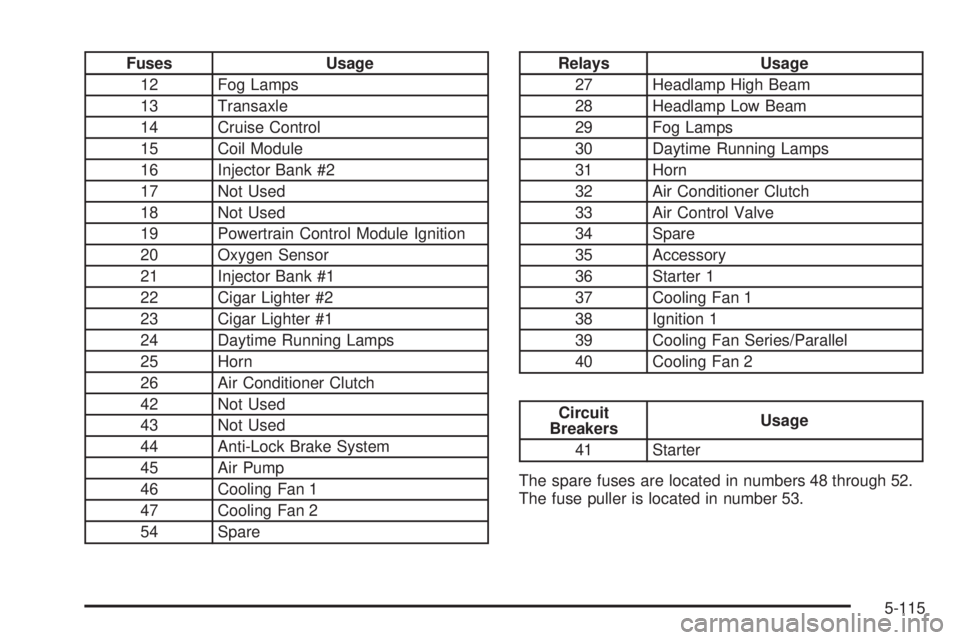
Fuses Usage
12 Fog Lamps
13 Transaxle
14 Cruise Control
15 Coil Module
16 Injector Bank #2
17 Not Used
18 Not Used
19 Powertrain Control Module Ignition
20 Oxygen Sensor
21 Injector Bank #1
22 Cigar Lighter #2
23 Cigar Lighter #1
24 Daytime Running Lamps
25 Horn
26 Air Conditioner Clutch
42 Not Used
43 Not Used
44 Anti-Lock Brake System
45 Air Pump
46 Cooling Fan 1
47 Cooling Fan 2
54 SpareRelays Usage
27 Headlamp High Beam
28 Headlamp Low Beam
29 Fog Lamps
30 Daytime Running Lamps
31 Horn
32 Air Conditioner Clutch
33 Air Control Valve
34 Spare
35 Accessory
36 Starter 1
37 Cooling Fan 1
38 Ignition 1
39 Cooling Fan Series/Parallel
40 Cooling Fan 2
Circuit
BreakersUsage
41 Starter
The spare fuses are located in numbers 48 through 52.
The fuse puller is located in number 53.
5-115
Page 430 of 438
G
Gage
Check Gages Warning Light..........................3-54
Engine Coolant Temperature.................3-45, 3-46
Fuel..................................................3-56, 3-57
Oil Pressure.......................................3-51, 3-52
Speedometer..............................................3-37
Tachometer.................................................3-38
Voltmeter Gage...........................................3-40
Garage Door Opener.......................................2-40
Gasoline
Octane........................................................ 5-5
Specications............................................... 5-6
Glove Box.....................................................2-44
GM Mobility Reimbursement Program.................. 7-5
H
Hazard Warning Flashers................................... 3-6
Head Restraints............................................... 1-7
Headlamp Wiring...........................................5-111
Headlamps....................................................5-68
Bulb Replacement.......................................5-67
Daytime Running Lamps...............................3-15
Flash-to-Pass............................................... 3-9
Front Turn Signal and Parking Lamps.............5-69
Halogen Bulbs............................................5-67
High/Low Beam Changer................................ 3-8Headlamps (cont.)
On Reminder..............................................3-15
Wiper Activated...........................................3-14
Head-Up Display (HUD)...................................3-21
Heated Seats................................................... 1-4
Heater...................................................3-25, 3-28
Highbeam On Light.........................................3-54
Highway Hypnosis...........................................4-22
Hill and Mountain Roads..................................4-22
HomeLink
®Transmitter....................................2-40
HomeLink®Transmitter, Programming................2-41
Hood
Checking Things Under................................5-10
Release.....................................................5-11
Horn............................................................... 3-6
How to Use This Manual...................................... ii
How to Wear Safety Belts Properly...................1-12
I
Ignition Positions.............................................2-24
Inadvertent Power Battery Saver.......................3-21
Infants and Young Children, Restraints...............1-30
Ination -- Tire Pressure..................................5-80
Inspection
Brake System.............................................6-24
Engine Cooling System................................6-23
Exhaust System..........................................6-23
6