Page 127 of 506

125 Controls in detailSeats
Removing and installing rear seat head
restraints
1Release catch
Removing rear seat head restraints
�
Fold the backrest forward
(�page 257).
�
Fold back head restraint (
�page 124).
�
Press head restraint release catch1
and pull the head restraints out of the
guides.
�
Fold the backrest back to its original
position.Installing rear seat head restraints
Warning!
G
For your protection, drive only with properly
positioned head restraints.
Adjust head restraint so that the head re-
straint supports the back of the head at eye
level. This will reduce the potential for injury
to the head and neck in the event of an ac-
cident or similar situation.
Do not drive the vehicle without the seat
head restraints. Head restraints are intend-
ed to help reduce injuries during an acci-
dent.
Do not interchange head restraints from
front and rear seat.
iWhen installing the head restraints,
make sure that:�
you place the correct head restraint
on the middle seat. It is marked
with the letter “M” on the outside of
the metal bars.
�
the head restraints engage fully.
Page 129 of 506

127 Controls in detailSeats
Drive-dynamic features
Activating�
Press button4 (
�page 126).
The indicator lamp in the button comes
on for five seconds and the following
display appears in the multi-function
display for about five seconds.
Deactivating
�
Press button4 (
�page 126) again.
The indicator lamp in the button goes
out.Massage function (PULSE)
The massage function can help prevent
muscle tension during long drives.
�
Press button6 (
�page 126).
The indicator lamp in button2 comes
on. The air cushions in the lumbar area
pulsate.
Seat heating*
Both switches for the front seats are locat-
ed in the center console. The red indicator
lamps in the switch come on to show
which heating level you have selected.
iYou can adjust the characteristics of
the Drive - Dynamic seat using the con-
trol system (
�page 169).
iWhen the engine is turned off, the last
cushion setting is retained in memory.
The cushion is automatically adjusted
to this setting when the engine is re-
started.iThe massage function turns off auto-
matically after approximately five min-
utes.
Leveloff
No indicator lamps on
1
One indicator lamp on
2
Two indicator lamps onThe seat heater automatically
switches to level 1 after approxi-
mately ten minutes.
3
Three indicator lamps onThe seat heater automatically
switches to level 2 after approxi-
mately five minutes.
Page 130 of 506

128 Controls in detailSeats1Seat heating switch�
Switch on the ignition (
�page 33).
Switching seat heating on
�
Press button1 repeatedly until the
desired heating level is set.
One or more red indicator lamps on the
switch show the selected heater level.Switching seat heating off
�
Press button1 repeatedly until all in-
dicator lamps go out.
Seat ventilation*
The switch is located on the center con-
sole. Seat ventilation can be activated
manually with the ignition on, or by the
summer opening feature (
�page 220).
The blue indicator lamps on the switch
show the ventilation level selected:
iThe seat heating will be automatically
switched off after approximately
20 minutes.!If one or more of the lamps on the seat
heater switch are flashing, there is in-
sufficient voltage available since too
many electrical consumers are turned
on. The seat heater switches off auto-
matically.
The seat heater will switch back on
again automatically as soon as suffi-
cient voltage is available.
Level3
Three indicator lamps on
2
Two indicator lamps on
1
One indicator lamp on
off
No indicator lamp on
Page 131 of 506
129 Controls in detailSeats
1Seat ventilation switch�
Switch on the ignition (
�page 33).Switching seat ventilation on
�
Press button1 repeatedly until the
desired ventilation level is set.
Switching seat ventilation off
�
Press button1 repeatedly until all in-
dicator lamps go out.iThe seat ventilation is automatically set
to the highest level if activated via sum-
mer opening feature (
�page 220).
!If one or all of the lamps flash on the
seat ventilation switch, there is insuffi-
cient voltage due to too many electrical
consumers being switched on. The seat
ventilation switches off automatically.
The seat ventilation will switch back on
again automatically as soon as suffi-
cient voltage is available.
Page 151 of 506
149 Controls in detail
Control system
Menus, submenus and functions
Menu1
Menu2
Menu3
Menu4
Menu5
Menu6
Menu7
Menu8
Standard
display
AUDIO
NAV*
Distronic*
Vehicle status
message mem-
ory
Settings
Trip computer
Telephone
(�page 150)
(�page 150)
(�page 152)
(�page 152)
(�page 153)
(�page 154)
(�page 170)
(�page 171)
Commands/submenusDigital speed-
ometer
Select radio
station
Activate
route guid-
ance
Call up set-
tings
Call up vehicle
malfunction,
warning and sys-
tem status mes-
sages stored in
memory
Reset to factory
settings
Fuel consumption
statistics after
start
Load phone
book
Call up main-
tenance sys-
tem display
Operate CD
player
Instrument clus-
ter submenu
Fuel consumption
statistics since
the last reset
Search for
name in
phone book
Check tire
pressure*
Time/Date sub-
menu
Call up range
Check engine
oil level
Lighting sub-
menuVehicle sub-
menuConvenience
submenuDynamic seat*
submenu
Page 152 of 506
150 Controls in detailControl systemStandard display menu
You can select the functions in the stan-
dard display menu with buttonk
orj.
The following functions are available:Display digital speedometer
�
Press buttonj twice.
The current vehicle speed is shown in
the multifunction display.
AUDIO menu
The functions in the
Audio
menu operate
the audio equipment which you currently
have turned on.
If no audio equipment is currently turned
on, the message
AUDIO off
is shown in the
display.
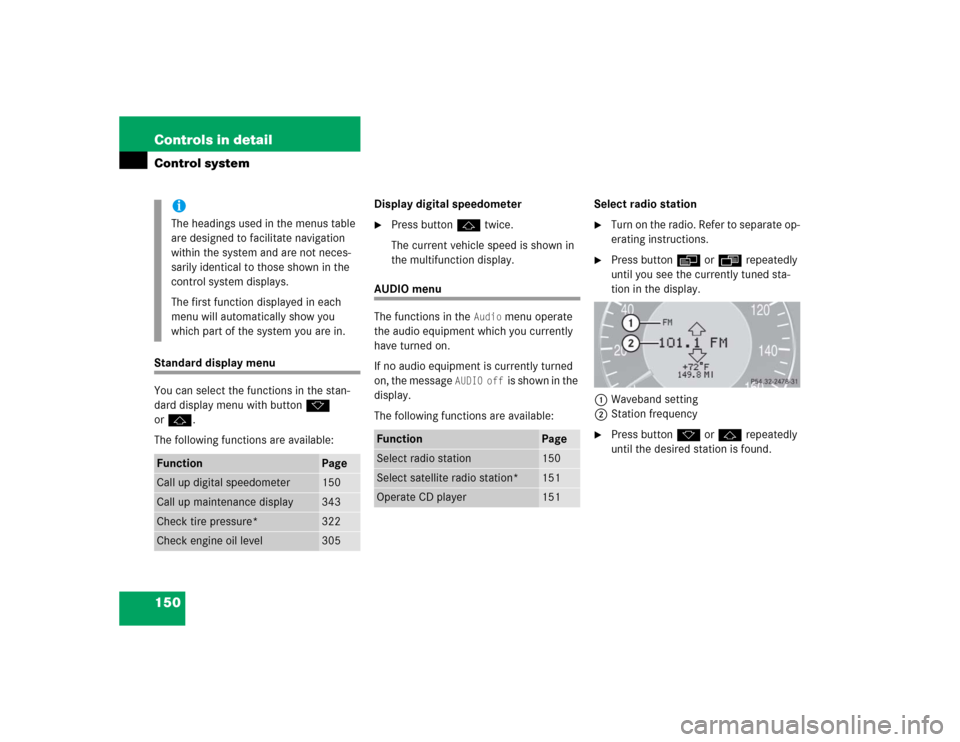
The following functions are available:Select radio station
�
Turn on the radio. Refer to separate op-
erating instructions.
�
Press buttonè orÿ repeatedly
until you see the currently tuned sta-
tion in the display.
1Waveband setting
2Station frequency
�
Press buttonk orj repeatedly
until the desired station is found.
iThe headings used in the menus table
are designed to facilitate navigation
within the system and are not neces-
sarily identical to those shown in the
control system displays.
The first function displayed in each
menu will automatically show you
which part of the system you are in.
Function
Page
Call up digital speedometer
150
Call up maintenance display
343
Check tire pressure*
322
Check engine oil level
305
Function
Page
Select radio station
150
Select satellite radio station*
151
Operate CD player
151
Page 158 of 506

156 Controls in detailControl systemThe table below shows what settings can
be changed within the various menus. De-
tailed instructions on making individual
settings can be found on the following pag-
es.INSTRUMENT CLUSTER
TIME/DATE
LIGHTING
VEHICLE
CONVENIENCE
DYNAMIC SEAT*
Select temperature dis-
play mode
Synchronizing the
time
Set daytime running
lamp mode
(USA only)
Set automatic lock-
ing
Activate easy-en-
try/exit feature
Set level for dynam-
ic seat, driver
Select speedometer dis-
play mode
Set time (hours)
Set locator lighting
Limiting opening
height of trunk lid*
Set SmartKey-
dependency
Set level for dynam-
ic seat, passenger
Select language
Set time (minutes)
Ambient lighting
Set parking position
for exterior rear
view mirror
Select display (speed dis-
play or outside tempera-
ture) for status line
Set date (month)
Exterior lamps de-
layed shut-off
Select display (speed dis-
play or outside tempera-
ture) for basic display
Set date (day)
Interior lighting de-
layed shut-off
Tire pressure unit dis-
play*
Set date (year)
Page 167 of 506

165 Controls in detail
Control system
Vehicles with KEYLESS-GO*:�
Press the KEYLESS-GO start/stop but-
ton on the gear selector lever
(�page 35).
Setting interior lighting delayed shut-off
Use this function to set whether and how
long you would like the interior lighting to
remain lit during darkness after you have
removed the SmartKey from the starter
switch.
�
Move the selection marker with
buttonæ orç to the
Lighting
submenu.
�
Press buttonj ork repeatedly
until you see
Interior lamp delayed
shut-off
in the multifunction display.The selection marker is on the current
setting.
�
Press buttonæ orç to select
the desired lamp-on period.
You can select:�
0 sec.
, the delayed shut-off feature
is deactivated.
�
5 sec.,
10 sec.
, 15 sec.
or
20 sec.
, the interior lighting de-
layed shut-off feature is activated
with the desired lamp-on period.
Setting ambient lighting
Using this function to adjust the brightness
of the ambient lighting.
�
Move the selection marker with
buttonæ orç to the
Lighting
submenu.
�
Press buttonj ork repeatedly
until you see
Ambient light Level
in
the multifunction display.
The selection marker is on the current
setting.
�
Press buttonæ orç to select
the desired brightness of the ambient
lighting.
The setting 1 represents the darkest
level and setting 5 the brightest level.
The ambient light is switched off at set-
ting 0.

