Page 124 of 491
123 Controls in detail
Locking and unlocking
Depending on production date, your vehi-
cle is equipped with either switch design A
or B.
The switches are located in the center con-
sole.Switch design A1Central locking switch
2Central unlocking switch
Switch design B1Central locking switch
2Central unlocking switchLocking
�
Press central locking switch1.
If all doors are closed, the vehicle
locks.
Unlocking
�
Press central unlocking switch2.
The vehicle unlocks.
iYou can open a locked door from the
inside. Open door only when conditions
are safe to do so.
If the vehicle was previously centrally
locked using the SmartKey, it will not
unlock using the central unlocking
switch2.
If the vehicle was previously locked
with the central locking switch1�
while in the selective remote con-
trol mode, only the front door
opened from the inside is unlocked.
�
while in the global remote control
mode, the vehicle is unlocked com-
pletely when a front door is opened
from the inside.
Page 211 of 491
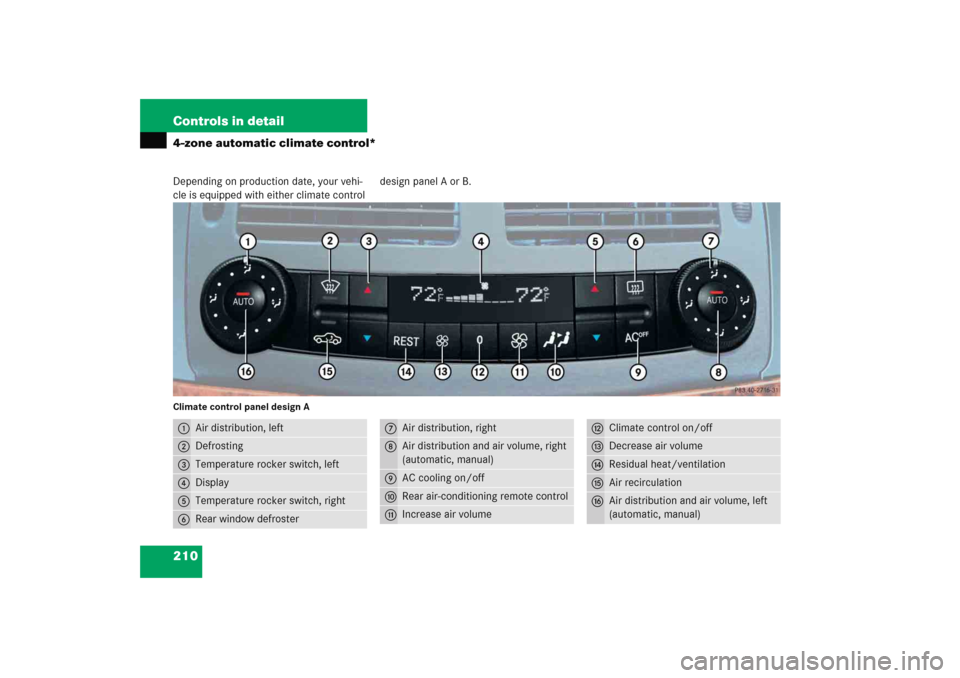
210 Controls in detail4-zone automatic climate control*Depending on production date, your vehi-
cle is equipped with either climate controldesign panel A or B.Climate control panel design A1
Air distribution, left
2
Defrosting
3
Temperature rocker switch, left
4
Display
5
Temperature rocker switch, right
6
Rear window defroster
7
Air distribution, right
8
Air distribution and air volume, right
(automatic, manual)
9
AC cooling on/off
a
Rear air-conditioning remote control
b
Increase air volume
c
Climate control on/off
d
Decrease air volume
e
Residual heat/ventilation
f
Air recirculation
g
Air distribution and air volume, left
(automatic, manual)
Page 212 of 491
211 Controls in detail
4-zone automatic climate control*
Climate control panel design B1
Air distribution, left
2
Defrosting
3
Temperature rocker switch, left
4
Display
5
Temperature rocker switch, right
6
Rear window defroster
7
Air distribution, right
8
Air distribution and air volume, right
(automatic, manual)
9
AC cooling on/off
a
Rear air-conditioning remote control
b
Increase air volume
c
Climate control on/off
d
Decrease air volume
e
Air recirculation
f
Air distribution and air volume, left
(automatic, manual)
Page 271 of 491

270 Controls in detailUseful featuresThe Tele Aid system
(Tele
matic A
larm I
dentification on D
e-
mand)
The Tele Aid system consists of three
types of response:
�
automatic and manual emergency
�
Roadside Assistance and
�
information
The Tele Aid system is operational provid-
ing that the vehicle’s battery is charged,
properly connected, not damaged and cel-
lular and GPS coverage is available.
The speaker volume of a Tele Aid call can
be adjusted when using the volume control
on the multifunction steering wheel. To
raise, press buttonæ and to lower,
press buttonçor use the volume knob
on your COMAND headunit.
�
To activate, press the SOS button, the
Roadside Assistance button• or
the Information button¡, depend-
ing on the type of response required.
Shortly after the completion of your ac-
quaintance call, you will receive a user ID
and password via first call mail. By visiting
www.mbusa.com and selecting “Tele Aid”
(USA only), you will have access to account
information, remote door unlock and
more.System self-check
Initially, after switching on ignition, mal-
functions are detected and indicated (the
indicator lamps in the SOS button, the
Roadside Assistance button• and the
Information button¡ stay on longer
than ten seconds or do not come on). The
message
TELE AID malfunction – Drive
to workshop
appears for approximately
ten seconds in the multifunction display.
iThe SOS button is located above the in-
terior rear view mirror.
The Roadside Assistance button•
and the Information button¡ are
located below the center armrest cov-
er.
iThe Tele Aid system utilizes the cellular
network for communication and the
GPS (Global Positioning System) satel-
lites for vehicle location. If either of
these signals are unavailable, the
Tele Aid system may not function and if
this occurs, assistance must be sum-
moned by other means.
Page 277 of 491

276 Controls in detailUseful features
Remote door unlock
In case you have locked your vehicle unin-
tentionally (e.g. SmartKey inside vehicle),
and the reserve SmartKey is not handy:�
Contact the Mercedes-Benz Response
Center at 1-800-756-9018 (in the USA)
or 1-888-923-8367 (in Canada).
You will be asked to provide your pass-
word which you provided when you
completed the subscriber agreement.
�
Then return to your vehicle and pull the
tailgate recessed handle for a minimum
of 20 seconds until the SOS button is
flashing.
The message
Call connected
appears
in the multifunction display.
As an alternative, you may unlock the vehi-
cle via Internet using the ID and password
sent to you shortly after the completion of
your acquaintance call.
The Response Center will then unlock your
vehicle with the remote door unlocking
feature.
!If the indicator lamp continues to flash
or the system does not reset, contact
the Response Center at
1-800-756-9018 (in the USA) or
1-888-923-8367 (in Canada), or
Mercedes-Benz Customer Assistance
at 1-800-FOR-MERCedes
(1-800-367-6372) in the USA or Cus-
tomer Service at 1-800-387-0100 in
Canada.
iWhen a Tele Aid call has been initiated,
the COMAND system audio is muted
and the selected mode (radio or CD)
pauses. The optional cellular phone (if
installed) switches off. If you must use
this phone, the vehicle must be parked.
Disconnect the coiled cord and place
the call. The COMAND navigation*
system (if engaged) will continue to
run. The display in the instrument clus-
ter is available for use, and spoken
commands are only available by press-
ing the RPT button on the COMAND
unit. A pop-up window will appear in
the COMAND display to indicate that a
Tele Aid call is in progress.
Page 278 of 491

277 Controls in detail
Useful features
Stolen Vehicle Recovery services
In the event your vehicle was stolen:�
Report the incident to the police.
The police will issue a numbered inci-
dent report.
�
Pass this number on to the
Mercedes-Benz Response Center along
with your password issued to you when
you subscribed to the service.
The Response Center will then attempt
to covertly contact the vehicle’s
Tele Aid system. Once the vehicle is lo-
cated, the Response Center will con-
tact the local law enforcement and you.
The vehicle’s location will only be pro-
vided to law enforcement.
Garage door opener
The built-in remote control is capable of
operating up to three separately controlled
devices, for example garage door openers,
gate openers, or other devices compatible
with HomeLink
® or some other systems.
You can program the signal transmitter
buttons.
123Signal transmitter button
4Indicator lamp
5Hand-held transmitter button
6Hand-held remote control trans-
mitter (not part of the vehicle
equipment)
iThe remote door unlock feature is avail-
able if the relevant cellular phone net-
work is available.
The SOS button will flash and the mes-
sage
Call connected
w i l l a p p e a r i n t h e
multifunction display to indicate re-
ceipt of the door unlock command.
Once the vehicle is unlocked, a Re-
sponse Center specialist will attempt
to establish voice contact with the ve-
hicle occupants.
If the tailgate recessed handle was
pulled for more than 20 seconds be-
fore door unlock authorization was re-
ceived by the Response Center, you
must wait 15 minutes before pulling
the tailgate recessed handle again.
iWhen the anti-theft alarm or the
tow-away alarm stays on for more than
30 seconds, call is initiated automati-
cally to the Response Center. See an-
ti-theft alarm system (
�page 98) and
tow-away alarm (
�page 99).
Page 279 of 491

278 Controls in detailUseful featuresWarning!
G
Before programming the integrated remote
control to a garage door opener or gate op-
erator, make sure that people and objects
are out of the way of the device to prevent
potential harm or damage. When program-
ming a garage door opener, the door moves
up or down. When programming a gate oper-
ator, the gate opens or closes.
Do not use the integrated remote control
with any garage door opener that lacks safe-
ty stop and reverse features as required by
U.S. federal safety standards (this includes
any garage door opener model manufac-
tured before April 1, 1982). A garage door
that cannot detect an object - signaling the
door to stop and reverse - does not meet
current U.S. federal safety standards.
iCertain types of garage door openers
are incompatible with the integrated
opener. If you should experience diffi-
culties with programming the transmit-
ter, contact an authorized
Mercedes-Benz Center, or call
Mercedes-Benz Customer Assistance
Center (in the USA only) at
1-800-FOR-MERCedes, or Customer
Service (in Canada) at
1-800-387-0100.
iUSA only:
This device complies with Part 15 of
the FCC Rules. Operation is subject to
the following two conditions:
(1) This device may not cause harmful
interference, and
(2) this device must accept any inter-
ference received, including interfer-
ence that may cause undesired
operation.
Any unauthorized modification to this
device could void the user’s authority
to operate the equipment.
Page 280 of 491

279 Controls in detail
Useful features
Programming or reprogramming the in-
tegrated remote control
Step 1:�
Switch on the ignition (
�page 34).
Step 2:
�
If you have previously programmed an
integrated signal transmitter button
and wish to retain its programming,
proceed to step 3. Otherwise, press
and hold the two outer signal transmit-
ter buttons1 and3 and release
them only when the indicator lamp4
begins to flash after approximately
20 seconds (do not hold the button for
longer than 30 seconds). This proce-
dure erases any previous settings for
all three channels and initializes the
memory. If you later wish to program a
second and/or third hand-held trans-
mitter to the remaining two signal
transmitter buttons, do not repeat this
step and begin directly with step 3.Step 3:
�
Hold the end of the hand-held remote
control transmitter6 of the device
you wish to train approximately 2 to
5 in (5 to12 cm) away from the surface
of the integrated remote control locat-
ed on the interior rear view mirror,
keeping the indicator lamp4 in view.
Step 4:
�
Using both hands, simultaneously
press the hand-held transmitter
button5 and the desired integrated
signal transmitter button (1, 2
or3). Do not release the buttons until
completing step 5.
The indicator lamp4 on the integrat-
ed remote control will flash, first slowly
and then rapidly.
iCanada only:
This device complies with RSS-210 of
Industry Canada. Operation is subject
to the following two conditions:
(1) This device may not cause interfer-
ence, and
(2) this device must accept any inter-
ference received, including interfer-
ence that may cause undesired
operation of the device.
Any unauthorized modification to this
device could void the user’s authority
to operate the equipment.
��