Page 107 of 320
MULTI-FUNCTION LEVER
Windshield wiper:Rotate the end
of the control away from you to
increase the speed of the wipers;
rotate towards you to decrease the
speed of the wipers.
Windshield washer:Push the end
of the stalk:
•Quickly pressing the end of the
stalk switch causes a single wipe
without washer fluid.
•Push and hold the end of the
stalk to activate the washer. The
wash cycle will continue for up to
ten seconds or until released. After release, there will be three
clearing wipes.
Note:The windshield wiper will not automatically cycle if the washer
fluid is low, refer toWindshield washer fluidin theMaintenance and
Specificationschapter.
Changing the wiper blades
To replace the wiper blades:
1. Pull the passenger side wiper arm
away from the windshield into the
service position. Turn the blade at
an angle from the wiper arm.
REVIEW COPY
2005 Lincoln LS(dew), Owners Guide (post-2002-fmt)(own2002),
Market:USA_English(fus)
Driver Controls
Driver Controls
107
Page 108 of 320
2. Firmly press the release tab from
the bottom side of the wiper arm to
unlock wiper blade from wiper arm.
3. Pull the wiper blade down toward
the windshield to remove it from the
arm.
4. Attach the new wiper to the
wiper arm and reposition the clip
until it locks.
Repeat for driver’s side wiper arm.
POWER TILT/TELESCOPE STEERING COLUMN
The steering column can be
adjusted manually by moving the
four-way rocker adjustment control
located below the turn signal/wiper
control stalk. Hold the control to
adjust.
The telescope function is adjusted
by moving the control toward the
driver to telescope out and toward
the instrument panel to telescope
in.
The tilt function is adjusted by moving the control up or down.
REVIEW COPY
2005 Lincoln LS(dew), Owners Guide (post-2002-fmt)(own2002),
Market:USA_English(fus)
Driver Controls
108
Page 109 of 320

Easy entry/exit feature
When you remove the key, the column will move, if this feature is activated
through the Message Center, to the full in and up position, refer to the
Message Centerin theDriver Controlschapter. When the key is inserted
into the ignition, the column will return to the previous setting.
Note:The easy entry/exit feature will prevent the steering wheel from
returning to the memory position until the key is inserted into the ignition.
Memory feature
The steering column positions are saved when doing a memory set
function and can be recalled along with the vehicle personality features
when a memory position is selected through the remote entry
transmitter, keyless entry keypad or memory switch on the driver’s door
(if equipped with memory feature). Refer toMemory seats/steering
column/mirrors/adjustable pedalsin theSeating and Safety
Restraintschapter.
If the steering column adjustment control is pressed during memory
recall it will cancel the automatic operation and the column will respond
to manual adjustment of the control.
Never adjust the steering wheel when the vehicle is moving.
STEERING COLUMN LOCK (IF EQUIPPED)
The steering column will automatically lock when the key is removed
from the ignition. When the vehicle key is inserted into the ignition, the
steering column will automatically unlock.
ILLUMINATED VISOR MIRROR
To turn on the visor mirror lamps,
lift the mirror cover. Adjust the
amount of light by sliding the
control.
REVIEW COPY
2005 Lincoln LS(dew), Owners Guide (post-2002-fmt)(own2002),
Market:USA_English(fus)
Driver Controls
109
Page 110 of 320

OVERHEAD CONSOLE
The appearance of your vehicle’s overhead console will vary according to
your option package.
Storage compartment
Press to open the storage
compartment.
The storage compartment may be
used to secure sunglasses or a
similar object.
AUXILIARY POWER POINT
Power outlets are designed for accessory plugs only. Do not hang
any type of accessory or accessory bracket from the plug.
Improper use of the power outlet can cause damage not covered
by your warranty.
The auxiliary power point is located
on the instrument panel next to the
cigarette lighter. Push the top door
to access the power point.
Do not plug optional electrical
accessories into the cigarette lighter.
Use the power point.
Do not use the power point for
operating the cigarette lighter
element.
Another auxiliary power point is located in the center console, refer to
theCenter Consolein this chapter for more information.
The Maximum power each power point can supply depends on the fuse
rating. For example: a 20A fuse should supply a maximum of 240 Watts,
a 15A fuse should supply a maximum of 180 Watts and a 10A fuse should
supply a maximum of 120 Watts. Exceeding these limits will result in a
blown fuse.
Always keep the power point caps closed when not being used.
REVIEW COPY
2005 Lincoln LS(dew), Owners Guide (post-2002-fmt)(own2002),
Market:USA_English(fus)
Driver Controls
110
Page 111 of 320
POWER WINDOWS
Do not leave children unattended in the vehicle and do not let
children play with the power windows. They may seriously injure
themselves.
When closing the power windows, you should verify they are free
of obstructions and ensure that children and/or pets are not in
the proximity of the window openings.
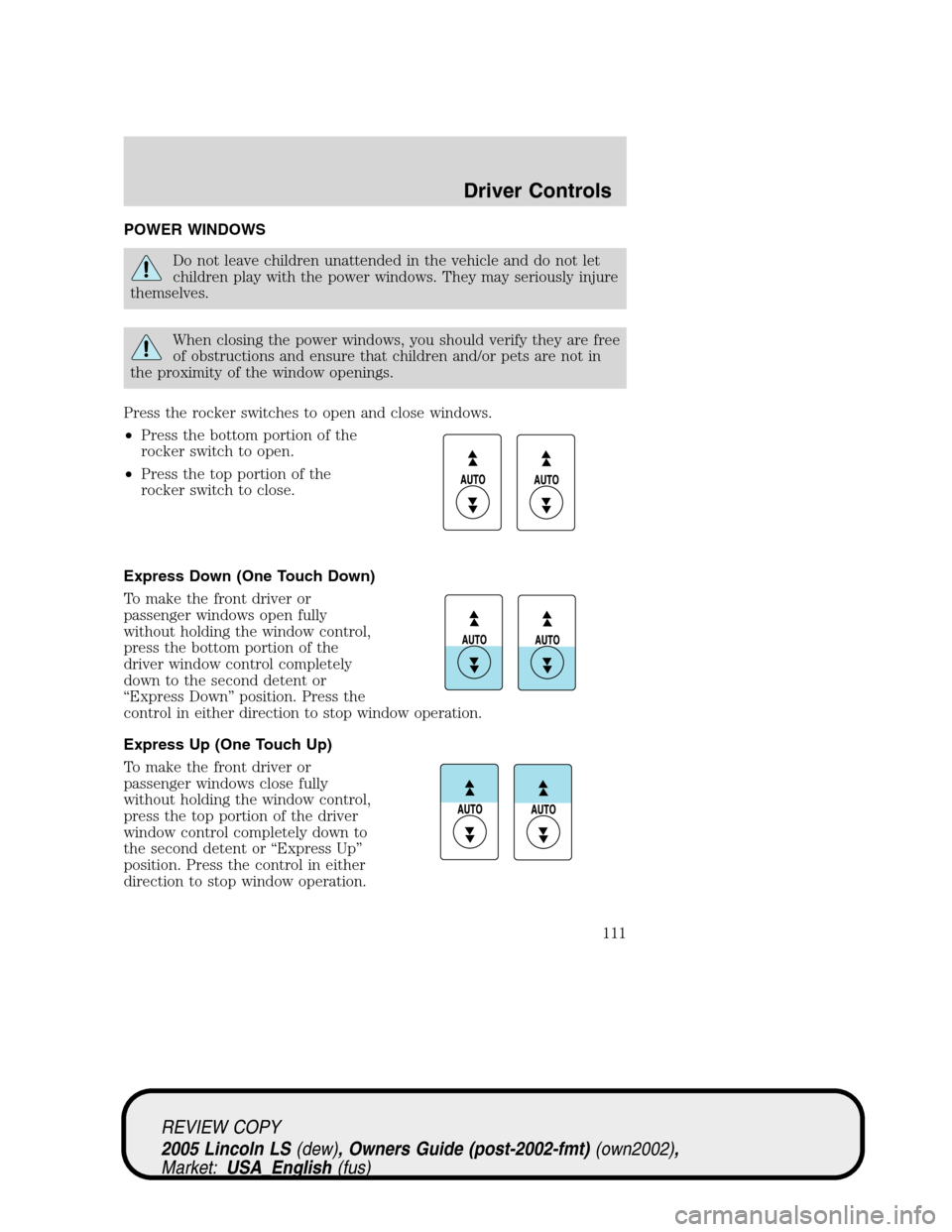
Press the rocker switches to open and close windows.
•Press the bottom portion of the
rocker switch to open.
•Press the top portion of the
rocker switch to close.
Express Down (One Touch Down)
To make the front driver or
passenger windows open fully
without holding the window control,
press the bottom portion of the
driver window control completely
down to the second detent or
“Express Down”position. Press the
control in either direction to stop window operation.
Express Up (One Touch Up)
To make the front driver or
passenger windows close fully
without holding the window control,
press the top portion of the driver
window control completely down to
the second detent or“Express Up”
position. Press the control in either
direction to stop window operation.
REVIEW COPY
2005 Lincoln LS(dew), Owners Guide (post-2002-fmt)(own2002),
Market:USA_English(fus)
Driver Controls
111
Page 112 of 320

When closing the power windows, you should verify they are free
of obstructions and ensure that children and/or pets are not in
the proximity of the window openings.
Restoring the Express up functionality
Under low battery power conditions, Express Up only functionality may
be lost. To reset this function after restoring full battery power, press the
rocker switch to the Express Up position, hold the switch until the glass
reaches the stall position and continue to hold for 2 seconds.
Accessory delay
With accessory delay, the window switches may be used for up to ten
minutes after the ignition switch is turned to the OFF position or until
either front door is opened.
Bounce Back (Front Windows Only)
When an obstacle has been detected in the window opening as the
window is moving upward, the window will automatically move down and
stop at a prescribed position.
Bounce Back Override (Front Windows Only)
To override Bounce Back, within 2 seconds after reaching Bounce Back
position, if the rocker switch is moved from the Neutral to the Express
Up positionthe window will travel up with no bounce back
protection.If the switch is released before the window reaches fully
closed position, the window will stop. For example: Bounce Back
Override can be used to overcome the resistance of ice on the window or
seals.
Window lock
The window lock feature allows only
the driver to operate the rear power
windows.
To lock out the rear window
controls press the right side of the
control. Press the left side to
restore the window controls.
MIRRORS
Automatic dimming inside rear view mirror (if equipped)
Your vehicle is equipped with an inside rear view mirror which has an
auto-dimming function. The electronic day/night mirror will change from
REVIEW COPY
2005 Lincoln LS(dew), Owners Guide (post-2002-fmt)(own2002),
Market:USA_English(fus)
Driver Controls
112
Page 113 of 320

the clear state to the non-glare state when bright lights (glare) reach the
mirror. When the mirror detects bright light from behind, it will
automatically adjust (darken) to minimize glare at night only.
The mirror will automatically return to the clear state whenever the
vehicle is placed in R (Reverse)(when the mirror is on).
Do not block the sensor on the backside of the mirror since this may
impair proper mirror performance. (Examples: no parking stickers or
hanging tags.)
Ensure the mirror is pulled down low enough to prevent visibility
interference with the overhead console. The mirror support arm has two
pivot points which lets you adjust the mirror UP or DOWN and from
SIDE to SIDE.
Without Navigation System
Press the control to turn the mirror
on. Press the control again to turn
the mirror off.
With Navigation System
The illuminated LED to the right of
the AUTO button indicates if the
mirror is in the auto-dimming
function. To turn the mirror off push
the OFF button until the LED goes
out.
Electronic compass (if equipped)
The compass reading will remain accurate during most driving
conditions. Unknown to the driver, the compass is continuously
re-calibrating due to changing magnetic fields and subtle, slow changes
in vehicle magnetics which can occur over the life of the vehicle. If
heading appears inaccurate re-calibrate mirror, refer toCompass
calibration adjustment.
COMP MIRROR
REVIEW COPY
2005 Lincoln LS(dew), Owners Guide (post-2002-fmt)(own2002),
Market:USA_English(fus)
Driver Controls
113
Page 114 of 320

The compass reading will remain fixed when significant levels of
magnetic interference are experienced (such as steel bridges). The
compass will return to normal operation upon leaving the magnetized
area.
If highly magnetized items (such as magnetic mount antennas) are
placed very near the compass the display will change to“C”.Ifa“C”is
displayed, remove the source of magnetic interference and re-calibrate
compass, refer toCompass calibration adjustment.
Most geographic areas (zones) have a magnetic north compass point that
varies slightly from the northerly direction on maps. A correct zone
setting will eliminate this error. Refer toCompass zone adjustment.
Compass zone adjustment
1. Determine which compass zone
you are in by referring to the zone
map.
2. Turn the ignition to the ON/RUN
position.
3. With the compass display turned
on, press and hold the COMP side of
the control for no more than six
seconds until the zone selection
number appears in the mirror
display window. If a“C”appears
repeat this step.
4. Release the COMP side of the
control, then press it down again.
5. Repeatedly press until your zone number is shown in the mirror
display, then release.
6. The display will show all segments, then return to normal compass
mode within ten seconds.
Compass calibration adjustment
Perform this adjustment in an open area free from steel structures and
high voltage lines.
1 2 3
4
5
6 7 8 9 101112 13 14 15
COMP MIRROR
NW
REVIEW COPY
2005 Lincoln LS(dew), Owners Guide (post-2002-fmt)(own2002),
Market:USA_English(fus)
Driver Controls
114

