Page 137 of 424
Tire PSI
Shows the pressure and location of each tire, except for
the spare tire. The tire location will blink when under
pressure.
Blank Screen
Shows a blank screen. Pressing the C/T button returns to
the Compass and Temperature display. Pressing the STEP
button returns you to the Average Miles per Gallon
display.
Automatic Compass Calibration
This compass is self-calibrating which eliminates the
need to manually set the compass. When the vehicle is
new, the compass may appear erratic and the CAL
symbol will be displayed.
After completing three 360 degree turns in an area free
from large metal or metallic objects, the CAL symbol will
turn off and the compass will function normally.
Manual Compass Calibration
If the compass appears erratic and the CAL symbol does
not appear, you must manually put the compass into the
“Calibration” mode.
To Put Into a Calibration Mode
Turn on the ignition and set the display to “Compass/
Temperature.” Press and hold the RESET button (more
than 10 seconds) to change the display between VARI-
ANCE (compass variance) and CAL (compass calibra-
tion) modes. When the CAL symbol is displayed com-
plete three 360 degree turns in an area free from large
metal objects or power lines. The CAL symbol will turn
off and the compass will function normally.
UNDERSTANDING THE FEATURES OF YOUR VEHICLE 137
3
Page 138 of 424
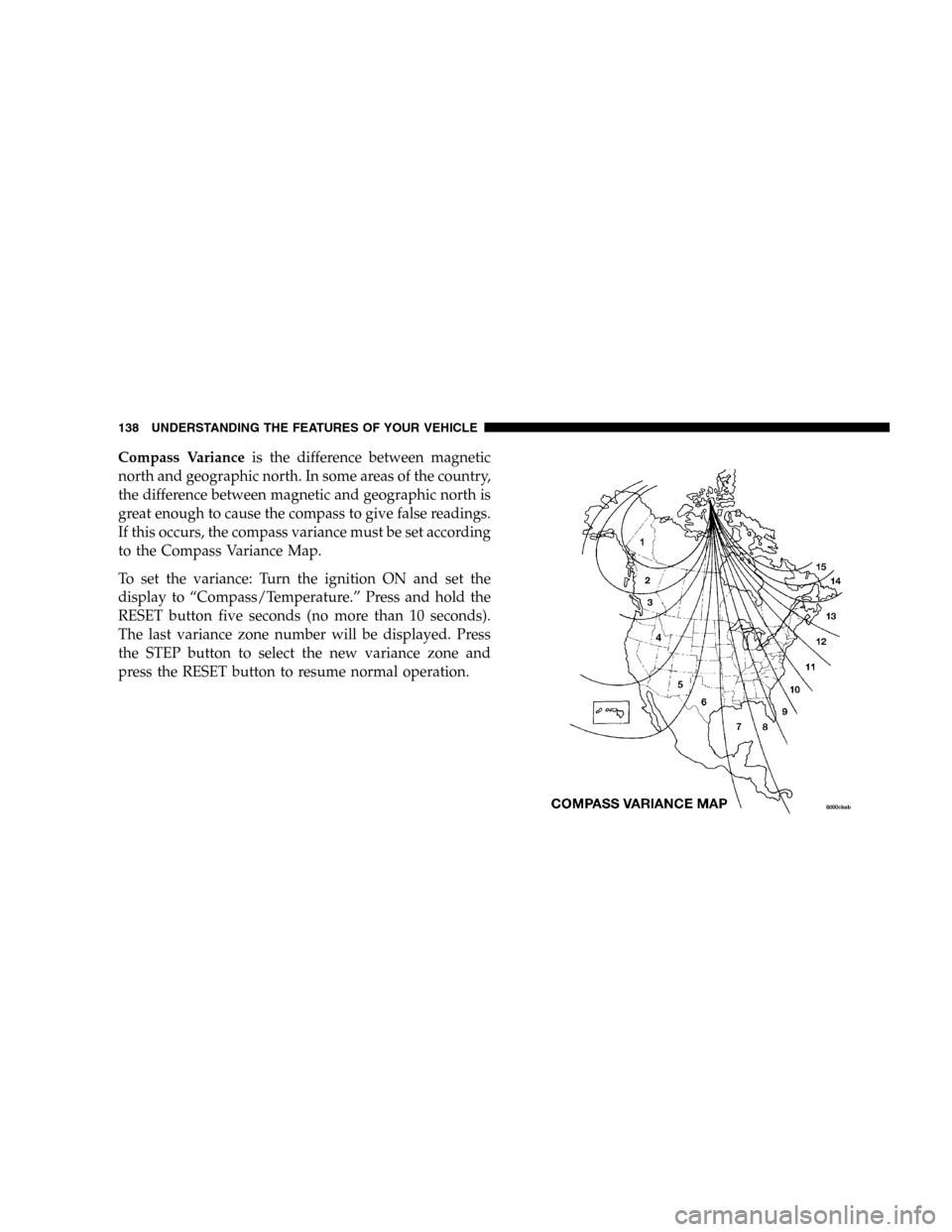
Compass Varianceis the difference between magnetic
north and geographic north. In some areas of the country,
the difference between magnetic and geographic north is
great enough to cause the compass to give false readings.
If this occurs, the compass variance must be set according
to the Compass Variance Map.
To set the variance: Turn the ignition ON and set the
display to “Compass/Temperature.” Press and hold the
RESET button five seconds (no more than 10 seconds).
The last variance zone number will be displayed. Press
the STEP button to select the new variance zone and
press the RESET button to resume normal operation.
138 UNDERSTANDING THE FEATURES OF YOUR VEHICLE
Page 171 of 424

11. Temperature Gage
Indicates engine coolant temperature. Any read-
ing within the normal range indicates that the
cooling system is operating satisfactorily.
The gage pointer will likely indicate a higher temperature
(above center scale) when driving in hot weather, up
mountain grades, in heavy stop and go traffic, or when
towing a trailer. It should not be allowed to exceed the
upper limits of the normal operating range.
If the pointer rises to the red zone (five chimes will
occur), pull over and stop the vehicle. Do not turn the
engine off. Idle the vehicle with the air conditioning
turned off, until the pointer drops back into the normal
range. If the engine remains in the high range, turn the
engine off and call for service.12. Reset Button
Press this button to toggle between the odometer and trip
odometer display. When in the trip odometer mode,
holding the button in resets the trip odometer. Also,
pressing the “Reset” button will clear out any warning
messages in the odometer display.
13. Odometer/Trip Odometer
A vacuum fluorescent display indicates the total distance
the vehicle has been driven. Also, the cluster will display,
replacing the odometer/trip odometer, vehicle warning
messages such as: door/gate/glass ajar and low washer
fluid. See appropriate sections for more information.
NOTE:If vehicle is equipped with the optional Elec-
tronic Vehicle Information Center (EVIC) in the overhead
console, all warnings including “door”, “GATE”,
“GLASS”, and “LOWASH” will only be displayed in the
UNDERSTANDING YOUR INSTRUMENT PANEL 171
4
Page 180 of 424
Program Type Radio Display
Country Country
Information Inform
Jazz Jazz
Foreign Language Language
News News
Nostalgia Nostalga
Oldies Oldies
Personality Persnlty
Public Public
Rhythm and Blues R & B
Religious Music Rel Musc
Religious Talk Rel Talk
Rock Rock
Soft Soft
Soft Rock Soft Rck
Soft Rhythm and Blues Soft R&BProgram Type Radio Display
Sports Sports
Talk Talk
Top 40 Top 40
Weather Weather
By pressing the SEEK button when the PTY icon is
displayed, the radio will be tuned to the next frequency
station with the same selected PTY name. The PTY
function only operates when in the FM mode.
The radio display will flash “SEEK” and the selected PTY
program type when searching for the next PTY station. If
no station is found with the selected PTY program type,
the radio will return to the last preset station.
If a preset button is activated while in the PTY (Program
Type) mode, the PTY mode will be exited and the radio
will tune to the preset station.
180 UNDERSTANDING YOUR INSTRUMENT PANEL
Page 190 of 424
Tune
Press the TUNE control up or down to increase or
decrease the frequency. If you press and hold the button,
the radio will continue to tune until you release the
button. The frequency will be displayed and continu-
ously updated while the button is pressed.
To Set The Radio Push-Button Memory
When you are receiving a station that you wish to
commit to push-button memory, press the SET button.
SET 1 will show in the display window. Select the “1–5”
button you wish to lock onto this station and press and
release that button. If a button is not selected within 5
seconds after pressing the SET button, the station will
continue to play but will not be locked into push-button
memory.
You may add a second station to each push-button by
repeating the above procedure with this exception: Press
the SET button twice and SET 2 will show in the displaywindow. Each button can be set for SET 1 and SET 2 in
both AM and FM. This allows a total of 10 AM and 10 FM
stations to be locked into push-button memory. The
stations stored in SET 2 memory can be selected by
pressing the push-button twice. Every time a preset
button is used a corresponding button number will be
displayed.Audio
The audio button controls the BASS, TREBLE, BAL-
ANCE, and FADE.
Press the AUDIO button and BASS will be displayed.
Press the SEEK + or SEEK – to increase or decrease the
Bass tones.
Press the AUDIO button a second time and TREB will be
displayed. Press the SEEK + or SEEK – to increase or
decrease the Treble tones.
190 UNDERSTANDING YOUR INSTRUMENT PANEL
Page 197 of 424
and release that button. If a button is not selected within
5 seconds after pressing the SET RND button, the station
will continue to play but will not be locked into push-
button memory.
You may add a second station to each push-button by
repeating the above procedure with this exception: Press
the SET button twice and SET 2 will show in the display
window. Each button can be set for SET 1 and SET 2 in
both AM and FM. This allows a total of 12 AM and 12 FM
stations to be locked into push-button memory. The
stations stored in SET 2 memory can be selected by
pressing the corresponding push-button twice. Every
time a preset button is used, a corresponding button
number will be displayed.
Audio
The audio button controls the BASS, TREBLE, BAL-
ANCE, and FADE.Press the AUDIO button and BASS will be displayed.
Press the SEEK + or SEEK – to increase or decrease the
Bass tones.
Press the AUDIO button a second time and TREB will be
displayed. Press the SEEK + or SEEK – to increase or
decrease the Treble tones.
Press the AUDIO button a third time and BAL will be
displayed. Press the SEEK + or SEEK – to adjust the
sound level from the right or left side speakers.
Press the AUDIO button a fourth time and FADE will be
displayed. Press the SEEK + or SEEK – to adjust the
sound level between the front and rear speakers.
Press the AUDIO button again or wait 5 seconds to exit
setting tone, balance, and fade.Time Button
Press the TIME button to change the display between
radio frequency and time.
UNDERSTANDING YOUR INSTRUMENT PANEL 197
4
Page 201 of 424
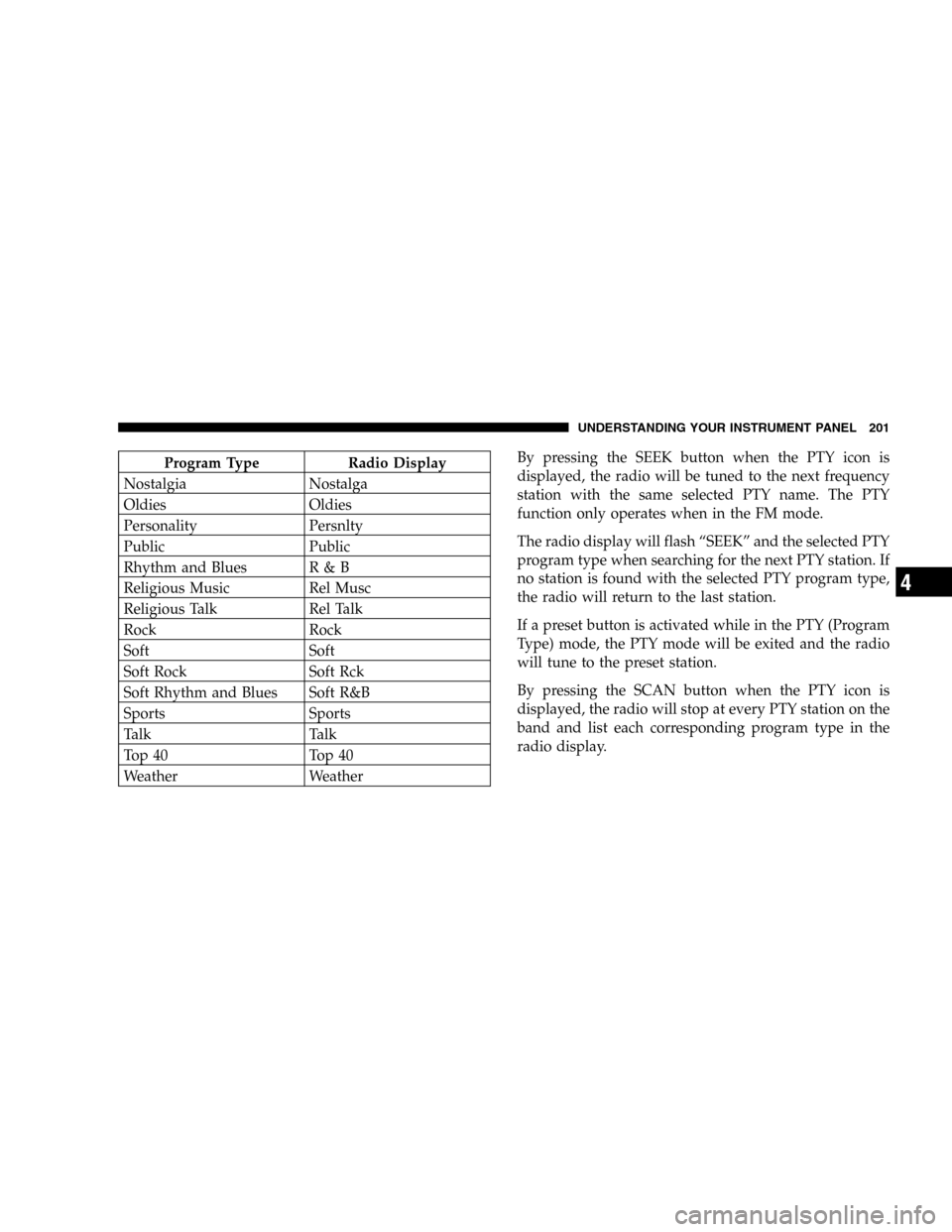
Program Type Radio Display
Nostalgia Nostalga
Oldies Oldies
Personality Persnlty
Public Public
Rhythm and Blues R & B
Religious Music Rel Musc
Religious Talk Rel Talk
Rock Rock
Soft Soft
Soft Rock Soft Rck
Soft Rhythm and Blues Soft R&B
Sports Sports
Talk Talk
Top 40 Top 40
Weather WeatherBy pressing the SEEK button when the PTY icon is
displayed, the radio will be tuned to the next frequency
station with the same selected PTY name. The PTY
function only operates when in the FM mode.
The radio display will flash “SEEK” and the selected PTY
program type when searching for the next PTY station. If
no station is found with the selected PTY program type,
the radio will return to the last station.
If a preset button is activated while in the PTY (Program
Type) mode, the PTY mode will be exited and the radio
will tune to the preset station.
By pressing the SCAN button when the PTY icon is
displayed, the radio will stop at every PTY station on the
band and list each corresponding program type in the
radio display.
UNDERSTANDING YOUR INSTRUMENT PANEL 201
4
Page 209 of 424
Radio Operation
Pressing the top of the switch will “Seek” up for the next
listenable station and pressing the bottom of the switch
will “Seek” down for the next listenable station.
The button located in the center of the left hand control
will tune to the next preset station that you have pro-
grammed in the radio preset push-button.
Tape Player
Pressing the top of the switch once will go to the next
selection on the cassette. Pressing the bottom of the
switch once will go to the beginning of the current
selection or to the beginning of the previous selection if it
is within the first 5 seconds of the current selection.
If you press the switch up or down twice it plays the
second selection, three times, it will play the third, etc.
The button in the center of the left hand switch switches
the side of the tape to be played.
CD Player — Single Disc in Radio
Pressing the top of the switch once will go to the next
track on the CD. Pressing the bottom of the switch once
will go to the beginning of the current track or to the
beginning of the previous track if it is within one second
after the current track begins to play.
If you press the switch up or down twice it plays the
second track, three times, it will play the third, etc.
The button in the center of the left hand switch has no
function in this mode.
CD Player — 6 Disc in Cargo Area
Pressing the top of the switch once will go to the next
track on the CD. Pressing the bottom of the switch once
will go to the beginning of the current track or to the
beginning of the previous track if it is within one second
after the current track begins to play.
UNDERSTANDING YOUR INSTRUMENT PANEL 209
4