Page 4173 of 4731
PB-4
PARKING BRAKE CONTROL
Revision: 2005 July 2005 FX
12. Remove right and left rear cables installation nut, bolt, and remove right and left rear cable assembly from
the vehicle.
INSTALLATION
1. Refer to “Components” for tightening torque. Install in the reverse order of removal.
CAUTION:
Do not reuse adjusting nut after removing it.
2. Adjust parking brake. Refer to PB-2, "
ADJUSTMENT" .
Page 4174 of 4731
PARKING BRAKE SHOE PB-5
C
D E
G H
I
J
K L
M A
B
PB
Revision: 2005 July 2005 FX
PARKING BRAKE SHOEPFP:44060
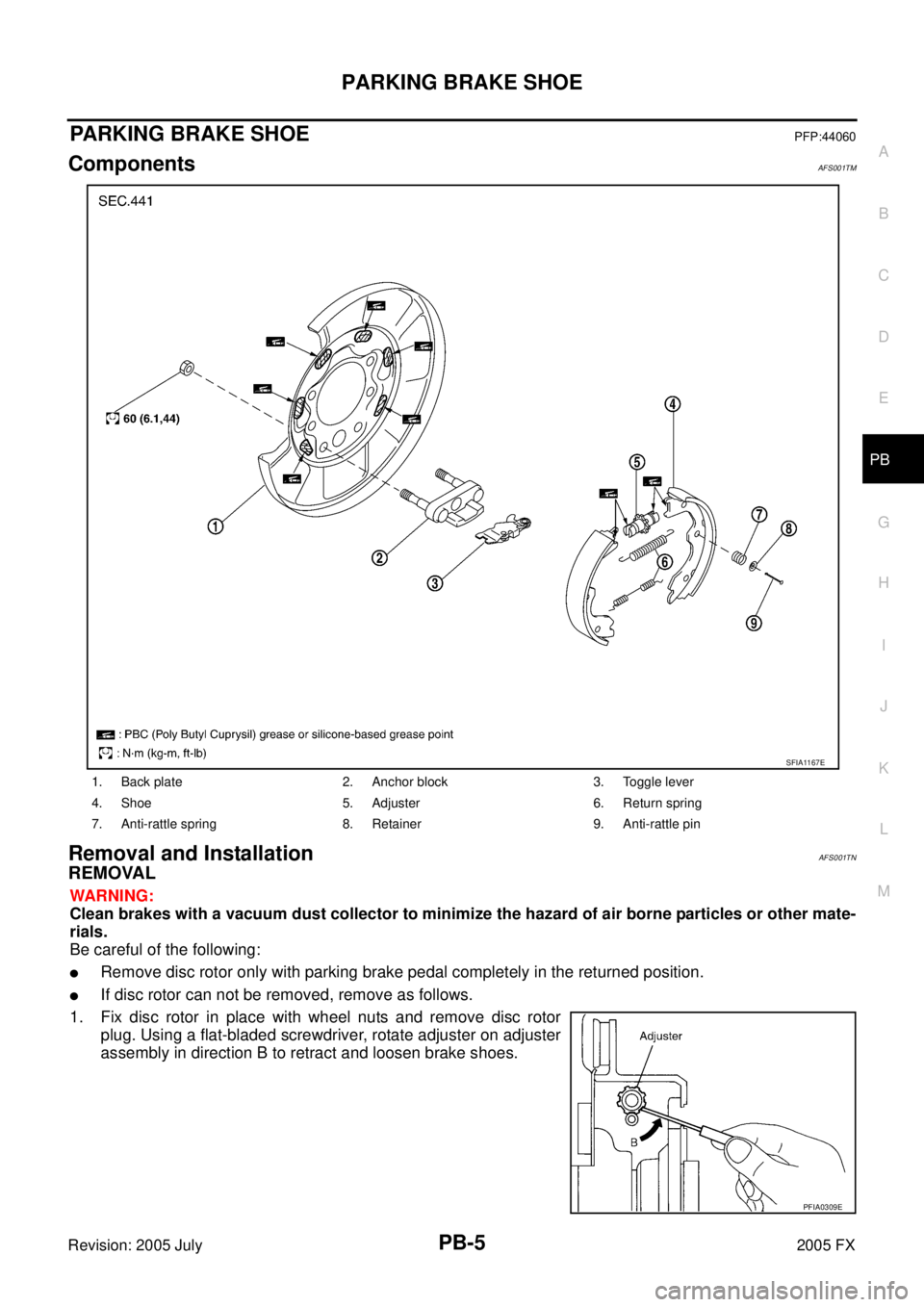
ComponentsAFS001TM
Removal and InstallationAFS001TN
REMOVAL
WARNING:
Clean brakes with a vacuum dust collector to minimize the hazard of air borne particles or other mate-
rials.
Be careful of the following:
�Remove disc rotor only with parking brake pedal completely in the returned position.
�If disc rotor can not be removed, remove as follows.
1. Fix disc rotor in place with wheel nuts and remove disc rotor plug. Using a flat-bladed screwdriver, rotate adjuster on adjuster
assembly in direction B to retract and loosen brake shoes.
1. Back plate 2. Anchor block 3. Toggle lever
4. Shoe 5. Adjuster 6. Return spring
7. Anti-rattle spring 8. Retainer 9. Anti-rattle pin
SFIA1167E
PFIA0309E
Page 4175 of 4731
PB-6
PARKING BRAKE SHOE
Revision: 2005 July 2005 FX
INSPECTION AFTER REMOVAL
Lining Thickness Inspection
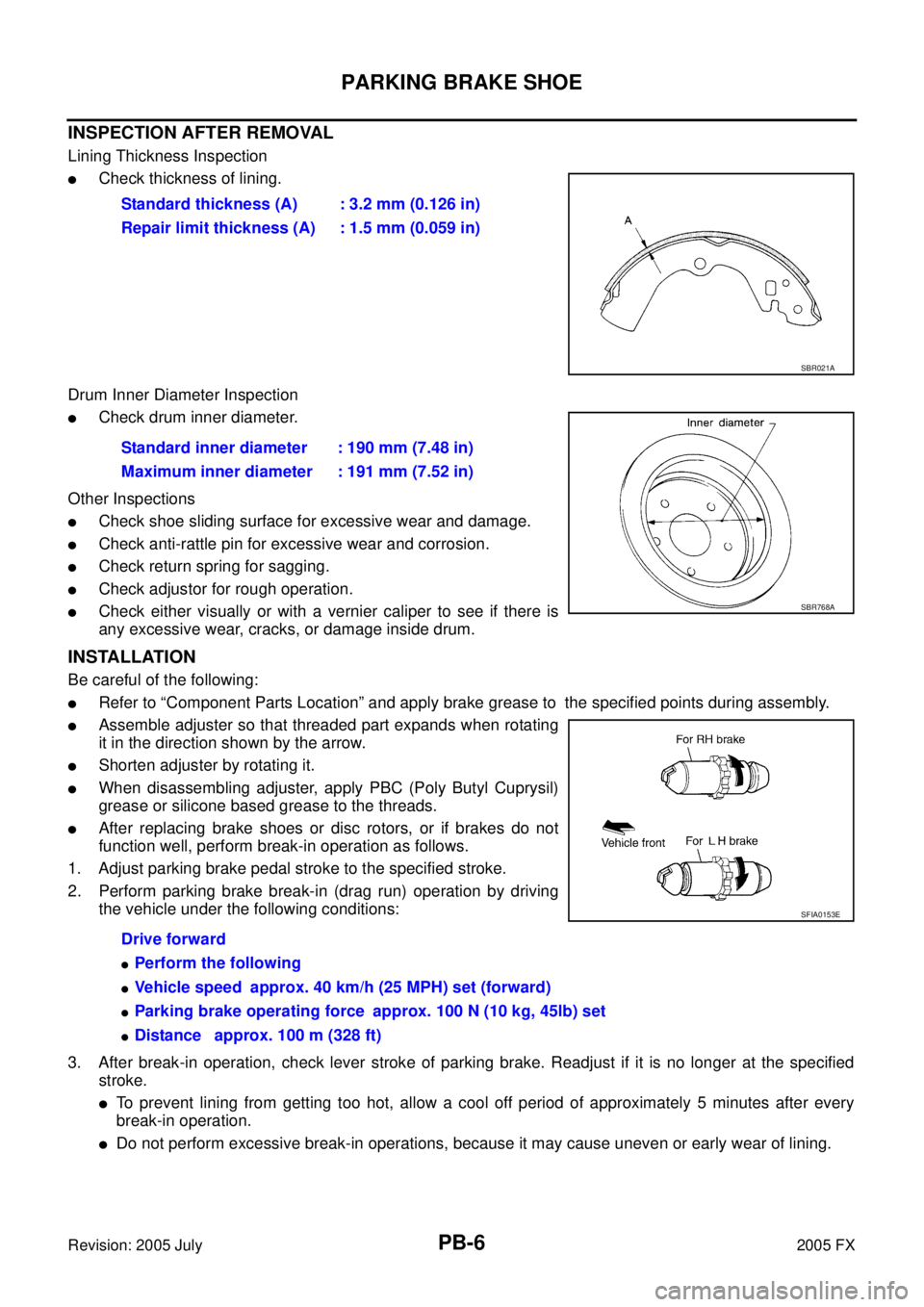
�Check thickness of lining.
Drum Inner Diameter Inspection
�Check drum inner diameter.
Other Inspections
�Check shoe sliding surface for excessive wear and damage.
�Check anti-rattle pin for excessive wear and corrosion.
�Check return spring for sagging.
�Check adjustor for rough operation.
�Check either visually or with a vernier caliper to see if there is
any excessive wear, cracks, or damage inside drum.
INSTALLATION
Be careful of the following:
�Refer to “Component Parts Location” and apply brake grease to the specified points during assembly.
�Assemble adjuster so that threaded part expands when rotating
it in the direction shown by the arrow.
�Shorten adjuster by rotating it.
�When disassembling adjuster, apply PBC (Poly Butyl Cuprysil)
grease or silicone based grease to the threads.
�After replacing brake shoes or disc rotors, or if brakes do not
function well, perform break-in operation as follows.
1. Adjust parking brake pedal stroke to the specified stroke.
2. Perform parking brake break-in (drag run) operation by driving the vehicle under the following conditions:
3. After break-in operation, check lever stroke of parking brake. Readjust if it is no longer at the specified stroke.
�To prevent lining from getting too hot, allow a cool off period of approximately 5 minutes after every
break-in operation.
�Do not perform excessive break-in operations, because it may cause uneven or early wear of lining. Standard thickness (A) : 3.2 mm (0.126 in)
Repair limit thickness (A) : 1.5 mm (0.059 in)
SBR021A
Standard inner diameter : 190 mm (7.48 in)
Maximum inner diameter : 191 mm (7.52 in)
SBR768A
Drive forward
�Perform the following
�Vehicle speed approx. 40 km/h (25 MPH) set (forward)
�Parking brake operating force approx. 100 N (10 kg, 45lb) set
�Distance approx. 100 m (328 ft)
SFIA0153E
Page 4176 of 4731
SERVICE DATA AND SPECIFICATIONS (SDS) PB-7
C
D E
G H
I
J
K L
M A
B
PB
Revision: 2005 July 2005 FX
SERVICE DATA AND SPECIFICATIONS (SDS)PFP:00030
Parking Drum Brake AFS001TO
Parking Brake ControlAFS001TP
TypeDS19HC
Brake lining Standard thickness (new) 3.2 mm (0.126 in)
Wear limit thickness 1.5 mm (0.059 in)
Drum (disc) Standard inner diameter (new) 190 mm (7.48 in)
Wear limit of inner diameter 191 mm (7.52 in)
Control type Foot pedal
Number of notches [under a force of 200 N (20.4 kg, 44.9 lb)] 4 − 5 notches
Number of notches
when warning lamp switch comes on 1 notches
Page 4244 of 4731

HARNESS PG-67
C
D E
F
G H
I
J
L
M A
B
PG
Revision: 2005 July 2005 FX
Wiring Diagram Codes (Cell Codes) AKS007X0
Use the chart below to find out what each wiring diagram code stands for.
Refer to the wiring diagram code in the alphabetical index to find the location (page number) of each wiring
diagram.
Code Section Wiring Diagram Name
A/C ATC Air Conditioner
APPS1 EC Accelerator Pedal Position Sensor
APPS2 EC Accelerator Pedal Position Sensor
APPS3 EC Accelerator Pedal Position Sensor
ASC/BS EC Automatic Speed Control Device (ASCD) Brake Switch
ASC/SW EC Automatic Speed Control Device (ASCD) Steering Switch
ASCBOF EC Automatic Speed Control Device (ASCD) Brake Switch
ASCIND EC Automatic Speed Control Device (ASCD) Indicator
AT/IND DI A/T Indicator Lamp
AUDIO AV Audio
AUT/DP SE Automatic Drive Positioner
AUTO/L LT Automatic Light System
AWD TF AWD Control System
B/CLOS BL Back Door Closure System
BACK/L LT Back-Up Lamp
BRK/SW EC Brake Switch
CAN AT CAN Communication Line
CAN EC CAN Communication Line
CAN LAN CAN System
CHARGE SC Charging System
CHIME DI Warning Chime
CIGAR WW Cigarette Lighter
CLOCK DI Clock
COMBSW LT Combination Switch
COMM AV Audio Visual Communication Line
COMPAS DI Compass
COOL/F EC Cooling Fan Control
D/LOCK BL Power Door Lock
DEF GW Rear Window Defogger
DTRL LT Headlamp - With Daytime Light System
ECM/PW EC ECM Power Supply for Back-Up
ECTS EC Engine Coolant Temperature Sensor
ETC1 EC Electric Throttle Control Function
ETC2 EC Electric Throttle Control Motor Relay
ETC3 EC Electric Throttle Control Motor
F/FOG LT Front Fog Lamp
F/PUMP EC Fuel Pump
FTS AT A/T Fluid Temperature Sensor Circuit
FTTS EC Fuel Tank Temperature Sensor
FUELB1 EC Fuel Injection System Function (Bank 1)
FUELB2 EC Fuel Injection System Function (Bank 2)
Page 4245 of 4731

PG-68
HARNESS
Revision: 2005 July 2005 FX
H/AIM LT Headlamp Aiming Control System
H/LAMP LT Headlamp
HORN WW Horn
HSEAT SE Heated Seat
I/KEY BL Intelligent Key System
I/MIRR GW Inside Mirror (Auto Anti-Dazzling Mirror)
IATS EC Intake Air Temperature Sensor
ICC ACS Intelligent Cruise Control System
ICC/BS EC ICC Brake Switch
ICC/SW EC ICC Steering Switch
ICCBOF EC ICC Brake Switch
IGNSYS EC Ignition System
ILL LT Illumination
INF/D AV Vehicle Information and Integrated Switch System
INJECT EC Injector
IVCB1 EC Intake Valve Timing Control Solenoid Valve Bank 1
IVCB2 EC Intake Valve Timing Control Solenoid Valve Bank 2
IVCSB1 EC Intake Valve Timing Control Position Sensor Bank 1
IVCSB2 EC Intake Valve Timing Control Position Sensor Bank 2
IVTB1 EC Intake Valve Timing Control System (Bank 1)
IVTB2 EC Intake Valve Timing Control System (Bank 2)
KEYLES BL Remote Keyless Entry System
KS EC Knock Sensor
LDW DI Lane Departure Warning System
M/ANT AV Manual Antenna
MAFS EC Mass Air Flow Sensor
MAIN AT Main Power Supply and Ground Circuit
MAIN EC Main Power Supply and Ground Circuit
MES AV Mobile Entertainment System
METER DI Speedometer, Tachometer, Temp. and Fuel Gauges
MIL/DL EC MIL & Data Link Connectors
MIRROR GW Power Door Mirror
MMSW AT Manual Mode Switch
NATS BL Nissan Anti-Theft System
NAVI AV Navigation System
NONDTC AT Non-Detective Items
O2H1B1 EC Heated Oxygen Sensor 1 Heater Bank 1
O2H1B2 EC Heated Oxygen Sensor 1 Heater Bank 2
O2H2B1 EC Heated Oxygen Sensor 2 Heater Bank 1
O2H2B2 EC Heated Oxygen Sensor 2 Heater Bank 2
O2S1B1 EC Heated Oxygen Sensor 1 Bank 1
O2S1B2 EC Heated Oxygen Sensor 1 Bank 2
O2S2B1 EC Heated Oxygen Sensor 2 Bank 1
O2S2B2 EC Heated Oxygen Sensor 2 Bank 2 Code Section Wiring Diagram Name
Page 4264 of 4731
NOISE, VIBRATION AND HARSHNESS (NVH) TROUBLESHOOTING PR-3
C E F
G H
I
J
K L
M A
B
PR
Revision: 2005 July 2005 FX
NOISE, VIBRATION AND HARSHNESS (NVH) TROUBLESHOOTINGPFP:00003
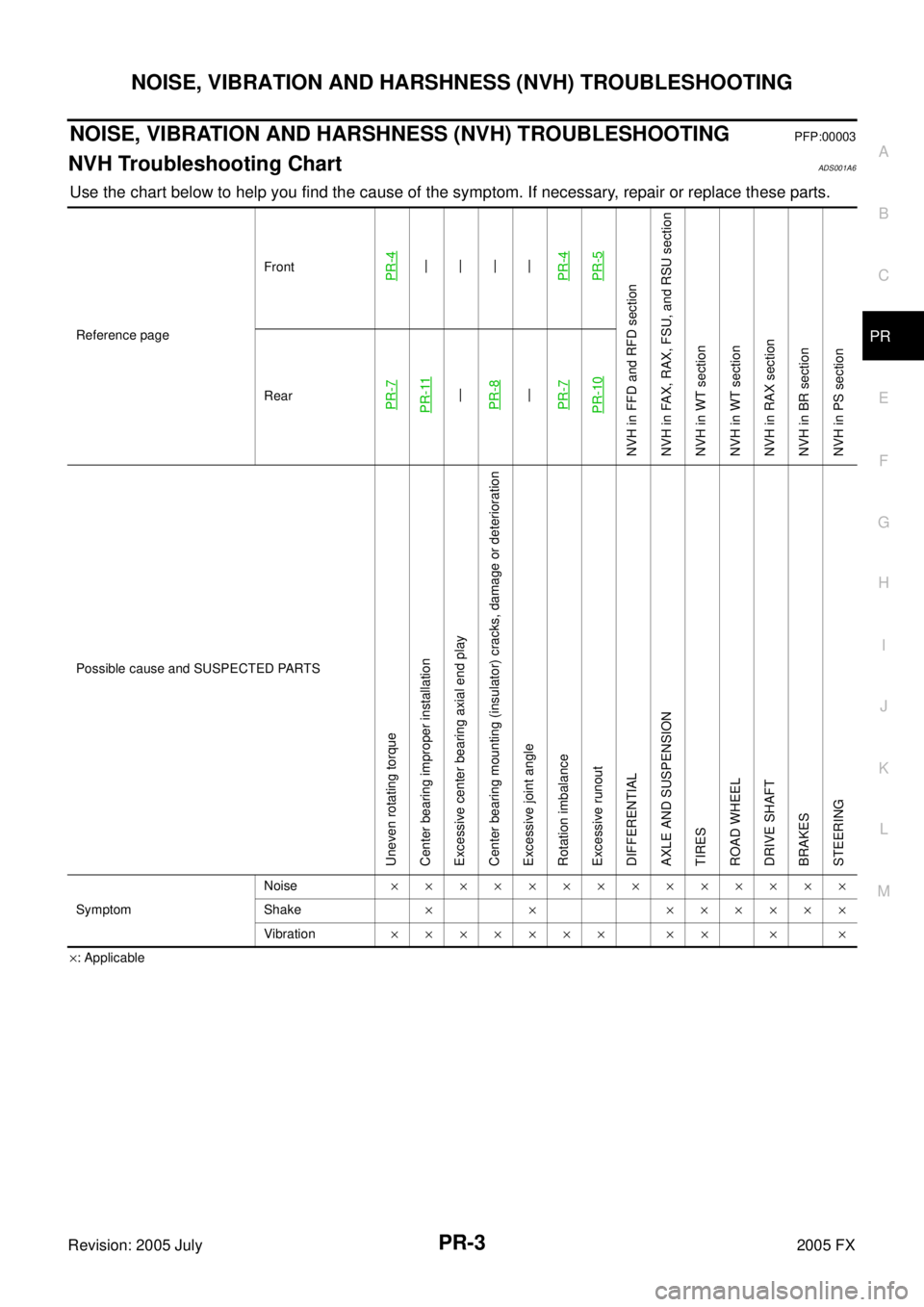
NVH Troubleshooting ChartADS001A6
Use the chart below to help you find the cause of the symptom. If necessary, repair or replace these parts.
×: Applicable
Reference page
Front
PR-4—
—
—
—
PR-4PR-5
NVH in FFD and RFD section
NVH in FAX, RAX, FSU, and RSU section
NVH in WT section
NVH in WT section
NVH in RAX section
NVH in BR section
NVH in PS section
RearPR-7PR-11—
PR-8—
PR-7PR-10
Possible cause and SUSPECTED PARTS
Uneven rotating torque
Center bearing improper installation
Excessive center bearing axial end play
Center bearing mounting (insulator) cracks, damage or deterioration
Excessive joint angle
Rotation imbalance
Excessive runout
DIFFERENTIAL
AXLE AND SUSPENSION
TIRES
ROAD WHEEL
DRIVE SHAFT
BRAKES
STEERING
Symptom Noise
××××××××××××××
Shake × × ××××××
Vibration ××××××× ×× × ×
Page 4270 of 4731
REAR PROPELLER SHAFT PR-9
C E F
G H
I
J
K L
M A
B
PR
Revision: 2005 July 2005 FX
Removal and InstallationADS001AC
REMOVAL
1. Move the A/T select lever to N position and release the parking brake.
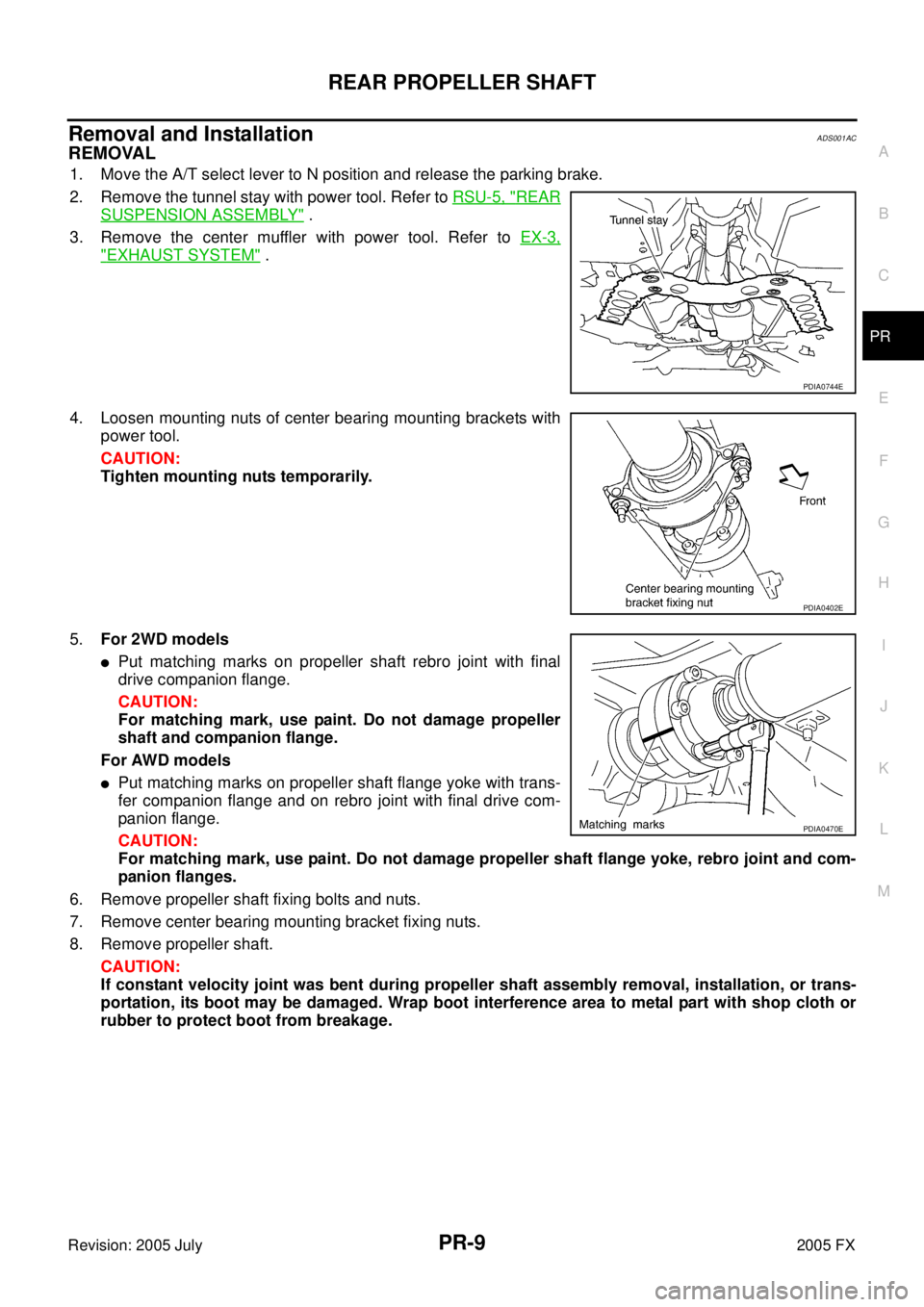
2. Remove the tunnel stay with power tool. Refer to RSU-5, "
REAR
SUSPENSION ASSEMBLY" .
3. Remove the center muffler with power tool. Refer to EX-3,
"EXHAUST SYSTEM" .
4. Loosen mounting nuts of center bearing mounting brackets with power tool.
CAUTION:
Tighten mounting nuts temporarily.
5. For 2WD models
�Put matching marks on propeller shaft rebro joint with final
drive companion flange.
CAUTION:
For matching mark, use paint. Do not damage propeller
shaft and companion flange.
For AWD models
�Put matching marks on propeller shaft flange yoke with trans-
fer companion flange and on rebro joint with final drive com-
panion flange.
CAUTION:
For matching mark, use paint. Do not damage propeller shaft flange yoke, rebro joint and com-
panion flanges.
6. Remove propeller shaft fixing bolts and nuts.
7. Remove center bearing mounting bracket fixing nuts.
8. Remove propeller shaft.
CAUTION:
If constant velocity joint was bent during propeller shaft assembly removal, installation, or trans-
portation, its boot may be damaged. Wrap boot interference area to metal part with shop cloth or
rubber to protect boot from breakage.
PDIA0744E
PDIA0402E
PDIA0470E