Page 4356 of 4731
SUNROOF RF-17
C
D E
F
G H
J
K L
M A
B
RF
Revision: 2005 July 2005 FX
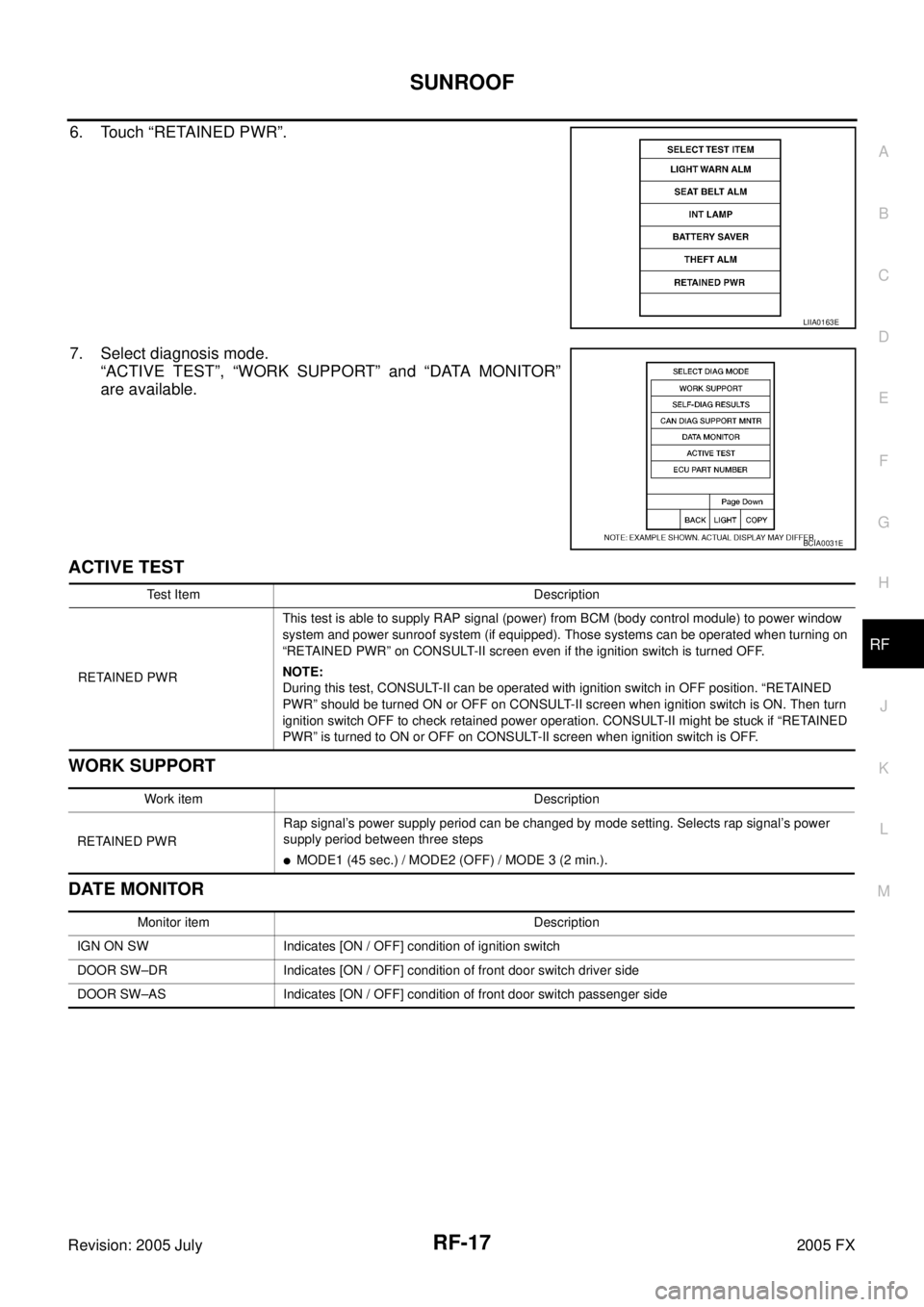
6. Touch “RETAINED PWR”.
7. Select diagnosis mode.
“ACTIVE TEST”, “WORK SUPPORT” and “DATA MONITOR”
are available.
ACTIVE TEST
WORK SUPPORT
DATE MONITOR
LIIA0163E
BCIA0031E
Test Item Description
RETAINED PWR This test is able to supply RAP signal (power) from BCM (body control module) to power window
system and power sunroof system (if equipped). Those systems can be operated when turning on
“RETAINED PWR” on CONSULT-II screen even if the ignition switch is turned OFF.
NOTE:
During this test, CONSULT-II can be operated with ignition switch in OFF position. “RETAINED
PWR” should be turned ON or OFF on CONSULT-II screen when ignition switch is ON. Then turn
ignition switch OFF to check retained power operation. CONSULT-II might be stuck if “RETAINED
PWR” is turned to ON or OFF on CONSULT-II screen when ignition switch is OFF.
Work item Description
RETAINED PWR Rap signal’s power supply period can be changed by mode setting. Selects rap signal’s power
supply period between three steps
�MODE1 (45 sec.) / MODE2 (OFF) / MODE 3 (2 min.).
Monitor item Description
IGN ON SW Indicates [ON / OFF] condition of ignition switch
DOOR SW–DR Indicates [ON / OFF] condition of front door switch driver side
DOOR SW–AS Indicates [ON / OFF] condition of front door switch passenger side
Page 4357 of 4731
RF-18
SUNROOF
Revision: 2005 July 2005 FX
Trouble Diagnosis Chart by SymptomAIS003D0
Power Supply and Ground Circuit Check of BCMAIS003D1
1. CHECK FUSE
�Check 15A fuse [No.1, located in the fuse block (J/B)]
�Check 15A fuse [No.22, located in the fuse block (J/B)]
�Check 50A fusible link (letter M, located in the fuse and fusible link box).
NOTE:
Refer to RF-10, "
Component Parts and Harness Connector Location" .
OK or NG
OK >> GO TO 2.
NG >> If fuse is blown out, be sure to eliminate cause of malfunction before installing new fuse. Refer to RF-10, "
Component Parts and Harness Connector Location" .
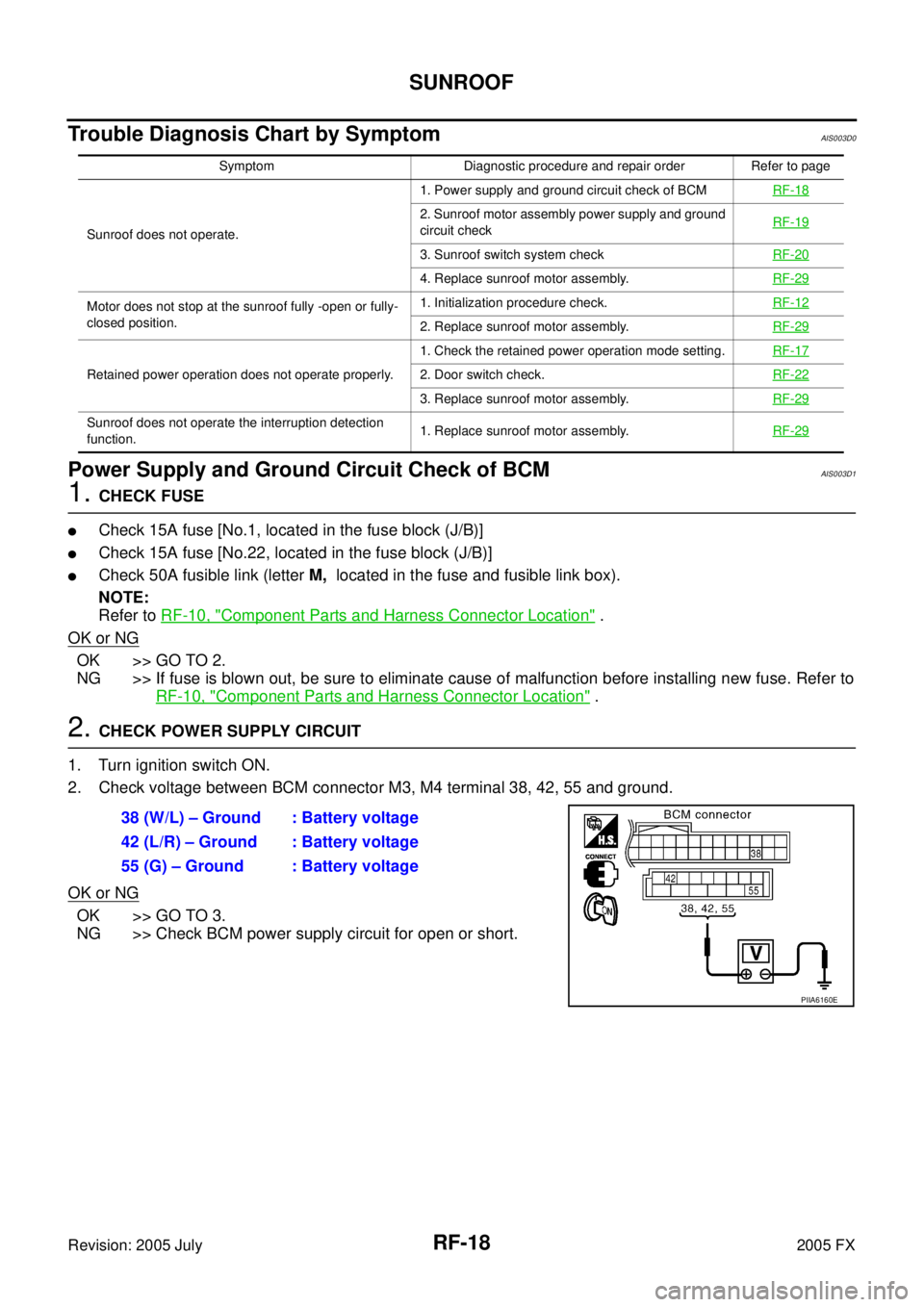
2. CHECK POWER SUPPLY CIRCUIT
1. Turn ignition switch ON.
2. Check voltage between BCM connector M3, M4 terminal 38, 42, 55 and ground.
OK or NG
OK >> GO TO 3.
NG >> Check BCM power supply circuit for open or short.
Symptom Diagnostic procedure and repair order Refer to page
Sunroof does not operate. 1. Power supply and ground circuit check of BCM
RF-18
2. Sunroof motor assembly power supply and ground
circuit check RF-19
3. Sunroof switch system check
RF-20
4. Replace sunroof motor assembly.RF-29
Motor does not stop at the sunroof fully -open or fully-
closed position. 1. Initialization procedure check.
RF-12
2. Replace sunroof motor assembly.RF-29
Retained power operation does not operate properly. 1. Check the retained power operation mode setting.
RF-172. Door switch check.RF-22
3. Replace sunroof motor assembly.RF-29
Sunroof does not operate the interruption detection
function. 1. Replace sunroof motor assembly.
RF-29
38 (W/L) – Ground : Battery voltage
42 (L/R) – Ground : Battery voltage
55 (G) – Ground : Battery voltage
PIIA6160E
Page 4358 of 4731
SUNROOF RF-19
C
D E
F
G H
J
K L
M A
B
RF
Revision: 2005 July 2005 FX
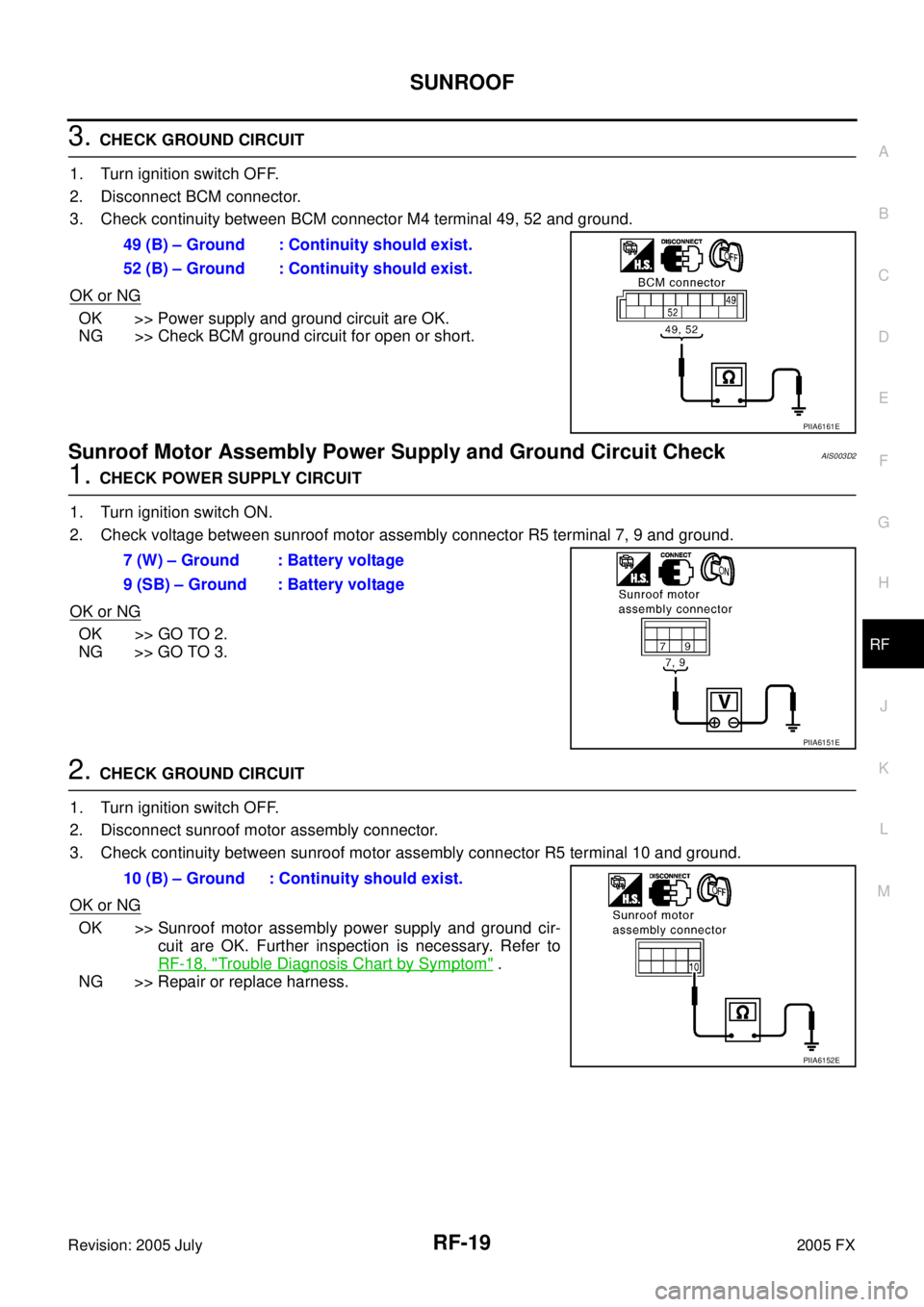
3. CHECK GROUND CIRCUIT
1. Turn ignition switch OFF.
2. Disconnect BCM connector.
3. Check continuity between BCM connector M4 terminal 49, 52 and ground.
OK or NG
OK >> Power supply and ground circuit are OK.
NG >> Check BCM ground circuit for open or short.
Sunroof Motor Assembly Power Supply and Ground Circuit CheckAIS003D2
1. CHECK POWER SUPPLY CIRCUIT
1. Turn ignition switch ON.
2. Check voltage between sunroof motor assembly connector R5 terminal 7, 9 and ground.
OK or NG
OK >> GO TO 2.
NG >> GO TO 3.
2. CHECK GROUND CIRCUIT
1. Turn ignition switch OFF.
2. Disconnect sunroof motor assembly connector.
3. Check continuity between sunroof motor assembly connector R5 terminal 10 and ground.
OK or NG
OK >> Sunroof motor assembly power supply and ground cir- cuit are OK. Further inspection is necessary. Refer to
RF-18, "
Trouble Diagnosis Chart by Symptom" .
NG >> Repair or replace harness. 49 (B) – Ground : Continuity should exist.
52 (B) – Ground : Continuity should exist.
PIIA6161E
7 (W) – Ground : Battery voltage
9 (SB) – Ground : Battery voltage
PIIA6151E
10 (B) – Ground : Continuity should exist.
PIIA6152E
Page 4359 of 4731
RF-20
SUNROOF
Revision: 2005 July 2005 FX
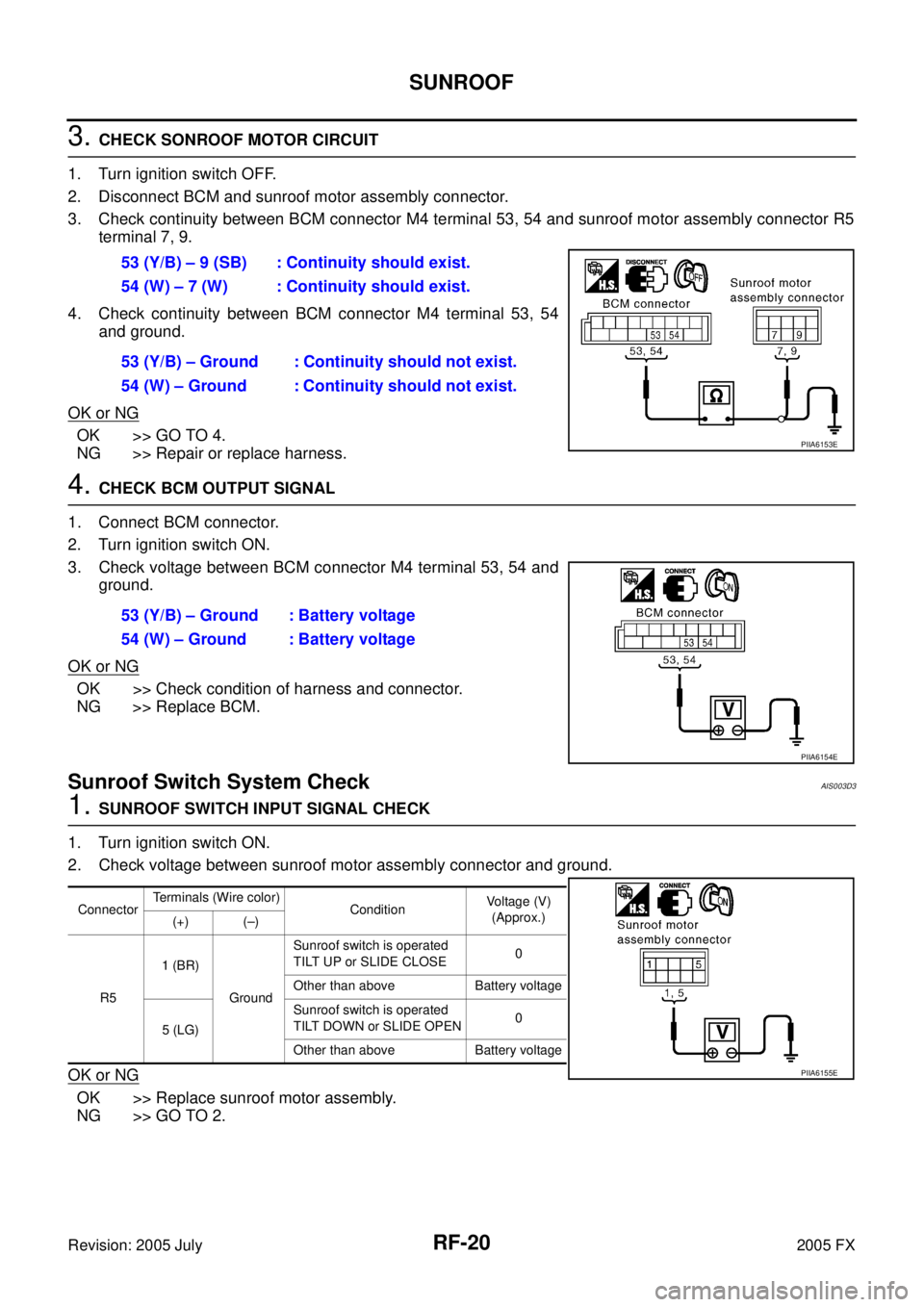
3. CHECK SONROOF MOTOR CIRCUIT
1. Turn ignition switch OFF.
2. Disconnect BCM and sunroof motor assembly connector.
3. Check continuity between BCM connector M4 terminal 53, 54 and sunroof motor assembly connector R5 terminal 7, 9.
4. Check continuity between BCM connector M4 terminal 53, 54 and ground.
OK or NG
OK >> GO TO 4.
NG >> Repair or replace harness.
4. CHECK BCM OUTPUT SIGNAL
1. Connect BCM connector.
2. Turn ignition switch ON.
3. Check voltage between BCM connector M4 terminal 53, 54 and ground.
OK or NG
OK >> Check condition of harness and connector.
NG >> Replace BCM.
Sunroof Switch System CheckAIS003D3
1. SUNROOF SWITCH INPUT SIGNAL CHECK
1. Turn ignition switch ON.
2. Check voltage between sunroof motor assembly connector and ground.
OK or NG
OK >> Replace sunroof motor assembly.
NG >> GO TO 2. 53 (Y/B) – 9 (SB) : Continuity should exist.
54 (W) – 7 (W) : Continuity should exist.
53 (Y/B) – Ground : Continuity should not exist.
54 (W) – Ground : Continuity should not exist.
PIIA6153E
53 (Y/B) – Ground : Battery voltage
54 (W) – Ground : Battery voltage
PIIA6154E
Connector Terminals (Wire color)
Condition Voltage (V)
(Approx.)
(+) (–)
R5 1 (BR)
Ground Sunroof switch is operated
TILT UP or SLIDE CLOSE 0
Other than above Battery voltage
5 (LG) Sunroof switch is operated
TILT DOWN or SLIDE OPEN 0
Other than above Battery voltage
PIIA6155E
Page 4360 of 4731
SUNROOF RF-21
C
D E
F
G H
J
K L
M A
B
RF
Revision: 2005 July 2005 FX
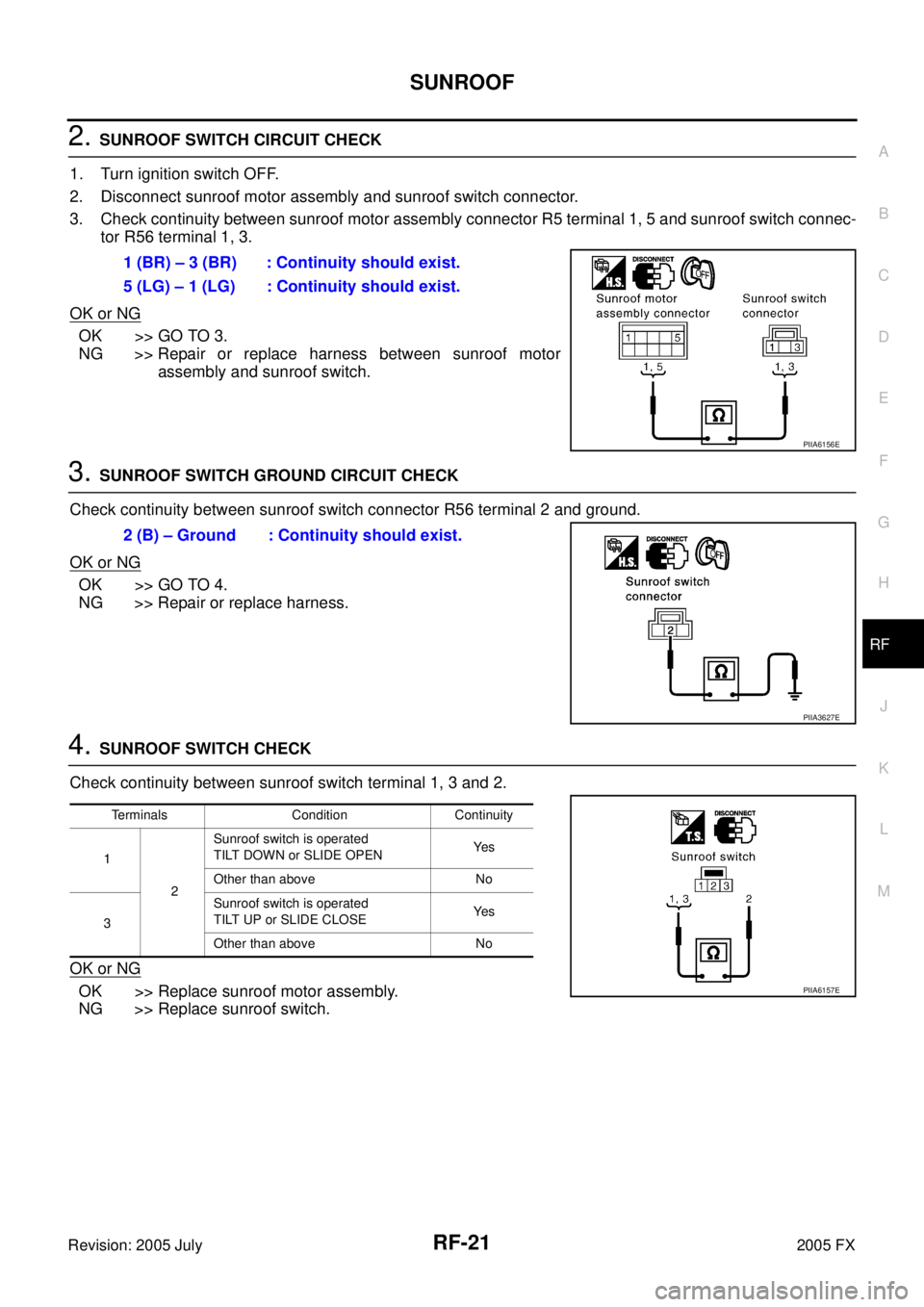
2. SUNROOF SWITCH CIRCUIT CHECK
1. Turn ignition switch OFF.
2. Disconnect sunroof motor assembly and sunroof switch connector.
3. Check continuity between sunroof motor assembly connector R5 terminal 1, 5 and sunroof switch connec- tor R56 terminal 1, 3.
OK or NG
OK >> GO TO 3.
NG >> Repair or replace harness between sunroof motor
assembly and sunroof switch.
3. SUNROOF SWITCH GROUND CIRCUIT CHECK
Check continuity between sunroof switch connector R56 terminal 2 and ground.
OK or NG
OK >> GO TO 4.
NG >> Repair or replace harness.
4. SUNROOF SWITCH CHECK
Check continuity between sunroof switch terminal 1, 3 and 2.
OK or NG
OK >> Replace sunroof motor assembly.
NG >> Replace sunroof switch. 1 (BR) – 3 (BR) : Continuity should exist.
5 (LG) – 1 (LG) : Continuity should exist.
PIIA6156E
2 (B) – Ground : Continuity should exist.
PIIA3627E
Terminals Condition Continuity
1 2 Sunroof switch is operated
TILT DOWN or SLIDE OPEN Ye s
Other than above No
3 Sunroof switch is operated
TILT UP or SLIDE CLOSE Ye s
Other than above No
PIIA6157E
Page 4361 of 4731
RF-22
SUNROOF
Revision: 2005 July 2005 FX
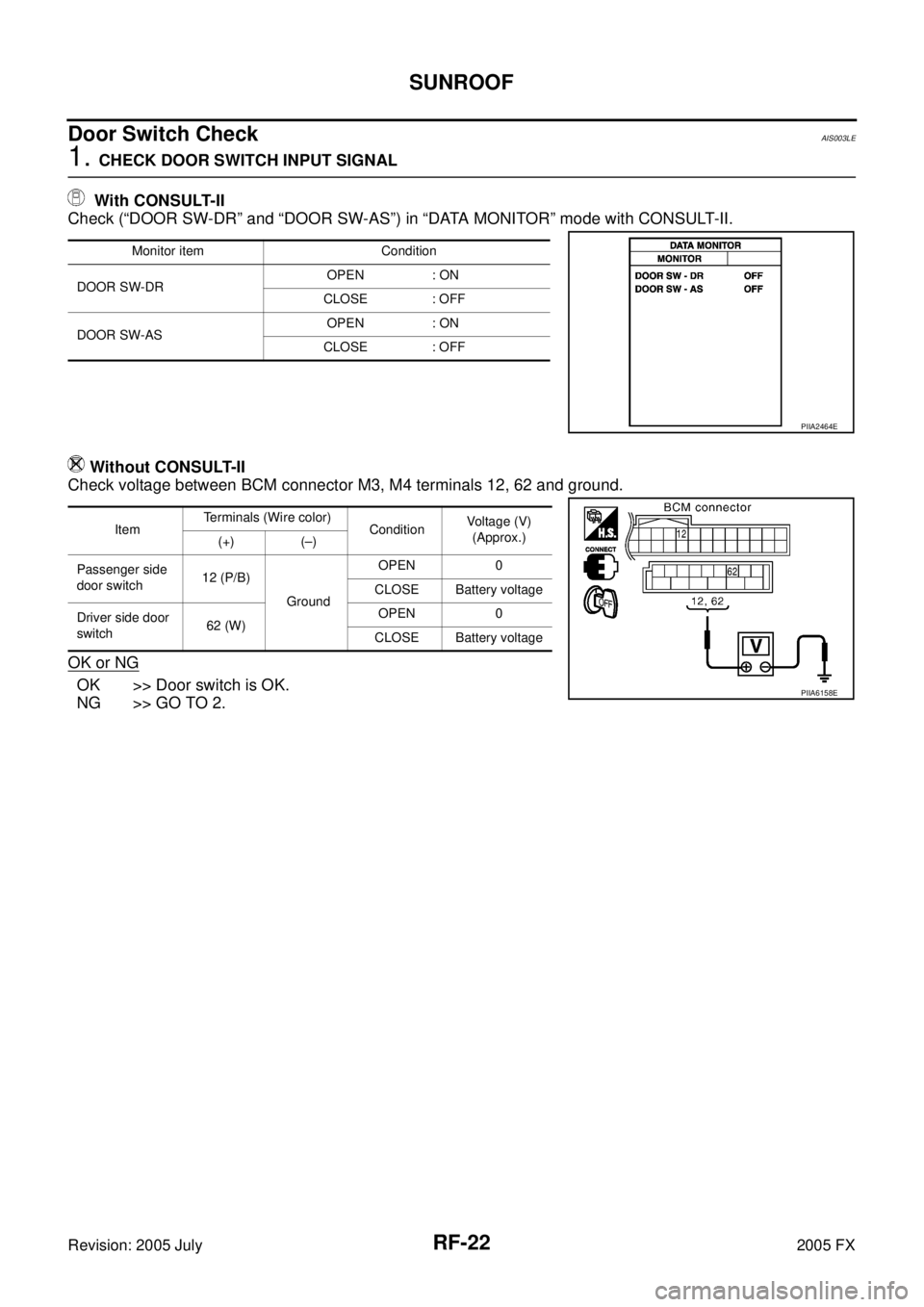
Door Switch Check AIS003LE
1. CHECK DOOR SWITCH INPUT SIGNAL
With CONSULT-II
Check (“DOOR SW-DR” and “DOOR SW-AS”) in “DATA MONITOR” mode with CONSULT-II.
Without CONSULT-II
Check voltage between BCM connector M3, M4 terminals 12, 62 and ground.
OK or NG
OK >> Door switch is OK.
NG >> GO TO 2.
Monitor item Condition
DOOR SW-DR OPEN : ON
CLOSE : OFF
DOOR SW-AS OPEN : ON
CLOSE : OFF
PIIA2464E
Item Terminals (Wire color)
Condition Voltage (V)
(Approx.)
(+) (–)
Passenger side
door switch 12 (P/B)
Ground OPEN 0
CLOSE Battery voltage
Driver side door
switch 62 (W) OPEN 0
CLOSE Battery voltage
PIIA6158E
Page 4362 of 4731
SUNROOF RF-23
C
D E
F
G H
J
K L
M A
B
RF
Revision: 2005 July 2005 FX
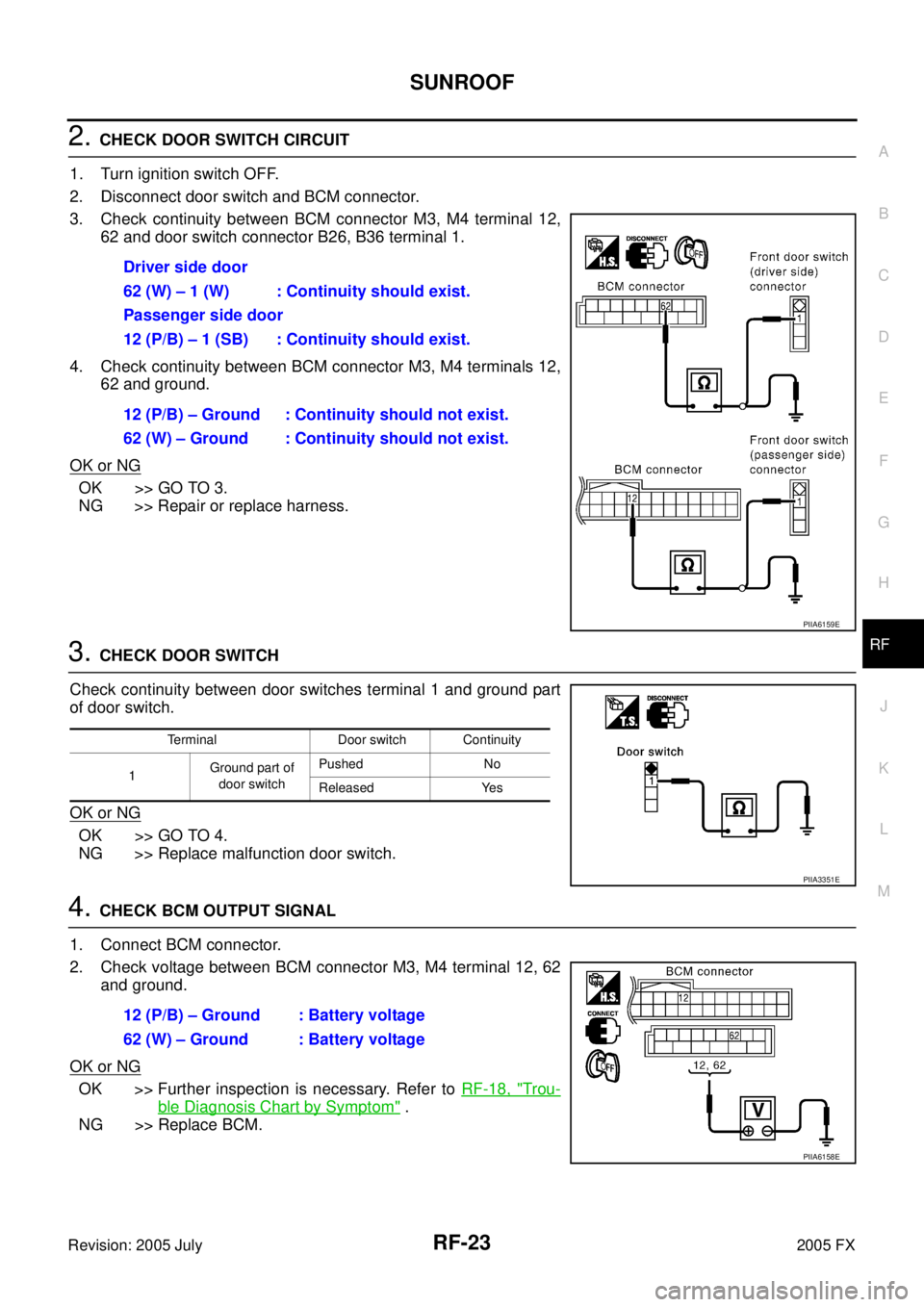
2. CHECK DOOR SWITCH CIRCUIT
1. Turn ignition switch OFF.
2. Disconnect door switch and BCM connector.
3. Check continuity between BCM connector M3, M4 terminal 12, 62 and door switch connector B26, B36 terminal 1.
4. Check continuity between BCM connector M3, M4 terminals 12, 62 and ground.
OK or NG
OK >> GO TO 3.
NG >> Repair or replace harness.
3. CHECK DOOR SWITCH
Check continuity between door switches terminal 1 and ground part
of door switch.
OK or NG
OK >> GO TO 4.
NG >> Replace malfunction door switch.
4. CHECK BCM OUTPUT SIGNAL
1. Connect BCM connector.
2. Check voltage between BCM connector M3, M4 terminal 12, 62 and ground.
OK or NG
OK >> Further inspection is necessary. Refer to RF-18, "Trou-
ble Diagnosis Chart by Symptom" .
NG >> Replace BCM. Driver side door
62 (W) – 1 (W) : Continuity should exist.
Passenger side door
12 (P/B) – 1 (SB) : Continuity should exist.
12 (P/B) – Ground : Continuity should not exist.
62 (W) – Ground : Continuity should not exist.
PIIA6159E
Terminal Door switch Continuity
1 Ground part of
door switch Pushed No
Released Yes
PIIA3351E
12 (P/B) – Ground : Battery voltage
62 (W) – Ground : Battery voltage
PIIA6158E
Page 4363 of 4731
RF-24
SUNROOF
Revision: 2005 July 2005 FX
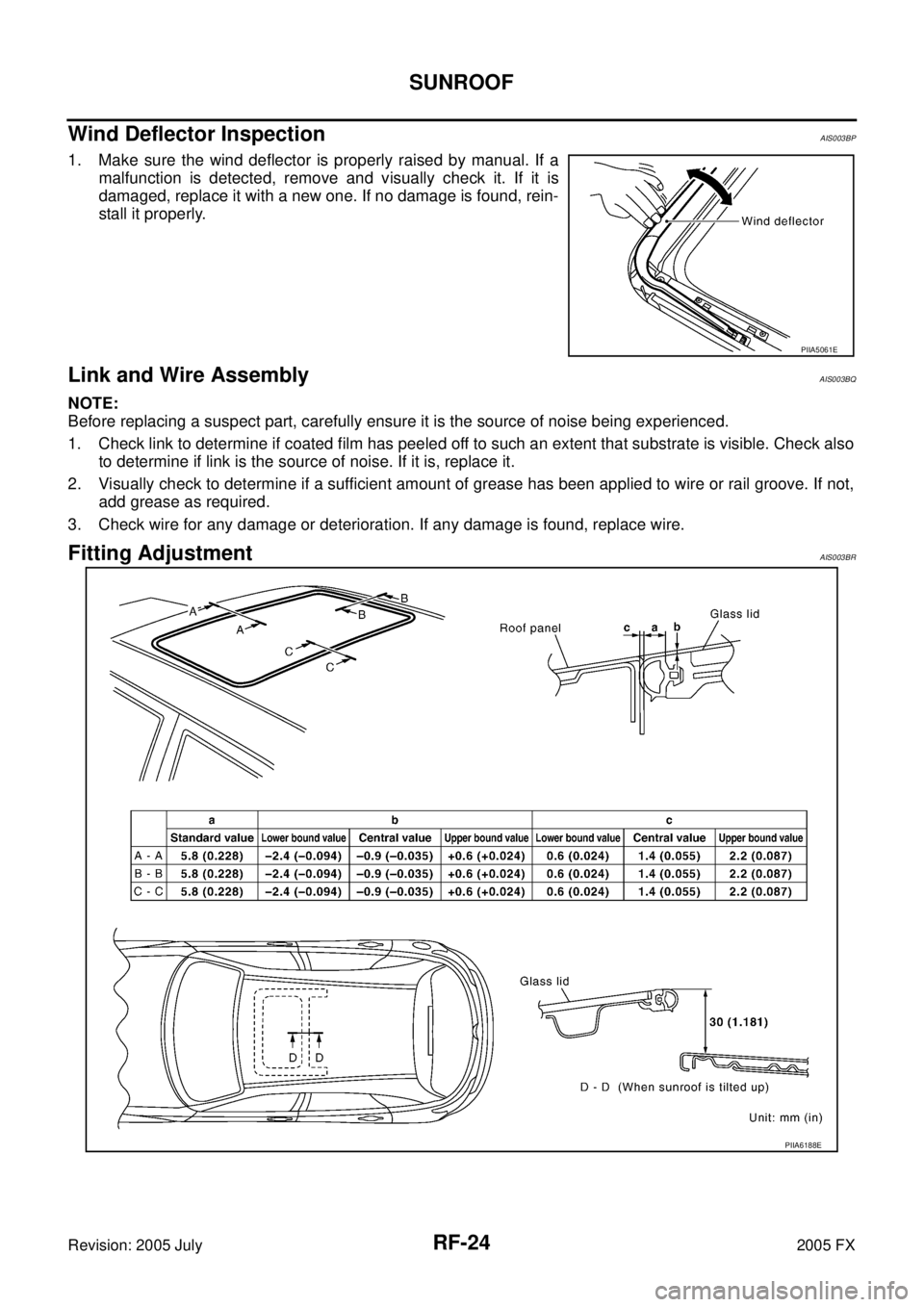
Wind Deflector InspectionAIS003BP
1. Make sure the wind deflector is properly raised by manual. If a
malfunction is detected, remove and visually check it. If it is
damaged, replace it with a new one. If no damage is found, rein-
stall it properly.
Link and Wire AssemblyAIS003BQ
NOTE:
Before replacing a suspect part, carefully ensure it is the source of noise being experienced.
1. Check link to determine if coated film has peeled off to such an extent that substrate is visible. Check also to determine if link is the source of noise. If it is, replace it.
2. Visually check to determine if a sufficient amount of grease has been applied to wire or rail groove. If not, add grease as required.
3. Check wire for any damage or deterioration. If any damage is found, replace wire.
Fitting AdjustmentAIS003BR
PIIA5061E
PIIA6188E