2005 HUMMER H2 wheel
[x] Cancel search: wheelPage 174 of 468

Anti-Lock Brake System Warning
Light
With the anti-lock brake
system, this light will come
on when you start your
engine and may stay on for
several seconds.
That’s normal. If the light doesn’t come on then, have it
xed so it will be ready to warn you if there is a
problem.
If the light stays on, or comes on when you’re driving,
your vehicle needs service. You will also hear a
chime sound when the light is on steady. If the regular
brake system warning light isn’t on, you still have
brakes, but you don’t have anti-lock brakes. If the
regular brake system warning light is also on you don’t
have anti-lock brakes and there’s a problem with
your regular brakes. In addition to both lights, you will
also hear a chime sound on the rst occurrence of
a problem and each time the vehicle is shut off and then
restarted. SeeBrake System Warning Light on
page 3-32.
Traction Off Light
The traction off light will
come on when a traction
control system or anti-lock
brake system problem
has been detected.
The vehicle may need
service.
When this light is on, the system will not limit wheel
spin. Adjust your driving accordingly. SeeTraction
Control System (TCS) on page 4-9.
If the Traction Control System (TCS) detects that the
vehicle’s brake’s are overheating, the TCS will shut off
and the traction off light will come on. When the
brakes cool off, the TCS will turn back on automatically
and the traction off light will go out.
3-34
Page 183 of 468

Here are some situations you may experience with your
fuel gage. None of these indicate a problem with the
fuel gage.
At the gas station, the fuel pump shuts off before
the gage reads full.
It takes a little more or less fuel to ll up than the
fuel gage indicated. For example, the gage may
have indicated the tank was half full, but it actually
took a little more or less than half the tank’s
capacity to ll the tank.
The gage goes back to empty when you turn off the
ignition.
Low Fuel Warning Light
The light next to the fuel gage will come on briey when
you are starting the engine.
This light comes on when the fuel tank is low on fuel.
To turn it off, add fuel to the fuel tank. SeeFuel on
page 5-5.
Driver Information Center (DIC)
The Driver Information Center (DIC) display is located
on the instrument panel cluster, below the speedometer.
The DIC buttons are located on the steering wheel.
The DIC can display information such as the trip
odometer, fuel economy, personalization features and
warning/status messages.
A
3(Trip Information):Press this button to display
the odometer, trip odometers, tire pressure (for
vehicles equipped with a tire pressure monitor), timer
and engine hours.
B
t(Fuel Information):Press this button to display
the current range, fuel used, average fuel economy and
engine oil life.
3-43
Page 184 of 468

C4(Personalization):Press this button to access the
vehicle settings menu and customize the personal
settings on your vehicle.
D
r(Select):Press this button to reset certain DIC
functions and set your personalization settings.
Pressing any of the four DIC buttons or the trip odometer
reset stem will acknowledge DIC messages and clear
them from the DIC display.
DIC Operation and Displays
The Driver Information Center (DIC) comes on when the
ignition is on. After a short delay, the DIC will display
the information that was last displayed before the engine
was turned off.
If a problem is detected, a warning message will appear
on the display. Pressing any of the four DIC buttons
or the trip odometer reset stem will acknowledge or clear
most current warnings or service messages. Some
warnings that cannot be acknowledged or cleared are:
ENGINE OVERHEATED, OIL PRESSURE LOW,
REDUCED ENGINE POWER, TRANS HOT IDLE
ENGINE. These warnings must be dealt with
immediately and therefore cannot be cleared until the
problem has been corrected.You should take any message that appears on the
display seriously and remember that clearing the
message will only make the message disappear, not
correct the problem.
The DIC has different modes which can be accessed by
pressing the four DIC buttons located on the steering
wheel. These buttons are trip information, fuel
information, personalization and select. The button
functions are detailed in the following pages.
Trip Information Button
Press the trip information button to scroll through the
ODOMETER, TRIP A, TRIP B, TIRE PRESSURES,
TIMER and ENGINE HOURS.
Odometer:Press the trip information button until
ODOMETER appears on the display. This mode shows
the total distance the vehicle has been driven in
either miles or kilometers. Pressing the reset stem
located on the instrument cluster with the vehicle off will
also display the odometer.
Trip A:Press the trip information button until TRIP A
appears on the display. This mode shows the current
distance traveled since the last reset for TRIP A in either
miles or kilometers.
3-44
Page 187 of 468

Personalization Button
Press the personalization button to access the VEHICLE
SETTINGS menu and customize the personalization
settings to your vehicle. SeeDIC Vehicle Personalization
on page 3-54for more information.
Select Button
Press the select button to reset certain DIC functions
and set your personalization settings. For example, this
button will reset the trip odometers and scroll through
the languages you can select the DIC to display
information in.
DIC Warnings and Messages
Warning messages are displayed on the Driver
Information Center (DIC) to notify the driver that the
status of the vehicle has changed and that some action
may be needed by the driver to correct the condition.
If there is more than one message that needs to
be displayed they will appear one after another. Some
messages may not require immediate action, but
you should press any of the four DIC buttons located on
the steering wheel or the trip odometer reset stem
located on the instrument panel cluster to acknowledge
that you received the messages and clear them from
the display. Some messages cannot be cleared from the
display because they are more urgent. These messagesrequire action before they can be removed from the DIC
display. You should take any messages that appear
on the display seriously and remember that clearing the
messages will only make the messages disappear,
not correct the problem. The following are the possible
messages that can be displayed and some information
about them.
BATTERY NOT CHARGING
If the battery is not charging during operation, this
message will appear on the DIC. Driving with this
problem could drain your battery. Have the electrical
system checked as soon as possible. Pressing any of
the four DIC buttons or the trip odometer reset stem will
clear the message from the DIC display.
CHANGE ENGINE OIL
This message is displayed when the engine oil needs to
be changed. See “Engine Oil Life System” underDIC
Operation and Displays on page 3-44andEngine
Oil Life System on page 5-16for information on how to
reset the message. This message will clear itself
after 10 seconds until the next ignition cycle.
3-47
Page 191 of 468

RIGHT REAR DOOR AJAR
If the passenger’s side rear door is not fully closed and
the vehicle is in a drive gear, this message will
appear on the display and you will hear a chime. Stop
and turn off the vehicle, check the door for obstacles,
and close the door again. Check to see if the message
still appears on the DIC. Pressing any of the four
DIC buttons or the trip odometer reset stem will clear
the message from the DIC display.
SERVICE 4WD
If a problem occurs with the all-wheel drive system, this
message will appear on the DIC. If this message
appears, stop as soon as possible and turn off the
vehicle. Restart the vehicle and check for the message
on the DIC display. If the message is still displayed,
or appears again when you begin driving, there is
a problem with the four wheel drive system. See your
GM dealer for service. Pressing any of the four DIC
buttons or the trip odometer reset stem will clear
the message from the DIC display.
SERVICE AIR BAG
If there is a problem with the air bag system, this
message will be displayed on the DIC. Have your
GM dealer inspect the system for problems. Pressing
any of the four DIC buttons or the trip odometer
reset stem will clear the message from the DIC display.
SERVICE AIR SUSPENSION
If a problem occurs with the suspension system, this
message will appear on the DIC. If this message
appears, stop as soon as possible and turn off the
vehicle. Restart the vehicle and check for the message
on the DIC display. If the message is still displayed,
or appears again when you begin driving, there is
a problem with the air suspension system. See your
GM dealer for service.
SERVICE BRAKE SYSTEM
If a problem occurs with the brake system, this message
will appear on the DIC. If this message appears, stop
as soon as possible and turn off the vehicle. Restart the
vehicle and check for the message on the DIC display.
If the message is still displayed, or appears again when
you begin driving, there is a problem with the brake
system. See your GM dealer for service. Pressing any
of the four DIC buttons or the trip odometer reset
stem will clear the message from the DIC display.
3-51
Page 192 of 468

SERVICE CHARGING SYSTEM
On some vehicles, if there is a problem with the battery
charging system, this message will appear on the
DIC. The battery will not be charging at an optimal rate
and the vehicle will lose the ability to enter the fuel
economy mode. The vehicle is safe to drive, however
you should have the electrical system checked by
your GM dealer. Pressing any of the four DIC buttons or
the trip odometer reset stem will clear the message
from the DIC display.
TIGHTEN FUEL CAP
If the vehicle’s fuel cap is not tightened properly, this
message may appear along with the check engine light
on the instrument panel cluster. SeeMalfunction Indicator
Lamp on page 3-37. Reinstall the fuel cap, making sure
to fully install the cap. SeeFilling Your Tank on page 5-7.
The diagnostic system can determine if the fuel cap has
been left off or improperly installed. A loose or missing
fuel cap will allow fuel to evaporate into the atmosphere.
A few driving trips with the cap properly installed should
turn the light and message off.
TRACTION ACTIVE
When the traction control system has detected that any
of the vehicle’s wheels are slipping, the traction
control system will activate and this message will appear
on the DIC. SeeTraction Control System (TCS) on
page 4-9for more information.
TRANS HOT IDLE ENGINE
If the transmission uid gets hot, this message will
appear on the DIC along with a continuous chime.
Driving with the transmission uid temperature high can
cause damage to the vehicle. Stop the vehicle and
let it idle to allow the transmission to cool. This message
will clear and the chime will stop when the uid
temperature reaches a safe level.
3-52
Page 229 of 468
When a CD is playing, press this button to go to the
beginning of the CD. This function is inactive if the front
seat passengers are listening to a CD.
When a CD is playing in the six-disc CD changer, press
this button to select the next CD, if multiple CDs are
loaded. This function is inactive if the front seat
passengers are listening to a CD.
Theft-Deterrent Feature
THEFTLOCK®is designed to discourage theft of your
vehicle’s radio. The feature works automatically by
learning a portion of the Vehicle Identication Number
(VIN). If the radio is moved to a different vehicle, it
will not operate and LOCKED will appear on the display.
When the radio and vehicle are turned off, the blinking
red light indicates that THEFTLOCK
®is armed.
With THEFTLOCK
®activated, the radio will not operate
if stolen.
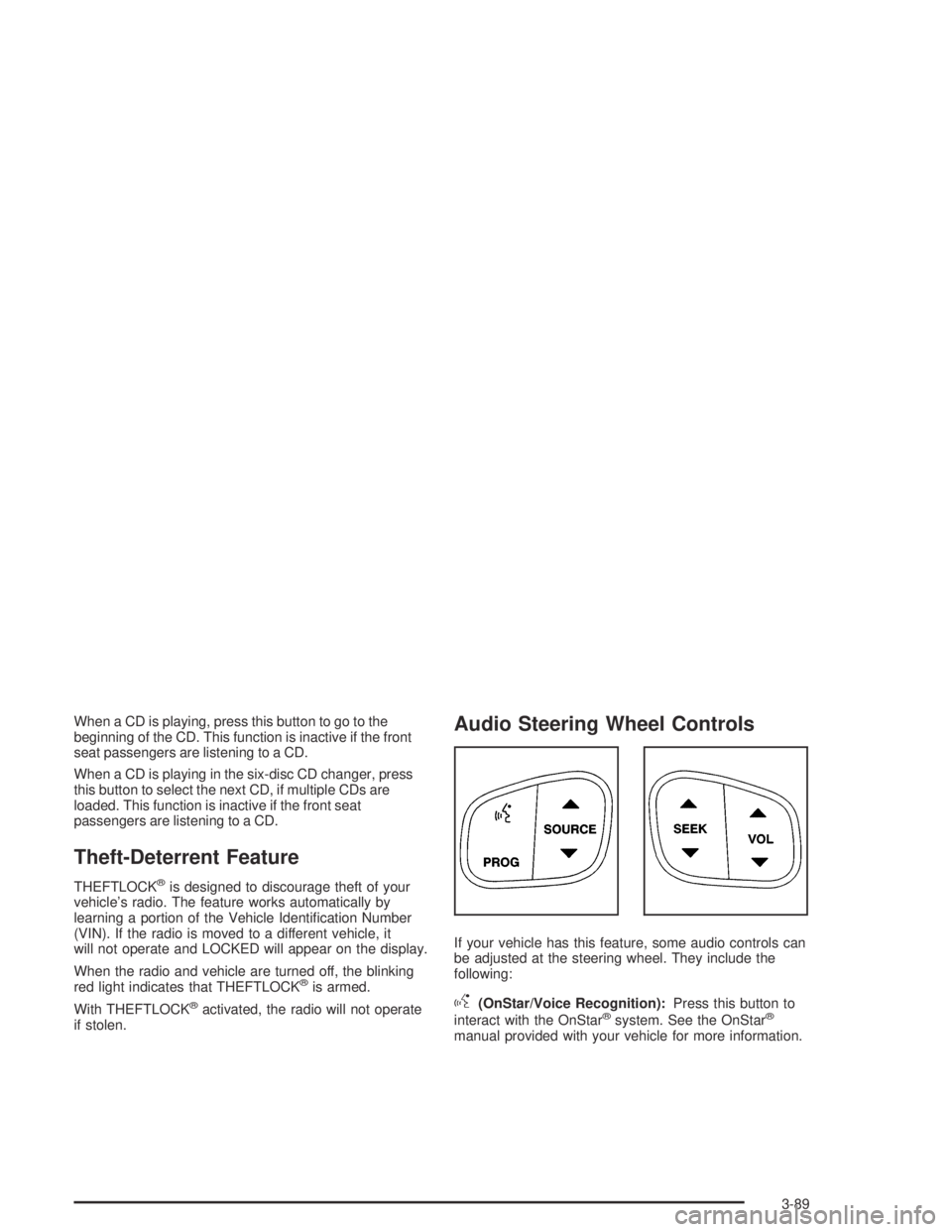
Audio Steering Wheel Controls
If your vehicle has this feature, some audio controls can
be adjusted at the steering wheel. They include the
following:
g(OnStar/Voice Recognition):Press this button to
interact with the OnStar®system. See the OnStar®
manual provided with your vehicle for more information.
3-89
Page 239 of 468

Anti-Lock Brake System (ABS)
Your vehicle has anti-lock brakes. ABS is an advanced
electronic braking system that will help prevent a
braking skid.
When you start your engine and begin to drive away,
your anti-lock brake system will check itself. You
may hear a momentary motor or clicking noise while
this test is going on. This is normal.
If there is a problem with
the anti-lock brake system,
this warning light will
stay on. SeeAnti-Lock
Brake System Warning
Light on page 3-34.
Let us say the road is wet and you are driving safely.
Suddenly, an animal jumps out in front of you. You slam
on the brakes and continue braking. Here is what
happens with ABS:
A computer senses that wheels are slowing down. If
one of the wheels is about to stop rolling, the computer
will separately work the brakes at each front wheel
and at both rear wheels.
4-7