Page 7 of 273
Your Vehicle at a Glance
Your Vehicle at a Glance
5
HEADLIGHTS/TURN SIGNALS
LIGHT CONTROL
SWITCH
REMOTE AUDIO
CONTROLS STEERING WHEEL
ADJUSTMENT CRUISE CONTROL
WINDSHIELD WIPERS/
WASHERS REAR WINDOW
DEFOGGER VTM-4
LOCK
HORN
CRUISE
CONTROL
MASTER
SWITCH HAZARD WARNING
BUTTON
VSA OFF
SWITCH PASSENGER AIRBAG
OFF INDICATOR
(P.
71) (P.73)
(P.164 )
(P. 31)
(P. 73)
(P. 70)
(P.
138)
(P. 74)
(P. 122)
(P.
138)
(P.
172)
(P.
97)
(P.
92)
MOONROOF BUTTONS
Page 57 of 273

This section gives inf ormation about
the controls and displays that
contribute to the daily operation of
your vehicle. All the essential
controls are within easy reach............................
Control Locations .56
............................
Instrument Panel .57
.............................................
Gauges .66
...............
Odometer/Trip Meter . 66
..................................
Fuel Gauge .66
...................
Temperature Gauge . 67
....
Outside Temperature Gauge . 67
..........
Check Fuel Cap Indicator . 68
Controls Near the Steering ...........................................
Wheel .69
.
Windshield Wipers and Washers . 70
...........
Turn Signal and Headlights . 71
................
Daytime Running Lights . 72
........
Instrument Panel Brightness . 72
.................
Hazard Warning Button . 73
.................
Rear Window Def ogger . 73
..........
Steering Wheel Adjustment . 74
...............................
Keys and Locks .75
........................
Immobilizer System .75
................................
Ignition Switch .77
......................................
Door Locks .78
......................
Power Door Locks .78
..............
Childproof Door Locks . 79
.......................
Remote Transmitter .79
..................................
Seats Heaters .82
.................................................
Seats .83 ......
Detachable Seat Belt Anchors . 88
.............................................
Mirrors .88
..............................
Power Windows .90
.........................................
Moonroof .92
.................................
Parking Brake .93
...........
Interior Convenience Items . 94
.......................
Beverage Holders .95
..........
Accessory Power Sockets . 95
...............
Console Compartment . 95
......................
Sunglasses Holder .96
....................................
Glove Box .96
......................................
Sun Visor .96
...............................................
Lights .97
Instruments and Controls
Inst rument s and Cont rols
55
Page 65 of 273
Canadian models onlyCanadian models only
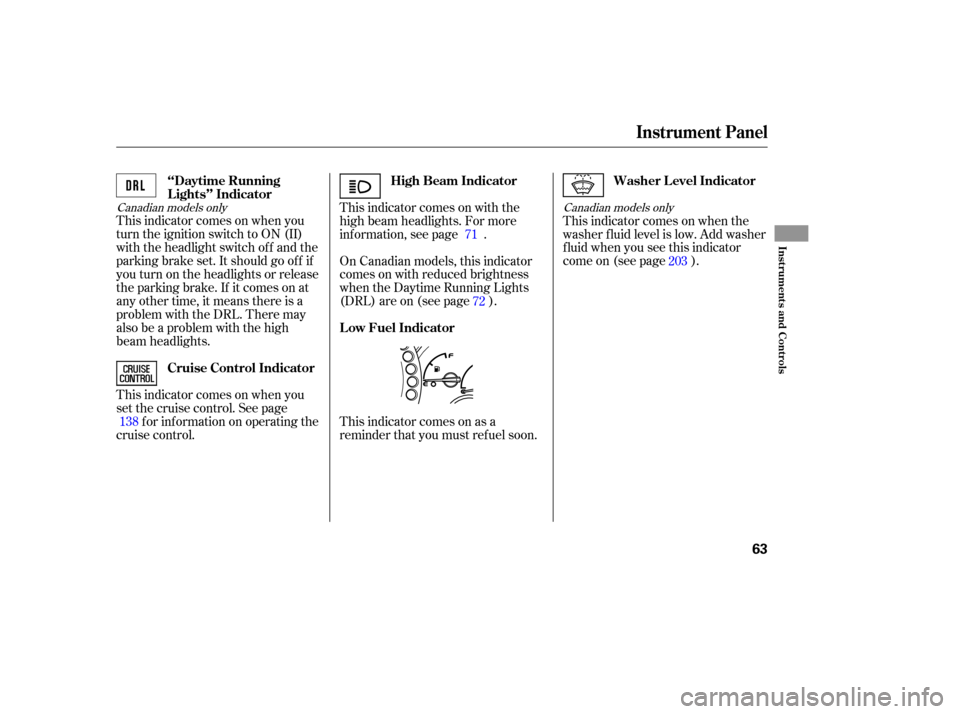
This indicator comes on when you
turn the ignition switch to ON (II)
with the headlight switch off and the
parking brake set. It should go of f if
youturnontheheadlightsorrelease
the parking brake. If it comes on at
any other time, it means there is a
problem with the DRL. There may
also be a problem with the high
beam headlights.
This indicator comes on when you
set the cruise control. See page
f or inf ormation on operating the
cruise control. This indicator comes on as a
reminder that you must ref uel soon.This indicator comes on when the
washer f luid level is low. Add washer
fluidwhenyouseethisindicator
come on (see page ).
This indicator comes on with the
high beam headlights. For more
inf ormation, see page .
On Canadian models, this indicator
comes on with reduced brightness
when the Daytime Running Lights
(DRL) are on (see page ).
138 71
72 203
High Beam Indicator
‘‘Daytime Running
Lights’’ Indicator
Cruise Control Indicator Washer Level Indicator
Low Fuel Indicator
Instrument Panel
Inst rument s and Cont rols
63
Page 71 of 273
�ÎTo use the horn, press the pad around the ‘‘H’’ logo.
Controls Near the Steering Wheel
Inst rument s and Cont rols
69
VTM-4LOCK
LIGHT CONTROL
SWITCH
CRUISE CONTROLHAZARD WARNING BUTTON
HEADLIGHTS/TURN SIGNALS
REAR WINDOW
DEFOGGER
CRUISE CONTROL
MASTER SWITCH
REMOTE AUDIO
CONTROLS WINDSHIELD WIPERS/
WASHERS
VSA OFF SWITCH
MOON ROOF
STEERING WHEEL
ADJUSTMENT HORN
PASSENGER AIRBAG
OFF INDICATOR
(P.92)
(P.97) (P.172)
(P.138)
(P.122) (P.74) (P.138) (P.70)(P.
73)
(P.
31)
(P.164)
(P.73)
(P.71)
Page 73 of 273
�µ
�µ
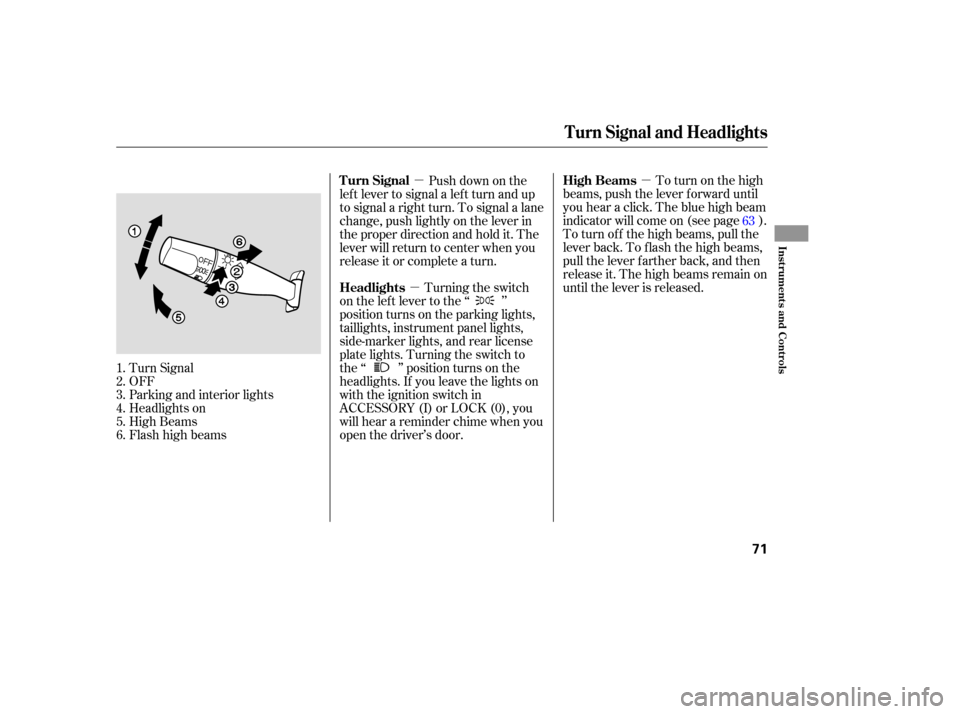
�µ To turn on the high
beams, push the lever f orward until
you hear a click. The blue high beam
indicator will come on (see page ).
To turn of f the high beams, pull the
lever back. To flash the high beams,
pull the lever f arther back, and then
release it. The high beams remain on
until the lever is released.
Turn Signal
OFF
Parking and interior lights
Headlights on
High Beams
Flashhighbeams Push down on the
lef t lever to signal a lef t turn and up
to signal a right turn. To signal a lane
change, push lightly on the lever in
the proper direction and hold it. The
lever will return to center when you
release it or complete a turn.
Turning the switch
on the lef t lever to the ‘‘ ’’
position turns on the parking lights,
taillights, instrument panel lights,
side-marker lights, and rear license
plate lights. Turning the switch to
the ‘‘ ’’ position turns on the
headlights. If you leave the lights on
with the ignition switch in
ACCESSORY (I) or LOCK (0), you
will hear a reminder chime when you
open the driver’s door.
1.
2.
3.
4.
5.
6. 63
Turn Signal and Headlights
High Beams
Turn Signal
Headlights
Inst rument s and Cont rols
71
Page 74 of 273

The knob on the instrument panel
controls the brightness of the instru-
ment panel lights. Turn the knob to
adjust the brightness.
The lights will turn on again when
you unlock or open the driver’s door.
With the headlight switch off, the
high beam headlights come on with
reduced brightness when you turn
the ignition switch to ON (II) and
release the parking brake. They
remain on until you turn the ignition
switch of f , even if you set the
parking brake.
The headlights revert to normal
operation when you turn the switch
to the ‘‘ ’’ position. If you unlock the door, but do not
open it within 15 seconds, the lights
will go off. With the driver’s door
open, you will hear a lights-on
reminder chime.
This f eature turns of f the headlights,
parking lights, taillights, side marker
lights, license plate lights, and
instrument panel lights within 15
seconds of removing the key f rom
the ignition switch and closing the
driver’s door.
This feature activates if you leave
the headlight switch in the ‘‘ ’’
or ‘‘ ’’ position, remove the key,
then open and close the driver’s door.
If you remove the key f rom the
ignition switch with the headlight
switch on, but do not open the door
and get out, the lights will turn of f
af ter 10 minutes.
On EX and EX-L model
Instrument Panel Brightness
Daytime Running L ights
(Canadian Models)
Automatic Lighting Of f Feature
Headlights, Instrument Panel Brightness
72
INSTRUMENT PANEL BRIGHTNESS
CONTROL KNOB
Page 90 of 273
To unlatch the detachable anchor,
insert a key into the slot on the side
of the small buckle. Line up the
triangle marks on the plate and
buckle when reattaching the belt and
buckle.The inside mirror has day and night
positions. The night position reduces
glare f rom headlights behind you.
Flip the tab on the bottom edge of
the mirror to select the day or night
position. Keeptheinsideandoutsidemirrors
clean and adjusted f or best visibility.
Be sure to adjust the mirrors bef ore
you start driving.
Seats, Mirrors
Detachable Seat Belt AnchorsMirrors
88
SMALL LATCH PLATE
TAB
TRIANGULAR MARKUsing a seat belt with the
detachable anchor unlatched
increases the chance of serious
injury or death in a crash.
Before using the seat belt,
make sure the detachable
anchor is correctly latched.
Page 139 of 273

The security system helps to protect
your vehicle and valuables f rom thef t.
The horn sounds and a combination
of headlights, parking lights, side
marker lights, and taillights f lash if
someone attempts to break into your
vehicle. This alarm continues for two
minutes, then the system resets. To
reset an alarm system bef ore the two
minutes have elapsed, unlock the
driver’s f ront door with the key or
the remote transmitter.Once the security system is set,
opening any door without using the
key or the remote transmitter, or the
hood, will cause it to alarm. It also
alarms if the radio is removed from
the dashboard or the wiring is cut.The security system will not set if
the hood, the tailgate, or any door is
not f ully closed. If the system will not
set, check the Door and Tailgate
Open Monitor on the instrument
panel (see page ) to see if the
doors and the tailgate are f ully
closed. Since it is not part of the
monitor display, manually check the
hood.
Do not attempt to alter this system
or add other devices to it.
The security system automatically
sets 15 seconds after you lock the
doors, hood, and the tailgate. For the
system to activate, you must lock the
doors f rom the outside with the key,
lock tab, door lock switch, or remote
transmitter. The security system
indicator next to the driver’s door
lock starts blinking immediately to
show you the system is setting itself . 62
On EX and EX-L models
Security System
Features
137
SECURITY SYSTEM INDICATOR


