Page 70 of 274

�µTurntheknobontheleftsideof the
instrument panel to adjust the
brightness of the instrument panel
lights. Push the button below the center
vents to turn on the hazard warning
lights (f our-way f lashers). This
causes all f our outside turn signals
and both turn indicators in the
instrument panel to f lash. Use the
hazard warning lights if you need to
park in a dangerous area near heavy
traffic, or if your vehicle is disabled.
To f lash the high beams, pull the
lever back lightly, then release it.
The high beams will stay on as long
as you hold the lever back.
The headlights revert to normal
operation when you turn the switch
to the ‘‘ ’’ position. With the headlight switch off, the
high beam headlights and the high
beam indicator come on with
reduced brightness when you turn
the ignition switch to the ON (II)
position and release the parking
brake. They remain on until you turn
the ignition switch of f , even if you
set the parking brake. To turn on high
beams, push the lever f orward until
you hear a click. The blue high beam
indicator will come on (see page ).
Pull the lever back to return to the
low beams. 59
Canadian models only
Hazard Warning Button
Instrument Panel Brightness
Daytime Running L ights High Beams
Headlights, Instrument Panel Brightness, Hazard Warning Button
Inst rument s and Cont rols
67
INSTRUMENT PANEL BRIGHTNESS
CONTROL KNOB
Page 72 of 274

To release the parking brake, push
andholdthereleasebuttononthe
side of the parking brake lever, pull
the lever toward you slightly, then
push the lever f orward.
The parking brake indicator on the
instrument panel should go out when
the parking brake is fully released
with the engine running (see page). Push the lever under the steering
column all the way down.
Move the steering wheel so it
points toward your chest, not
toward your f ace. Make sure you
can see the instrument panel
gauges and indicators.
Make any steering wheel adjustment
bef ore you start driving.
1.
2.
56
CONT INUED
Parking Brake, Steering Wheel A djustment
Steering Wheel A djustment
Inst rument s and Cont rols
69
RELEASE BUTTON
Adjusting the steering wheel
position while driving may
cause you to lose control of the
vehicle and be seriously injured
inacrash.
Adjust the steering wheel only
when the vehicle is stopped.
Driving the vehicle with the parking
brake applied can damage the rear
brakes and axles.
Page 75 of 274

�µ
�µ
�µ
�µ
The ignition switch has f our
positions: LOCK (0), ACCESSORY
(I), ON (II), and START (III).
You can insert or
remove the key only in this position.
To turn the key, push it in slightly. If
your vehicle has an automatic
transmission, the shif t lever must
also be in park.
If the f ront wheels are turned, the
anti-thef t lock may make it dif f icult
to turn the key. Firmly turn the
steering wheel to the lef t or right as
you turn the key.
This is the normal key
position when driving. Several of the
indicators on the instrument panel
come on as a test when you turn the
ignition switch f rom the
ACCESSORY (I) to the ON (II)
position.
You can
operate the audio system and the
accessory power socket in this
position.
Use this position
only to start the engine. The switch
returns to the ON (II) position when
you let go of the key.
You will hear a reminder beeper if
you leave the key in the LOCK (0) or
the ACCESSORY (I) position and
open the driver’s door. Remove the
key to turn of f the beeper.
If your vehicle has an automatic
transmission, the shif t lever must be
in Park bef ore you can remove the
key f rom the ignition switch.
LOCK (0)
ON (II)
A CCESSORY (I)
ST A RT (III)
Ignition Switch
72
Removing the key from the
ignition switch while driving
locks the steering. This can
cause you to lose control.
Remove the key from the
ignition switch only when
parked.
Page 111 of 274
�µ�µ
�µ
�µ You can use the instrument panel
brightness control knob to adjust the
illumination of the audio system (see
page ). The audio system
illuminates when the parking lights
are on, even if the radio is of f .
Adjust the balance or side-
to-side strength of the sound.
Adjust the fader or the
f ront-to-back strength of the sound.
Adjustthetrebleinthe
sound.
Adjust the bass in the sound. Press the knob to pop it
out. Turn it to adjust the Bass level.
Pull it out slightly f arther to adjust
the Fade, or front-to-back strength.
Pushtheknobbackinwhenyouare
done adjusting the sound.
Press the knob to pop it
out. Turn it to adjust the Treble level.
Pull it out slightly f arther to adjust
the balance, or side-to-side strength.
Pushtheknobbackinwhenyouare
done adjusting the sound. For inf ormation, see page .67
132
A udio System L ighting
Adjusting the Sound
BAL
FAD
TRE
BAS BAS/FAD:
TRE/BAL:
Radio Frequencies and Reception
Playing the Radio
108
Page 122 of 274
�µ�µ
�µ
�µ You can use the instrument panel
brightness control knob to adjust the
illumination of the audio system (see
page ). The audio system
illuminates when the parking lights
are on, even if the radio is of f .
Adjust the balance or side-
to-side strength of the sound.
Adjust the fader or the
f ront-to-back strength of the sound.
Adjustthetrebleinthe
sound.
Adjust the bass in the sound. Press the SOUND knob repeatedly
to display the Bass (BAS), Treble
(TRE), Fader (FAD), and Balance
(BAL) settings.
Eachmodeisshowninthedisplayas
it changes. Turn the SOUND knob
to adjust the setting to your liking.
When the level reaches the center,
you will see a ‘‘C’’ in the display. The
system will return to the audio
display about 5 seconds af ter you
stop adjusting a mode.
For inf ormation, see page .67
132
Playing the Radio
A udio System L ighting
Adjusting the Sound
BAL
FAD
TRE
BAS Radio Frequencies and Reception
Features
119
Page 141 of 274
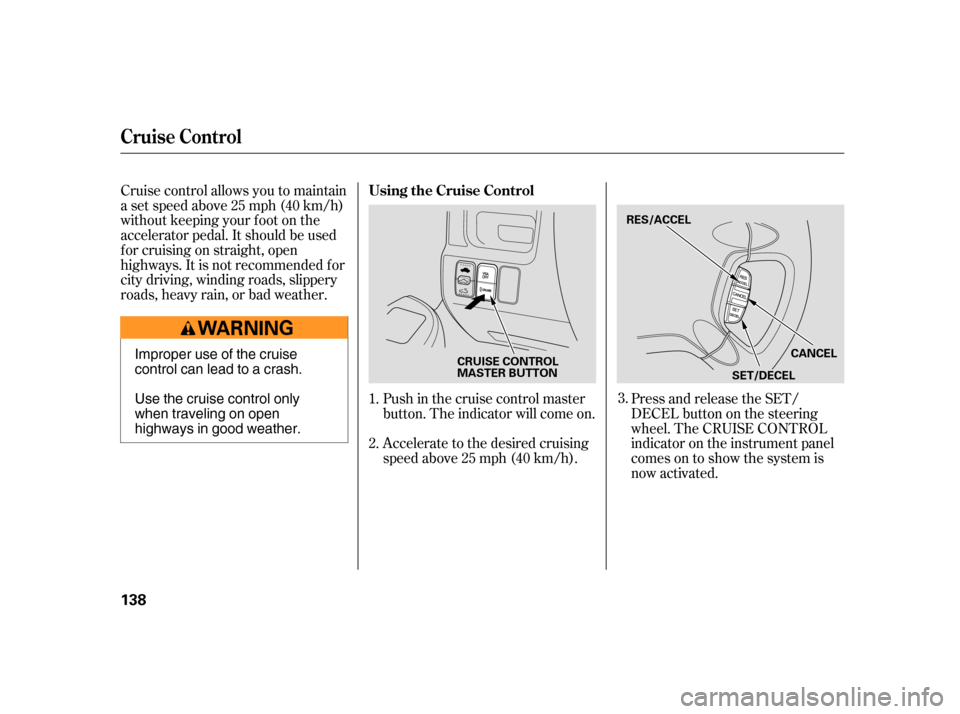
Cruise control allows you to maintain
asetspeedabove25mph(40km/h)
without keeping your f oot on the
accelerator pedal. It should be used
f or cruising on straight, open
highways. It is not recommended f or
city driving, winding roads, slippery
roads, heavy rain, or bad weather.
Accelerate to the desired cruising
speedabove25mph(40km/h).
Press and release the SET/
DECELbuttononthesteering
wheel. The CRUISE CONTROL
indicator on the instrument panel
comes on to show the system is
now activated.
Push in the cruise control master
button. The indicator will come on.
1.
2.
3.
Using the Cruise Control
Cruise Control
138
RES/ACCEL
SET/DECEL
CRUISE CONTROL MASTER BUTTON
CANCELImproper use of the cruise
control can lead to a crash.
Use the cruise control only
when traveling on open
highways in good weather.
Page 142 of 274

You can increase the set cruising
speed in any of these ways:
You can decrease the set cruising
speed in any of these ways:
When climbing a steep hill, the
automatic transmission may
downshif t to hold the set speed.
Press and hold the RES/ACCEL
button. When you reach the
desired cruising speed, release the
button.
Push on the accelerator pedal until
you reach the desired cruising
speed, then press the SET/
DECEL button.
To increase the speed in very
small amounts, tap the RES/
ACCEL button. Each time you do
this, your vehicle will speed up
about 1 mph (1.6 km/h).
Cruise control may not hold the set
speed when you are going up and
down hills. If your speed increases
going down a hill, use the brakes to
slow down. This will cancel the
cruise control. To resume the set
speed, press the RES/ACCEL button.
The CRUISE CONTROL indicator
on the instrument panel will come
back on.
Tap the brake or clutch pedal
lightly with your f oot. The
CRUISE CONTROL indicator on
the instrument panel goes out.
When the vehicle slows to the
desired speed, press the SET/
DECEL button.
To slow down in very small
amounts, tap the SET/DECEL
button. Each time you do this,
your vehicle will slow down about
1 mph (1.6 km/h).
Press and hold the SET/DECEL
button. Release the button when
you reach the desired speed.
If you need to decrease your
speed quickly, use the brakes as you
normally would.
CONT INUED
Changing the Set Speed
Cruise Control
Features
139
NOTE:
Page 145 of 274

Help assure your vehicle’s f uture
reliability and perf ormance by paying
extra attention to how you drive
during the f irst 600 miles (1,000 km).
Avoid full-throttle starts and rapid
acceleration.
Do not change the oil until the
scheduled maintenance time.
Avoidhardbrakingforthefirst
200 miles (300 km).
During this period:
You should also f ollow these
recommendations with an
overhauled or exchanged engine, or
when the brakes are replaced.
Do not tow a trailer.
Your vehicle is designed to operate
on unleaded gasoline with a pump
octane number of 87 or higher. Use
of a lower octane gasoline can cause
a persistent, heavy metallic rapping
noise that can lead to engine damage.
We recommend using gasoline
containing detergent additives that
help prevent f uel system and engine
deposits.
In addition, in order to maintain good
perf ormance, f uel economy, and
emissions control, we strongly
recommend, in areas where it is
available, the use of gasoline that
does NOT contain manganese-based
f uel additives such as MMT.
Use of gasoline with these additives
may adversely af f ect perf ormance,
and cause the malfunction indicator
lamp on your instrument panel to
come on. If this happens, contact
your authorized dealer f or service.
Some gasoline today is blended with
oxygenates such as ethanol or
MTBE. Your vehicle is designed to
operate on oxygenated gasoline
containing up to 10 percent ethanol
by volume and up to 15 percent
MTBE by volume. Do not use
gasoline containing methanol.
If you notice any undesirable
operating symptoms, try another
service station or switch to another
brand of gasoline.
For f urther important f uel-related
inf ormation, please ref er to your
.
Break-in Period Fuel Recommendation
Quick Start Guide
Break-in Period, Fuel Recommendation
142