Page 58 of 274
�Î
�Î
�ÎThe U.S. instrument panel is shown. Dif f erences f or the Canadian models are noted in the text.
Instrument Panel
Inst rument s and Cont rols
55
LOW OIL PRESSURE INDICATOR
IMMOBILIZER
SYSTEM
INDICATOR
MALFUNCTION
INDICATOR
LAMP
CHARGING
SYSTEM
IND ICATOR
HIGH BEAM
INDICATORDOOR-OPEN
INDICATOR
PARKING BRAKE AND BRAKE
SYSTEM INDICATOR LOW FUEL
INDICATOR
CRUISE CONTROL
INDICATOR
TAILGATE AND HATCH GLASS OPEN INDICATOR
SUPPLEMENTAL RESTRAINT SYSTEM INDICATOR
(P.57)
(P.59)(P.
58)
(P.57)
(P.59)
(P.57)
(P.57)
(P.56)
ANTI-LOCK BRAKE SYSTEM INDICATOR
(P.59)(P.
59)
SIDE AIRBAG OFF
INDICATOR
SEAT BELT
REMINDER
IND ICATOR
MAINTENANCE
REQUIRED
INDICATOR
(P.60) VSA ACTIVATION
INDICATOR
(P. 58)
VEHICLE STABILITY
ASSIST (VSA)
SYSTEM INDICATOR
(P.58)
(P.56,
233)
(P.234)
(P.56, 233)
(P.56,235)
Page 59 of 274
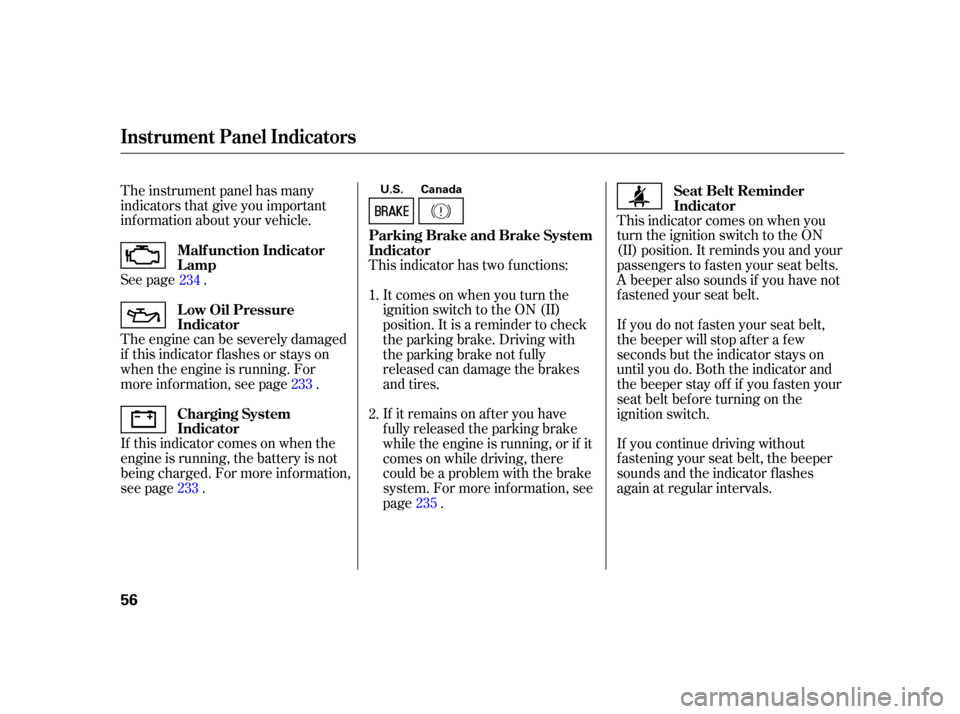
The instrument panel has many
indicators that give you important
inf ormation about your vehicle.
See page .
If this indicator comes on when the
engine is running, the battery is not
being charged. For more inf ormation,
see page . The engine can be severely damaged
if this indicator f lashes or stays on
when the engine is running. For
more inf ormation, see page .This indicator has two f unctions:
This indicator comes on when you
turn the ignition switch to the ON
(II) position. It reminds you and your
passengers to f asten your seat belts.
A beeper also sounds if you have not
f astened your seat belt.
If you continue driving without
f astening your seat belt, the beeper
sounds and the indicator f lashes
again at regular intervals.
If it remains on af ter you have
fully released the parking brake
while the engine is running, or if it
comes on while driving, there
could be a problem with the brake
system. For more inf ormation, see
page . Itcomesonwhenyouturnthe
ignition switch to the ON (II)
position. It is a reminder to check
the parking brake. Driving with
the parking brake not f ully
released can damage the brakes
and tires.
If you do not f asten your seat belt,
the beeper will stop af ter a f ew
seconds but the indicator stays on
until you do. Both the indicator and
the beeper stay of f if you f asten your
seat belt bef ore turning on the
ignition switch.
2. 1.
234
233
233 235
Malf unction Indicator
Lamp
L ow Oil Pressure
Indicator
Charging System
Indicator
Seat Belt Reminder
Indicator
Parking Brake and Brake System
Indicator
Instrument Panel Indicators
56
U.S. Canada
Page 60 of 274

This indicator also blinks several
times when you turn the ignition
switch f rom the ON (II) position to
the ACCESSORY (I) or the LOCK
(0) position.
This indicator comes on brief ly when
you turn the ignition switch to the
ON (II) position. If it comes on at
any other time, it indicates a
potential problem with your f ront
airbags. This indicator will also alert
you to a potential problem with your
side airbags, passenger’s side airbag
automatic cutoff system, side curtain
airbags, automatic seat belt
tensioners, driver’s seat position
sensor, or the f ront passenger’s
weight sensors. For more
inf ormation, see page . This indicator comes on f or a f ew
seconds when you turn the ignition
switch to the ON (II) position. It will
then go of f if you have inserted a
properly-coded ignition key. If it is
not a properly-coded key, the
indicator will blink, and the engine
will not start (see page ).
This indicator comes on when you
turn the ignition switch to the ON
(II) position. If it comes on at any
other time, it indicates that the
passenger’s side airbag has automatically shut off. For more
inf ormation, see page .
This indicator normally comes on f or
a f ew seconds when you turn the
ignition switch to the ON (II)
position, and when the ignition
switch is turned to the START (III)
position. If it comes on at any other
time, there is a problem with the
ABS. If this happens, have your
vehicle checked at a dealer. With
this indicator on, your vehicle still
has normal braking ability but no
anti-lock f unction. For more
inf ormation, see page .
29 29
71
168
Supplemental Restraint
System Indicator
Immobilizer System
Indicator
Side Airbag Of f Indicator Anti-lock Brake System
(A BS) Indicator
Instrument Panel Indicators
Inst rument s and Cont rols
57
Canada
U.S.
Page 61 of 274

This indicator normally comes on f or
a f ew seconds when you turn the
ignition switch to the ON (II)
position.This indicator has three f unctions.
Itcomesonasareminderthatyou
have turned off the vehicle
stability assist (VSA) system.
It flashes when VSA is active (see
page ).
It comes on along with the VSA
system indicator if there is a
problem with the VSA system.
This indicator normally comes on f or
a f ew seconds when you turn the
ignition switch to the ON (II)
position. See page f or more
inf ormation on the VSA system. This indicator comes on when you
set the cruise control. See page
f or inf ormation on operating the
cruise control.
If itcomesonandstaysonatany
other time, or if it does not come on
when you turn the ignition switch to
the ON (II) position, there is a
problem with the VSA system. Take
your vehicle to a dealer to have it
checked. Without VSA, your vehicle
still has normal driving ability, but
will not have VSA traction and
stability enhancement. See page f or more inf ormation on the
VSA system. 1.
2.
3.
170 170
170 138
Vehicle Stability Assist
(VSA ) System Indicator
VSA A ctivation Indicator
Cruise Control Indicator
Instrument Panel Indicators
58
Page 62 of 274
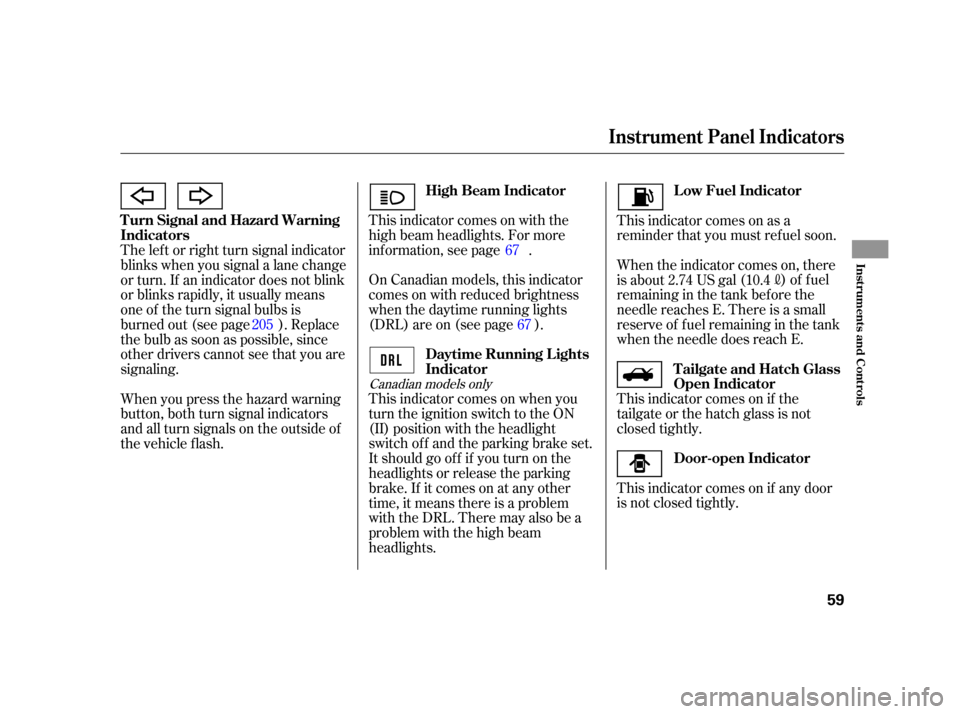
This indicator comes on with the
high beam headlights. For more
inf ormation, see page .
On Canadian models, this indicator
comes on with reduced brightness
when the daytime running lights
(DRL) are on (see page ).
This indicator comes on when you
turn the ignition switch to the ON
(II) position with the headlight
switch of f and the parking brake set.
It should go of f if you turn on the
headlights or release the parking
brake. If it comes on at any other
time, it means there is a problem
withtheDRL.Theremayalsobea
problem with the high beam
headlights.This indicator comes on as a
reminder that you must ref uel soon.
The lef t or right turn signal indicator
blinks when you signal a lane change
or turn. If an indicator does not blink
or blinks rapidly, it usually means
one of the turn signal bulbs is
burned out (see page ). Replace
the bulb as soon as possible, since
other drivers cannot see that you are
signaling.
When you press the hazard warning
button, both turn signal indicators
and all turn signals on the outside of
the vehicle f lash. When the indicator comes on, there
is about 2.74 US gal (10.4
)of fuel
remaining in the tank bef ore the
needle reaches E. There is a small
reserve of f uel remaining in the tank
when the needle does reach E.
This indicator comes on if the
tailgate or the hatch glass is not
closed tightly.
This indicator comes on if any door
is not closed tightly.
67
67
205
Canadian models only
Turn Signal and Hazard Warning
Indicators High Beam Indicator
L ow Fuel Indicator
Daytime Running L ights
Indicator Tailgate and Hatch Glass
Open Indicator
Door-open Indicator
Instrument Panel Indicators
Inst rument s and Cont rols
59
Page 63 of 274

If you exceed 10,000 miles (16,000
km) without having the scheduled
maintenance perf ormed, this
indicator will remain on as a constant
reminder.
Your dealer will reset this indicator
af ter completing the scheduled
maintenance. If this maintenance is
done by someone other than your
dealer, reset the indicator as f ollows.Turn of f the engine. Press and hold the Select/Reset
buttonontheinstrumentpanel,
then turn the ignition switch to the
ON (II) position.
Hold the button for about
10
seconds until the indicator goes
off.
This indicator comes on when the
washer f luid level is low. Add washer
fluidwhenyouseethisindicator
(see page ).
This indicator reminds you that it is
time to take your vehicle in for
scheduled maintenance.
Ref er to the maintenance schedule
f or normal and severe driving
conditions on pages and .
For the f irst 8,000 miles (12,800 km)
af ter the maintenance required
indicator is reset, it will come on f or
2 seconds when you turn the ignition
switch to the ON (II) position. Between 8,000 miles (12,800 km)
and 10,000 miles (16,000 km), this
indicator will come on f or 2 seconds
when you f irst turn the ignition
switch to the ON (II) position, and
then f lash f or 10 seconds.
1.
2.
3.
198
188
187
Canadian models only
Instrument Panel Indicators
Washer Level Indicator
Maintenance Required
Indicator
60
SELECT/RESET BUTTON
Page 67 of 274
�Î
�Î
�Î
�Î �Î
To use the horn, press the center pad of the steering wheel.
If equipped.
1:
2:
Controls Near the Steering Wheel
64
CRUISE CONTROL
MASTER BUTTON
(P.138)HEADLIGHTS/TURN SIGNALS
SHIFT LEVER (A/T)
WINDSHIELD WIPERS/
WASHERS
A/T model is shown. REAR WINDOW DEFOGGER
HAZARD WARNING BUTTON
(P.65) (P.
67)
(P.88)
(P.68)
(P.30)
(P.69)
(P.66)
PASSENGER AIRBAG OFF
INDICATOR
VEHICLE STABILITY
ASSIST (VSA)
SYSTEM ON/OFF
SWITCH INSTRUMENT PANEL
BRIGHTNESS
(P.67)
(P.171)
MOONROOF SWITCH
REMOTE AUDIO
CONTROLS
(P.135) (P.161)
PARKING BRAKE
(P.68)
STEERING WHEEL ADJUSTMENT
CRUISE CONTROL
BUTTONS
(P.138) HORN
2
2 1
Page 69 of 274

�µ
�µ
Push down on the
lef t lever to signal a lef t turn and up
to signal a right turn. To signal a lane
change, push lightly on the lever,
and hold it. The lever will return to
center when you release it or
complete a turn.
OFF
When you turn the wiper switch to
the ‘‘OFF’’ position or turn of f the
ignition switch, the wiper will
return to its parked position.
Rotate the switch
counterclockwise to turn the
window wiper on and the window
washer to spray.
The rear wiper will not work if the
hatch glass is not f ully closed.
If you open the hatch glass while the
rear wiper is operating, the wiper will
stop. To return the wiper to its
parked position, close the hatch
glass, and then rotate the switch to
the ‘‘OFF’’ position.
Therearwindowwasherusesthe
same f luid reservoir as the wind-
shield washer.
Turn signal
Of f
Parking and interior lights
Headlights
High beams
Flashhighbeams
Turning the switch to
the ‘‘ ’’ position turns on the
parking lights, taillights, instrument
panel lights, side-marker lights, and
rear license plate lights. Turning the
switch to the ‘‘ ’’ position turns
on the headlights. If you leave the
lights on with the key removed f rom
the ignition switch, you will hear a
reminder tone when you open the
driver’s door.
1.
2.
3.
4.
5.
6.
3.
4.
Turn Signal Turn Signal and Headlights
Headlights
Windshield Wipers and Washers, Turn Signal and Headlights
66

