Page 74 of 226
�µ
If equipped
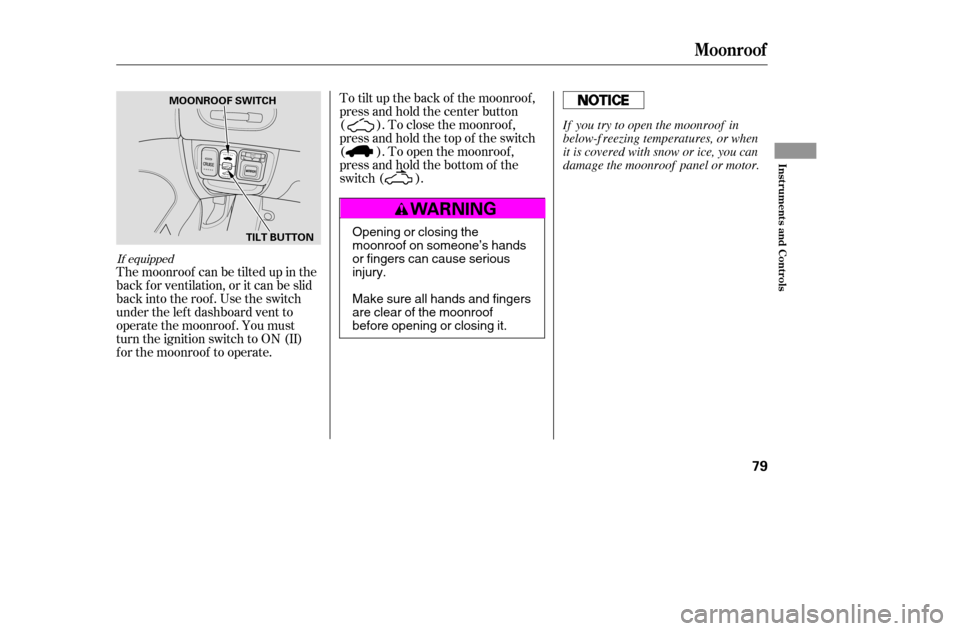
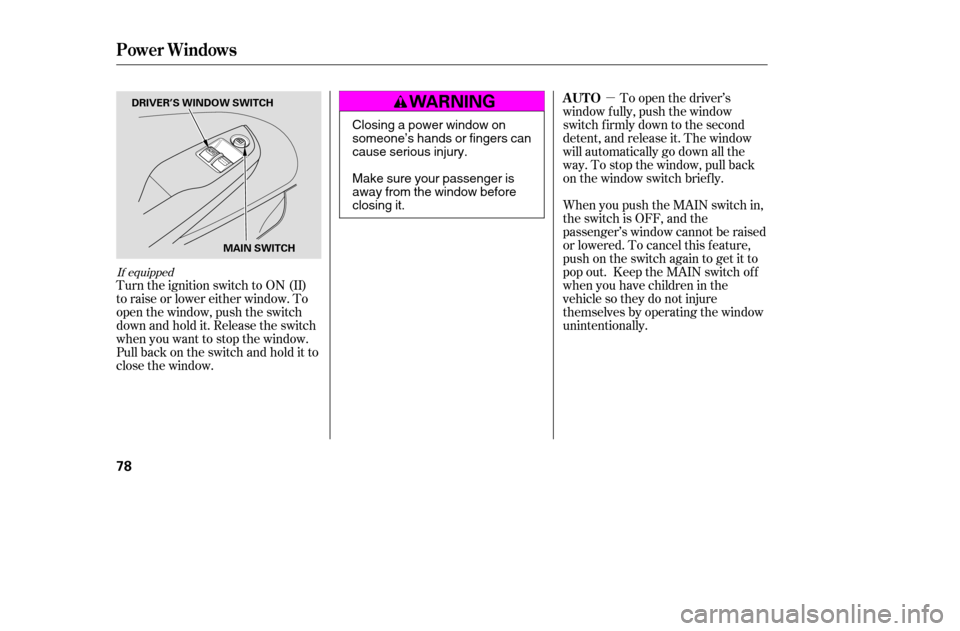
Turn the ignition switch to ON (II)
to raise or lower either window. To
open the window, push the switch
downandholdit.Releasetheswitch
when you want to stop the window.
Pull back on the switch and hold it to
close the window.To open the driver’s
window f ully, push the window
switch f irmly down to the second
detent, and release it. The window
will automatically go down all the
way. To stop the window, pull back
on the window switch briefly.
When you push the MAIN switch in,
the switch is OFF, and the
passenger’s window cannot be raised
or lowered. To cancel this f eature,
push on the switch again to get it to
pop out. Keep the MAIN switch off
whenyouhavechildreninthe
vehicle so they do not injure
themselves by operating the window
unintentionally.
AUTO
Power Windows
78
MAIN SWITCH
DRIVER’S WINDOW SWITCH
Closing a power window on
someone’s hands or fingers can
cause serious injury.
Make sure your passenger is
away from the window before
closing it.
�����—�����—�����y�
�����������
�y���
�(���%�������y�������
�y
Page 75 of 226
If equipped
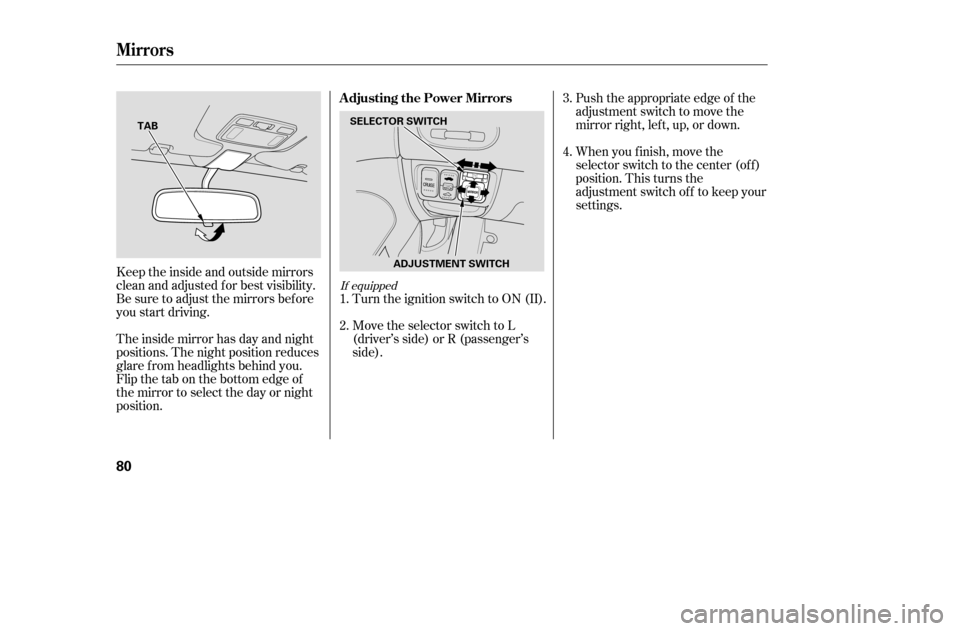
The moonroof can be tilted up in the
back f or ventilation, or it can be slid
back into the roof. Use the switch
under the lef t dashboard vent to
operate the moonroof . You must
turn the ignition switch to ON (II)
f or the moonroof to operate.To tilt up the back of the moonroof ,
press and hold the center button
( ). To close the moonroof ,
press and hold the top of the switch
( ). To open the moonroof ,
press and hold the bottom of the
switch ( ).
Moonroof
Inst rument s and Cont rols
79
MOONROOF SWITCH
TILT BUTTON
Opening or closing the
moonroof on someone’s hands
or fingers can cause seriousinjury.
Make sure all hands and fingers
are clear of the moonroof
before opening or closing it. If you try to open the moonroof in
below-f reezing temperatures, or when
it is covered with snow or ice, you can
damage the moonroof panel or motor.
�����—�����—�����y�
�������������y���
�(���%�������y���������y
Page 76 of 226
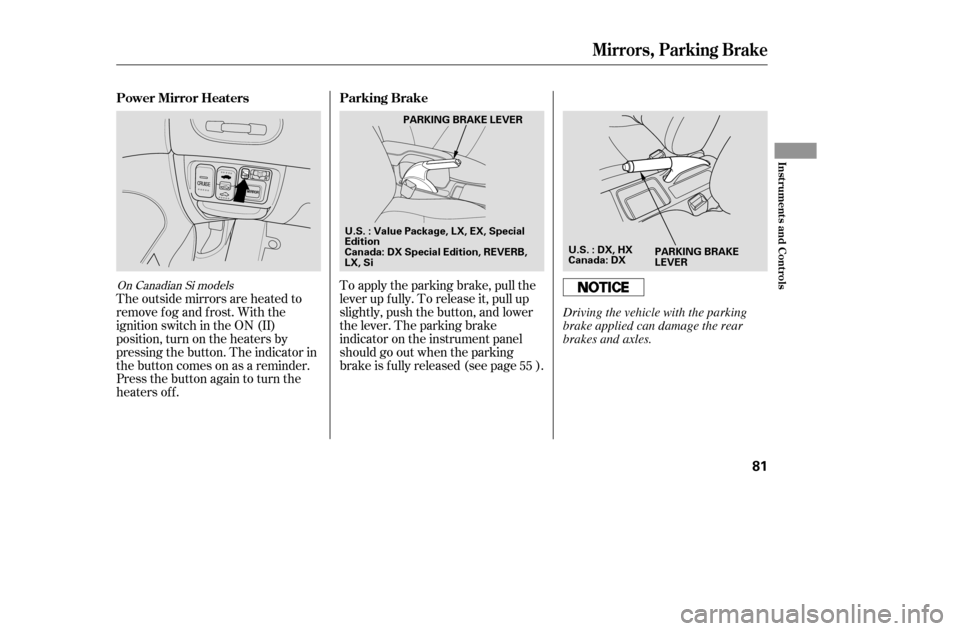
Push the appropriate edge of the
adjustment switch to move the
mirrorright,left,up,ordown.
The inside mirror has day and night
positions. The night position reduces
glare f rom headlights behind you.
Flip the tab on the bottom edge of
the mirror to select the day or night
position.
Keeptheinsideandoutsidemirrors
clean and adjusted f or best visibility.
Be sure to adjust the mirrors bef ore
you start driving. When you f inish, move the
selector switch to the center (off)
position. This turns the
adjustment switch of f to keep your
settings.
Turn the ignition switch to ON (II).
Move the selector switch to L
(driver’s side) or R (passenger’s
side).
1. 2. 3. 4.
If equipped
Adjusting the Power Mirrors
Mirrors
80
SELECTOR SWITCH
ADJUSTMENT SWITCH
TAB
�����—�����—�����y�
�������������y���
�(���%�������y���������y
Page 77 of 226
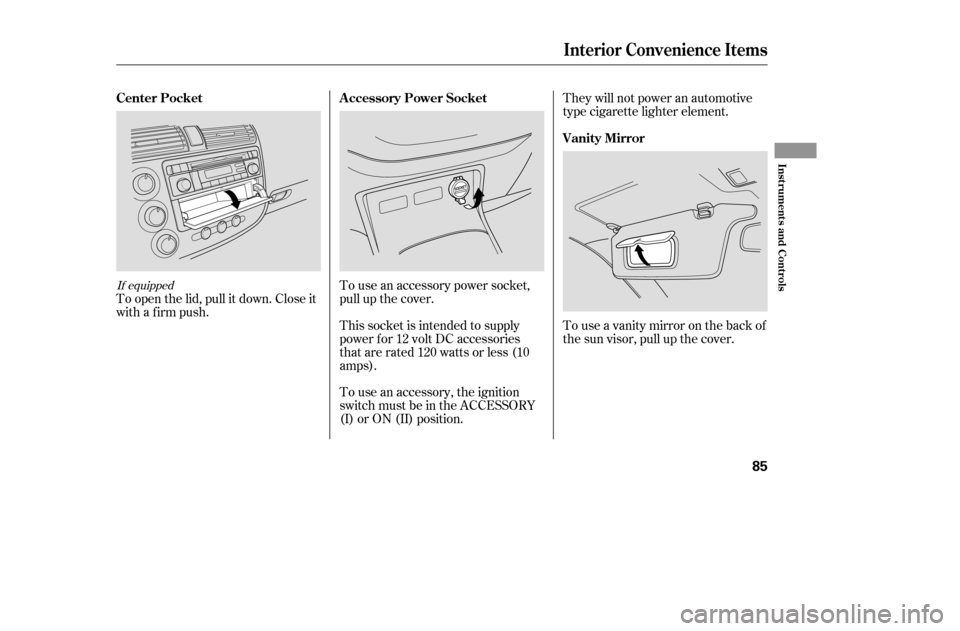
The outside mirrors are heated to
remove fog and frost. With the
ignition switch in the ON (II)
position, turn on the heaters by
pressing the button. The indicator in
the button comes on as a reminder.
Press the button again to turn the
heaters off.To apply the parking brake, pull the
lever up f ully. To release it, pull up
slightly, push the button, and lower
the lever. The parking brake
indicator on the instrument panel
should go out when the parking
brake is f ully released (see page ).
55
On Canadian Si models
Power Mirror Heaters Parking Brake
Mirrors, Parking Brake
Inst rument s and Cont rols
81
PARKING BRAKE
LEVER
U.S. : Value Package, LX, EX, Special
Edition
Canada: DX Special Edition, REVERB,
LX, Si PARKING BRAKE LEVER
U.S. : DX, HX
Canada: DX
Driving the vehicle with the parking
brake applied can damage the rear
brakes and axles.
�����—�����—�����y�
�������������y���
�(���%�������y���������y
Page 81 of 226
To use an accessory power socket,
pull up the cover.
To open the lid, pull it down. Close it
with a firm push.
Touseavanitymirroronthebackof
the sun visor, pull up the cover.
They will not power an automotive
type cigarette lighter element.
To use an accessory, the ignition
switch must be in the ACCESSORY
(I) or ON (II) position.
This socket is intended to supply
power f or 12 volt DC accessories
that are rated 120 watts or less (10
amps).If equipped
Center Pocket A ccessory Power Socket
Vanity Mirror
Interior Convenience Items
Inst rument s and Cont rols
85
�����—�����—�����y�
�������������y���
�(���%�������y���������y
Page 82 of 226
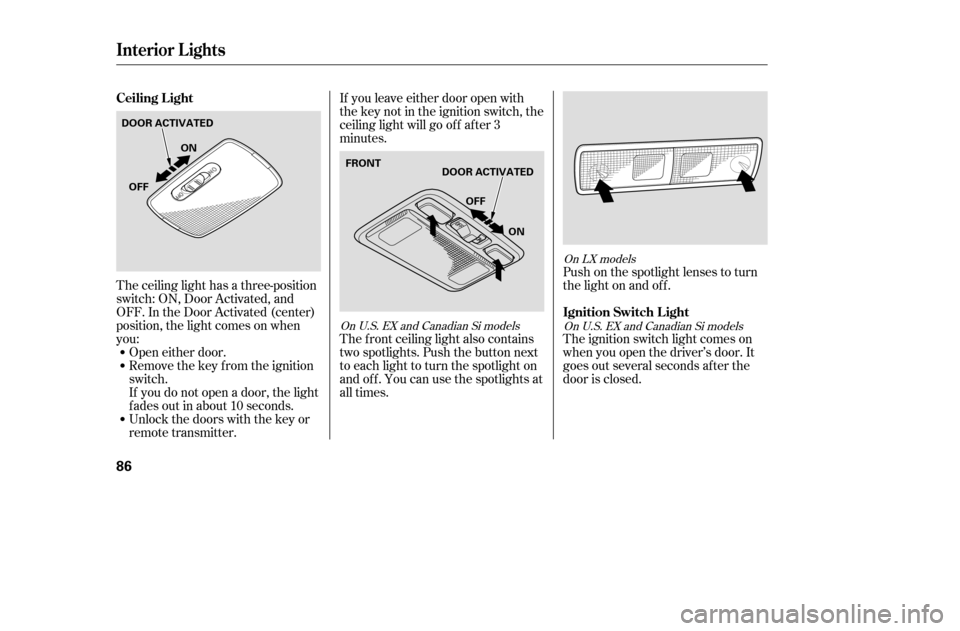
Push on the spotlight lenses to turn
the light on and of f .
The ignition switch light comes on
when you open the driver’s door. It
goes out several seconds af ter the
door is closed.
If you leave either door open with
the key not in the ignition switch, the
ceiling light will go of f af ter 3
minutes.
The f ront ceiling light also contains
two spotlights. Push the button next
to each light to turn the spotlight on
andoff.Youcanusethespotlightsat
all times.
The ceiling light has a three-position
switch: ON, Door Activated, and
OFF. In the Door Activated (center)
position, the light comes on when
you:
Open either door.
Remove the key from the ignition
switch.
If you do not open a door, the light
f ades out in about 10 seconds.
Unlock the doors with the key or
remote transmitter.
On LX models
OnU.S.EXandCanadianSimodels
OnU.S.EXandCanadianSimodels
Ceiling L ight
Ignition Switch L ight
Interior Lights
86
DOOR ACTIVATEDON
OFF
OFF
ON
FRONTDOOR ACTIVATED
�����—�����—�����y�
�������������y���
�(���%�������y���������y
Page 88 of 226

�µ�µ
�µ
The ignition switch must be in the
ACCESSORY (I) or ON (II) position.
Turn the system on by pushing the
Power Volume knob or the AM/FM
button (FM/AM button on models
with in-dash CD changer). Adjust the
volume by turning the Power
Volume knob.
As you adjust a volume, you will hear
a beep whenever the adjustment
level reaches the maximum and
minimum of its range.
The band and f requency that the
radio was last tuned to is displayed.
To change bands, press the AM/FM
or FM/AM button. On the FM band,
ST will be displayed if the station is
broadcasting in stereo. Stereo
reproduction on AM is not available. On the AM band, AM noise
reduction turns on automatically.
You can use any of f ive methods to
f ind a radio station on the selected
band: the
preset buttons, and .
Use the TUNE knob or
the SEEK bar to tune the radio to a
desired f requency.
Turn the knob to the right to tune a
higher f requency, and turn it to the
lef t to tune a lower f requency.
Press the side of the SEEK bar
to tune a higher f requency, and
press the side to tune a lower
f requency. The SEEK f unction
searches up and down f rom the
current f requency to f ind a station
with a strong signal. To activate it,
press the or side of the
SEEK bar, then release it.
On models with in-dash CD changer,
press the or side of the
SEEK bar until you hear a beep, then
release it.
The SCAN function
samples all stations with strong
signals on the selected band. To
activate it, press the SCAN button,
then release it. You will see SCAN in
the display. The system will scan f or
a station with a strong signal. When
it f inds one, it will stop and play that
station for about 5 seconds.On models with in-dash CD changer On models with in-dash CD changer
Except f or models with in-dash CDchanger
On models with in-dash CD changer Except f or models with in-dash CD
changer
CONT INUED
Playing the Radio
To Play the Radio
To Select a StationTUNE,SEEK,SCAN, AUTO SELECT
TUNE SEEK
SCAN
Features
93
�����—�����—�����y�
�������������y���
�(���%�������y���������y
Page 95 of 226

�µ �µ �µ �µ
On models with in-dash CD changerOn models with CD player
Optional on DX model
The in-dash CD changer can also
play CD-Rs and CD-RWs
compressed in MP3 standard. When
playing a disc in MP3, you will see
‘‘MP3’’ in the display. You can select
afolderortrackupto .
Video CDs and DVD discs will not
work in this unit.
The specif ications of the compatible
MP3 f ile are:
You operate the CD player/CD
changer with the same controls used
for the radio. To select the CD
player/CD changer, press the CD
button. You will see ‘‘CD’’ in the
display. The number of the track
playing is shown in the display. With
the in-dash CD changer, the disc and
track numbers are displayed. The
system will continuously play a disc
until you change modes.
To load or play discs, the ignition
switch must be in the ACCESSORY
(I) or ON (II) position.
Sampling f requency: 32/44.1/48kHz
Bit rate: 32/40/48/56/64/80/96/
112/128/160/192/224/256/
320 kbps
Compatible with variable bit rate
and multi-session
Maximum layers
(including ROOT): 8 layersWhile playing a disc, you can see the
playing time in the display by
cancelling the clock display (see
page ).
Insert a CD into the CD slot. The
drive will pull the CD in the rest of
the way to play it. When the system
reaches the end of the disc, it will
return to the beginning and play the
disc again.
You can also play 3-inch (8-cm) discs
without using an adapter ring.
To play the radio when a disc is
playing, press the AM/FM button.
Press the CD button again to switch
back to the CD player.
255
116
To Play a Disc
Playing a Disc
100
Do not use discs with adhesive labels.
The label can curl up and cause the
disc to jam in the unit.
�����—�����—�����y�
�����������
�y���
�(���%�������y���
�����y