Page 146 of 289

Once the security system is set,
opening either door without using
the key or the remote transmitter,
the hood, or the trunk will cause the
system to alarm. It also alarms if the
radio is removed f rom the dashboard
or the wiring is cut.With the system set, you can still
open the trunk with the remote
transmitter without triggering the
alarm. The alarm will sound if the
trunk lock is f orced, or the trunk is
opened with the trunk release handle
or the emergency trunk opener.
The security system will not set if
the hood, trunk, or either door is not
f ully closed. If the system will not set,
check the door and trunk open
monitor on the instrument panel (see
page ), to see if the doors and the
trunk are f ully closed. Since it is not
part of the monitor display, manually
check the hood.
Do not attempt to alter this system
or add other devices to it.
The security system helps to protect
your vehicle and valuables f rom thef t.
The horn sounds and a combination
of headlights, parking lights, side
marker lights, and taillights f lashes if
someone attempts to break into your
vehicleorremovetheradio.This
alarm continues f or 2 minutes, then
the system resets. To reset an
alarming system bef ore the 2
minutes have elapsed, unlock the
driver’s door with the key or the
remote transmitter.
The security system automatically
sets 15 seconds after you lock the
doors, hood, and trunk. For the
system to activate, you must lock the
doors f rom the outside with the key,
lock tab, door lock switch, or remote
transmitter. The security system
indicator on the instrument panel
starts blinking immediately to show
you the system is setting itself .
59
If equipped
Security System
Features
151
SECURITY SYSTEM INDICATOR
�����—�����—�����y�
�
�������
�
�y���
�(���%�������y���
�����y
Page 187 of 289

Make turns more slowly and wider
than normal. The trailer tracks a
smaller arc than your vehicle, and it
canhitorrunoversomethingthe
vehicle misses. Allow more time and
distance f or braking. Do not brake or
turn suddenly as this could cause the
trailer to jackknif e or turn over.
The added weight, length, and
height of a trailer will af f ect your
vehicle’s handling and perf ormance,
so driving with a trailer requires
some special driving skills and
techniques.
Foryoursafetyandthesafetyof
others,taketimetopracticedriving
maneuvers bef ore heading f or the
open road, and f ollow the guidelines
below.
Drive slower than normal in all
driving situations, and obey posted
speed limits f or vehicles with trailers.
Do not exceed 55 mph (88 km/h). At
higher speeds, the trailer may sway
or af f ect vehicle handling. If you
have an automatic transmission, use
D position when towing a trailer on
level roads. When climbing hills, closely watch
your temperature gauge. If it nears
the red (hot) mark, turn the air
conditioning of f , reduce speed and, if
necessary, pull to the side of the
road to let the engine cool.
If the automatic transmission shif ts
f requently while going up a hill, shif t
to D .If youmuststopwhenfacinguphill,
use the f oot brake or parking brake.
Do not try to hold the vehicle in
placebypressingontheaccelerator,
as this can cause the automatic
transmission to overheat.
When driving down hills, reduce
your speed, and shif t down to 2nd
gear. Do not ‘‘ride’’ the brakes, and
remember, it will take longer to slow
downandstopwhentowingatrailer.
Crosswinds and air turbulence
caused by passing trucks can disrupt
your steering and cause trailer
swaying. When being passed by a
large vehicle, keep a constant speed,
and steer straight ahead. Do not try
to make quick steering or braking
corrections.
3
Towing a Trailer
Making T urns and Braking
T owing Speeds and Gears Driving on Hills
Handling Crosswinds and Buf f et ingDriving Saf ely With a T railer
194
�����—�����—�����y�
�
�����������y���
�(���%�������y���
�����y
Page 192 of 289

�Ì�µ�µ
�µ
�µ
�µ
�µ
We recommend the use of Honda
parts and f luids whenever you have
maintenance done. According to state and federal
regulations, f ailure to perf orm
maintenance on the items marked
with will not void your emissions
warranties. However, all
maintenance services should be
perf ormed at the recommended time
or mileage period to ensure long-
term reliability.Youshouldcheckthefollowing
items at the specif ied intervals. If
you are unsure of how to perf orm
any check, turn to the appropriate
page listed.
Lights Check the operation of
the headlights, parking lights,
taillights, high-mount brake light,
and license plate lights monthly.
See page .
Engine oil level Check every
time you fill the fuel tank. See
page .
Engine coolant level Check the
radiator reserve tank every time
you f ill the f uel tank. See page .
Automatic transmission Check
the f luid level monthly. See page
.
Brakes Check the f luid level
monthly. See page .
Tires Check the tire pressure
monthly. Examine the tread f or
wear and foreign objects. See page .
U.S. Vehicles:
Your authorized dealer knows your
vehicle best and can provide
competent, ef f icient service.
However, service at a dealer is not
mandatory to keep your warranties
in effect. Maintenance may be done
by any qualif ied service f acility or
skilled person to keep your
warranties in ef f ect. Keep all the
receipts as proof of completion, and
have the person who does the work
f ill out the maintenance record.
Check your warranty booklet f or
more inf ormation. 164
165
221
239 228 226
Maintenance Schedule
Servicing Your Vehicle
Owner’s Maintenance Checks
Maintenance,
replacement, or repair of
emissions control devices and
systems may be done by any
automotive repair establishment
or individual using parts that are
‘‘certif ied’’ to EPA standards.
200
�����—�����—�����y�
�
�����������y���
�(���%�������y���������y
Page 220 of 289
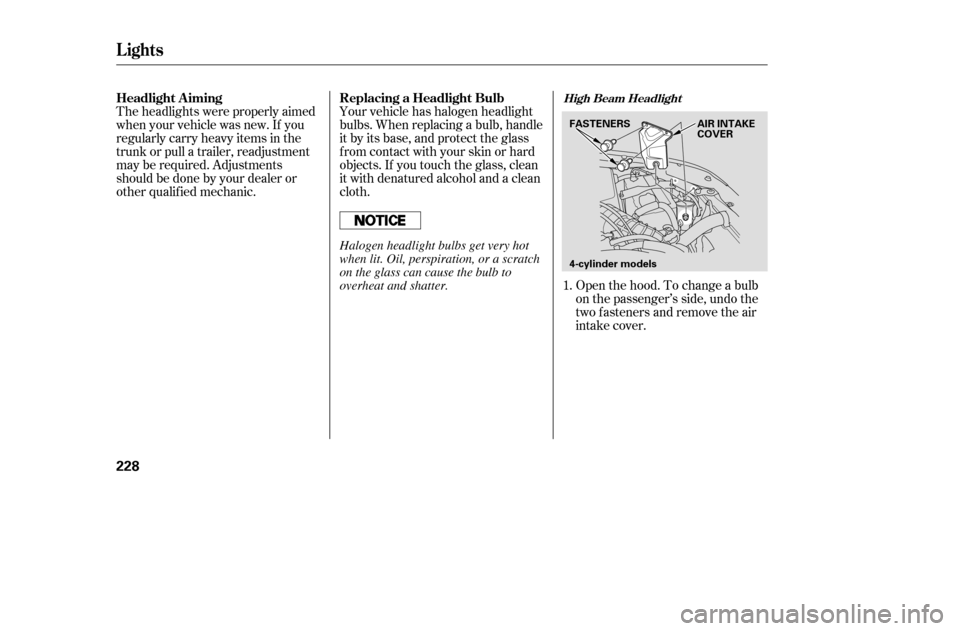
Open the hood. To change a bulb
on the passenger’s side, undo the
two fasteners and remove the air
intake cover.
Theheadlightswereproperlyaimed
when your vehicle was new. If you
regularly carry heavy items in the
trunk or pull a trailer, readjustment
may be required. Adjustments
should be done by your dealer or
other qualif ied mechanic.
Your vehicle has halogen headlight
bulbs. When replacing a bulb, handle
it by its base, and protect the glass
f rom contact with your skin or hard
objects. If you touch the glass, clean
it with denatured alcohol and a clean
cloth.
1.
Headlight A iming Replacing a Headlight Bulb
High Beam Headlight
Lights
228
4-cylinder models
FASTENERS AIR INTAKE
COVER
Halogen headlight bulbs get very hot
when lit. Oil, perspiration, or a scratch
on the glass can cause the bulb to
overheat and shatter.
�����—�����—�����y�
�
��
������
�y���
�(���%�������y�������
�y
Page 221 of 289
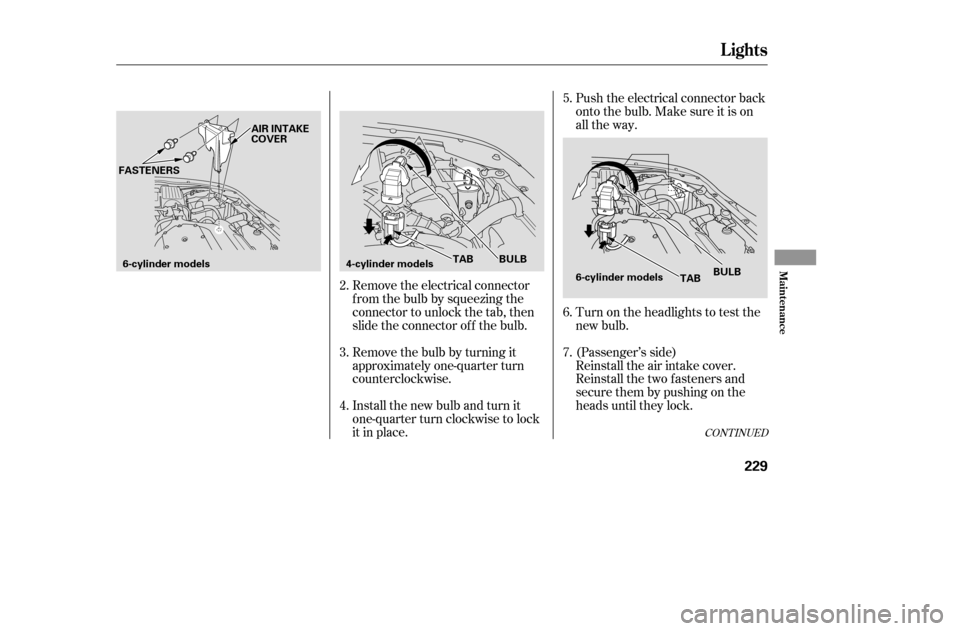
Remove the electrical connector
f rom the bulb by squeezing the
connector to unlock the tab, then
slide the connector of f the bulb.
Remove the bulb by turning it
approximately one-quarter turn
counterclockwise.
Install the new bulb and turn it
one-quarter turn clockwise to lock
it in place.Push the electrical connector back
onto the bulb. Make sure it is on
all the way.
Turn on the headlights to test the
new bulb.
(Passenger’s side)
Reinstall the air intake cover.
Reinstall the two fasteners and
secure them by pushing on the
heads until they lock.
3.
2. 4. 5. 6. 7.
CONT INUED
Lights
Maint enance
229
6-cylinder models
AIR INTAKE
COVER
FASTENERS
4-cylinder models 6-cylinder models
TAB BULB
TABBULB
�����—�����—�����y�
�
��
��������y���
�(���%�������y���������y
Page 222 of 289
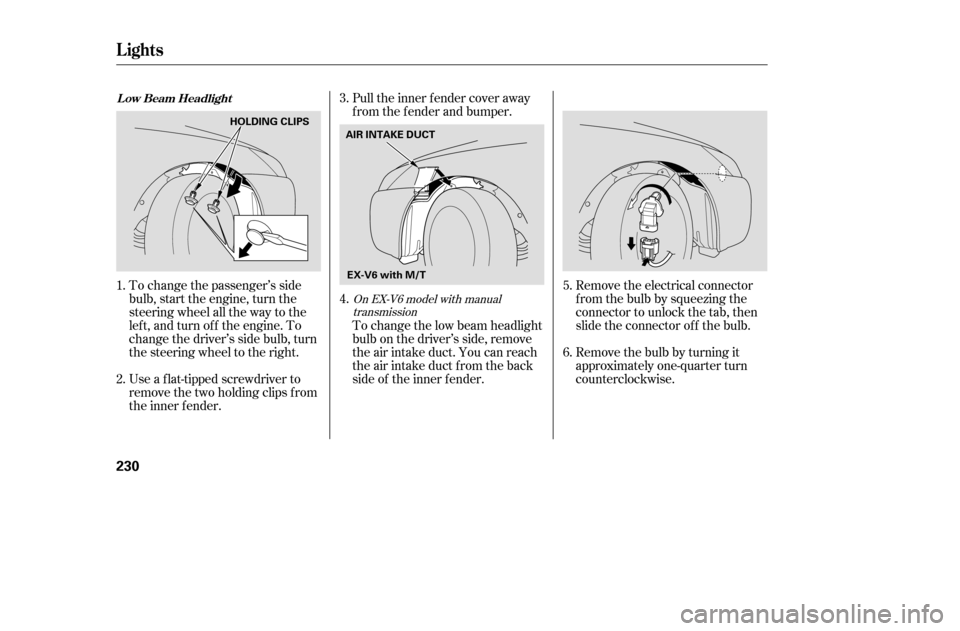
Remove the electrical connector
fromthebulbbysqueezingthe
connector to unlock the tab, then
slide the connector of f the bulb.
Remove the bulb by turning it
approximately one-quarter turn
counterclockwise.
To change the passenger’s side
bulb, start the engine, turn the
steering wheel all the way to the
lef t, and turn of f the engine. To
change the driver’s side bulb, turn
the steering wheel to the right.
Use a f lat-tipped screwdriver to
remove the two holding clips f rom
the inner f ender. Pull the inner f ender cover away
f rom the f ender and bumper.
To change the low beam headlight
bulb on the driver’s side, remove
the air intake duct. You can reach
the air intake duct f rom the back
side of the inner f ender.
6.
5.
4.
1. 2. 3.
On EX-V6 model with manual
transmission
Lights
L ow Beam Headlight
230
AIR INTAKE DUCT
EX-V6 with M/T
HOLDING CLIPS
�����—�����—�����y�
�
��
��������y���
�(���%�������y���������y
Page 223 of 289
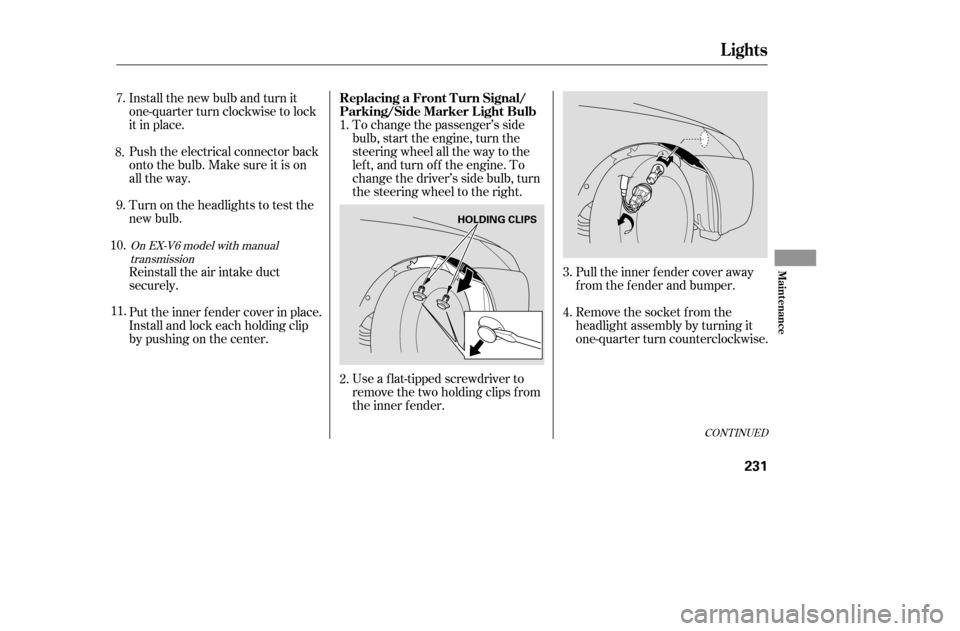
Pull the inner f ender cover away
f rom the f ender and bumper.
Remove the socket from the
headlight assembly by turning it
one-quarter turn counterclockwise.
To change the passenger’s side
bulb, start the engine, turn the
steering wheel all the way to the
lef t, and turn of f the engine. To
change the driver’s side bulb, turn
the steering wheel to the right.
Install the new bulb and turn it
one-quarter turn clockwise to lock
it in place.
Push the electrical connector back
onto the bulb. Make sure it is on
all the way.
Turn on the headlights to test the
new bulb.
Reinstall the air intake duct
securely.
Put the inner f ender cover in place.
Install and lock each holding clip
bypushingonthecenter.
Use a f lat-tipped screwdriver to
remove the two holding clips f rom
the inner f ender.
1.
3.
2. 4.
9.
7.
8.
10. 11.
CONT INUED
On EX-V6 model with manual transmission
Lights
Replacing a Front T urn Signal/
Parking/Side Marker Light Bulb
Maint enance
231
HOLDING CLIPS
�����—�����—�����y�
�
��
����
���y���
�(���%�������y���������y
Page 224 of 289
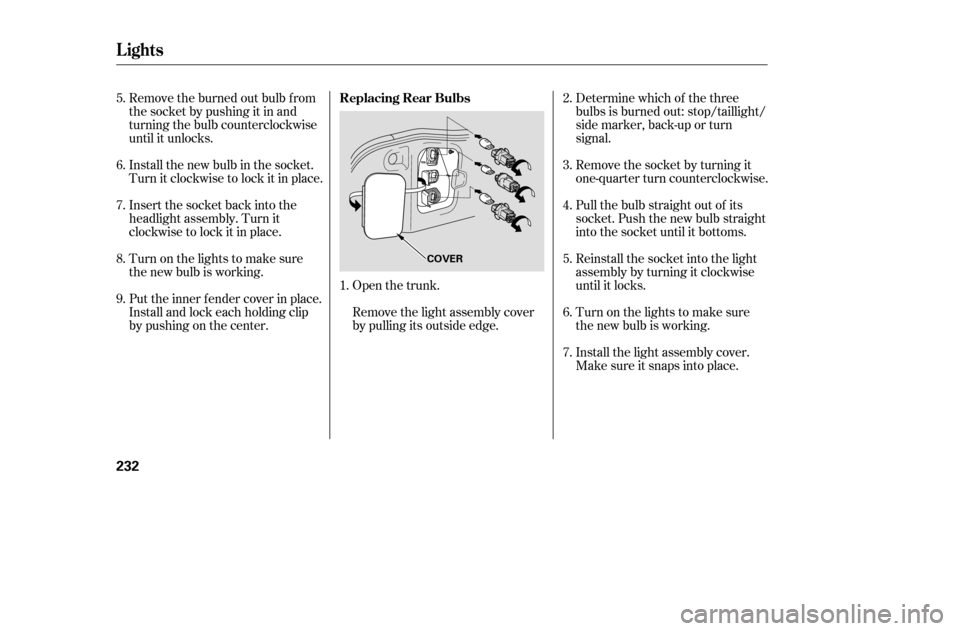
Remove the burned out bulb f rom
thesocketbypushingitinand
turning the bulb counterclockwise
until it unlocks.
Install the new bulb in the socket.
Turn it clockwise to lock it in place.
Insert the socket back into the
headlight assembly. Turn it
clockwise to lock it in place.
Turn on the lights to make sure
the new bulb is working.
Put the inner f ender cover in place.
Install and lock each holding clip
bypushingonthecenter.Open the trunk.
Remove the light assembly cover
by pulling its outside edge.Determine which of the three
bulbs is burned out: stop/taillight/
side marker, back-up or turn
signal.
Remove the socket by turning it
one-quarter turn counterclockwise.
Pull the bulb straight out of its
socket. Push the new bulb straight
into the socket until it bottoms.
Reinstall the socket into the light
assembly by turning it clockwise
until it locks.
Turn on the lights to make sure
the new bulb is working.
Install the light assembly cover.
Make sure it snaps into place.
1. 3.
2. 4. 5.6. 7.
5. 6. 7. 8. 9.
Lights
Replacing Rear Bulbs
232
COVER
�����—�����—�����y�
�
��
��������y���
�(���%�������y���������y