Page 1 of 286
 to navigate through\
this reference.
For a printed owners manual, click on authorized manuals")
2005 Accord Hybrid Online Reference Owner's Manual
Use these links (and links throughout this manual) to navigate through\
this reference.
For a printed owner's manual, click on authorized manuals or go to www.h\
elminc.com.
Contents
Instruments and Controls........................................................................\
......................................... 51
Indicators, gauges, dashboard, and steering column.
Features ........................................................................................................................\
...................... 99
Climate, audio, steering wheel, security, cruise control, and HomeLink.
Before Driving........................................................................\
.......................................................... 151
Fuel, vehicle break-in, and cargo loading.
Driving ........................................................................\
...................................................................... 165
Engine and transmission operation.
Maintenance........................................................................\
............................................................. 189
Schedules, fluid checking, minor services, and vehicle storage.
Taking Care of the Unexpected........................................................................\
.............................. 229
Flat tire, dead battery, overheating, fuses.
Technical Information........................................................................\
............................................. 257
Vehicle specifications, tires, fuels, and emissions controls.
Warranty and Customer Relations (U.S. and Canada)................................................................ 271
Warranty and contact information.
Authorized Manuals (U.S. only)........................................................................\
.............................. 275
How to order.
Index........................................................................\
............................................................................. I
Service Information Summary
Fluid capacities and tire pressures.
Driver and Passenger Safety ........................................................................\
.................................... 7
Seat belts, SRS, and child protection. Introduction ........................................................................\
............................................................... i
A Few Words About Safety........................................................................\
........................................ ii
Your Vehicle at a Glance........................................................................\
........................................... 4
Main Controls
Owner's Identification Form
Page 5 of 286
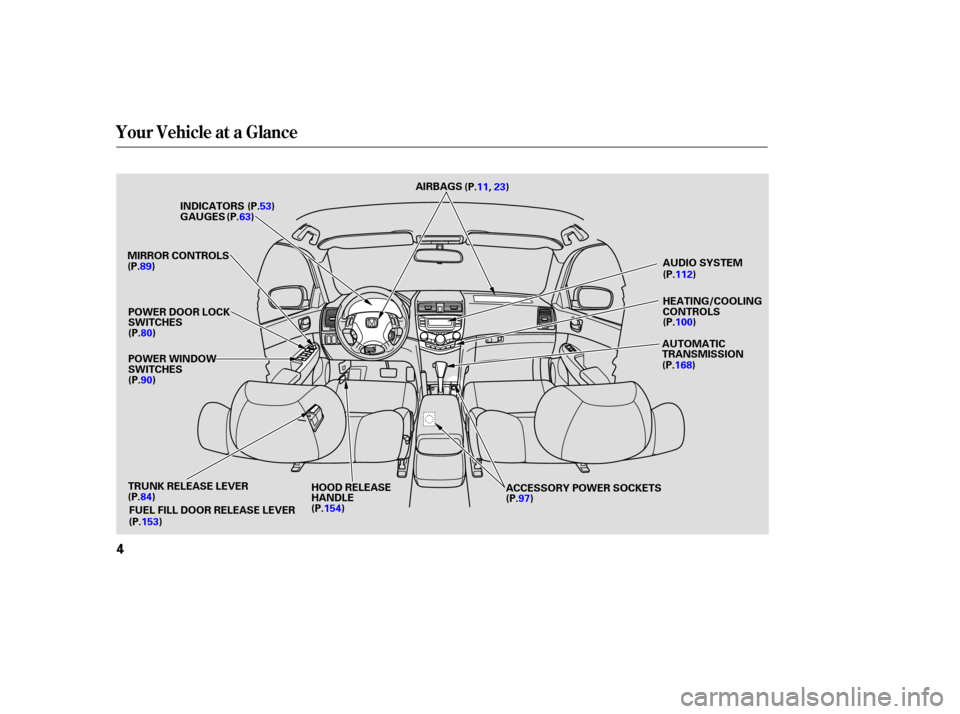
Your Vehicle at a Glance
4
HEATING/COOLING
CONTROLS
MIRROR CONTROLS
POWER WINDOW
SWITCHES GAUGES
HOOD RELEASE
HANDLE ACCESSORY POWER SOCKETSAUDIO SYSTEM
AUTOMATIC
TRANSMISSION
AIRBAGS
(P.11,23)
INDICATORS
TRUNK RELEASE LEVER FUEL FILL DOOR RELEASE LEVER (P.63)
(P.53)
(P.112)
(P.100)
(P.168)
(P.97)
(P.154)
(P.84)
(P.153)
(P.90) (P.80)
(P.89)
POWER DOOR LOCK
SWITCHES
�����—�
���—�����y���������������y���
�(���'�������y���������y
Page 53 of 286
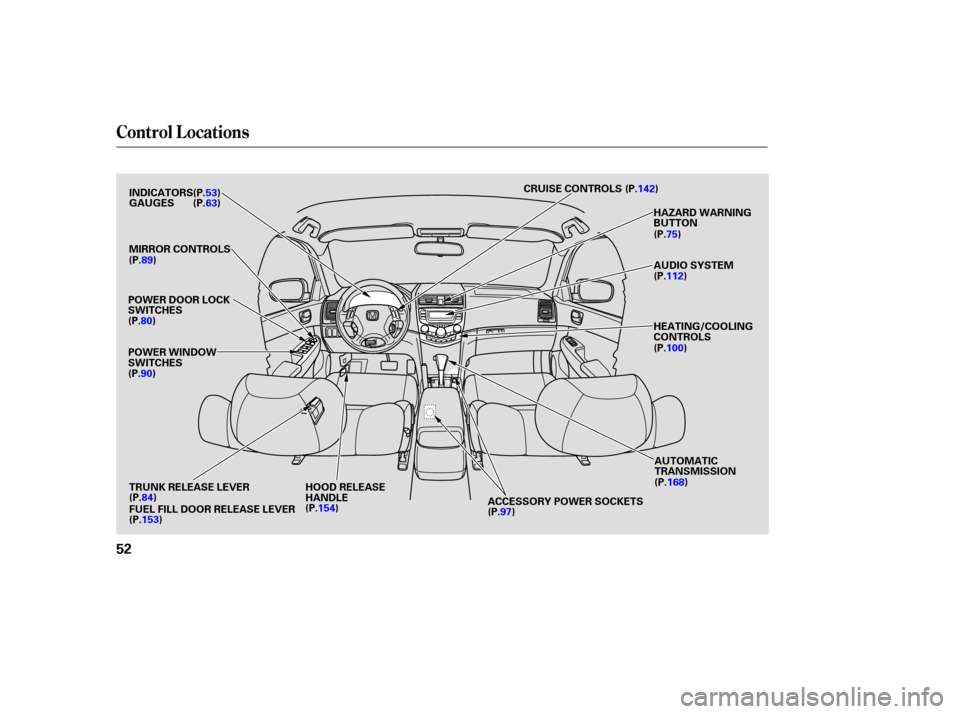
Control L ocations
52
POWER DOOR LOCK
SWITCHES
POWER WINDOW
SWITCHESMIRROR CONTROLS
ACCESSORY POWER SOCKETSAUDIO SYSTEM
HEATING/COOLING
CONTROLS HAZARD WARNING
BUTTON
CRUISE CONTROLS
TRUNK RELEASE LEVER HOOD RELEASE HANDLE
INDICATORS
GAUGES
FUEL FILL DOOR RELEASE LEVER (P.53)
(P.63)
(P.89)
(P.80)
(P.90)
(P.153) (P.154)
(P.97)(P.100) (P.112)
(P.142)
(P.84) AUTOMATIC
TRANSMISSION
(P.168)
(P.75)
�����—���
�—�����y�
����
��������y���
�(���'�������y���������y
Page 67 of 286
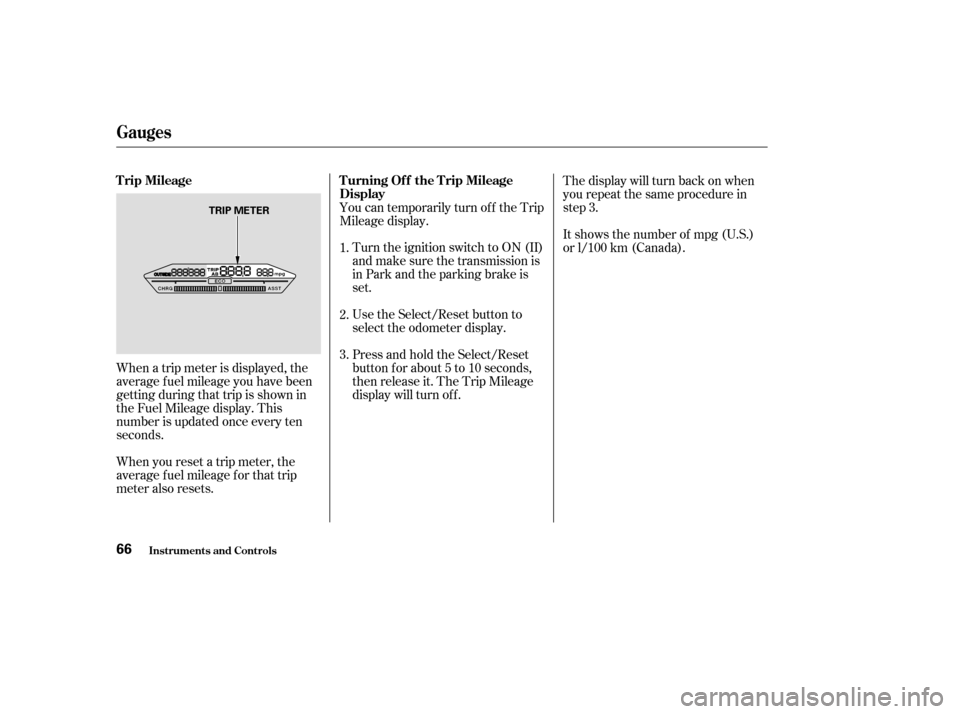
When a trip meter is displayed, the
average fuel mileage you have been
getting during that trip is shown in
the Fuel Mileage display. This
number is updated once every ten
seconds.
When you reset a trip meter, the
average fuel mileage for that trip
meter also resets.You can temporarily turn of f the Trip
Mileage display.
Turn the ignition switch to ON (II)
and make sure the transmission is
in Park and the parking brake is
set.
Use the Select/Reset button to
select the odometer display.
Press and hold the Select/Reset
button for about 5 to 10 seconds,
then release it. The Trip Mileage
display will turn of f . The display will turn back on when
you repeat the same procedure in
step 3.
It shows the number of mpg (U.S.)
or l/100 km (Canada).
1.
2.
3.
Inst rument s and Cont rols
Gauges
T rip Mileage T urning Of f the T rip Mileage
Display
66
TRIP METER
�����—�
���—�����y���������������y���
�(���'�������y���������y
Page 166 of 286

This section gives you tips on
starting the engine under various
conditions, and how to operate the
manual and automatic transmissions.
It also includes important
information on parking your vehicle,
the braking system, the traction
control system, and f acts you need if
you are planning to tow a trailer.........................
Preparing to Drive .166
.......................
Starting the Engine .167
..............
Automatic Transmission .168
Shif t Lever Position ...............................
Indicators .168
.......................................
Shif ting .168
..............
Engine Speed Limiter .170
....................
Shif t Lock Release .171
...........................................
Parking .175
.............................
Braking System .176
...............
Brake System Design .176
.............
Brake Wear Indicators .176
...........
Anti-lock Brakes (ABS) .177
Activating the Anti-lock ................................
Brakes .177
........................
ABS Indicator .177
..............
Traction Control System .179
.........................
TCS Of f Switch .180
.........
TCSActivationIndicator .180
............................
TCS Indicator .180
...........................
Towing a Trailer .182
Driving
Driving
165
�����—�
���—���
�y���������������y���
�(���'�������y���
�����y
Page 169 of 286
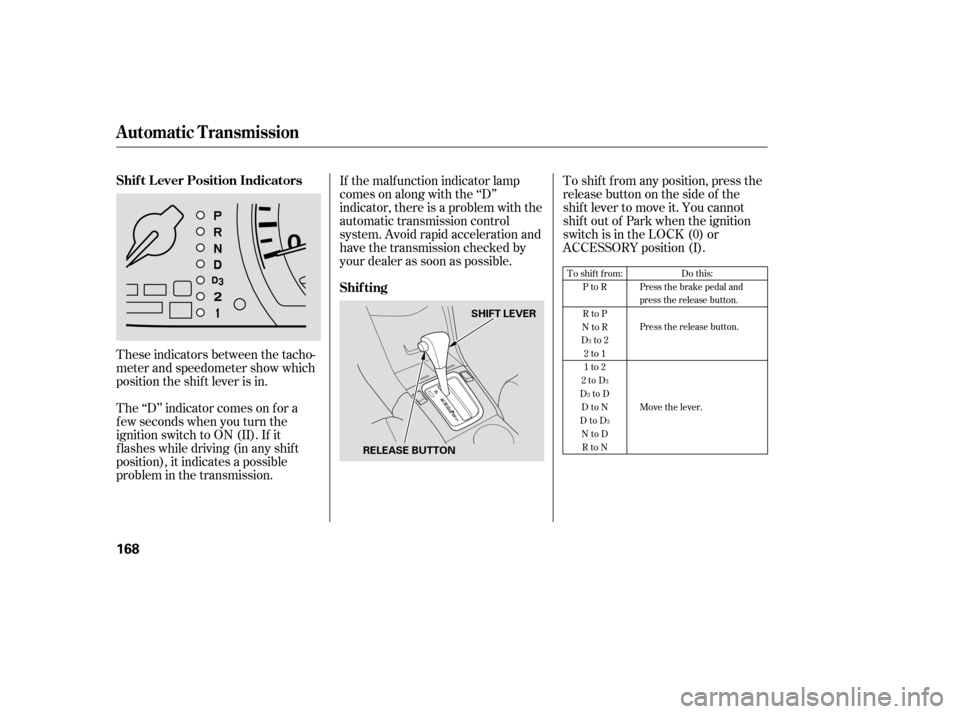
These indicators between the tacho-
meter and speedometer show which
position the shif t lever is in.
The ‘‘D’’ indicator comes on f or a
f ew seconds when you turn the
ignition switch to ON (II). If it
f lashes while driving (in any shif t
position), it indicates a possible
problem in the transmission.To shif t f rom any position, press the
release button on the side of the
shif t lever to move it. You cannot
shif t out of Park when the ignition
switch is in the LOCK (0) or
ACCESSORY position (I).
If the malf unction indicator lamp
comes on along with the ‘‘D’’
indicator, there is a problem with the
automatic transmission control
system. Avoid rapid acceleration and
have the transmission checked by
your dealer as soon as possible.
To shift from:
PtoR
RtoP
NtoR
Dto2 2to1
1to2
2toD
DtoD DtoN
DtoD NtoDRtoN Do this:
Press the brake pedal and
press the release button.
Press the release button.
Move the lever.
3
3
3
3
Automatic Transmission
Shif t L ever Position Indicators
Shif ting
168
SHIFT LEVER
RELEASE BUTTON
�����—���
�—�����y�
�������������y���
�(���'�������y���
���
�y
Page 170 of 286

�µ�µ�µ�µ�µ
This position mechani-
cally locks the transmission. Use
Park whenever you are turning of f or
starting the engine. To shif t out of
Park, you must press on the brake
pedal and have your f oot of f the
accelerator pedal. Press the release
button on the side of the shift lever
to move it.
If you have done all of the above and
still cannot move the lever out of
Park, see on
page .
You must also press the release
button to shift into Park. To avoid
transmission damage, come to a
complete stop bef ore shif ting into
Park. The shif t lever must be in Park
bef ore you can remove the key f rom
the ignition switch. Press the brake
pedal and press the release button to
shif t f rom Park to Reverse. To shif t
from Reverse to Neutral, come to a
completestopandthenshift. This position is similar
to D, except only the first three
gears are selected instead of all f ive.
Use D when towing a trailer in hilly
terrain, or to provide engine braking
when going down a steep hill. D can
also keep the transmission f rom
cycling between third and f ourth
gears in stop-and-go driving.
Use this position f or
your normal driving. The
transmission automatically selects a
suitable gear for the vehicle speed
and acceleration. You may notice the
transmission shif ting up at higher
speeds when the engine is cold. This
helps the engine warm up f aster. Use Neutral if you
need to restart a stalled engine, or if
it is necessary to stop brief ly with
the engine idling. Shif t to the Park
position if you need to leave your
vehicle and apply the parking brake.
Press on the brake pedal when you
are moving the shif t lever f rom
Neutral to another gear.
171
3
3
CONT INUED
Automatic Transmission
Park (P)
Shif t L ock Release Reverse (R) Drive (D )
Drive (D) Neutral (N)3
Driving
169
�����—�
���—���
�y���������������y���
�(���'�������y���
�����y
Page 171 of 286

�µ�µThis position locks
the transmission in second gear. It
does not downshif t to f irst gear
when you come to a stop.
Use Second gear:
For starting out on a slippery
surf ace or in deep snow.
To help reduce wheel spin.
When driving downhill with a
trailer. To shif t f rom Second to
First, press the release button on the
side of the shif t lever. This position
locks the transmission in f irst gear.
By upshif ting and downshif ting
through 1, 2, D , and D, you can
operate this transmission much like
a manual transmission without a
clutch pedal. If you exceed the maximum speed
f or the gear you are in, the engine
speed will enter into the tachometer’s
red zone. If this occurs, you may f eel
the engine cut in and out. This is
caused by a limiter in the engine’s
computer controls. The engine will
run normally when you reduce the
RPM below the red zone.
For more power when climbing.
To increase engine braking when
going down steep hills.
3
Automatic Transmission
Second (2)
First (1)Engine Speed L imiter
170
�����—�
���—���
�y���������������y���
�(���'�������y���
�����y