Page 125 of 286
�µ�´
Load the desired CDs in the
magazine, and load the magazine in
the changer according to the
instructions that came with the unit.
To select the CD changer, press the
CD button. The disc and track
numbers will be displayed. To select
a dif f erent disc, use Preset 5 (DISC
), f or a previous disc; or Preset 6
(DISC ), to select the next disc in
sequence.
If you select an empty slot in the
magazine, the changer will search
f or the next available CD to load and
play. If there are no CDs in the changer,
the display will f lash, and you will
have to select another mode.
An optional six or eight disc CD
changer is available f or your vehicle
f rom your dealer.
This disc changer uses the same
controls used f or the in-dash CD
player/changer or the radio. Operating the Optional CD
Changer
Playing a CD, CD Changer
124
�����—�
���—���
�y���������������y���
�(���'�������y���
�����y
Page 129 of 286
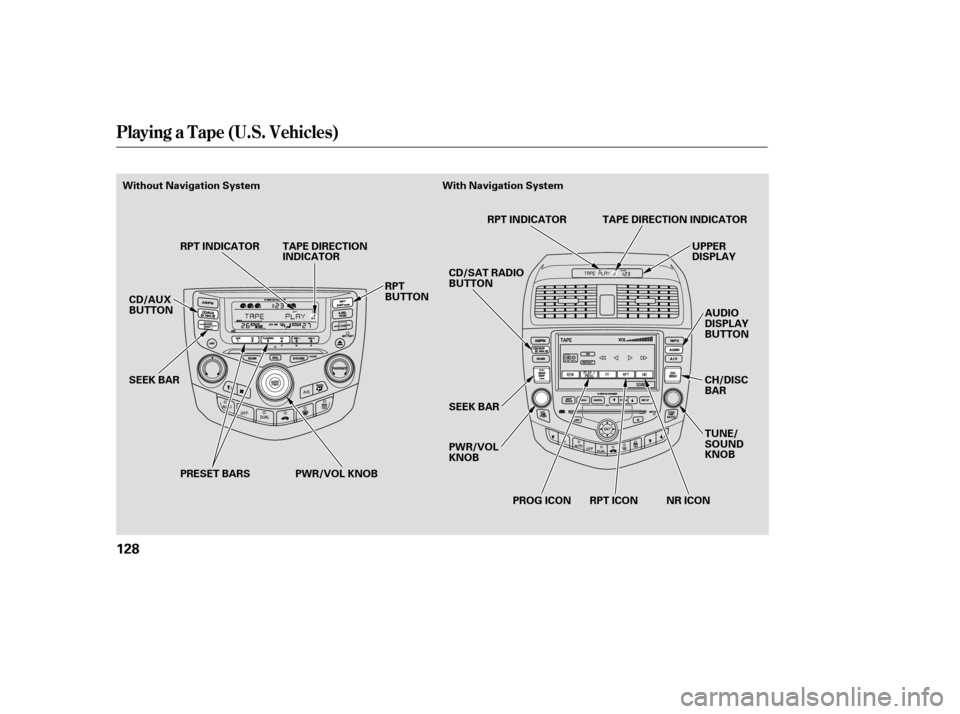
Playing a T ape (U.S. Vehicles)
128
PWR/VOL KNOBUPPER
DISPLAY
AUDIO
DISPLAY
BUTTON
SEEK BAR
CD/AUX
BUTTON
SEEK BAR RPT INDICATOR TAPE DIRECTION
INDICATOR
RPT
BUTTONCD/SAT RADIO
BUTTON
PWR/VOL
KNOBRPT INDICATOR
NR ICON
RPT ICON
PROG ICON TUNE/
SOUND
KNOB
TAPE DIRECTION INDICATOR
CH/DISC
BAR
PRESET BARS
Without Navigation System With Navigation System
�����—�
���—���
�y���������������y���
�(���'�������y���
���
�y
Page 130 of 286

�Û
�Î
�Î
The ignition switch must be in
ACCESSORY (I) or ON (II). Make
sure the open side of the tape is
facing right, then insert the tape
most of the way into the slot. The
system will pull the tape in the rest
of the way, and begin to play it.
The tape direction indicator will light
to show you which side of the tape is
playing. The indicates the side
youinsertedupwardinnowplaying.
If you want to play the other side,
press the Preset 3 (PLAY/PROG)
side of the preset bar or press the
AUDIO DISPLAY button and touch
the PROG icon. When the player
reaches the end of the tape, it will
automatically reverse direction and
play the other side. Dolby noise reduction turns on
when you insert a tape. The
indicator will light in the
display. If the tape was not recorded
in Dolby, turn it of f by pressing the
Preset 4 (NR) side of the preset bar
or touching the NR icon. Dolby
remains of f until you press the
preset bar or the icon again.
Dolby noise reduction
manuf actured under license f rom
Dolby laboratories licensing
Corporation. ‘‘Dolby’’ and the
double-D symbol are trademarks
of the Dolby Laboratories
Licensing Corporation. To remove the tape, press the
EJECT button on the cassette player.
If you want to turn the player of f ,
press the PWR/VOL knob or turn
of f the ignition. The tape will remain
in the drive.
When you turn the system back on,
the tape player will be in pause mode.
Press the Preset 3 (PLAY/PROG)
side of the preset bar or touch the
PROG icon on vehicles with
navigation system to resume play.
To switch to the radio or CD player
while a tape is playing, press the
AM/FM, or CD/AUX button or CD/
AUX XM button. To change back to
thetapeplayer,pushtheCD/AUX
button or CD/AUX XM button.
Optional on all U.S. models
To Play a Tape
To Stop Playing a Tape
Playing a T ape (U.S. Vehicles)
Features
129
�����—�
���—���
�y���������������y���
�(���'�������y���
�����y
Page 131 of 286

�µ�Û
�Ý �µ
�µ �Û
�Ý �µ
To rewind the tape,
push the Preset 1 (REW) side of the
presetbarortheupperside( )of
theCHDISCbar.YouwillseeREW
in the display. To f ast f orward the
tape, push the Preset 2 (FF) side of
the preset bar. You will see FF dis-
played.PressthePreset1,2,or3
sideof thebarsorthelowerside
( ) of the CH DISC bar to take the
system out of rewind or f ast f orward. Press the side to f ind
the beginning of the current song or
passage. Press the side to f ind
the beginning of the next song or
passage. When the system reaches
the beginning of a song or passage, it
begins to play it.
To rewind the tape
push the upper side ( ) of the CH
DISC bar. To f ast f orward the tape,
push the lower side ( ) of the CH
DISC bar. Press either side of the
PROG icon in the audio display to
take the system out of rewind or fast
forward. Press the RPT button
or icon to continuously play a song or
passage. You will see RPT displayed.
The track will repeat until you press
the RPT button or icon again.
The SKIP and REPEAT
f unctions use silent periods on the
tape to find the end of a song or
passage. These f eatures may not
work if there is almost no gap
between selections, a high noise
level, or a silent period in the middle
of a selection. If you see the error message
‘‘ ’’ on the display, press the
tape eject button to remove the tape
from the unit. Make sure the tape is
not damaged. If the tape will not
eject or the error message stays on
after the tape ejects, take your
vehicle to your dealer.
With Navigation System
With Navigation System
T ape Search Functions
FF/REW
SK IP
FF/REW REPEAT
Playing a T ape (U.S. Vehicles)
130
NOTE:
�����—�
���—���
�y���������������y���
�(���'�������y���
�����y
Page 133 of 286
Your vehicle is capable of receiving
XM Satellite Radio anywhere in the
United States except Hawaii, Alaska,
and Canada.
XM
is a registered trademark of
XM Satellite Radio, Inc.
Satellite radio is available in U.S.
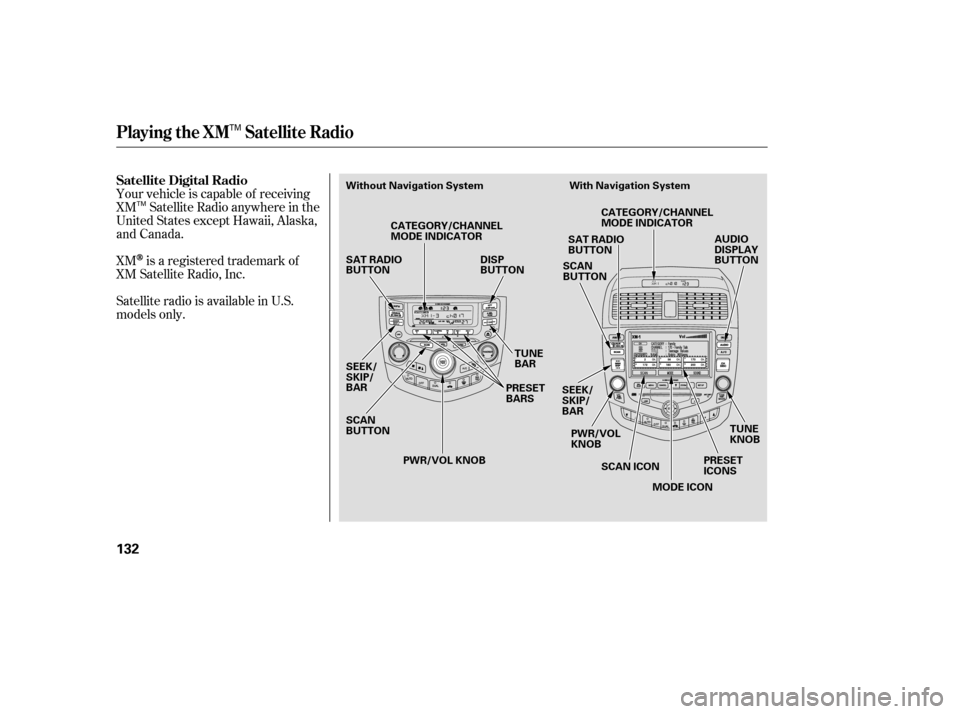
models only. Satellite Digital Radio
Playing the XM Satellite Radio
132
DISP
BUTTON
SAT RADIO
BUTTON
SCAN
BUTTON SCAN
BUTTON
TUNE
KNOB
TUNE
BAR
SEEK/
SKIP/
BAR CATEGORY/CHANNEL
MODE INDICATOR
CATEGORY/CHANNEL
MODE INDICATOR
MODE ICON
SCAN ICON
SEEK/
SKIP/
BAR
PWR/VOL
KNOB
SAT RADIO
BUTTON
PWR/VOL KNOB AUDIO
DISPLAY
BUTTON
PRESET
BARS PRESET
ICONS
Without Navigation System With Navigation System
TM
TM
�����—�
���—���
�y�����������
���y���
�(���'�������y���
�����y
Page 135 of 286

�µ�µ�µ
The
seek/skip f unction selects the
various categories in XM, such as
Jazz/Blues, Rock, Classical, etc.
Push the to change the
category f orward. Push the to
change the category backward. To
search f or channels within a
category, turn the TUNE knob
clockwiseorpresstheTUNEbar . The scan f unction samples
all channels f or 5 seconds. To
activate the f unction, push the SCAN
button. Push it again to get out of the
sequence.
Each preset icon or button
canstoreonechannelinXM1and
one in XM2.
Use the TUNE, SEEK or SCAN
function to tune the radio to a
desired channel.
Pick a preset icon or button and
hold it until you hear a beep.
Repeat steps 1 to 3 to store a total
of six stations on XM1 and XM2. Once your XM channels are preset,
pressing the CH DISC button will
select your preset channels.
Push the CD/AUX XM button.
(You will see XM1 or XM2.)
1.
2.
3.
4.With Navigation SystemSEEK /SK IP (CA T EGORY) SCA N
Preset
Playing the XM Satellite Radio
134
TM
�����—�
���—���
�y���������������y���
�(���'�������y���
�����y
Page 139 of 286
�Û�Ý�´�µ
�´
�µ
�´
�µ
The VOL button adjusts the volume
up ( ) or down ( ). Press the top
or bottom of the button and hold it
until the desired volume is reached,
then release it.
If youareplayingaCD,thesystem
skips to the beginning of the next
track each time you press the top
( ) of the CH button. Press the
bottom ( ) to return to the
beginning of the current track. Press
it twice to return to the previous
track. You will see the disc and track
numbers in the display.
If youareplayingatapeinthe
optional tape player, press the top
( ) of the CH button to advance to
the next selection. Press the bottom
( ) to go back to the previous
selection. The system senses a silent
period, then resumes playing.
The MODE button changes the
mode. Pressing the button
repeatedly selects FM1, FM2, AM,
XM1, XM2, CD, or a tape.
If you are listening to the radio, use
the CH button to change stations.
Each time you press the top ( ) of
the button, the system goes to the
next preset station on the band you
are listening to. Press the bottom
( ) to go back to the previous
station.
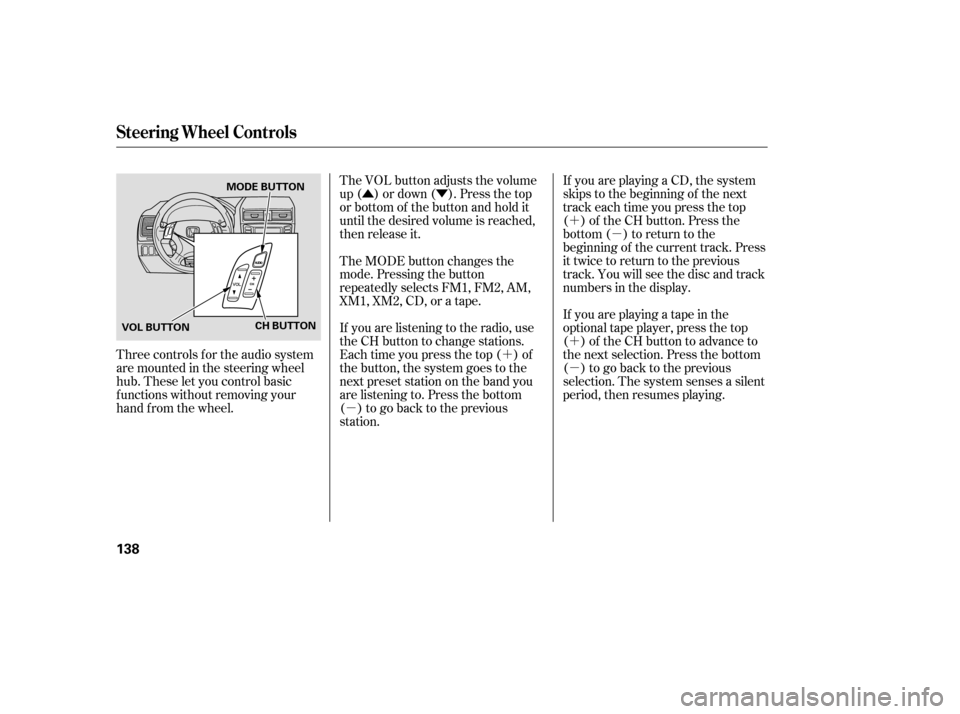
Three controls f or the audio system
are mounted in the steering wheel
hub. These let you control basic
f unctions without removing your
hand f rom the wheel.
Steering Wheel Controls
138
CH BUTTON
VOL BUTTON MODE BUTTON
�����—�
���—���
�y���������������y���
�(���'�������y���
���
�y
Page 140 of 286

�µ
If your vehicle’s battery is discon-
nected or goes dead, the audio
system will disable itself . If this
happens, you will see ‘‘CODE’’ in the
frequencydisplaythenexttimeyou
turn on the system. Use the preset
buttons to enter the five-digit code.
Thecodeisontheradiocodecard
included in your Owner’s Manual kit.
When it is entered correctly, the
radio will start playing.
If ‘‘0’’ is the f irst digit in your code,
press and release the TUNE knob to
store it. If your vehicle is equipped with a
navigation system, press and release
the TUNE knob; the number ‘‘0’’
appears on the display.
If you make a mistake entering the
code, do not start over; complete the
f ive-digit sequence, then enter the
correct code. You have ten tries to
enter the correct code. If you are
unsuccessful in ten attempts, you
must then leave the system on for 1
hour bef ore trying again.
If thecodecardislost,adealercan
access your code with the your radio’s
serial number. To access the serial
number, turn the radio on. It must
display ‘‘CODE’’, then turn the radio
of f . Push the preset 1, preset 6, and
power buttons at the same time, then
quickly release.
You will have to store your favorite
stations on each side of the preset
bars (1 6) af ter the system begins
working. Your original settings were
lost when power was disconnected.
If ‘‘0’’ is not the f irst digit in your
code, turn the TUNE knob lef t or
right until the f irst digit is displayed.
Press and release the TUNE knob to
store it. Enter the remaining three digits the same way.
Your vehicle’s audio system will
disable itself if it is disconnected
f rom electrical power f or any reason.
To make it work again, you must
enter a specif ic f ive-digit code using
the preset bars or the TUNE knob.
Because there are hundreds of
number combinations possible f rom
the five-digit, making the system
work without knowing the exact
code is nearly impossible.
Youshouldhavereceivedacardthat
lists your audio system code number
and serial number. It is best to store
this card in a saf e place at home. In
addition, you should write the audio
system’s serial number in this owner’s
manual.
If you lose the card, you must obtain
the code number f rom a dealer. To
do this, you will need the system’s
serial number.
Radio T hef t Prot ect ion
Features
139
�����—�
���—���
�y�����������
���y���
�(���'�������y���
�����y