Page 92 of 286

�µIf the driver’s
window senses any obstacle while it
is closing automatically, it will
reverse direction and then stop. To
close the window, remove the
obstacle, then use the window switch
again.
Auto reverse stops sensing when the
window is almost closed. You should
always check that all passengers and
objects are away from the window
bef ore closing it. If your vehicle’s battery is
disconnected or goes dead, or the
driver’s window f use is removed, the
AUTO f unction will be disabled. The
power window system needs to be
reset af ter reconnecting the battery
or installing the f use.
Start the engine. Push down and
hold the driver’s window switch
until the window is f ully open.
Pull and hold the driver’s window
switch to close the window
completely, then hold the switch
f or a second or two more.
If the power windows do not operate
properly af ter resetting, have your
vehicle checked by your dealer.
To open or close the driver’s window
partially, push down or pull back on
the window switch lightly and hold it.
The window will stop when you
release the switch.
The passenger windows cannot be
raised or lowered if the MAIN switch
is OFF. Keep the MAIN switch off
whenyouhavechildreninthe
vehicle so they do not injure
themselves by operating the
windows unintentionally.
1.
2.
AUTO REVERSE
Power Windows
Inst rument s and Cont rols
91
�����—�
���—���
�y���������������y���
�(���'�������y���������y
Page 96 of 286
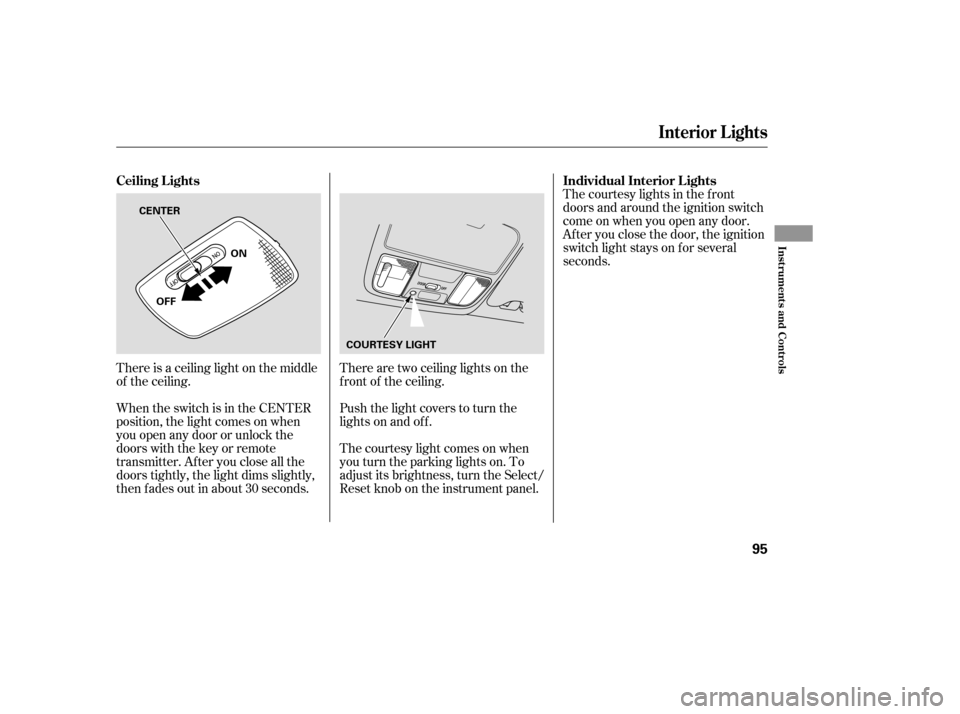
There is a ceiling light on the middle
of the ceiling.
When the switch is in the CENTER
position, the light comes on when
you open any door or unlock the
doors with the key or remote
transmitter. After you close all the
doors tightly, the light dims slightly,
then f ades out in about 30 seconds.There are two ceiling lights on the
f ront of the ceiling.
Push the light covers to turn the
lights on and of f .
The courtesy light comes on when
youturntheparkinglightson.To
adjust its brightness, turn the Select/
Reset knob on the instrument panel.The courtesy lights in the f ront
doors and around the ignition switch
come on when you open any door.
Af ter you close the door, the ignition
switch light stays on f or several
seconds.
Ceiling L ights Individual Interior L ights
Interior Lights
Inst rument s and Cont rols
95
ON
OFF COURTESY LIGHT
CENTER
�����—�
���—���
�y�������������
�y���
�(���'�������y���������y
Page 113 of 286
Playing the Radio
112
STEREO INDICATOR
SEEK BAR PRESET BARS
PWR/VOL KNOB SEEK BAR SCAN
BUTTON
PWR/VOL
KNOB UPPER
DISPLAY
PRESET
ICONS
AUDIO
DISPLAY
BUTTON
TUNE/
SOUND
KNOB
SCAN BUTTON TUNE
BAR A.SEL
BUTTON
SOUND BUTTON
AM/FM
BUTTON
STEREO INDICATOR
AM/FM
BUTTON
AUDIO
SELECT
ICON SOUND ICON
SCAN
ICON
Without Navigation System
With Navigation System (U.S. Model Only)
�����—�
���—���
�y�����������
���y���
�(���'�������y���
�
���y
Page 114 of 286

�µ
�µ
�µ
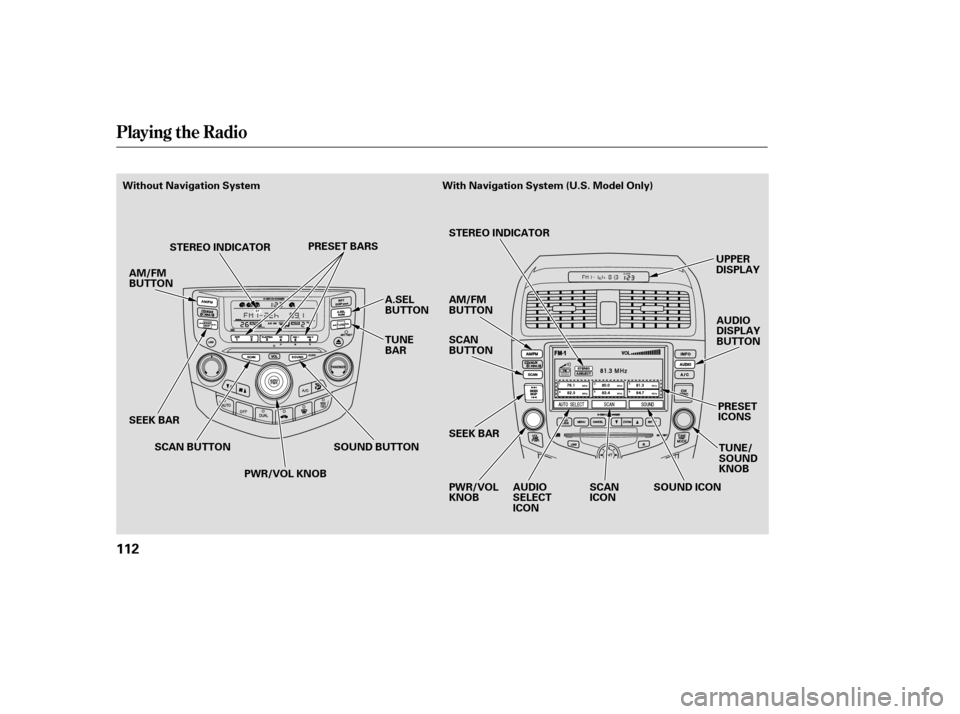
The ignition switch must be in the
ACCESSORY (I) or ON (II) position.
Turn the system on by pushing the
PWR/VOL knob or the AM/FM
button. Adjust the volume by turning
the PWR/VOL knob.
The SCAN function
samples all stations with strong
signals on the selected band. To
activate it, press the SCAN button,
then release it. You will see SCAN in
the display. The system will scan f or
a station with a strong signal. When
it f inds one, it will stop and play that
station f or about f ive seconds.
If you do nothing, the system will
then scan f or the next strong station
and play it for five seconds. When it
plays a station you want to listen to,
press the SCAN button again.
You can use any of f ive methods to
f ind radio stations on the selected
band: TUNE, SEEK, SCAN, AUTO
SELECT, and the preset bars or
icons.
Use the TUNE bar or
knob to tune the radio to a desired
f requency. Press the side of the
bar or turn the knob to the right to
tune to a higher f requency, and the side or turn the knob to the left
to tune to a lower f requency.
The SEEK f unction
searches up and down f rom the
current f requency to f ind a station
with a strong signal. To activate it,
press the or side of the
bar, then release it.
Pushing the AUDIO DISPLAY
button will also turn on the system.
The band and f requency that the
radio was last tuned to is displayed.
To change bands, press the AM/FM
button. On the FM band, ST will be
displayed if the station is broadcast-
ing in stereo. Stereo reproduction on
AM is not available.
XM Satellite Radio inf ormation is
available on page .
132
With Navigation System
To Play the Radio SCAN
To Select a Station
TUNE
SEEK
Playing the Radio
Features
113
�����—�
���—���
�y���������������y���
�(���'�������y���
�
���y
Page 115 of 286
�µ�µEach preset bar or icon
can store one f requency on AM, and
two f requencies on FM. The preset f requencies will be lost if
your vehicle’s battery goes dead, is
disconnected, or the radio f use is
removed.
Select the desired band, AM or
FM. FM1 and FM2 let you store
two f requencies with each preset
baroricon.
Push the AUDIO DISPLAY button
to view the preset icons.
UsetheTUNE,SEEK,orSCAN
function to tune the radio to a
desired station. Pick the preset number (1 6)
you want for that station. Press
the left or right side of the bar or
iconandholdituntilyouheara
beep.
Repeat steps 1 through 3 to store a
total of six stations on AM and
twelve stations on FM.
1.
2. 3.
4.
With Navigation System
Preset
Playing the Radio
114
�����—�
���—���
�y���������������y���
�(���'�������y���
�
���y
Page 116 of 286

�µ
�µ If you are
traveling far from home and can no
longer receive your preset stations,
you can use the auto select feature to
find stations in the local area.
Press the A. SEL button or touch the
Auto Select icon. A. SEL will f lash in
the display, and the system will go
into scan mode f or several seconds.
It stores the f requencies of six AM,
and twelve FM stations in the preset
bars (1 6) or icons. You will see a
‘‘0’’ displayed af ter pressing a preset
bar or icon if Auto Select cannot f ind
a strong station for every preset bar
or icon. If you do not like the stations Auto
Select has stored, you can store
other f requencies on the preset bars
or icons. Use the TUNE, SEEK, or
SCAN f unction to f ind stations, then
store them in the preset bars or
icons as described previously.
press the A.
SEL button or Auto Select icon. This
restores the presets you originally
set.
To turn of f Auto Select,
AUTO SELECT
Playing the Radio
Features
115
�����—�
���—���
�y���������������y���
�(���'�������y���
�
���y
Page 122 of 286

�µ�µ�´
�Û
�Ý
Press the LOAD button until you
hear a beep and see ‘‘LOAd’’ in the
display.
The disc number f or an empty
position is highlighted and the red
light starts blinking.
When the CD load indicator turns
green and ‘‘LOAD’’ appears in the
screen again, insert the next CD in
the slot.
Repeat steps 1 through 3 until all
six positions are loaded. If you are
not loading all six positions, the
system begins playing the last CD
loaded. You can also load a CD into an empty
position while a CD is playing. Select
the empty position (the disc number
indicator is not highlighted) and
press the appropriate preset bar or
touch a disc icon. The current CD
stops playing and starts the loading
sequence. The CD just loaded will
play.
You operate the CD changer with
the same controls used f or the radio.
The numbers of the disc and track
playingareshowninthedisplay.On
vehicles with navigation system,
these numbers also appear in the
upper display.
To select a dif f erent disc, press the
appropriate side of a preset bar
(1 6) or use the Preset 5 (DISC )
to select the previous disc or Preset
6 (DISC ) to select the next disc in
sequence. On vehicles with
navigation system, touch the
appropriate disc icon or press the
or side of the CH/DISC bar. If
youselectanemptypositioninthe
CD changer, the system will try to
load the CD in the next available slot.
Insert the disc into the CD slot
when the green CD load indicator
comes on. Insert it only about
half way; the drive will pull it in the
rest of the way. You will see
‘‘BUSY’’ in the display as the CD
load indicator turns red and blinks
as the CD is loaded.
1.
2.
3.
4.
5.
On vehicles with in-dash CD changer
For Vehicle with in-dash CD Changer
Playing a CD, CD Changer
Features
121
�����—�
���—���
�y���������������y���
�(���'�������y���
�����y
Page 124 of 286

�µ�µ
�µ Touch the icon to
continuously replay the current CD.
Touch again to turn it of f .
Touch the icon to
play the current CD in random order.
Touch again to stop.
Selects an icon and
plays the disc.
Press the eject button ( ) to
remove the CD. If you eject the CD,
but do not remove it f rom the slot,
the system will automatically reload
the CD af ter 15 seconds and put it in
pause mode. To begin playing, press
the CD button. PresstheAM/FMorXM/CD
buttontoswitchtotheradioor
satellite radio while a CD is playing.
Press the CD button again to play
the CD.
If a tape is in the optional tape player,
press the AUX button to switch to
the tape while a CD is playing. Press
the CD button again to switch back
to the CD player.
If you turn the system of f while a CD
is playing, the CD will stay in the
drive. When you turn the system
back on, the CD will begin playing
where it lef t of f .
To remove the disc currently playing,
press the EJECT button. When a
disc is removed f rom a slot, the
system automatically begins the load
sequence so you can load another
CD in that position. If you do not
remove the disc f rom the changer
within 15 seconds, the system
returns to the previous mode (AM/
FM or satellite radio). The disc will
reload into the system and will
remainthereinapausemode.
To remove a dif f erent disc f rom the
changer,firstselectitwiththe
appropriate preset bar or icon. When
that CD begins playing, press the
eject button. Continue pressing the
EJECT button to remove all the discs
f rom the changer.
On models with CD player or changer
DISC RPT
TRACK RDM
CH DISC
To Stop Playing a CD
Removing CDs f rom the Changer
Playing a CD, CD Changer
Features
123
�����—�
���—���
�y���������������y���
�(���'�������y���
�����y