Page 171 of 289

�µ�µ�µ
�µ �µ
This position mechani-
cally locks the transmission. Use
Park whenever you are turning of f or
starting the engine. To shif t out of
Park, you must press on the brake
pedal and have your f oot of f the
accelerator pedal. Press the release
button on the side of the shift lever
to move it.
If you have done all of the above and
still cannot move the lever out of
Park, see on
page .
You must also press the release
button to shift into Park. To avoid
transmission damage, come to a
complete stop bef ore shif ting into
Park. The shif t lever must be in Park
bef ore you can remove the key f rom
the ignition switch. Press the brake
pedal and press the release button to
shif t f rom Park to Reverse. To shif t
from Reverse to Neutral, come to a
completestopandthenshift. This position is similar
to D, except only the first three
gears are selected instead of all f ive.
Use D when towing a trailer in hilly
terrain, or to provide engine braking
when going down a steep hill. D can
also keep the transmission f rom
cycling between third and f ourth
gears in stop-and-go driving.
Use this position f or
your normal driving. The
transmission automatically selects a
suitable gear for the vehicle speed
and acceleration. You may notice the
transmission shif ting up at higher
speeds when the engine is cold. This
helps the engine warm up f aster. Use Neutral if you
need to restart a stalled engine, or if
it is necessary to stop brief ly with
the engine idling. Shif t to the Park
position if you need to leave your
vehicle and apply the parking brake.
Press on the brake pedal when you
are moving the shif t lever f rom
Neutral to another gear.
181
3
3
CONT INUED
Automatic Transmission
Park (P)
Shif t L ock Release Reverse (R) Drive (D )
Drive (D)
Neutral (N)3
Driving
179
�����—�����—�����y�
����
�
������y���
�(�����������y���
�����y
Page 172 of 289

�µ�µThis position locks
the transmission in second gear. It
does not downshif t to f irst gear
when you come to a stop.
Use Second gear:
For starting out on a slippery
surf ace or in deep snow.
To help reduce wheel spin.
When driving downhill with a
trailer. To shif t f rom Second to
First, press the release button on the
side of the shif t lever. This position
locks the transmission in f irst gear.
By upshif ting and downshif ting
through 1, 2, D , and D, you can
operate this transmission much like
a manual transmission without a
clutch pedal. If you exceed the maximum speed
f or the gear you are in, the engine
speed will enter into the tachometer’s
red zone. If this occurs, you may f eel
the engine cut in and out. This is
caused by a limiter in the engine’s
computer controls. The engine will
run normally when you reduce the
RPM below the red zone.
For more power when climbing.
To increase engine braking when
going down steep hills.
3
Automatic Transmission
Second (2) First (1) Engine Speed L imiter
180
�����—�����—�����y�
����
��������y���
�(�����������y���
�����y
Page 174 of 289
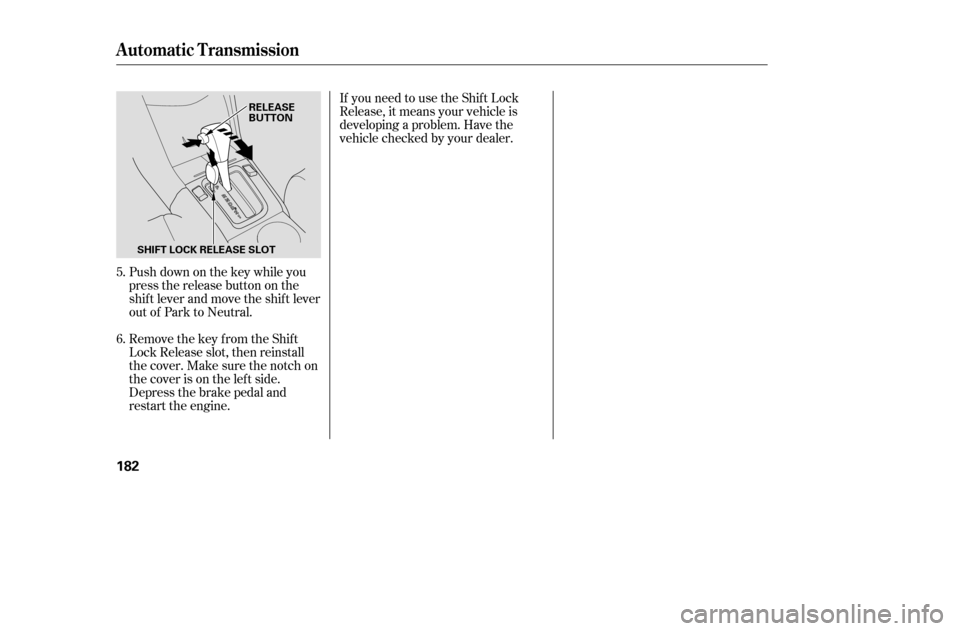
Push down on the key while you
pressthereleasebuttononthe
shif t lever and move the shif t lever
out of Park to Neutral.
Remove the key from the Shift
Lock Release slot, then reinstall
thecover.Makesurethenotchon
the cover is on the lef t side.
Depress the brake pedal and
restart the engine.If you need to use the Shif t Lock
Release, it means your vehicle is
developing a problem. Have the
vehicle checked by your dealer.
5. 6.
Automatic Transmission
182
RELEASE
BUTTON
SHIFT LOCK RELEASE SLOT
�����—�����—�����y�
����
����
���y���
�(�����������y���
�����y
Page 176 of 289

Your vehicle is equipped with disc
brakes. The brakes on the rear
wheels may be disc or drum,
depending on the model. A power
assist helps reduce the ef f ort needed
on the brake pedal. The ABS helps
you retain steering control when
braking very hard.Check the brakes after driving
through deep water. Apply the
brakes moderately to see if they f eel
normal. If not, apply them gently and
f requently until they do. Be extra
cautious in your driving.
Constant application of the brakes
when going down a long hill builds
up heat and reduces their ef f ective-
ness. Use the engine to assist the
brakes by taking your f oot of f the
accelerator and downshif ting to a
lower gear.
Put your f oot on the brake pedal only
when you intend to brake. Resting
your f oot on the pedal keeps the
brakes applied lightly, builds up heat,
increases wear and reduces their
ef f ectiveness. It also keeps your
brake lights on all the time,
conf using drivers behind you.
If the brake pads need replacing, you
will hear a distinctive, metallic
screeching sound when you apply
the brake pedal. If you do not have
the brake pads replaced, they will
screech all the time. It is normal f or
the brakes to occasionally squeal or
squeak when you apply them.
The f ront disc brakes have audible
brake wear indicators. They are also
in the rear disc brakes of the EX,
EX-V6, and LX-V6 models.
The hydraulic system that operates
the brakes has two separate circuits.
Each circuit works diagonally across
the vehicle (the lef t-f ront brake is
connected with the right-rear brake,
etc.). If one circuit should develop a
problem, you will still have braking
at two wheels.
Braking System
Brake Wear Indicators
Braking System Design
184
�����—�����—�����y�
����
��������y���
�(�����������y���
�����y
Page 180 of 289
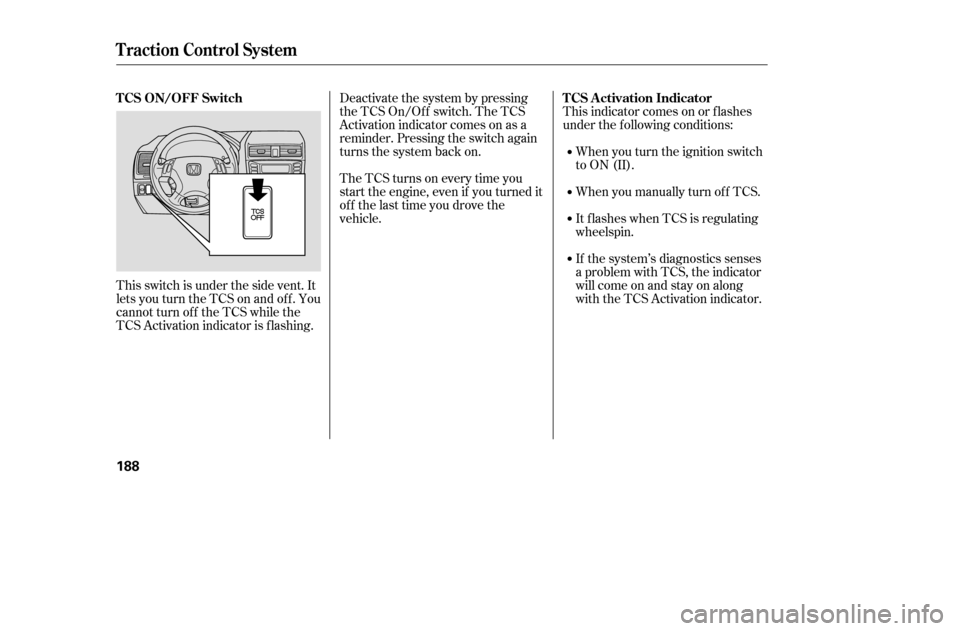
This switch is under the side vent. It
letsyouturntheTCSonandoff.You
cannot turn of f the TCS while the
TCS Activation indicator is f lashing.The TCS turns on every time you
start the engine, even if you turned it
off the last time you drove the
vehicle.
This indicator comes on or f lashes
under the f ollowing conditions:
Deactivate the system by pressing
the TCS On/Off switch. The TCS
Activation indicator comes on as a
reminder. Pressing the switch again
turns the system back on. When you turn the ignition switch
to ON (II).
When you manually turn of f TCS.
It f lashes when TCS is regulating
wheelspin.
If the system’s diagnostics senses
a problem with TCS, the indicator
will come on and stay on along
with the TCS Activation indicator.
Traction Control System
TCS ON/OFF Switch TCS Activation Indicator
188
�����—�����—�����y�
����
����
���y���
�(�����������y���
���
�y
Page 181 of 289
If the TCS indicator comes on while
driving, pull to the side of the road
when it is saf e and turn of f the
engine. Reset the system by
restarting the engine, and watch the
TCS indicator. If the TCS indicator
remains on, or comes back on while
driving, have the TCS inspected by
your dealer. You can still drive the
vehicle without TCS.
The TCS indicator may occasionally
come on f or 1 or 2 seconds and then
go out. This is normal.This indicator will come on along
with the ABS indicator if there is a
problem in the anti-lock brake
system (see on page
).
If the TCS indicator comes on along
with the Brake System indicator, it
indicates a problem in the brake
system (see on page ).
185
58
Traction Control System
ABS Indicator
Brake System
Indicator
Driving
189
�����—�����—�����y�
����
��������y���
�(�����������y���
�����y
Page 182 of 289

Your vehicle has been designed to
primarily carry passengers and their
cargo. You can also use it to tow a
trailer if you caref ully observe the
load limits, use the proper equipment,
and f ollow the guidelines in this
section.The
maximum allowable weight of the
trailerandeverthinginoronit
must not exceed 1,000 lbs (450 kg).
Towing a load that is too heavy
can seriously af f ect your vehicle’s
handling and perf ormance. It can
also damage the engine and
drivetrain. The weight that
the tongue of a f ully-loaded trailer
puts on the hitch should be
approximately 10 percent of the
total trailer weight. Too much
tongue load reduces f ront-tire
traction and steering control. Too
little tongue load can make the
trailer unstable and cause it to
sway.
Towing a Trailer
Load Limits
T otal T railer Weight: T ongue L oad:
190
Exceeding any load limit or
improperly loading your vehicle
and trailer can cause a crash in
which you can be seriously hurt
or killed.
Check the loading of your
vehicle and trailer carefully
beforestartingtodrive.
�����—�����—�����y�
����
��������y���
�(�����������y���
�����y
Page 187 of 289

The added weight, length, and
height of a trailer will af f ect your
vehicle’s handling and perf ormance,
so driving with a trailer requires
some special driving skills and
techniques.Maketurnsmoreslowlyandwider
than normal. The trailer tracks a
smaller arc than your vehicle, and it
canhitorrunoversomethingthe
vehicle misses. Allow more time and
distance f or braking. Do not brake or
turn suddenly as this could cause the
trailer to jackknif e or turn over.
When climbing hills, closely watch
your temperature gauge. If it nears
the red (Hot) mark, turn the air
conditioning of f , reduce speed and, if
necessary, pull to the side of the
road to let the engine cool.
If the automatic transmission shifts
f requently while going up a hill, shif t
to D .If youmuststopwhenfacinguphill,
use the f oot brake or parking brake.
Do not try to hold the vehicle in
place by pressing on the accelerator,
as this can cause the automatic
transmission to overheat.
When driving down hills, reduce
your speed and shif t down to 2nd
gear. Do not ‘‘ride’’ the brakes, and
remember it will take longer to slow
downandstopwhentowingatrailer.
Drive slower than normal in all
driving situations, and obey posted
speed limits f or vehicles with trailers.
If you have an automatic
transmission, use D position when
towing a trailer on level roads. D is
the proper shif t lever position to use
when towing a trailer in hilly terrain.
(See ‘‘ ’’ in the next
column f or additional gear
inf ormation.)
Foryoursafetyandthesafetyof
others,taketimetopracticedriving
maneuvers bef ore heading f or the
open road, and f ollow the guidelines
below.
3
3
Driving Saf ely With a T railerMaking T urns and Braking
Driving on Hills
Driving on Hills
T owing Speeds and Gears
Towing a Trailer
Driving
195
�����—�����—�����y�
����
��������y���
�(�����������y���
�����y