2005 GMC YUKON XL DENALI audio
[x] Cancel search: audioPage 52 of 62
After adjustments are made, press the BAND hard key
to go back to the preset station menu. Now that you
have preset the station and the EQ setting, you can
assign the EQ to the preset station. To do this, touch the
desired preset station screen button until you hear a
beep. The EQ setting will now be assigned to that preset
unless you decide to change it.
If you were at the CD screen before setting an EQ and
you press the CD hard key, you will be returned to
the CD screen, and the EQ will be set to that screen
until you change it.Digital Signal Processing (DSP)
If your vehicle is equipped with DSP, you have a choice
of four different listening experiences. DSP can be used
while listening to the audio system or the CD player.
You can choose from the following DSP settings:
Normal:Touch this screen button to adjust the audio to
deliver all occupants the best possible sound qualities.
Driver:Touch this screen button to adjust the audio
to deliver the driver’s seat occupant the best possible
sound qualities.
Rear:Touch this screen button to adjust the audio to
deliver the rear seat occupants the best possible
sound qualities.
Spacious:Touch this screen button to make the
listening space seem larger.
See “Rear Seat Audio (RSA)”, “Theft-Deterrent Feature”,
“Audio Steering Wheel Controls”, “Radio Reception”,
and antenna information in Section 3 of your vehicle’s
owner manual for more information.
3-6
Page 53 of 62
Radio Data Systems (RDS)
The audio system has a Radio Data System (RDS).
RDS features are available for use only on FM stations
that broadcast RDS info. With RDS, the radio can
do the following:
Display station name
Display messages from radio stations
Display song title and artist name
This system relies on receiving specic information from
these stations and will only work when the information
is available. In rare cases, a radio station may broadcast
incorrect information that will cause the radio features
to work improperly. If this happens, contact the
radio station.
While the radio is tuned to an RDS station, the station
name or call letters will appear on the display instead of
the frequency.
Touch the Info screen button on the band menu to
receive information the selected radio station is
currently broadcasting.
XM™ Satellite Radio Service
XM™ is a satellite radio service that is based in the
48 contiguous United States. XM™ offers 100 coast to
coast channels including music, news, sports, talk,
and children’s programming. XM™ provides digital
quality audio and text information, including song title
and artist name. A service fee is required in order
to receive the XM™ service. For more information,
contact XM™ at www.xmradio.com or call
1-800-852-XMXM (9696).
Press the BAND hard key repeatedly until you reach the
XM™ selection. When XM™ is active, the channel
name and number, song title and artist will be displayed
on the screen.
Touch the XM Info screen button to display additional
XM station information.
3-7
Page 55 of 62
XM™ Radio Messages
Radio Display
MessageCondition Action Required
XL (Explicit Language
Channels)XL on the radio display,
after the channel name,
indicates content with
explicit language.These channels, or any others, can be blocked at a
customer’s request, by calling 1-800-852-XMXM (9696).
XM Updating Updating encryption code The encryption code in your receiver is being updated, and
no action is required. This process should take no longer
than 30 seconds.
No XM signal Loss of signal Your system is functioning correctly, but you are in a location
that is blocking the XM signal. When you move into an open
area, the signal should return.
Loading XM Acquiring channel audio
(after 4 second delay)Your radio system is acquiring and processing audio and
text data. No action is needed. This message should
disappear shortly.
Channel Off Air Channel not in service This channel is not currently in service. Tune in to
another channel.
Channel Unavail Channel no longer
availableThis previously assigned channel is no longer assigned.
Tune to another station. If this station was one of your
presets, you may need to choose another station for that
preset button.
No Artist Info Artist Name/Feature
not availableNo artist information is available at this time on this channel.
Your system is working properly.
No Title Info Song/Program Title
not availableNo song title information is available at this time on this
channel. Your system is working properly.
3-9
Page 57 of 62

Playing a CD
Remove the navigation map DVD from the slot and
return it to its case. Insert a CD partway into the slot,
label side up. The player will pull it in.
There will be a 12 to 15 second delay while the CD is
read, before it begins to play. When the player begins to
read a CD, the Disc Check in Process message will
appear briey to remind you of the delay. When the
map DVD is reinserted and read, the DVD Check
in Process message will appear briey to remind you
of the delay.
While playing a CD in the CD player, the navigation
system is not available. A message will display
if the NAV key is pressed. If your vehicle is equipped
with Rear Seat Entertainment (RSE), you can play
an audio CD while using the navigation system.
SeeRear Seat Entertainment System on page 3-14
for more information.
B(CD):Press this hard key to play a CD when
listening to the radio. The CD screen will be displayed.
Y(Eject):Press this hard key to eject a CD.
Random:Touch this screen button to play the tracks in
random, rather than sequential, order. Touch it again
to turn off random play.
Repeat:Touch this screen button to repeat the track
that is currently being played. Touch it again to turn this
feature off.
3-11
Page 58 of 62
[(Forward):Touch this screen button to advance
quickly within a track. As the CD advances, elapsed time
will be displayed to help you nd the correct passage.
Release this screen button to play the passage.
r(Reverse):Touch this screen button to reverse
quickly within a track. As the CD reverses, elapsed time
will be displayed to help you nd the correct passage.
Release this screen button to play the passage.
u(Track Forward):Touch this screen button to
advance to the next track on the CD.
t(Track Reverse):Touch this screen button to return
to the previous track on the CD.
wSEEKx:Within two seconds, press and release
the SEEK up arrow to advance to the next track, or
the down arrow to return to the previous track.
Track Scan:Press and hold one of the SEEK arrows
for two seconds or more to enter CD TRACK SCAN
mode. A chime will sound to alert you that TRACK
SCAN is active, and the rst 10 seconds of each track
on the disc will be played before advancing to the
next track. Press one of the SEEK arrows again to stop
the scan at the track currently being played.
BAND:Press the BAND hard key to switch to the radio
when a CD is playing.
CD Messages
CD ERROR:If this message appears on the screen,
the CD is not being read by the system. The CD could
be dirty, scratched, wet, or upside down. You may
also be driving on a very rough road. When the road
becomes smoother, the CD should play.
NO MUSIC DISC:If this message appears on the
screen, the map DVD is still inserted in the system.
Press eject and return the map DVD to its case, then
insert a CD. The CD should play.
NO DISC:If this message appears on the screen, the
CD slot is empty. Insert a CD. The CD should play.
If a CD is not playing correctly for any other reason, try a
known good CD. If any error occurs repeatedly or if
an error cannot be corrected, contact your dealer. If your
radio displays an error message, write it down and
provide it to your dealer when reporting the problem.
See “Rear Seat Audio (RSA)”, “Care of Your CDs
and DVDs”, and “Care of Your CD and DVD Player”
in Section 3 of your vehicle’s owner manual for
more information.
3-12
Page 60 of 62

Rear Seat Entertainment System
Your vehicle may have a DVD Rear Seat Entertainment
(RSE) system. While playing a DVD or audio CD
in the RSE, press the CD key to view the RSE screen
and to switch to DVD as your main audio source.
At this point, you will hear what is being played in the
RSE system through all of the vehicle’s speakers.
From the RSE screen you can mute the Front or Rear
speakers, mute RSE entirely, or turn off RSE.
RSE Messages
CD ERROR:If this message appears on the navigation
screen, the DVD or CD is not being read by the system.
The DVD or CD could be dirty, scratched, wet, or
upside down. You may also be driving on a very rough
road. When the road becomes smoother, the DVD
or CD should play.
RSE ERROR:If this message appears on the
navigation screen, the RSE system is not working
properly. See “DVD Messages” under “Rear Seat
Entertainment System” in the index of your vehicle’s
owner manual for more information.
NO DISC:If this message appears on the navigation
screen, the DVD slot is empty. Insert a DVD or CD.
The DVD or CD should play.
See “Rear Seat Entertainment System”, “Rear Seat
Audio (RSA)”, “DVD Distortion”, “Care of Your CDs and
DVDs”, “Care of Your CD and DVD Player”, “Cleaning
Your DVD Player”, and “Cleaning the Video Screen”
in the index of your vehicle’s owner manual for
more information.
3-14
Page 61 of 62
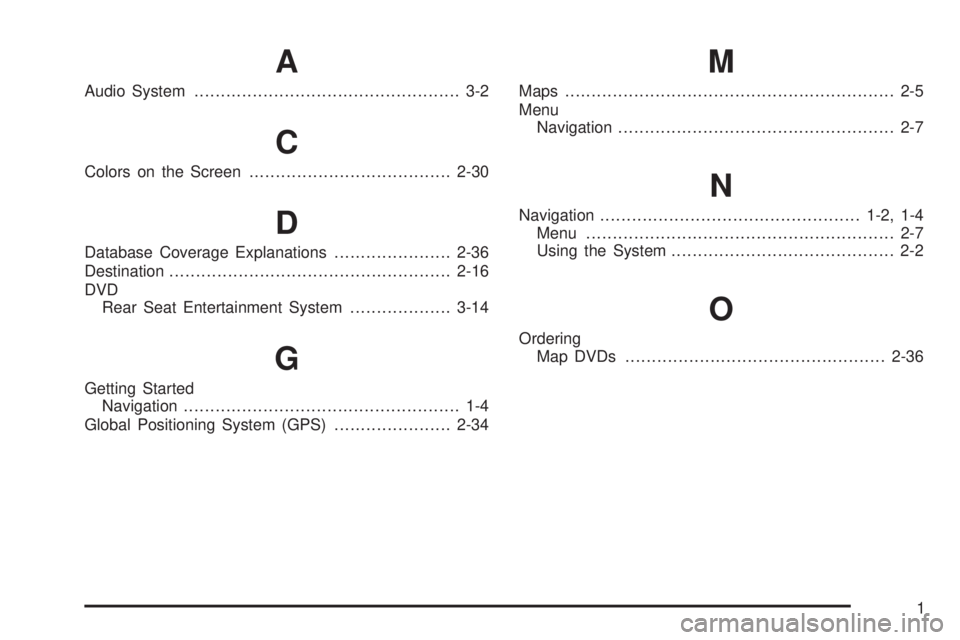
A
Audio System.................................................. 3-2
C
Colors on the Screen......................................2-30
D
Database Coverage Explanations......................2-36
Destination.....................................................2-16
DVD
Rear Seat Entertainment System...................3-14
G
Getting Started
Navigation.................................................... 1-4
Global Positioning System (GPS)......................2-34
M
Maps.............................................................. 2-5
Menu
Navigation.................................................... 2-7
N
Navigation.................................................1-2, 1-4
Menu.......................................................... 2-7
Using the System.......................................... 2-2
O
Ordering
Map DVDs.................................................2-36
1